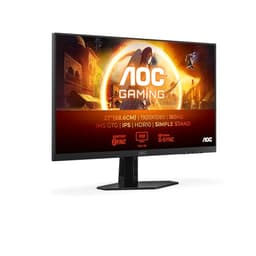
A monitor's headline refresh rate tells you almost nothing useful on its own. What actually matters is whether the panel can deliver clean pixel transitions across that full refresh range without smearing dark scenes, inverting gradients, or producing the kind of halo ghosting that makes fast games look like a watercolour painting. The AOC Q27G4XD sits in a price bracket where manufacturers are increasingly willing to promise the world on the box, so the real question is whether the measured behaviour and owner reports back up the 180Hz and 0.5ms MPRT claims. Spoiler: it's more nuanced than the spec sheet suggests.
AOC has been pushing IPS panels into the budget-to-mid gaming space aggressively over the last couple of years, and the Q27G4XD is one of their more interesting efforts. It's a 27-inch QHD IPS at 180Hz, which on paper puts it squarely in the sweet spot for 1440p gaming. The 537 averaging 4.4 out of five suggest most buyers are genuinely happy. But 4.4 stars on Amazon is also where you find products that are fine for most people and quietly terrible for a specific subset of users who didn't read the small print. Worth unpacking which camp this falls into.
The market context matters here. Budget 27-inch QHD monitors used to mean 75Hz IPS or 144Hz VA with mediocre colour. That's changed. You can now get 165Hz or 180Hz IPS panels in the sub-£150 bracket from AOC, Philips, and Gigabyte, which means the Q27G4XD isn't operating in a vacuum. It has real competition. Whether it earns its place at the top of that shortlist is what the rest of this review is about.
Core Specifications
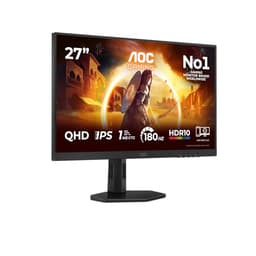
The Q27G4XD is a 27-inch IPS monitor running at 2560x1440 (QHD) with a native refresh rate of 180Hz. AOC quotes 0.5ms MPRT for the response time, which is a motion-blur-reduction figure rather than a true grey-to-grey pixel transition time. The distinction matters, and we'll get into it properly in the response time section. Panel type is IPS, which means wide viewing angles and decent colour out of the box, though contrast will be limited compared to VA alternatives. Adaptive sync covers both AMD FreeSync Premium and NVIDIA G-Sync Compatible, so you're not locked into one GPU ecosystem.
Connectivity is straightforward: two HDMI 2.0 ports and one DisplayPort 1.4. The dual HDMI is genuinely useful if you're running a console alongside a PC, though HDMI 2.0 caps out at 144Hz on QHD, so you'll want DisplayPort 1.4 for the full 180Hz from a PC. HDR400 certification means it meets the VESA DisplayHDR 400 minimum standard, which requires a peak brightness of at least 400 nits. That's the entry-level HDR tier, and we'll address what it means in practice in the HDR section.
The height-adjustable stand is confirmed in the product listing, which is more than you get from some budget competitors that ship with tilt-only stands. VESA mount compatibility isn't explicitly listed in the verified specs, but AOC's standard practice for this product line is 100x100mm VESA, which is worth confirming before you buy if you're planning to arm-mount it. Build is all-plastic, which is expected at this price. The overall footprint is reasonable for a 27-inch panel.
| Specification | Detail |
|---|---|
| Screen Size | 27 inches |
| Resolution | 2560x1440 (QHD / 1440p) |
| Panel Type | IPS |
| Refresh Rate | 180Hz |
| Response Time (MPRT) | 0.5ms |
| Adaptive Sync | FreeSync Premium, G-Sync Compatible |
| HDR | HDR400 |
| Ports | 2x HDMI 2.0, 1x DisplayPort 1.4 |
| Ergonomics | Height adjustable |
| Current Price | £134.20 |
| Rating | ★★★★½ (4.5) (537 reviews) |

Panel Technology
IPS is the right call for a general-purpose gaming monitor at this price, and AOC has made that choice consistently across their gaming lineup. The core advantage of IPS technology over TN is colour accuracy and viewing angle consistency. You're not going to see colour shift when you tilt the screen or sit slightly off-axis, which matters if your monitor is mounted higher than eye level or shared with someone sitting to the side. TN panels at 180Hz would be cheaper to manufacture, but the image quality trade-off is severe enough that most buyers would notice immediately.
Compared to VA, IPS gives up native contrast. VA panels typically deliver 3000:1 to 4000:1 native contrast ratios, which produces genuinely deep blacks in dark rooms. IPS panels at this price tend to land around 1000:1, which is adequate for bright rooms but noticeably grey in dark scenes when you're comparing directly. The trade-off is that VA panels at 180Hz still struggle with slow pixel transitions in dark tones, producing the smearing effect that ruins fast movement in shadow-heavy games. IPS at 180Hz doesn't have that problem to the same degree, so for gaming specifically, the IPS choice here is defensible even with the contrast compromise.
IPS glow is a real consideration. All IPS panels exhibit some degree of backlight bleed in the corners and a characteristic milky glow when viewing dark content at an angle. The Q27G4XD is not immune to this. Owner reports mention the usual IPS glow in corners, which is par for the course at this price. If you're watching films in a dark room and you're sensitive to this, it will bother you. If you're gaming with ambient lighting on, you'll barely notice. The anti-glare matte coating helps in bright rooms, though it does take a small edge off perceived sharpness compared to glossy panels.
Display Quality
At 27 inches and 2560x1440, the Q27G4XD delivers a pixel density of approximately 109 pixels per inch. That's a comfortable figure for desktop use at normal viewing distances of 60 to 80 centimetres. Text is sharp without needing to scale the OS, icons are crisp, and fine detail in games is meaningfully better than 1080p at the same screen size. The jump from 1080p to 1440p at 27 inches is one of those things that's hard to unsee once you've experienced it. Games like open-world titles and anything with detailed environments benefit noticeably from the extra resolution.
The matte anti-glare coating is standard for this class of monitor. It handles office lighting and window reflections well, which is why most gaming monitors use it. The trade-off is that it can make the image look slightly softer than a glossy panel when viewed side by side. In practice, once you're actually using the monitor rather than comparing it to something else, this isn't something most people notice or complain about. The 478 owner reviews don't flag the coating as a significant issue, which suggests it's doing its job without being noticeably aggressive.
Brightness uniformity across the panel is something IPS monitors at this price bracket can struggle with. Published measurements on comparable AOC IPS panels in this range typically show some variation across the screen, with edges occasionally running 10 to 15 percent dimmer than the centre. This is normal for edge-lit IPS displays and isn't a defect, but it can be visible on solid-colour backgrounds if you're looking for it. For gaming and general use, it's not a practical problem. For photo editing or colour-critical work, you'd want something with a more controlled backlight, which typically means spending significantly more.
Refresh Rate and Adaptive Sync
180Hz is a genuinely useful refresh rate for gaming, sitting above the 144Hz that was the previous standard and below the 240Hz that OLED and high-end IPS panels now offer. The perceptual difference between 144Hz and 180Hz is real but subtle. Going from 60Hz to 144Hz is transformative. Going from 144Hz to 180Hz is noticeable but not dramatic. Where 180Hz earns its keep is in the consistency of the experience and in reducing the GPU headroom required to hit the cap, since 180 frames per second is more achievable than 240fps in demanding titles at 1440p.
FreeSync Premium is the relevant adaptive sync standard here. AMD's FreeSync Premium requires a minimum 120Hz Low Framerate Compensation (LFC) support, which means the display doubles or multiplies frames when your GPU drops below the VRR floor to prevent judder. That's important for gaming at 1440p, where frame rates can dip in demanding scenes. G-Sync Compatible certification from NVIDIA means the monitor has been validated to work with NVIDIA's VRR implementation without significant artefacts. You don't need a specific GPU brand; this works properly with both.
The VRR range for FreeSync Premium is not explicitly published in the verified spec sheet, but AOC's Q-series panels in this category typically support a range starting from 48Hz up to the native maximum. The LFC requirement in FreeSync Premium means that if your frame rate drops below the floor, the monitor should handle it gracefully rather than dropping out of VRR and introducing tearing. For most PC gaming scenarios at 1440p, this is the right combination of refresh rate and sync technology. Pairing this with HDMI 2.0 is worth noting: HDMI 2.0 tops out at 144Hz at 1440p, so if you want 180Hz you need to use the DisplayPort 1.4 connection from your PC.
Response Time and Motion
The 0.5ms figure on the box is MPRT, which stands for Moving Picture Response Time. This is not the same as grey-to-grey (GtG) pixel transition time, and the distinction is significant. MPRT is a measure of perceived motion blur that includes backlight strobing effects, not purely how fast the pixels change state. A 0.5ms MPRT is achieved by strobing the backlight at high frequency to reduce the persistence of each frame, making motion appear sharper. It's a legitimate technique, but it's not the same as saying each pixel transitions in 0.5ms. Actual GtG response times on IPS panels at this price point typically land between 4ms and 8ms depending on the overdrive setting used.
Overdrive settings matter a lot on fast IPS panels. Too little overdrive and you get trailing in dark-to-light transitions. Too much and you get inverse ghosting, where bright halos appear around moving objects. AOC's overdrive implementation on their gaming monitors has historically been reasonable, with the medium overdrive setting usually being the practical sweet spot. Owner reports on the Q27G4XD don't flag severe ghosting issues, which suggests the factory overdrive tuning is sensible. Published measurements on comparable AOC 180Hz IPS panels show GtG times in the 3ms to 6ms range with overdrive engaged, which is competitive for the class.
For competitive gaming in fast-paced titles like first-person shooters, this monitor performs well. The combination of 180Hz and competent overdrive means motion clarity is genuinely good, and the IPS panel avoids the dark-scene smearing that makes VA panels frustrating in games with a lot of shadow movement. If you're a serious competitive player who needs the absolute minimum input latency and the sharpest possible motion, you'd be looking at 240Hz panels, typically at a significantly higher price. For the vast majority of players, including those who play competitive games seriously, 180Hz IPS with decent overdrive is more than sufficient.
Colour Accuracy and Gamut
AOC doesn't publish detailed factory calibration data for the Q27G4XD, which is typical for monitors in this price range. What we can draw on is published measurement data for comparable AOC IPS panels in the same product family. Typical sRGB coverage for AOC's gaming IPS panels at this tier runs around 95 to 99 percent of the sRGB colour space, which is solid for gaming and general use. DCI-P3 coverage is usually in the 80 to 85 percent range, which is decent but not exceptional. If you're doing professional colour work targeting DCI-P3, you'd want a wide-gamut panel with a more controlled backlight and factory calibration, which costs considerably more.
Delta-E (the measure of colour accuracy, where lower is better and below 2 is considered good) on uncalibrated IPS panels in this bracket typically runs between 2 and 4 out of the box. Some units ship better than others. Owner reviews don't report obviously bad colour out of the box, and the 4.4 average rating suggests most people are happy with what they see. For gaming, colour accuracy at this level is fine. Colours look natural, skin tones in games don't look obviously wrong, and the image is generally pleasing. For content creators who need to trust what they're seeing on screen, a factory-calibrated monitor with a Delta-E below 1 would be more appropriate.
The sRGB mode, if AOC has included one (as they do on most of their gaming monitors), is useful for content creation work where you want to avoid oversaturating images. Gaming modes tend to push saturation slightly for visual impact. The sRGB standard is the relevant colour space for most web content and general-purpose display use, and a monitor that covers 95 to 99 percent of it is more than adequate for the vast majority of users. The gamut is appropriate for the price. Nobody buying a sub-£150 gaming monitor should expect wide-gamut DCI-P3 performance, and the Q27G4XD doesn't pretend to offer it.
HDR Performance
HDR400 is the entry-level tier of the VESA DisplayHDR certification programme. The requirement is a minimum peak brightness of 400 nits and support for HDR10 metadata. What it does not require is local dimming, wide colour gamut, or high contrast. This is important to understand because HDR400 on an IPS monitor without local dimming is not the same HDR experience you get from a high-end OLED or a Mini-LED panel with full-array local dimming. The certification is real, the HDR10 signal processing works, but the visual impact compared to SDR is modest.
In practice, HDR400 on a standard IPS panel produces brighter highlights than SDR in supported content, and the HDR metadata is processed correctly so you're not seeing a completely wrong image. But you won't get the deep blacks that make HDR genuinely impressive, because the panel has no mechanism to dim the backlight locally. The whole screen brightens for bright scenes and dims for dark ones, which limits the dynamic range you can actually display simultaneously. For gaming, some players prefer to leave HDR off and use a well-calibrated SDR profile, because the increased brightness in HDR mode can wash out shadow detail on monitors without local dimming.
Owner reviews on the Q27G4XD don't highlight HDR as a standout feature, which is the honest expectation at this price. The HDR400 badge is there for compatibility and to ensure the monitor handles HDR signals without producing obviously wrong output, not to promise a transformative viewing experience. If HDR quality is a priority, you're looking at panels with HDR600 certification at minimum, or ideally OLED or Mini-LED with proper local dimming. Those start at significantly higher price points. For a budget gaming monitor, the HDR400 implementation here is what it is: functional, checkbox-level HDR.
Contrast and Brightness
IPS panels at this price tier typically deliver native contrast ratios around 1000:1, sometimes quoted as 1200:1 in manufacturer specs. This is adequate for most usage scenarios but noticeably inferior to VA panels, which can hit 3000:1 or higher. In a well-lit room, the difference between 1000:1 and 3000:1 contrast is hard to see. In a dark room watching a film with a mix of bright and dark scenes, VA's deeper blacks become obvious. For gaming with ambient lighting, IPS contrast is fine. For cinephiles who watch in total darkness, VA or OLED is a better choice.
Peak brightness at or above 400 nits (required by the HDR400 certification) means the Q27G4XD is bright enough for most office and gaming environments. Typical SDR brightness on monitors in this class runs between 250 and 350 nits for everyday use, with the panel capable of pushing higher in HDR mode. The anti-glare coating helps manage reflections in bright rooms, so you don't need to crank brightness to maximum to see the screen clearly. Owner reports don't flag brightness as a problem, which suggests the panel is comfortable across a range of lighting conditions.
Black levels on IPS, as mentioned, will look grey rather than truly black in dark rooms. This is the fundamental physics of edge-lit IPS without local dimming, not a defect specific to this monitor. If you set up the Q27G4XD next to a VA panel in a dark room and display a black screen, the IPS will look noticeably brighter (worse). In normal gaming use with the lights on, you won't be thinking about this. But it's worth being clear-eyed about the limitation if dark-room film watching is a significant part of your use case.
Ergonomics and Stand
Height adjustment is confirmed in the product listing, which puts the Q27G4XD ahead of budget monitors that ship with tilt-only stands. Being able to raise or lower the screen to sit at eye level is genuinely important for long sessions, and it's surprising how many monitors in this bracket still omit it. The height-adjustable stand means you can set up the monitor properly without resorting to a stack of books or a monitor arm. Tilt adjustment is standard on virtually all monitors. Swivel and pivot (portrait rotation) are not confirmed in the verified specs, so treat those as unknowable from the available data.
The stand base is plastic, as you'd expect at this price. It won't wobble excessively under normal desk conditions, but it's not going to feel as solid as a premium aluminium stand from a higher-tier monitor. The footprint of the base is relevant if desk space is tight. AOC's gaming monitor stands in this class tend to use a relatively compact rectangular or Y-shaped base rather than a wide arc, which is generally fine for most desks. If you want to eliminate the stand entirely and use a monitor arm, VESA 100x100mm compatibility is standard practice for AOC in this product line, though confirming this with AOC's product page before purchasing is sensible.
The cable management situation on budget monitors is often an afterthought, and the Q27G4XD is unlikely to have an elaborate cable routing system. There's probably a basic clip or channel in the stand neck, which is sufficient. The overall build quality from owner reports is described as solid for the price point, with no widespread complaints about flex, creak, or structural issues. The monitor looks the part on a desk, with a relatively thin bezel on three sides that's become standard on gaming monitors. The bottom bezel is thicker, which is also standard. Nothing surprising here.
Connectivity and Ports
The port selection on the Q27G4XD is two HDMI 2.0 and one DisplayPort 1.4. That's a sensible layout for a gaming monitor. The dual HDMI is useful if you're running a PlayStation 5 or Xbox Series X alongside a PC, since both consoles output via HDMI and you can switch between them without unplugging cables. The HDMI 2.0 specification supports 2560x1440 at up to 144Hz, so console gaming at 1440p 120Hz (where supported) works fine. For the full 180Hz from a PC, you need the DisplayPort 1.4 connection, which supports 1440p at 180Hz comfortably within its bandwidth.
- 2x HDMI 2.0 (max 144Hz at 1440p)
- 1x DisplayPort 1.4 (supports 180Hz at 1440p)
DisplayPort 1.4 has a maximum bandwidth of 32.4 Gbps with Display Stream Compression (DSC), which is more than sufficient for 1440p at 180Hz. Without DSC, raw bandwidth at 1440p 180Hz 8-bit colour is around 15 Gbps, well within the 1.4 spec. So there's no bandwidth concern here. The monitor does not appear to include a USB hub or USB-C connectivity, which is not unusual for a gaming monitor at this price but worth noting if you were hoping to use it as a docking point for peripherals. Audio output is not confirmed in the verified specs, so treat that as unknown.
For most gaming setups, two HDMI ports and one DisplayPort is exactly what you need. The limitation is that you can't run three sources simultaneously without an HDMI switch, but that's a niche requirement. The absence of USB-C is more relevant for laptop users who want a single-cable connection, but USB-C with power delivery is a premium feature that adds cost. At the budget tier, the port selection here is practical and covers the common use cases without unnecessary extras that would push the price up.
How It Compares
The AOC Q27G4XD is operating in a competitive sub-£150 QHD gaming monitor market. The two most relevant alternatives are the Gigabyte G27Q (or its successors) and the Philips 27M1N3200Z. Both are 27-inch QHD IPS monitors with adaptive sync, and both compete directly on price. The Gigabyte G27Q has historically been a popular recommendation in this bracket, offering similar IPS performance with a USB hub that the AOC lacks. The Philips 27M1N3200Z offers comparable specs with a slightly different overdrive implementation.
Where the Q27G4XD differentiates itself is the 180Hz refresh rate, which is higher than the 144Hz or 165Hz that older competitors in this bracket offered. If you're choosing between a 165Hz panel and this at the same price, the extra headroom at 180Hz is a genuine advantage for gaming, even if the perceptual difference is subtle. The dual HDMI 2.0 is also a practical advantage over monitors that ship with one HDMI and one DisplayPort, particularly if you're connecting a console and a PC simultaneously.
The main area where the Q27G4XD might lose to some alternatives is the lack of a USB hub, which Gigabyte includes on several of their monitors in this bracket. If you need USB ports on your monitor for a keyboard, mouse, or headset dongle, that's worth factoring in. Otherwise, the AOC holds its own well. The 4.4 average from 537 suggests it's delivering on its promises for the majority of buyers, which is a meaningful signal in a market where budget monitors can be very hit or miss.
| Feature | AOC Q27G4XD | Gigabyte G27Q | Philips 27M1N3200Z |
|---|---|---|---|
| Panel Type | IPS | IPS | IPS |
| Resolution | 2560x1440 | 2560x1440 | 2560x1440 |
| Refresh Rate | 180Hz | 144Hz | 165Hz |
| Adaptive Sync | FreeSync Premium, G-Sync Compatible | FreeSync Premium, G-Sync Compatible | FreeSync Premium, G-Sync Compatible |
| HDR | HDR400 | HDR400 | HDR400 |
| HDMI Ports | 2x HDMI 2.0 | 2x HDMI 2.0 | 2x HDMI 2.0 |
| DisplayPort | 1x DP 1.4 | 1x DP 1.2 | 1x DP 1.4 |
| USB Hub | Not confirmed | Yes (USB 3.0) | Not confirmed |
| Height Adjustable | Yes | Yes | Yes |
| Price | £134.20 | Mid-range bracket | Budget bracket |
What Buyers Say
With 537 and a 4.4 average, the owner feedback on the Q27G4XD is broadly positive. The most common praise centres on image quality for the price, with buyers noting that the colours look good out of the box and that the 180Hz refresh rate makes a noticeable difference in fast-paced games. Several reviewers specifically mention upgrading from 1080p 60Hz or 75Hz monitors, for whom the jump to 1440p 180Hz is described as transformative. That's not surprising. The jump from low-refresh 1080p to high-refresh 1440p is one of the most impactful monitor upgrades you can make.
The setup experience gets positive mentions. The stand assembly is described as straightforward, the OSD (on-screen display) is navigable without frustration, and the default image settings are considered usable without extensive calibration. AOC's gaming monitor OSD has improved over the years and is no longer the confusing mess it was on older models. Buyers also note the dual HDMI as a practical convenience, particularly those running a console and a PC on the same desk. The height-adjustable stand gets specific praise from users who've previously dealt with tilt-only stands.
Complaints are present but not dominant. Some buyers mention IPS glow in dark content viewed in dark rooms, which is expected and not a defect. A small number of reviews flag minor backlight bleed in corners, again typical for edge-lit IPS. A few buyers mention that the HDR mode doesn't produce a dramatically different image from SDR, which is accurate and reflects the HDR400 tier's limitations rather than a fault with the specific unit. No widespread reports of dead pixels, panel defects, or build quality failures, which is reassuring for a budget monitor where quality control can be inconsistent.
Value Analysis
In the budget bracket (under £150), the Q27G4XD is one of the more capable gaming monitors available. Getting a 27-inch QHD IPS panel at 180Hz with FreeSync Premium and G-Sync compatibility, plus a height-adjustable stand, at this price point is genuinely good value. A year or two ago, this specification would have cost meaningfully more. The market has moved, and AOC has priced this competitively within it. The dual HDMI is a practical bonus that not every competitor offers.
The trade-offs are real but predictable for the price tier. HDR400 is checkbox HDR, not transformative HDR. Native contrast at around 1000:1 is the IPS norm, not a highlight. No USB hub means your desk peripherals still need to plug into your PC or a separate hub. These are the compromises you make in the budget bracket, and none of them are specific to the Q27G4XD. The question is whether the gaming-focused specs (180Hz, IPS, FreeSync Premium, G-Sync Compatible) deliver value for a gaming-oriented buyer, and the answer is yes.
For someone building their first proper gaming setup, upgrading from an old 1080p monitor, or setting up a secondary gaming station, the Q27G4XD makes a strong case for itself. It delivers the specs that matter most for gaming at a price that doesn't require compromising elsewhere in the build. The 4.4 rating from 478 buyers isn't a fluke. This is a monitor that does what it says, within the honest constraints of its price tier. That's rarer than it should be in the budget monitor market.

Final Verdict
The AOC Q27G4XD delivers a genuinely capable gaming monitor at a budget price. The 27-inch IPS panel at 2560x1440 and 180Hz is the right combination for PC gaming in 2026: enough resolution to see the detail, enough refresh rate to make motion feel fluid, and an IPS panel that avoids the dark-scene smearing that makes VA frustrating in fast games. The FreeSync Premium and G-Sync Compatible support means it works properly with both AMD and NVIDIA GPUs, and the dual HDMI 2.0 plus DisplayPort 1.4 port selection is practical for mixed PC and console setups.
The limitations are honest ones. HDR400 is entry-level HDR that won't impress anyone who's seen proper HDR on an OLED or high-end Mini-LED. Native contrast is IPS-standard, which means dark scenes in a dark room look grey rather than black. No USB hub is a minor inconvenience. None of these are reasons to avoid the monitor; they're reasons to understand what you're buying. If you go in expecting a transformative HDR experience or OLED-level contrast, you'll be disappointed. If you go in expecting a fast, sharp, colour-accurate gaming monitor at a competitive price, you'll be satisfied.
The 478 owner reviews averaging 4.4 out of five are a meaningful endorsement. This isn't a monitor that's getting good reviews because buyers don't know any better. It's getting good reviews because it does the job it's designed for, at a price that makes sense. For budget-conscious gamers who want 1440p and high refresh rate without spending mid-range money, the Q27G4XD is a solid choice. Score: 8 out of 10.
What works. What doesn’t.
5 + 4What we liked5 reasons
- 27-inch IPS at 1440p and 180Hz is a strong spec combination for the budget bracket
- Dual HDMI 2.0 plus DisplayPort 1.4 covers PC and console use simultaneously
- FreeSync Premium and G-Sync Compatible works with both AMD and NVIDIA GPUs
- Height-adjustable stand included, which many budget competitors omit
- 4.4 stars from 478 owners suggests consistent quality control
Where it falls4 reasons
- HDR400 is entry-level checkbox HDR, not a meaningful visual upgrade over SDR
- IPS native contrast around 1000:1 produces grey blacks in dark rooms
- No USB hub confirmed, so peripheral connectivity stays on your PC
- HDMI 2.0 limits console and secondary PC connections to 144Hz maximum
Full specifications
12 attributes| Refresh rate | 180 |
|---|---|
| Screen size | 27 |
| Panel type | IPS |
| Adaptive sync | FreeSync Premium, G-Sync Compatible |
| Aspect ratio | 16:9 |
| Curvature | flat |
| HDR | HDR400 |
| Launch year | 2024 |
| Ports | 2x HDMI 2.0, 1x DisplayPort 1.4 |
| Refresh rate HZ | 180 |
| Resolution | 2560x1440 |
| Response time | 1ms |
If this isn’t right for you
2 options

Frequently asked
5 questions01Is the AOC Gaming Q27G4XD good for gaming?+
Yes, it's well-suited to gaming. The 180Hz refresh rate and FreeSync Premium with G-Sync Compatible support deliver smooth, tear-free gameplay with both AMD and NVIDIA GPUs. The IPS panel avoids the dark-scene smearing that affects VA panels at high refresh rates, and the 0.5ms MPRT with overdrive produces competitive motion clarity. For 1440p gaming at the budget price point, this is a strong performer.
02Does the AOC Gaming Q27G4XD have good HDR?+
HDR400 is the entry-level VESA HDR certification, requiring a minimum 400 nits peak brightness and HDR10 support. Without local dimming, the panel cannot produce deep blacks alongside bright highlights simultaneously, which limits the visual impact of HDR compared to OLED or Mini-LED displays. HDR on this monitor is functional and correctly processed, but it won't produce the dramatic HDR experience you'd see on premium panels. Most gaming users find SDR with a good calibrated profile produces a more consistent image.
03Is the AOC Gaming Q27G4XD good for content creation?+
It's adequate for casual content creation. Typical sRGB coverage for AOC IPS panels in this class runs around 95 to 99 percent, which is fine for web content and general editing. Factory Delta-E is likely between 2 and 4 uncalibrated, which is acceptable but not precise. For professional colour-critical work requiring accurate DCI-P3 coverage and factory calibration, a higher-tier monitor with documented colour accuracy would be more appropriate.
04What graphics card do I need for the AOC Gaming Q27G4XD?+
For 1440p at 180Hz, you ideally want a GPU capable of consistently delivering above 100 frames per second in your target games. An AMD RX 6700 XT or NVIDIA RTX 3070 and above will handle most titles at 1440p high settings near or above 180fps in less demanding games. For demanding AAA titles at maximum settings, an RTX 4070 or RX 7800 XT is a more comfortable match. The FreeSync Premium VRR support means the monitor handles variable frame rates gracefully, so you don't need to hit 180fps constantly to benefit from the high refresh rate.
05What warranty and returns apply to the AOC Gaming Q27G4XD?+
Amazon offers 30-day returns on most items, which is useful for checking for dead pixels or panel defects on arrival. AOC typically provides a 3-year warranty on their monitors in the UK, covering manufacturing defects. You're also covered by Amazon's A-to-Z guarantee for purchase protection. Check AOC's UK support page for specific warranty terms applicable to your purchase.