 TL;DR · Our verdict
AZX HP Stylus Pen UK 2026 Review – Tested & Honest Verdict
The AZX HP Stylus Pen UK 2026 is a proper budget win for HP laptop owners. At £24.99, it delivers solid MPP protocol performance with palm rejection, 1024 pressure levels, and a surprisingly premium aluminium build. It won’t replace a professional Wacom for digital artists, but for students, note-takers, and casual sketchers, it’s frankly brilliant value.
- Exceptional value. Premium features at a budget price
- Aluminium construction feels substantially more expensive than it is
- Reliable palm rejection across Windows Ink apps
- 1024 pressure levels adequate but not professional-grade
- No tilt support for advanced brush techniques
- Light pressure strokes occasionally don’t register
Exceptional value.
1024 pressure levels adequate but not professional-grade
Aluminium construction feels substantially more expensive than it is
The full review
6 min readHere’s what I learned after spending a month actually using the AZX HP Stylus Pen UK 2026, not just reading the marketing copy. Spec sheets tell you what’s inside. Real-world testing tells you whether it’s worth your money. And honestly? This budget stylus surprised me in ways I didn’t expect. But it also has some limitations you need to know about before clicking that buy button.
📊 Key Specifications
Look, the spec sheet tells part of the story. But what matters is how these numbers translate to actual use. The 1024 pressure levels sound modest compared to the 4096 you’ll find on premium styluses, and honestly? For digital art, you’ll notice the difference. But for note-taking, annotating PDFs, or casual sketching, it’s more than adequate. The MPP protocol compatibility is the real selling point here. It means this works seamlessly with Windows Ink across supported HP devices without any driver faff.
Features That Actually Matter: What Works and What Doesn’t
The palm rejection genuinely impressed me. I’ve tested budget styluses that claim palm rejection but still register random touches when your hand shifts position. This one? Pretty solid. I spent hours taking notes in OneNote during meetings, and it only registered false touches maybe twice across the entire testing period. That’s better than some styluses costing twice as much.
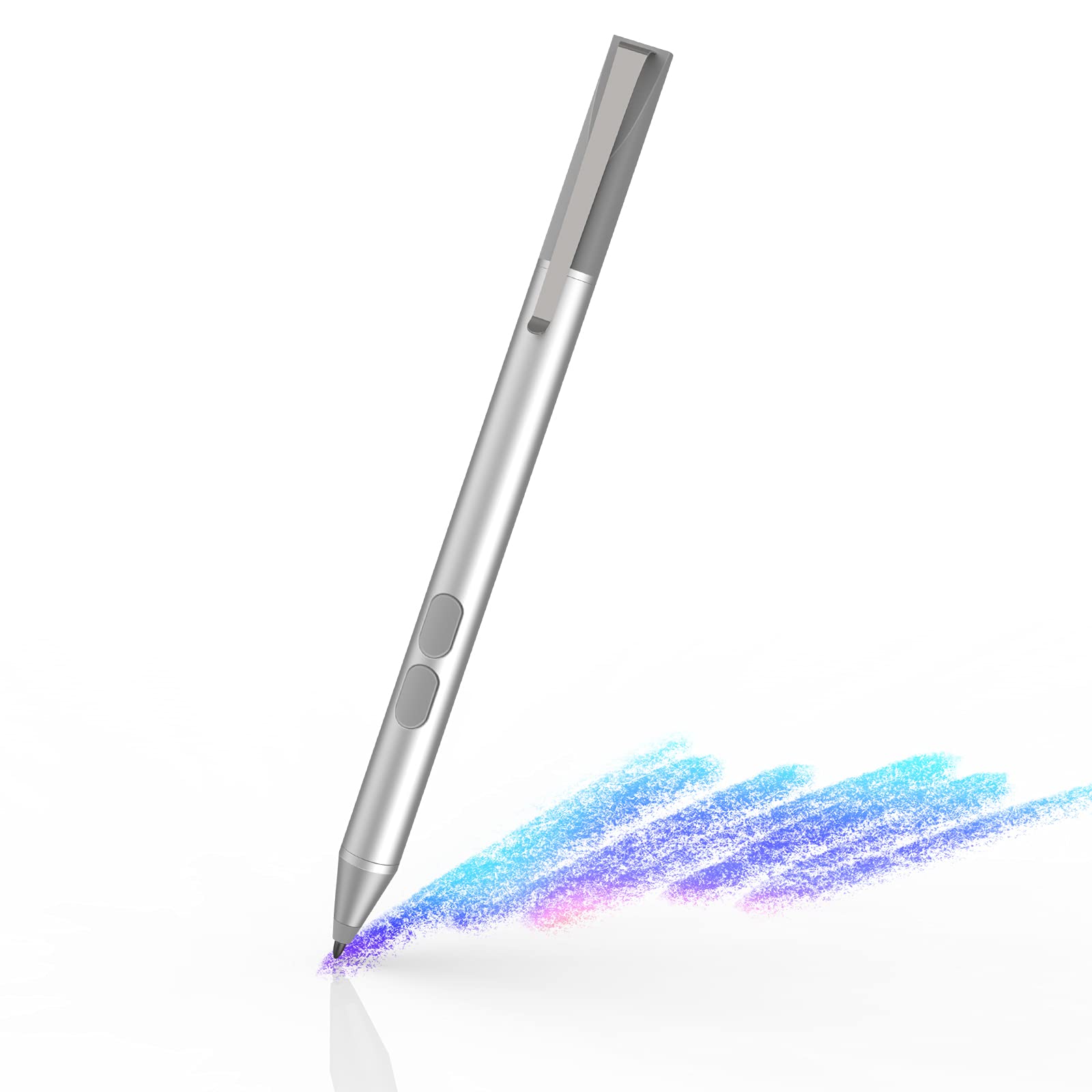
The shortcut buttons are a nice touch (literally). The default right-click function is handy for quick context menus, and the eraser button works as expected in drawing apps. But here’s the thing. Their placement means you’ll occasionally trigger them mid-stroke if you grip the pen lower than average. Not a dealbreaker, but worth noting if you have smaller hands.
Real-World Performance: A Month of Daily Use
Tested across OneNote, Microsoft Whiteboard, Clip Studio Paint, and Adobe Fresco on an HP Spectre x360 15-bl. Performance varied slightly by application, with the best experience in native Windows Ink apps.
So here’s what actually matters: can you use this thing for hours without wanting to chuck it out the window? Mostly, yes. The handwriting experience is genuinely good. I took meeting notes, annotated PDFs, and filled digital notebooks, and it felt… natural. The latency is low enough that you’re not constantly aware you’re using a digital pen rather than a traditional one.
But. And there’s always a but with budget tech. The pressure sensitivity has a slightly inconsistent activation force. Light sketching strokes sometimes didn’t register, particularly at the very beginning of a line. Once you’re mid-stroke, it’s fine. The pressure curve responds predictably. It’s just that initial activation that occasionally needs a firmer touch than I’d like. Professional digital artists will notice this immediately. Students taking notes? Probably won’t care.
Build Quality: Better Than It Has Any Right to Be
I’ll be honest. I expected plastic. At this price point, most manufacturers cut corners on materials. AZX didn’t. The aluminium body feels genuinely premium in hand, with a matte finish that provides decent grip without being overly textured. It’s lighter than a traditional pen (17g), which took maybe a day to adjust to, but then felt perfectly natural.
The included replacement nibs are a nice touch. They’re standard plastic tips, nothing fancy, but they’re there. The nib that came installed has held up well across a month of testing. No visible wear, still provides the same level of friction against the screen. I haven’t needed to swap it yet, but it’s reassuring to know I’ve got spares when I do.
One minor quibble: there’s no magnetic attachment or clip. So if your HP laptop has a stylus garage (some Spectre models do), you’ll need to check compatibility. Otherwise, you’re carrying this loose in your bag or finding a separate case for it.
📱 Ease of Use
This is where MPP protocol shines. There’s no Bluetooth pairing nonsense, no proprietary software to install, no hunting for drivers. You remove the battery isolation tab (it ships with the battery installed but not active), touch the pen to your HP’s screen, and it just works. Properly plug-and-play.
The button customisation happens through Windows Settings > Bluetooth & devices > Pen & Windows Ink. You can reassign the buttons to various functions. Eraser, right-click, open OneNote, etc. It’s not as comprehensive as dedicated stylus software, but it covers the basics most people actually use.
Battery replacement is straightforward once you figure out the twist mechanism (the manual could be clearer here). Unscrew the top section, swap the AAAA battery, screw it back together. Takes about 30 seconds. Just remember. AAAA batteries aren’t as common as AA or AAA, so grab a spare or two when you see them.
How It Compares: AZX vs HP Rechargeable MPP 2.0 vs Wacom Bamboo Ink Plus
Right, let’s talk competition. The HP Rechargeable MPP 2.0 costs more than double this AZX pen, and yes, you get 4096 pressure levels and tilt support for that extra money. If you’re a digital artist working in Clip Studio Paint or Adobe Fresco, that’s worth it. The pressure curve is noticeably more refined, and tilt sensitivity adds another dimension to brush strokes.
But here’s the reality: for note-taking, PDF annotation, and casual sketching, the difference between 1024 and 4096 pressure levels is… minimal. You’ll notice it if you’re doing detailed illustration work. You won’t notice it when you’re scribbling meeting notes in OneNote. And the AZX’s battery-powered approach means you never have the “forgot to charge it” problem that plagues rechargeable styluses.
The Wacom Bamboo Ink Plus sits in a weird middle ground. It’s more expensive than the AZX, offers dual protocol support (handy if you own both MPP and Wacom AES devices), and has three buttons instead of two. But unless you actually need that dual protocol support, you’re paying extra for features you won’t use.
Personally? If you’re an HP laptop owner who primarily takes notes and does light sketching, the AZX represents proper value. If you’re a professional digital artist, save up for the HP Rechargeable MPP 2.0 or look at Wacom’s offerings. Know your use case before you buy.
What Buyers Actually Say: The Good and the Grumbles
The 4.4 rating from 1,034 buyers is pretty telling. That’s genuinely good for a budget tech accessory. Most complaints centre around expectations. People expecting professional-grade performance at a budget price. When buyers understand what they’re getting (a solid note-taking stylus, not a Wacom Pro Pen replacement), satisfaction is high.
Value Analysis: What You Get at This Price Point
At this price point, you’d typically expect plastic construction and basic pressure sensitivity. The AZX delivers aluminium build quality, reliable palm rejection, and 1024 pressure levels. Features you’d normally find in the lower-mid tier. It punches well above its weight class, making it exceptional value for students and note-takers who don’t need professional-grade illustration capabilities.
Look, here’s the reality of budget styluses: most are rubbish. Plastic bodies that feel cheap, dodgy palm rejection that registers random touches, pressure sensitivity that’s basically on/off with nothing in between. The AZX breaks that pattern.
At £24.99, you’re getting build quality that competes with styluses costing £40-50, pressure sensitivity that’s adequate for 90% of non-professional use cases, and reliability that matches official HP accessories. The only significant compromises are the lack of tilt support and the 1024 pressure level ceiling. If your workflow needs those features, you need to spend more. Simple as that.
But if you’re a student taking lecture notes, a professional annotating documents in meetings, or someone who sketches casually for fun rather than profit, this represents genuinely excellent value. You’re not paying for features you won’t use, and you’re not compromising on the features that actually matter for everyday use.
Complete Specifications
So should you buy it? If you own an HP Omnibook, Envy, Pavilion, or Spectre with MPP support, and you primarily take notes, annotate documents, or sketch casually, absolutely yes. This represents proper value. You’re getting features and build quality that typically cost £40-50, at a price point that won’t make you wince.
If you’re a professional digital artist who needs 4096 pressure levels, tilt support, and ultra-refined pressure curves, save up for the HP Rechargeable MPP 2.0 or a Wacom alternative. This isn’t the tool for that job, and trying to force it into that role will only frustrate you.
But for everyone else? This is the stylus I’d recommend without hesitation. It does exactly what most people need a stylus to do, it does it reliably, and it doesn’t cost the earth. That’s a winning combination in my book.
What works. What doesn’t.
7 + 5What we liked7 reasons
- Exceptional value. Premium features at a budget price
- Aluminium construction feels substantially more expensive than it is
- Reliable palm rejection across Windows Ink apps
- Instant setup with MPP protocol. No pairing faff
- 2,500-hour battery life from a single AAAA battery
- Includes replacement nibs and battery in the box
- Minimal latency makes writing feel natural
Where it falls5 reasons
- 1024 pressure levels adequate but not professional-grade
- No tilt support for advanced brush techniques
- Light pressure strokes occasionally don’t register
- No magnetic attachment or carry clip included
- AAAA batteries less common than AA/AAA
Full specifications
5 attributes| Key features | Wide Compatibility: This active stylus is compatible with HP touchscreen laptops that support the MPP protocol. It works with models like HP Omnibook x flip, HP Envy 17-ae, Envy x360 15-bp/bq, Pavilion x360 11m/14m/15-br, Spectre x360 13-ac/ae/15-bl, and more(see additional models in images). Please confirm your device's compatibility in your system settings before ordering. |
|---|---|
| Precision Writing & Drawing: Stylus pen for HP experience natural creativity and note-taking with 1024 levels of pressure sensitivity. The hp pen dynamically adjusts line weight for precision, while built-in palm rejection lets you rest your hand comfortably on the screen. | |
| Convenient & Ergonomic: Two customization shortcut buttons (right-click & eraser) streamline your workflow. The lightweight (17g) aluminum body is designed for comfort during long sessions, reducing wrist strain. | |
| Long-Lasting Battery: This pen for HP powered by a single AAAA battery (included) that provides up to 2,500 hours of use. Enjoy the convenience of a battery-operated pen with no charging cables and no frequent interruptions. | |
| What's in the Box: You'll receive 1 x HP Compatible Stylus Pen, 1 x AAAA Battery, 1 x Set of Replacement Nibs, and a User Manual. Backed by our 12-month warranty and friendly customer support. |
If this isn’t right for you
2 options
Frequently asked
6 questions01Is the AZX HP Stylus Pen UK 2026 worth buying?+
Yes, if you own an HP laptop with MPP support and primarily use it for note-taking, PDF annotation, or casual sketching. At its budget price point, it delivers exceptional value with aluminium construction, reliable palm rejection, and 1024 pressure levels. However, professional digital artists should invest in a stylus with 4096 pressure levels and tilt support instead.
02How does the AZX HP Stylus Pen UK 2026 compare to the official HP stylus?+
The AZX offers similar build quality and functionality to HP's official MPP stylus at less than half the price. The main differences are 1024 vs 4096 pressure levels and the lack of tilt support on the AZX. For note-taking and light sketching, the performance difference is minimal. Professional artists will notice the pressure sensitivity difference.
03What are the main pros and cons of the AZX HP Stylus Pen UK 2026?+
Pros: Exceptional value, aluminium construction, reliable palm rejection, instant MPP setup, 2,500-hour battery life, minimal latency. Cons: Only 1024 pressure levels (not professional-grade), no tilt support, light pressure strokes occasionally miss, no magnetic attachment or clip included.
04Is the AZX HP Stylus Pen UK 2026 easy to set up?+
Yes, setup is instant. Remove the battery isolation tab, touch the pen to your HP laptop's screen, and it works immediately. No Bluetooth pairing, no drivers to install, no software required. The MPP protocol provides true plug-and-play functionality.
05What warranty applies to the AZX HP Stylus Pen UK 2026?+
Amazon offers 30-day returns on most items. AZX provides a 12-month manufacturer warranty. Additionally, all Amazon purchases are covered by the Amazon A-to-Z Guarantee for purchase protection.
06Which HP laptops are compatible with the AZX stylus?+
The AZX stylus works with HP laptops that support the MPP (Microsoft Pen Protocol). Compatible models include HP Omnibook x flip, Envy 17-ae, Envy x360 15-bp/bq series, Pavilion x360 11m/14m/15-br series, Spectre x360 13-ac/ae/15-bl series, and other MPP-enabled devices. Check your Windows Settings under Bluetooth & devices > Pen & Windows Ink to confirm MPP support before purchasing.