
VR-DESKTOP Decision guide
Best Gaming Desktop for Competitive Gamers: £1000, £1500
Buying a competitive gaming desktop between £1000 and £1500? We cut through the noise and point you to the right build for your playstyle and budget.
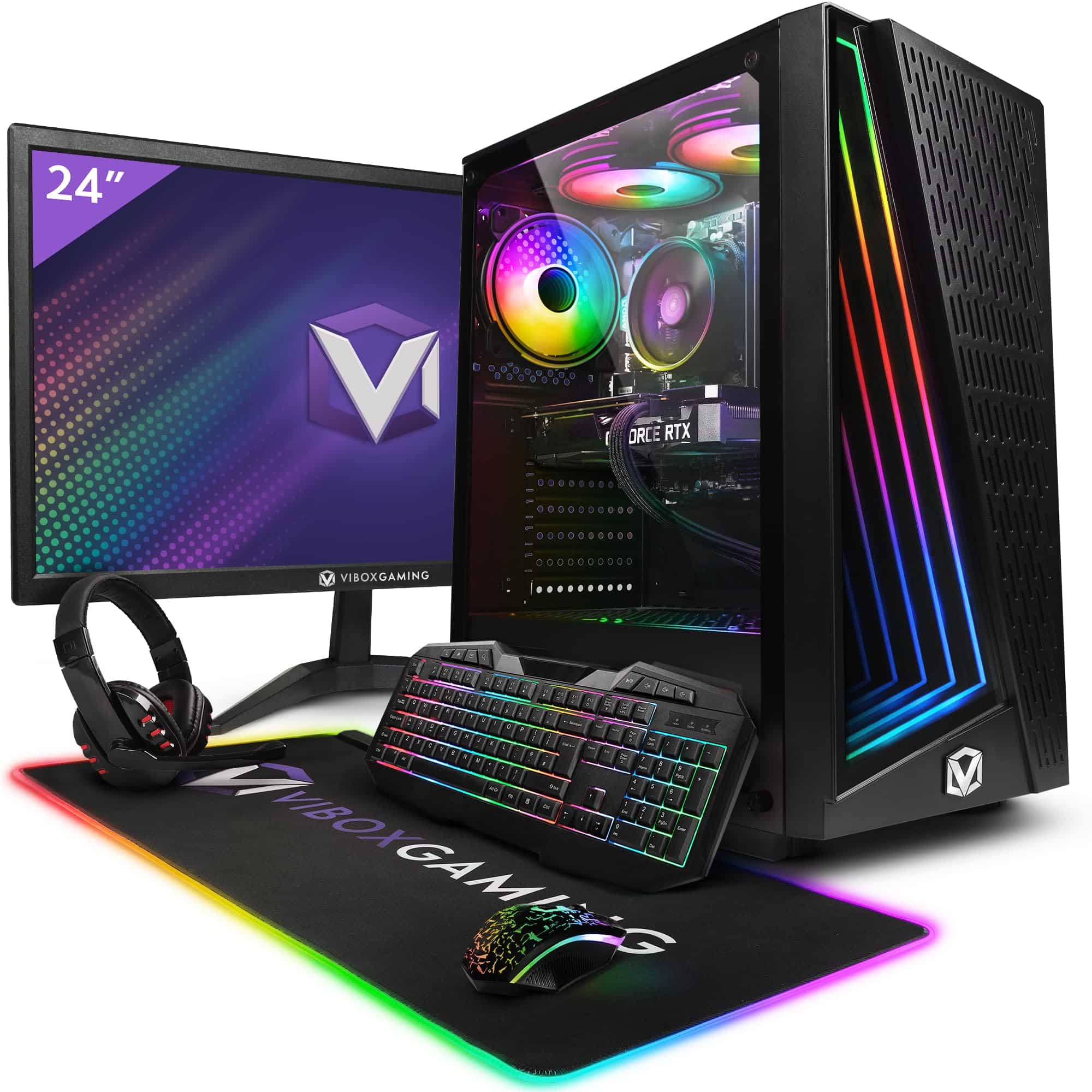 Top pick: Vibox Vibox V Gaming PC (Ryzen 5 5500, RTX 5060 Ti, Black)
It's 11pm, you're two rounds from promotion, and your current rig just dropped to 80fps mid-fight. That's not a hardware inconvenience, that's a lost match. Competitive gaming at a serious level demands consistent, high-frame-rate performance above almost everything else, and between £1000 and £1500 you can genuinely get a desktop that never becomes the reason you lose. The question is knowing exactly what to prioritise and what to ignore.
What actually matters
CPU performance and frame consistency
Raw GPU power gets the headlines, but for competitive titles it's the CPU that keeps frame times tight. Valorant, CS2, Apex, Warzone: all of these are heavily CPU-dependent at high frame rates. You want a modern processor with strong single-core performance and enough cores to handle background tasks without stealing cycles from your game. Anything from the last two Intel or AMD generations at this budget should do the job properly.
GPU and target resolution
Most competitive players run 1080p for maximum frames, and some push to 1440p for the extra clarity on long-range targets. Either way, a mid-to-upper-mid GPU is all you need. You're not rendering 4K cinematic scenes, you're pushing 200-plus frames in a relatively simple game engine. Spend sensibly here rather than going overboard.
RAM speed and capacity
16GB gets you through most sessions, but 32GB is worth having if you stream or run Discord, a browser, and your game simultaneously. More importantly, RAM speed matters: fast DDR4 or DDR5 reduces CPU bottlenecking in frame-rate-sensitive titles. Don't overlook this when comparing builds.
Storage
An NVMe SSD is non-negotiable. Fast load times mean you're in the server before your opponents have finished loading, which is a small but real advantage. 1TB is the sensible minimum at this budget.
What you can ignore
4K capability. You're not using it. Competitive players drop resolution to gain frames, not the other way around. Paying extra for a GPU that handles 4K ultra is money that could go toward a better CPU or faster RAM.
Massive storage arrays. Two or three terabytes of HDD storage sounds appealing but adds cost without improving performance. One fast NVMe drive covers your game library and your OS. You can always add storage later.
Elaborate cooling aesthetics. RGB loops and custom water cooling look brilliant in case tour videos. They don't make your bullets land faster. Solid air cooling keeps thermals in check at this budget without the faff or the extra cost.
Integrated graphics or hybrid setups. Irrelevant here. You need a dedicated GPU, full stop. Any build that leans on integrated graphics for gaming is the wrong build entirely.
Three worth considering
The Vibox VII Gaming PC (i7-12700KF, RTX 5060, White) is the one to look at if you want the strongest overall frame rate performance in this shortlist. The i7-12700KF is a proper workhorse with excellent single-core numbers, and the RTX 5060 is well-matched to competitive resolutions. It's a no-brainer for anyone targeting 1080p at 240fps or 1440p at a consistent 165fps-plus. The white finish is a bonus if your setup leans that way. The honest trade-off is that the RTX 5060, while excellent for competitive play, won't be the card you reach for if you later want to push AAA titles at 4K ultra settings. For competitive gaming though, that's barely a concern.
The Vibox IV Gaming PC (Ryzen 7 5700X, RTX 4060, Black) sits at the more accessible end of this budget band and is worth a serious look if you want to keep some money back for peripherals. The Ryzen 7 5700X is a capable eight-core chip that handles competitive titles without complaint, and the RTX 4060 is spot on for 1080p high-frame-rate gaming. It's the pick for someone who reckon they'd rather spend the saving on a 240Hz monitor or a decent headset. The trade-off is that the RTX 4060 shows its age slightly in more demanding titles, and the 5700X is an older architecture than the i7-12700KF. For pure competitive play at 1080p, neither of those points is a dealbreaker.
The Apple Mac Mini M4 is on the list because it's a remarkable machine in many respects, and some readers will arrive here curious about it. Be straight with yourself: if your game of choice is CS2, Valorant, or any title with kernel-level anti-cheat, macOS is going to cause you real problems. The Mac Mini M4 is a brilliant desktop for almost everything else, but competitive Windows gaming is the one area where it genuinely can't compete. If your library is macOS-compatible and you play casually rather than ranked, it's worth a look. For serious competitive play, it's the wrong tool.
AMD vs Intel: does it actually matter here?
At this budget, both platforms deliver strong competitive gaming performance and the difference in real-world frame rates is smaller than the spec sheets suggest. Intel's i7-12700KF edges ahead in single-threaded workloads, which helps in CPU-bound competitive titles. AMD's Ryzen 7 5700X offers excellent multi-core efficiency and runs cool under sustained load. Neither is a dodgy choice. Pick based on the full build spec and price rather than brand loyalty, and you'll be sorted either way.
Before you buy: a checklist
- Confirm your monitor's refresh rate before committing to a GPU. A 144Hz panel doesn't need the same card as a 240Hz one.
- Check whether the build ships with Windows 11 pre-installed and activated. Some pre-builts leave this to you.
- Verify RAM speed, not just capacity. 16GB of slow RAM can bottleneck a fast CPU in competitive titles.
- Look up the warranty terms. A one-year return-to-base warranty is standard; anything less is a red flag.
- Check the case has room for a GPU upgrade in two or three years. Full-tower or mid-tower cases give you options; small form factor builds often don't.
Three worth your money
Each link adds the product to your Amazon basket so you can compare them side-by-side at checkout.


- Gawfolk 27 inch 4K 180Hz Monitor Review UK (2026) - Specs, Value & Verdict
- Best Desktop PCs for Small Businesses: £600 to £1,000 (UK)
- Stormforce Gaming Carbon Elite AMD Review: Ryzen 7 8700G Compact Desktop
- Best Desktop PCs for Small Businesses: £1,500 to £2,200 (UK)
- Best Desktops for YouTube content creators
We're an Amazon Associate. If you click a product link and buy something, we earn a small commission at no extra cost to you. We only recommend products we'd use ourselves.
Top pickVibox V Gaming PC (Ryzen 5 5500, RTX 5060 Ti, Black)£1064.95Add to cart →