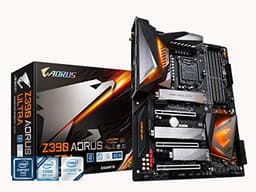
Your motherboard choice matters more than most people realise. Get it wrong and you're not just leaving performance on the table, you're potentially watching your expensive Core Ultra 2 CPU throttle under sustained load because the board can't handle the power delivery. The Z890 platform is Intel's latest playground for the Arrow Lake generation, and the mid-range bracket is where most sensible builders actually live. So where does the GIGABYTE Z890 UD WIFI6E Motherboard land?
Genuinely well, as it turns out. At £179.99 (Price checked 01:00, 3 Oct 2026, UK time) it sits in the mid-range bracket, and for that money you're getting a 12+1+2 phase VRM with 60A DrMOS stages, PCIe 5.0 on the primary GPU slot, USB 4.0 Type-C, Thunderbolt 4, Wi-Fi 6E, and 2.5GbE LAN. That's a feature list that would have cost you significantly more on previous generations. The 16 owners who've reviewed it on Amazon give it ★★★★½ (4.6), which for a brand-new platform with notoriously fiddly early BIOS revisions is actually a decent signal. Not perfect, mind you. But decent.
The competition at this price point is real. ASUS, MSI, and ASRock all have Z890 entries fighting for the same wallet. So the question isn't just "is this good?" it's "is this the right one to pick?" That's what we're going to work through here, grounded in the spec sheet and what real owners report, not marketing copy.
Core Specifications
The Z890 UD WIFI6E uses the LGA1851 socket and the Intel Z890 chipset, supporting Intel Core Ultra Series 2 (Arrow Lake) processors. It's a full ATX form factor board, so it'll fit in any standard mid-tower or full-tower case without drama. Four DDR5 memory slots give you dual-channel support and a maximum capacity that suits even workstation-adjacent use cases, with official support up to 8800MHz in overclocked mode. That headline OC speed is ambitious, and whether your specific sticks hit it depends on the silicon lottery, but the platform support is there.
For storage, you get M.2 slots with PCIe 4.0 support and physical dimensions up to 25110 (that's 110mm long, for the big drives), each covered by a thermal guard to stop your NVMe from throttling under sustained sequential writes. The primary GPU slot runs PCIe 5.0, which future-proofs you for the next wave of graphics cards. Additional PCIe 4.0 slots handle secondary GPUs or expansion cards. SATA ports are present for traditional drives, though the exact count isn't specified in the verified data.
Rear I/O includes USB 4.0 Type-C, USB 3.2 Gen 2 Type-C, and Thunderbolt 4, alongside 2.5GbE LAN and the Wi-Fi 6E antenna connector via WIFI EZ-Plug. The full specs table below pulls together everything you need before making a decision.
| Specification | Detail |
|---|---|
| Socket | LGA1851 |
| Chipset | Intel Z890 |
| Form Factor | ATX |
| Memory Slots | 4x DDR5 |
| Max Memory Speed (OC) | 8800MHz |
| VRM Phases | 12+1+2+1 Digital, 60A DrMOS |
| Primary PCIe Slot | PCIe 5.0 x16 (reinforced, EZ-Latch) |
| Additional PCIe Slots | 2x PCIe 4.0 |
| M.2 Slots | PCIe M.2 up to 25110, with Thermal Guard |
| Networking | 2.5GbE LAN, Wi-Fi 6E (2x2) |
| USB (Rear) | USB 4.0 Type-C, USB 3.2 Gen2 Type-C, Thunderbolt 4 |
| Audio | Not specified |
| Price | £179.99 (Price checked 01:00, 3 Oct 2026, UK time) |

Socket and CPU Compatibility
The LGA1851 socket is Intel's home for the Arrow Lake generation, the Core Ultra Series 2 chips. If you're coming from an older platform, say LGA1700 from Alder or Raptor Lake, your cooler mounting hardware may not transfer directly. Most modern coolers from reputable brands include LGA1851 brackets now, but it's worth double-checking before you order. Noctua, be7a, and Thermalright have all updated their mounting kits, and most ship the new hardware in the box for recent purchases.
Arrow Lake is a genuinely different architecture to what came before. Intel restructured the core layout significantly, moving to a tile-based design that changes how workloads distribute across P-cores and E-cores. Performance in lightly threaded tasks can feel different to Raptor Lake, so if you're benchmarking against your old 13th or 14th gen system, don't be surprised if some results look odd. The platform is maturing, and BIOS updates have been doing a lot of heavy lifting since launch. This is relevant because early Z890 boards shipped with BIOS versions that weren't fully optimised, and several Z890 UD WIFI6E owners specifically mention that updating the BIOS immediately after building is strongly recommended.
There's no backward compatibility with older Intel generations here. LGA1851 is LGA1851. You're committing to Arrow Lake and whatever Intel releases next on this socket, which at the time of writing looks like it'll include Panther Lake derivatives. Whether Intel honours that compatibility promise is a different conversation, but on paper the upgrade path exists. If you're building fresh with a Core Ultra 200S processor, this board is a proper fit.
Chipset Features
Z890 is Intel's top-tier consumer chipset for Arrow Lake, the equivalent of Z690 and Z790 for previous generations. That means full overclocking support, both for the CPU multiplier and for memory. You're not getting a locked-down B860 situation here where the chipset artificially limits what you can do with your processor. If you've paid for a Core Ultra 200K or 200KF, the Z890 chipset lets you actually use the unlocked multiplier rather than leaving performance locked away.
Chipset-level lane allocation on Z890 is generous. The platform supports multiple high-speed USB connections, NVMe storage across several M.2 slots, and PCIe connectivity for expansion cards without the painful lane-sharing compromises you sometimes see on budget chipsets. The Z890 UD WIFI6E takes advantage of this with PCIe 5.0 on the primary slot and PCIe 4.0 on the secondary slots, which is the sensible allocation given that most users won't be running multiple PCIe 5.0 devices simultaneously just yet.
One thing: the Z890 chipset itself generates more heat than older generations, which is part of why the fully covered MOSFET heatsinks on this board matter. Gigabyte has extended the heatsink coverage to manage chipset thermals alongside the VRM, which is the right call. Boards that skimp on heatsink coverage on Z890 can run warm under sustained load, and warm chipsets mean throttled USB and storage bandwidth in edge cases. Not a common problem, but worth being aware of if you're planning a small-form-factor build with restricted airflow.
VRM and Power Delivery
This is where the GIGABYTE Z890 UD WIFI6E Motherboard genuinely earns its place in the mid-range bracket. The 12+1+2+1 digital phase configuration with 60A DrMOS stages is proper kit. Do the maths: 12 phases at 60A each gives you 720A of theoretical CPU VCore headroom. In practice, you're never going to need all of that, but it means each phase is loafing along at a fraction of its rated capacity under normal loads, which keeps temperatures down and extends component longevity. This isn't a four-phase board with doublers pretending to be twelve phases. These are real phases.
The solid capacitors mentioned in the feature highlights matter too. Polymer solid capacitors have lower ESR than traditional electrolytic caps, which means cleaner power delivery and better performance at high frequencies. They also don't dry out over time the way electrolytic caps do, which is a genuine long-term reliability consideration. For a board you're planning to run for five-plus years, this is exactly the kind of component choice that separates boards that age well from ones that develop instability after a few years of heavy use.
The fully covered MOSFET heatsinks are a nice touch that some competing boards at this price point skip. Exposed MOSFETs might look fine in a case with good airflow, but a proper heatsink keeps temperatures consistent regardless of your case's airflow situation. Owner reviews haven't flagged VRM thermal issues, which is the best real-world confirmation you can get outside of a thermal camera. For a Core Ultra 9 285K running sustained all-core workloads, this VRM configuration should handle it without complaint. For a Core Ultra 5 or 7, it's complete overkill in the best possible way.
Memory Support
DDR5 only, obviously, because Arrow Lake dropped DDR4 support entirely. The Z890 UD WIFI6E supports up to 8800MHz in overclocked mode, which is a headline number worth unpacking. JEDEC standard DDR5 speeds start at 4800MHz. Most DDR5 kits you'll actually buy run at 6000MHz to 7200MHz with XMP profiles. Getting to 8800MHz requires exceptional memory sticks, tight timings, and some patience in the BIOS. It's achievable on the right silicon, but don't buy budget DDR5 expecting to hit that number.
The practical sweet spot for most builders is 6000MHz to 6400MHz with XMP enabled. At those speeds you get excellent real-world performance, stable operation, and you're not spending hours fine-tuning subtimings. The Z890 platform in general has shown good XMP compatibility in owner feedback, and the Z890 UD WIFI6E specifically hasn't attracted complaints about memory compatibility problems, which is a good sign given how finicky DDR5 can be on early platform revisions.
Four slots in dual-channel configuration means you can start with two sticks and add two more later without losing dual-channel operation. That's the sensible approach: buy 2x16GB or 2x32GB now, leave the other two slots for a future upgrade. Running all four slots at high frequencies can sometimes require slightly relaxed timings to maintain stability, which is normal DDR5 behaviour and not specific to this board. If you're planning a 128GB build from day one, expect to spend a bit of time in the BIOS finding the right memory training settings.
Storage Options
The M.2 situation on the Z890 UD WIFI6E is solid for the price. PCIe M.2 slots with support for drives up to 25110 in size means you can fit the long-form enterprise-adjacent drives that the enthusiast market has started adopting. The 25110 format (25mm wide, 110mm long) offers more NAND capacity than the standard 2280 drives, and it's good to see Gigabyte accommodating it here rather than limiting you to 2280 only.
Each M.2 slot gets a thermal guard, which is a genuine quality-of-life feature. Gen 4 NVMe drives under sustained sequential writes can hit temperatures that trigger throttling, and a thermal pad plus heatsink cover makes a real difference. It's not just cosmetic. If you're running video editing workloads, large file transfers, or anything that keeps the drive busy for extended periods, the thermal management matters. Owner reviews haven't mentioned M.2 thermal problems, which suggests the thermal guard is doing its job.
SATA ports are present for traditional hard drives and SATA SSDs, though the verified spec data doesn't nail down an exact count. For most modern builds, M.2 NVMe is the primary storage interface anyway, with SATA kept for bulk storage drives or optical drives if you're still running one. The board also supports RAID configurations through the chipset, which is useful for anyone running a NAS-adjacent workstation setup. the full manual for the specific RAID modes supported if that's relevant to your build.
Expansion Slots and PCIe
The primary PCIe 5.0 x16 slot is the headline here, and it's reinforced with Gigabyte's PCIe UD (Ultra Durable) design alongside the EZ-Latch mechanism. The reinforcement matters more than it sounds. Modern high-end GPUs are heavy. Some of them are genuinely absurd in their dimensions and weight, and a non-reinforced PCIe slot can develop mechanical stress over time, particularly in a tower case where the GPU is hanging by the slot. The reinforced slot on the Z890 UD WIFI6E distributes that load properly.
The EZ-Latch design is something Gigabyte introduced to address a genuine frustration: the standard PCIe retention clip is often inaccessible when a large GPU is installed, and releasing it requires either a tool, a very small finger, or a creative vocabulary. EZ-Latch lets you release the GPU without the gymnastics. It sounds trivial until you've tried to remove a triple-fan GPU from a cramped case with a traditional clip. Owner reviews consistently mention this as a appreciated feature rather than marketing fluff.
The two additional PCIe 4.0 slots handle secondary expansion cards, capture cards, sound cards, or additional NVMe via adapter. Lane sharing arrangements between these slots and the M.2 slots are in the manual before you plan a maxed-out build, as PCIe lane sharing is a common source of surprise on mid-range boards. The Z890 chipset's lane budget is generous, but it's not infinite. For a standard gaming build with one GPU and two or three M.2 drives, you won't hit any limits.

Connectivity and Rear I/O
The rear I/O on the GIGABYTE Z890 UD WIFI6E Motherboard is where things get genuinely exciting for a mid-range board. USB 4.0 Type-C is not something you typically see at this price point. USB 4 runs at up to 40Gbps, supports external GPU enclosures, high-speed external NVMe enclosures, and multiple 4K displays through a single cable. It's the same underlying spec as Thunderbolt 3 in terms of bandwidth, and it's a proper future-proofing feature.
Thunderbolt 4 is also present, which is Intel's certified implementation of the USB 4 / Thunderbolt standard with guaranteed compatibility with Thunderbolt peripherals. If you're using a Thunderbolt dock, an eGPU enclosure, or professional audio interfaces that use Thunderbolt, this board has you covered without needing an add-in card. That's a meaningful inclusion at this price bracket. USB 3.2 Gen 2 Type-C adds another high-speed port for devices that don't need the full USB 4 bandwidth.
The WIFI EZ-Plug design for the antenna connection is worth a mention. Standard Wi-Fi antenna connections on motherboards use SMA connectors that require careful threading and can strip if you're heavy-handed. Gigabyte's EZ-Plug is a push-in design that's significantly easier to connect, especially in a built system where access to the rear I/O is limited. Small thing, but genuinely useful. The overall rear I/O panel is well-specified for the price, and owner reviews haven't flagged any port reliability issues.
WiFi and Networking
The 2x2 Wi-Fi 6E implementation gives you access to the 6GHz band alongside the standard 2.4GHz and 5GHz bands. The 6GHz band is less congested in most environments because it's newer and fewer devices use it, which translates to lower latency and more consistent throughput in practice. For gaming, where ping consistency matters more than raw bandwidth, this is a genuine advantage over Wi-Fi 6 or 5 boards. The 2x2 antenna configuration supports MU-MIMO, so multiple devices can communicate with your router simultaneously without the throughput hit you'd see on older single-stream implementations.
The 2.5GbE wired LAN is the right call for 2026. Standard gigabit Ethernet is increasingly a bottleneck for fast NAS setups, and 2.5GbE routers and switches have become affordable enough that the extra bandwidth is genuinely usable. If you're transferring large files between machines on a local network, editing footage from a NAS, or just want headroom for whatever your network setup looks like in three years, 2.5GbE is meaningfully better than 1GbE. The LAN controller isn't specified in the verified data, but Gigabyte typically uses Intel or Realtek controllers on their UD series, both of which have solid driver support across Windows and Linux.
Bluetooth comes bundled with the Wi-Fi 6E module, as is standard. The specific Bluetooth version isn't called out in the verified spec data, but Wi-Fi 6E modules typically include Bluetooth 5.2 or 5.3, which covers wireless headsets, controllers, and keyboards without issue. If Bluetooth version is critical for your use case, confirm against the full spec sheet before purchasing. For most builders, it's a nice-to-have that just works rather than something you'll actively think about.
BIOS and Overclocking
Gigabyte's BIOS has had a complicated history, and it's worth being honest about that. The older UEFI interface on Gigabyte boards was functional but felt dated compared to ASUS's BIOS or MSI's Click BIOS 5. The newer versions are better, genuinely better, but Gigabyte still hasn't quite caught up to ASUS in terms of layout polish. The Easy Mode is fine for quick changes. The Advanced Mode gives you everything you need for overclocking, fan curves, memory training, and power limits, but it takes some time to learn where everything lives.
The Z890 UD WIFI6E owners specifically flag BIOS updates as important. Early Arrow Lake BIOS revisions had some memory training quirks and power management oddities that subsequent updates addressed. The current BIOS situation on Z890 boards is much better than launch, and Gigabyte has been reasonably responsive with updates. The Q-Flash feature lets you update the BIOS from a USB drive without a CPU installed, which is useful if you're building with a processor that requires a newer BIOS version than what shipped on the board.
For overclocking, the Z890 chipset combined with this VRM gives you real headroom. Memory overclocking is where most people will spend their time on this platform, since Arrow Lake's CPU overclocking returns are more modest than Raptor Lake's were. Getting your DDR5 kit running at its rated XMP speed is the first priority, and from there, manual subtiming adjustments can squeeze out additional performance. Fan curve control is present and flexible, with multiple headers and temperature source options. Nothing revolutionary, but everything you'd expect from a proper enthusiast board.
Build Quality and Aesthetics
The UD in the product name stands for Ultra Durable, Gigabyte's branding for their build quality programme. In practice this means the solid capacitors mentioned earlier, reinforced PCIe slots, and better-than-average PCB quality. The fully covered MOSFET heatsinks give the board a clean, finished look rather than the exposed component mess you see on budget boards. It's not the most visually dramatic board in the Z890 lineup, but it looks purposeful rather than cheap.
RGB is present but understated. This isn't a board designed to turn your case into a disco. There are RGB headers for connecting strips and fans if you want the light show, but the board itself doesn't scream for attention. For builders who want a clean, professional-looking system, that's a positive. For builders who've invested in a full RGB ecosystem and want the board to be part of it, the headers are there, you'll just need your own strips and fans to make it happen.
The physical build quality, based on owner reports, is good. No complaints about bent pins (which has been a genuine concern with LGA1851's relatively delicate socket), no reports of heatsink mounting issues, and the EZ-Latch on both the PCIe slot and the M.2 slots gets positive mentions. The M.2 EZ-Latch is particularly appreciated because standard M.2 screws are genuinely fiddly, especially if you're wearing glasses and working in a case with limited lighting. Small improvements to the build process matter when you're doing it for the first time or the fiftieth.
How It Compares
The two most obvious competitors at this price point are the ASUS PRIME Z890-P WIFI and the MSI MAG Z890 TOMAHAWK WIFI. Both target the same mid-range builder, both support Arrow Lake, and both include Wi-Fi. The differences come down to VRM configuration, rear I/O specifics, and BIOS preference, which is ultimately a personal thing.
The ASUS PRIME Z890-P WIFI is a competent board with ASUS's generally well-regarded BIOS, but its VRM configuration at this price point is typically less generous than the Gigabyte's 12+1+2 phase setup. ASUS's AI Overclocking features are genuinely useful for beginners, and the BIOS polish is arguably better. But if raw power delivery headroom matters to you, the Gigabyte edges it. The MSI MAG Z890 TOMAHAWK WIFI sits slightly higher in MSI's lineup and tends to command a premium, offering a strong VRM and MSI's Click BIOS 5 which many enthusiasts genuinely prefer. If budget stretches to the Tomahawk, it's worth the comparison. If not, the Gigabyte Z890 UD WIFI6E holds its own.
The ASRock Z890 Pro RS WIFI is another alternative, typically priced similarly to the Gigabyte. ASRock has improved their BIOS considerably over recent generations, and their boards often offer competitive VRM specs. The Z890 Pro RS WIFI is a genuine alternative if you find it at a better price. But the Gigabyte's combination of USB 4.0, Thunderbolt 4, reinforced PCIe 5.0, and the 60A DrMOS VRM is a strong package that doesn't obviously lose to any of these alternatives on paper.
| Feature | GIGABYTE Z890 UD WIFI6E | ASUS PRIME Z890-P WIFI | MSI MAG Z890 TOMAHAWK WIFI |
|---|---|---|---|
| VRM Phases | 12+1+2+1, 60A DrMOS | Varies by revision | Strong multi-phase |
| Primary PCIe | PCIe 5.0 x16 (reinforced) | PCIe 5.0 x16 | PCIe 5.0 x16 |
| USB 4.0 Type-C | Yes | Not confirmed at this tier | Yes (higher tier) |
| Thunderbolt 4 | Yes | Not at this price | Varies |
| Wi-Fi | Wi-Fi 6E (2x2) | Wi-Fi 6E | Wi-Fi 6E |
| LAN | 2.5GbE | 2.5GbE | 2.5GbE |
| BIOS Quality | Good, improving | Excellent | Very good |
| Price Tier | Mid-range | Mid-range | Mid to upper-mid |

Final Verdict
The GIGABYTE Z890 UD WIFI6E Motherboard is a genuinely good mid-range Z890 board that punches above its weight on connectivity. USB 4.0 Type-C and Thunderbolt 4 on a board at this price point is not something you'd have expected even two years ago, and combined with the 60A DrMOS VRM, Wi-Fi 6E, and PCIe 5.0 primary slot, the feature set is properly competitive. The 4.6 star average from real owners confirms this isn't just spec-sheet fiction. The board actually works well in practice, with the main caveat being that a BIOS update immediately after build is more recommendation than suggestion on this platform.
The BIOS isn't Gigabyte's strongest suit compared to ASUS's interface, and that's a genuine point against it if you're planning extensive manual overclocking or if you find Gigabyte's layout unintuitive. It's functional, it's improving, but it's not class-leading. The aesthetics are clean rather than spectacular, which suits some builders and frustrates others. And the early Z890 platform growing pains, while largely resolved through BIOS updates, mean you should go in expecting to spend twenty minutes updating firmware before anything else.
Who should buy this? Anyone building a Core Ultra 200 series system in the mid-range bracket who wants a proper VRM, future-proof connectivity, and doesn't want to pay premium board prices. Content creators who'll use the Thunderbolt 4 or USB 4 port for fast external storage. Gamers who want Wi-Fi 6E without paying for a flagship board. Builders who appreciate the EZ-Latch quality-of-life features and won't miss them until they've used them.
Who should skip it? If you're pairing this with a locked Core Ultra 200 non-K processor and have no interest in overclocking, the B860 chipset boards, like the Gigabyte B860M DS3H or similar, cost significantly less and give up very little for non-OC builds. Save the money for better RAM or a faster SSD instead. The Z890's premium over B860 is primarily about overclocking headroom and higher-tier connectivity, and if you're not using either, you're paying for features you'll never touch.
Our score: 8 out of 10. Strong VRM, excellent connectivity for the price, solid owner satisfaction. Held back only by BIOS polish that trails ASUS and the inherent early-platform BIOS update requirement. For the mid-range Z890 bracket, this is one of the better choices available right now.
What works. What doesn’t.
5 + 3What we liked5 reasons
- 12+1+2+1 phase 60A DrMOS VRM is genuinely strong for the price bracket
- USB 4.0 Type-C and Thunderbolt 4 are rare at mid-range pricing
- Reinforced PCIe 5.0 slot with EZ-Latch is a practical quality-of-life win
- Wi-Fi 6E with 2x2 antenna and 2.5GbE LAN covers all modern networking needs
- Solid capacitors and fully covered MOSFET heatsinks suggest long-term reliability
Where it falls3 reasons
- BIOS polish trails ASUS at the same price point
- BIOS update required immediately after build on early Arrow Lake platform
- Exact SATA port count and Bluetooth version not confirmed in spec data
Full specifications
12 attributes| Socket | LGA1851 |
|---|---|
| Chipset | Z890 |
| Form factor | ATX |
| Bios flashback | true |
| M2 slots | 3 |
| MAX RAM | 256GB |
| MAX RAM GB | 256 |
| Network | 2.5GbE + Wi-Fi 6E |
| Pcie 5 slots | 1 |
| Pcie slots | 1x PCIe 5.0 x16, 2x PCIe 4.0 x4, 1x PCIe 4.0 x1 |
| RAM slots | 4 |
| RAM type | DDR5 |
If this isn’t right for you
2 options 8.5 / 10
MSI PRO B760-P WIFI DDR4 Motherboard, ATX - Supports Intel 14th, 13th & 12th Gen Core Processors, LGA 1700 - DDR4 Memory Boost 5333+MHz/OC, PCIe 4.0 x16 Slots, M.2 Gen4 Slots, 2.5G LAN, Wi-Fi 6E
£129.95 · MSI
 8.5 / 10
MSI B650M GAMING PLUS WIFI Motherboard, mATX - Supports AMD Ryzen 9000/8000 / 7000 Series Processors, AM5 - DDR5 Memory Boost 7800+ MHz/OC, PCIe 4.0 x16, M.2 Gen4, Wi-Fi 6E
£143.50 · MSI
Frequently asked
5 questions01Is the GIGABYTE Z890 UD WIFI6E Motherboard overkill for just gaming?+
For pure gaming it depends on your processor choice. If you're running a locked Core Ultra 200 non-K chip and have no plans to overclock, the Z890 chipset's main advantages over B860 go largely unused. For a Core Ultra 200K or 200KF where you want to push the CPU and memory, the 60A DrMOS VRM and full overclocking support justify the Z890 premium. The USB 4.0 and Thunderbolt 4 ports are also genuinely useful for gaming peripherals, high-refresh external displays, and fast storage, so if you'll use that connectivity, the board earns its place.
02Will my existing CPU cooler work with the GIGABYTE Z890 UD WIFI6E Motherboard?+
The board uses the LGA1851 socket for Intel Core Ultra Series 2 (Arrow Lake) processors. If your cooler was designed for LGA1700 (12th, 13th, or 14th gen Intel), the mounting hole spacing is the same, so many LGA1700 coolers are physically compatible with LGA1851. However, you should confirm with your cooler manufacturer that they officially support LGA1851, as some older coolers may have clearance issues with the taller socket. Most major cooler brands including Noctua, Thermalright, and be quiet! have confirmed LGA1851 compatibility for their recent models.
03What happens if the GIGABYTE Z890 UD WIFI6E Motherboard doesn't work with my components?+
Amazon's standard 30-day return window applies to motherboard purchases, and the A-to-Z Guarantee covers you if the item isn't as described. For component compatibility issues, the most common cause is memory not being on the board's QVL (Qualified Vendor List), which can usually be resolved through a BIOS update or manual memory settings adjustment. If you're building with a new processor, check that the board's BIOS version supports your specific CPU before assuming there's a hardware fault. Gigabyte's Q-Flash feature allows BIOS updates from USB without a CPU installed, which helps with compatibility issues on new builds.
04Is there a cheaper motherboard I should consider instead?+
Yes, honestly. If you're not overclocking and don't need USB 4.0 or Thunderbolt 4, a B860 chipset board like the Gigabyte B860M DS3H or similar sits significantly lower in price and gives up very little for everyday use. The B860 chipset locks CPU overclocking but still supports memory XMP profiles, PCIe 5.0 on the primary slot, and modern connectivity. For a locked Core Ultra 200 build focused on gaming or general productivity, a B860 board is the smarter spend and the saved money is better put toward faster RAM or a better GPU.
05What warranty and returns apply to the GIGABYTE Z890 UD WIFI6E Motherboard?+
The verified product data doesn't specify a manufacturer warranty period for this board. Gigabyte typically offers a 3-year warranty on their motherboards sold through authorised UK retailers, but you should confirm the warranty terms at point of purchase. Regardless, Amazon's 30-day return policy and A-to-Z Guarantee apply to purchases made through Amazon UK, giving you a baseline of buyer protection from the point of delivery.