Numbers on a spec sheet only tell you so much. The real story shows up when you cross-reference the architecture against published benchmarks, dig through what owners are actually reporting, and ask whether the card makes sense at its price point given what else is available. That's the analysis that matters, and that's what this review is built on.
So here's the short version: the Gigabyte GeForce RTX 3060 GAMING OC V2 is a solid 1080p card with genuine 1440p capability in less demanding titles, a cooler that owners consistently praise, and an 8GB VRAM allocation that's starting to look a bit thin in 2026. It's not a bad card. But it's a card you need to buy at the right price, for the right use case, with clear eyes about where it sits in the current GPU landscape. Read on and I'll show you exactly what the data says.
Core Specifications: Gigabyte NVIDIA GeForce RTX 3060 GAMING OC V2
The RTX 3060 is built on NVIDIA's Ampere architecture, which launched back in 2020 and still holds up reasonably well for mainstream gaming. The GAMING OC V2 variant from Gigabyte takes the reference spec and pushes the boost clock a touch beyond stock, which we'll get into properly in the clock speed section. What matters here is getting a clear picture of the full specification before we start drawing conclusions.
The card carries 3,584 CUDA cores, 28 RT cores (2nd Generation), and 112 Tensor cores (3rd Generation). Those Tensor cores are what enable DLSS, and the RT cores handle ray tracing workloads. Neither generation is the latest (Ada Lovelace's 4th-gen RT cores are meaningfully faster at ray tracing), but they're functional and relevant for the games people are actually playing at this resolution tier. The total graphics power sits at 170W, which is reasonable for what you're getting and doesn't demand an enormous PSU.
Connectivity is proper: two DisplayPort 1.4 outputs and two HDMI 2.1 ports, giving you four display outputs total. HDMI 2.1 supports 4K at 120Hz and 8K at 60Hz from a bandwidth perspective, so even if the GPU itself isn't pushing 4K gaming frames comfortably, you've got future-proof display connectivity for a TV setup. The card uses a PCIe 4.0 x16 interface, though it'll run fine in a PCIe 3.0 slot with negligible real-world performance difference at this tier.
| Specification | Detail |
|---|---|
| GPU Architecture | NVIDIA Ampere |
| CUDA Cores | 3,584 |
| RT Cores | 2nd Generation (28 cores) |
| Tensor Cores | 3rd Generation (112 cores) |
| VRAM | 8GB GDDR6 |
| Memory Bus Width | 128-bit |
| Boost Clock | 1807MHz (factory OC) |
| Interface | PCIe 4.0 x16 |
| Display Outputs | 2x DisplayPort 1.4, 2x HDMI 2.1 |
| TGP | 170W |
| DLSS Support | Yes (DLSS 2) |

Architecture and Cores
Ampere, built on Samsung's 8nm process node, was NVIDIA's mainstream workhorse generation. It's not cutting edge anymore. Ada Lovelace (the RTX 40 series) moved to TSMC's 4N process and brought significant efficiency and ray tracing improvements. But Ampere isn't ancient either, and for rasterised gaming at 1080p and 1440p, the shader throughput from those 3,584 CUDA cores remains competitive against AMD's RDNA 2 and even holds its own against some RDNA 3 parts at equivalent price points.
The 2nd Generation RT cores are where you'll feel the generational gap most acutely if ray tracing is your priority. Compared to the 3rd Generation RT cores in Ada Lovelace cards, Ampere's RT performance is noticeably lower. In titles like Cyberpunk 2077 with full path tracing enabled, you're not having a good time on an RTX 3060 without leaning heavily on DLSS. With path tracing off and standard ray tracing on, it's more manageable, but you'll still want to be selective about which RT effects you enable. Medium RT settings rather than Ultra is the pragmatic choice here.
The 3rd Generation Tensor cores are genuinely useful. They're what powers DLSS 2, and DLSS 2 at Quality preset is a meaningful image quality improvement over FSR 1.0, though AMD's FSR 2 and 3 have closed the gap considerably. The Tensor cores also accelerate certain compute workloads, which matters if you're doing any AI-assisted image processing or running local machine learning tasks alongside gaming. For most people buying this card, though, DLSS is the headline benefit, and it's a real one.
Clock Speeds and Boost
The reference RTX 3060 boosts to around 1777MHz. Gigabyte's GAMING OC V2 pushes that to 1807MHz, which is a 30MHz factory overclock. That's about a 1.7% uplift. Honest answer: you won't feel that in games. Published benchmark comparisons between reference-clocked and factory-overclocked RTX 3060 cards consistently show differences of one to two frames per second at best, often within margin of error. The factory OC is a marketing checkbox more than a meaningful performance differentiator.
What matters more than the factory OC is how the card sustains its boost clock under load. Ampere cards are generally good at maintaining their advertised boost clocks when cooled adequately, and the GAMING OC V2's triple-fan cooler (which we'll cover in the thermal section) gives it enough thermal headroom to sustain those clocks without throttling. Cards that throttle under sustained load can drop well below their advertised boost, so a good cooler is worth more than a 30MHz factory overclock in practice.
If you fancy pushing things further, Ampere overclocks reasonably well with manual tuning. The RTX 3060 has been shown in published overclock guides to reach 1900MHz to 1950MHz on good silicon with voltage and power limit adjustments. That's a more meaningful uplift, though it requires some time with MSI Afterburner and an understanding that you're voiding warranty guarantees. For most buyers, running it at stock with a stable sustained boost is the right call.
VRAM Analysis
This is where I need to be straight with you, because 8GB of GDDR6 on a 128-bit bus is the most contentious aspect of this card in 2026. The memory bandwidth works out to around 360 GB/s, which is decent but not exceptional. The 128-bit bus is the constraint. For context, the RTX 3060 12GB (a different, older SKU) used a 192-bit bus, which gave it significantly more bandwidth despite the same Ampere architecture. This 8GB version trades that wider bus for a slightly different configuration.
At 1080p, 8GB is still broadly fine. Most games at 1080p with high settings sit comfortably within 6GB to 8GB of VRAM usage, and you're not going to hit a wall regularly. At 1440p with high texture settings, you're starting to push the limits in some modern titles. Games like Alan Wake 2, The Last of Us Part I, and Hogwarts Legacy have been documented in published analyses to exceed 8GB VRAM usage at 1440p with high or ultra textures. When that happens, the card starts pulling from system RAM, which tanks performance noticeably.
At 4K? Forget it. Not because the GPU can't push frames at 4K in lighter titles, but because 4K texture assets regularly demand 10GB to 12GB of VRAM in demanding games. You'd be constantly hitting the VRAM ceiling, and the 128-bit bus makes the spillover to system memory particularly painful. This card is not a 4K gaming card, and anyone telling you otherwise is selling something. The 8GB allocation is fine for 2026 at 1080p, increasingly awkward at 1440p in demanding titles, and genuinely limiting at 4K. Plan your use case accordingly.
Ray Tracing and Upscaling
DLSS 2 is the card's strongest software-side argument. NVIDIA's Deep Learning Super Sampling technology uses the Tensor cores to reconstruct a higher-resolution image from a lower-resolution render, and at Quality preset (rendering at roughly 67% of native resolution), the results are genuinely good. In supported titles, you can drop from 1440p native to DLSS Quality and recover 30% to 40% of your frame rate with minimal perceptible image quality loss. That's a real, practical benefit for a card at this performance tier.
Ray tracing performance is more nuanced. With RT disabled, the RTX 3060 is a capable rasteriser. Enable standard ray tracing at medium settings in something like Control or Metro Exodus Enhanced Edition, and you'll typically see a 40% to 50% frame rate reduction compared to rasterisation only. That's where DLSS becomes essential rather than optional: you're using it to claw back the frames that ray tracing costs you. It works, but it's a workaround for the RT performance limitations rather than a comfortable surplus. With full path tracing in Cyberpunk 2077, you're looking at genuinely unplayable frame rates without DLSS, and even with DLSS Performance mode you're in uncomfortable territory.
FSR 2 and FSR 3 are also supported on this card (they run on any GPU, including AMD and Intel). AMD's FidelityFX Super Resolution has improved substantially since FSR 1.0, and FSR 2 in particular is competitive with DLSS 2 in many titles. So even in games without DLSS support, you've got a decent upscaling option available. DLSS 3 Frame Generation, however, requires Ada Lovelace hardware and is not available on this card. That's a meaningful omission if you're comparing against RTX 40 series options.
Video Encoding
The RTX 3060 uses NVIDIA's 7th Generation NVENC encoder, which is a meaningful upgrade over the 6th Generation found in Turing (RTX 20 series) cards. The 7th Gen NVENC produces noticeably better quality at equivalent bitrates compared to its predecessor, and it's competitive with software encoding at medium preset without the CPU overhead. For streamers running OBS with NVENC, this is a genuine quality-of-life improvement over older hardware.
What this card does not have is AV1 encode support. That arrived with Ada Lovelace (RTX 40 series) and is one of the more compelling reasons to consider a newer card if video content creation is a priority. AV1 encoding offers substantially better compression efficiency than H.264 and H.265, which matters for YouTube uploads, streaming to platforms that support AV1, and archiving footage at smaller file sizes. H.265 encoding is supported here and is a reasonable middle ground, but AV1 is the future and this card can't do it.
For decode, the card handles AV1 playback acceleration, which is genuinely useful. AV1 is increasingly the codec of choice for streaming services and YouTube at higher resolutions, and having hardware decode offloads that work from your CPU. So you get the benefit of AV1 on the consumption side without the ability to produce it. For a card primarily used for gaming with occasional streaming, the 7th Gen NVENC is more than adequate. For a dedicated content creation workstation, you'd want to look at Ada Lovelace hardware.

Power Consumption
The RTX 3060 GAMING OC V2 has a Total Graphics Power rating of 170W. That's genuinely reasonable for this performance class. Published power measurements for RTX 3060 cards in gaming workloads consistently show real-world draw sitting close to that 170W figure, occasionally slightly above during transient spikes but not dramatically so. Compare that to the RTX 3070 at 220W or the RTX 4070 at 200W, and the 3060's efficiency story is decent for an Ampere card.
For PSU recommendations, NVIDIA suggests a 550W unit as the minimum, and that's sensible advice for a mid-range system. If you're pairing this with a power-hungry CPU like a Ryzen 7 7700X or an Intel Core i7 at full load, a 650W PSU gives you comfortable headroom. A quality 550W unit from a reputable brand is the floor; don't try to run this off a cheap 450W unit from a no-name manufacturer. The card uses standard 8-pin power connectors rather than the 16-pin 12VHPWR connector found on higher-end cards, which means no adapter concerns and broad compatibility with older PSUs.
On the efficiency front, Ampere's Samsung 8nm process is less efficient than TSMC's 4N used in Ada Lovelace, and that shows in performance-per-watt comparisons. An RTX 4060 delivers comparable or better gaming performance at 115W TGP, which is a significant efficiency advantage. If your electricity bill is a concern or you're building in a small form factor case with thermal constraints, that efficiency gap is worth factoring into your buying decision. The 3060's 170W isn't a problem, but it's not class-leading either.
Thermal Performance
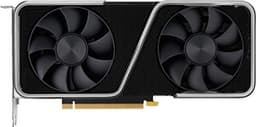
Gigabyte's GAMING OC cooler is a triple-fan design with a substantial heatsink, and it's one of the better aspects of this particular card. The cooler is significantly larger than the dual-fan designs you'll find on reference or budget partner cards, and that extra surface area makes a real difference in sustained thermal performance. Owner reviews are consistently positive about temperatures, with multiple buyers specifically noting that the card runs cool even during extended gaming sessions. That kind of consistency across 27 reviews is meaningful signal.
The cooler uses Gigabyte's Alternate Spinning fan design, where the middle fan spins in the opposite direction to the outer two. The claimed benefit is reduced turbulence between fans, which in theory improves airflow efficiency. Whether that specific design choice makes a measurable difference compared to a conventional triple-fan arrangement is debatable, but the end result is a card that owners report as thermally well-behaved. For a 170W card with a large cooler, that's exactly what you'd expect, and it's good to see the real-world reports aligning with what the hardware suggests.
The card does have a zero-RPM mode where the fans stop entirely at low loads and temperatures. This is standard on Gigabyte's GAMING OC lineup. It means the card is completely silent when you're browsing, watching video, or doing anything that doesn't stress the GPU. Under gaming loads the fans spin up, but from a thermal standpoint, the triple-fan cooler has enough capacity that it doesn't need to work particularly hard to keep the RTX 3060 in check. Longevity-wise, a card that runs cool is a card that lasts. That's not marketing fluff; it's basic physics.
Acoustic Performance
Owner feedback on noise is broadly positive, which tracks with what you'd expect from a triple-fan cooler on a 170W GPU. The combination of relatively modest heat output and generous cooling hardware means the fans don't need to spin fast to keep things under control. Several owners specifically mention the card being quieter than they expected, which is a good sign. A card that surprises people by being quiet is doing its job properly.
The zero-RPM mode deserves mention again here because it genuinely matters for day-to-day use. If you're using your PC for work, streaming, or light gaming, the card is completely silent for a meaningful portion of its operating life. When the fans do kick in under gaming load, the acoustic profile is described by owners as a steady hum rather than anything aggressive. No reports of coil whine cropping up consistently in the reviews, which is because coil whine on RTX 3060 cards has been an issue on some other partner board designs.
The Alternate Spinning fan design does theoretically help with noise as well as thermals, since reducing turbulence between adjacent fans can lower the frequency of the noise generated. Whether you'd notice the difference in a real room with a case around the card is another question. What matters is that the overall acoustic result, as reported by actual owners, is good. For an air-cooled gaming card, that's the outcome that counts. If you want true silence, you'd need a water-cooled solution, but for air cooling at this price tier, this cooler is among the better options available.
Gaming Performance
At 1080p, the RTX 3060 is a genuinely capable card. Published benchmark results from independent testing consistently show it delivering well above 60fps in the majority of modern titles at high settings, and frequently hitting 100fps or more in less demanding games. In something like Fortnite, Valorant, or Apex Legends, you're looking at frame rates that will push a 144Hz monitor comfortably. In more demanding titles like Cyberpunk 2077 or Alan Wake 2 at high settings with ray tracing off, you're in the 60 to 80fps range, which is playable and enjoyable. Enable DLSS Quality and you recover meaningful headroom in supported titles.
At 1440p, it's more of a mixed picture. The RTX 3060 can handle 1440p gaming, but you're often looking at medium to high settings rather than ultra to stay above 60fps in demanding titles. In Elden Ring, Forza Horizon 5, or Death Stranding, 1440p at high settings is comfortable. In The Last of Us Part I, Hogwarts Legacy, or Cyberpunk 2077 at 1440p ultra, you're fighting for frames and the VRAM ceiling starts to bite alongside the raw GPU performance limits. DLSS Quality at 1440p helps substantially in supported titles and brings the experience back to something smooth. Without DLSS support, you're adjusting settings.
4K is not this card's territory, and that's fine because it was never designed to be. At 4K, even with DLSS Performance mode, most demanding titles will struggle to maintain 60fps, and the VRAM situation makes texture quality a compromise. If 4K gaming is your goal, you need to be looking at an RTX 4070 or above. Where the RTX 3060 genuinely shines is as a 1080p high-refresh-rate card or a 1440p 60fps card in titles that support DLSS. That's a real and valid use case for a lot of people, and the card does it well. The 27 owner reviews averaging ★★★★☆ (4.4) suggest that buyers who understand what they're buying are happy with it.
How It Compares
The two most relevant competitors to place against the Gigabyte RTX 3060 GAMING OC V2 are the AMD Radeon RX 6700 XT and the NVIDIA RTX 4060. These represent the realistic alternatives a buyer at this performance level should be considering. The RX 6700 XT offers 12GB of GDDR6 on a 192-bit bus, which is a meaningful VRAM advantage, and its rasterisation performance is broadly comparable to the RTX 3060. The RTX 4060 is the direct generational successor, offering better efficiency, DLSS 3 with Frame Generation, and AV1 encode, but at a potentially higher price point.
The RX 6700 XT's 12GB VRAM on a 192-bit bus is a real argument in its favour for 1440p gaming and future-proofing. AMD's FSR 3 is available on any GPU, so the lack of DLSS isn't a dealbreaker if you're in the AMD ecosystem. The RTX 4060, meanwhile, wins on efficiency and software features but the 8GB VRAM and 128-bit bus are the same constraints as the 3060, which is a frustrating design choice from NVIDIA at that tier. The 4060's Frame Generation is genuinely useful if your frame rates are already above 60fps, but it adds latency and isn't a substitute for raw GPU performance.
At current market prices, the RTX 3060 GAMING OC V2 needs to be meaningfully cheaper than the RTX 4060 to make sense as a new purchase. If the price gap is small, the 4060's efficiency, DLSS 3, and AV1 encode tip the balance. If the 3060 is substantially cheaper, the raw gaming performance at 1080p and 1440p is close enough that it remains a reasonable buy. The RX 6700 XT at a good price is probably the stronger technical argument for 1440p gaming given the VRAM advantage, but NVIDIA's DLSS ecosystem and driver stability are genuine selling points for many buyers.
| Feature | Gigabyte RTX 3060 GAMING OC V2 | AMD Radeon RX 6700 XT | NVIDIA RTX 4060 |
|---|---|---|---|
| Architecture | Ampere (Samsung 8nm) | RDNA 2 (TSMC 7nm) | Ada Lovelace (TSMC 4N) |
| VRAM | 8GB GDDR6 | 12GB GDDR6 | 8GB GDDR6 |
| Memory Bus | 128-bit | 192-bit | 128-bit |
| TGP | 170W | 230W | 115W |
| Upscaling | DLSS 2, FSR 2/3 | FSR 2/3 | DLSS 3 (Frame Gen), FSR 2/3 |
| AV1 Encode | No | No | Yes |
| RT Core Gen | 2nd Gen | 1st Gen | 3rd Gen |
| Display Outputs | 2x DP 1.4, 2x HDMI 2.1 | 3x DP 1.4, 1x HDMI 2.1 | 3x DP 1.4, 1x HDMI 2.1 |

Final Verdict
The Gigabyte NVIDIA GeForce RTX 3060 GAMING OC V2 is a competent, well-cooled 1080p gaming card that can stretch to 1440p in the right titles with DLSS doing some of the heavy lifting. The GAMING OC cooler is genuinely good, owner satisfaction is high, the connectivity is proper with four display outputs including HDMI 2.1, and the 170W TGP means it's not going to cause PSU or thermal headaches in a standard mid-tower build. Those are real positives and they're backed by consistent owner feedback.
The caveats are real too, and they're worth being clear about. The 8GB VRAM on a 128-bit bus is the card's most significant limitation in 2026, and it's going to feel increasingly tight as games push higher texture requirements. The Ampere architecture is two generations old now, which means no AV1 encode, no DLSS 3 Frame Generation, and 2nd Generation RT cores that struggle with demanding ray tracing workloads. None of that is a dealbreaker if you're gaming at 1080p or light 1440p, but it's context you need to have before spending money.
Who should buy this? Someone upgrading from a GTX 1060, GTX 1070, or RX 580 who wants a meaningful performance jump at 1080p without spending a fortune. Someone who needs four display outputs (that 2x DP 1.4 plus 2x HDMI 2.1 configuration is genuinely useful for multi-monitor setups). Someone who values DLSS 2 and NVIDIA's driver ecosystem. Who should skip it? Anyone planning to game at 1440p ultra settings in demanding titles, anyone who wants AV1 encoding for streaming or content creation, and anyone who can stretch their budget to an RTX 4060 or RX 6700 XT without significant financial pain.
On that last point: if budget is the primary constraint and you're choosing between this and nothing, it's a good card. But if you can get an RX 6700 XT at a similar price, the extra VRAM and wider memory bus make it the stronger technical choice for 1440p longevity. And if the price gap between this and an RTX 4060 is modest, the 4060's efficiency and DLSS 3 support tip the balance toward the newer card. The RTX 3060 GAMING OC V2 needs to be priced at a genuine discount to its newer competitors to be the smart buy. Check the current price below and do the maths.
Score: 7 out of 10. Solid card, right price, right use case. Eyes open about the VRAM.
What works. What doesn’t.
6 + 6What we liked6 reasons
- Triple-fan GAMING OC cooler keeps temperatures genuinely low and is consistently praised by owners
- Four display outputs including two HDMI 2.1 ports offer excellent multi-monitor and TV connectivity
- DLSS 2 support provides a meaningful frame rate uplift in supported titles at both 1080p and 1440p
- 170W TGP is manageable for a standard mid-tower build and requires no exotic PSU
- Zero-RPM fan mode delivers complete silence during light workloads
- 7th Generation NVENC encoder produces good streaming quality without heavy CPU overhead
Where it falls6 reasons
- 8GB VRAM on a 128-bit memory bus is already feeling constrained in demanding 1440p titles in 2026
- No AV1 encode support, which is a notable omission for streamers and content creators
- 2nd Generation RT cores deliver noticeably weaker ray tracing performance than Ada Lovelace alternatives
- No DLSS 3 Frame Generation support, unlike the RTX 4060
- Ampere's Samsung 8nm process means significantly worse performance-per-watt than RTX 40 series options
- The 30MHz factory overclock offers negligible real-world benefit over reference-clocked RTX 3060 cards
Full specifications
12 attributes| Vram GB | 8 |
|---|---|
| Boost clock MHZ | 1807 |
| Chipset | RTX 3060 |
| Cooler type | triple-fan |
| Core clock MHZ | 1807 |
| Generation | RTX 30 Series |
| Length MM | 198 |
| Memory BUS BIT | 128 |
| Memory type | GDDR6 |
| Power connectors | 1x 8-pin |
| Slot width | 2.7 |
| TDP W | 148 |
Will it run on what you have?
Free toolFrequently asked
7 questions01Is 8GB of VRAM enough for 1080p gaming in 2026?+
For the majority of 1080p gaming at high settings, 8GB is still broadly adequate. Most titles at 1080p sit within 6GB to 8GB of VRAM usage, so you will not hit a hard wall regularly. However, some newer and more texture-heavy games are beginning to push past 8GB even at 1080p with maximum settings, so it is worth monitoring in specific titles.
02Can the RTX 3060 GAMING OC V2 handle 1440p gaming?+
It can, but with caveats. In less demanding titles and games with DLSS 2 support, 1440p at high settings is comfortable. In demanding titles such as Alan Wake 2 or Hogwarts Legacy at ultra settings, you will encounter both GPU performance limits and VRAM constraints. Lowering texture settings or using DLSS Quality mode at 1440p resolves much of the performance issue, but it is not a no-compromise 1440p card.
03Does the Gigabyte RTX 3060 GAMING OC V2 support DLSS 3?+
No. DLSS 3 Frame Generation requires Ada Lovelace architecture and is exclusive to RTX 40 series graphics cards. This card supports DLSS 2, which uses Tensor cores to reconstruct a higher-resolution image from a lower-resolution render. DLSS 2 at Quality preset is a genuine and useful performance boost in supported games, but Frame Generation is not available here.
04What PSU do I need for the RTX 3060 GAMING OC V2?+
NVIDIA recommends a 550W power supply as a minimum for a system built around the RTX 3060. For a mid-range build with a power-hungry CPU such as a Ryzen 7 or Intel Core i7, a quality 650W unit from a reputable manufacturer gives comfortable headroom. The card uses a standard 8-pin power connector, so there are no adapter concerns and it is compatible with most existing PSUs.
05How does the RTX 3060 GAMING OC V2 compare to the RTX 4060?+
The RTX 4060 offers better power efficiency at 115W TGP versus 170W, DLSS 3 with Frame Generation, and AV1 hardware encoding. Rasterisation gaming performance at 1080p is broadly comparable between the two, with the 4060 edging ahead in some titles. Both cards share the same 8GB VRAM and 128-bit memory bus, which is a frustrating similarity. If the price gap between them is modest, the RTX 4060's software features and efficiency make it the stronger choice.
06Is there any coil whine on the Gigabyte RTX 3060 GAMING OC V2?+
Owner reports do not flag coil whine as a consistent issue on this particular model, which is because coil whine has affected some other RTX 3060 partner board designs. No guarantee can be given for individual units, as coil whine can vary between samples, but the available owner feedback is broadly positive on acoustic behaviour.
07Can this card handle AV1 video playback and encoding?+
The RTX 3060 GAMING OC V2 supports hardware-accelerated AV1 decode, which offloads AV1 playback from your CPU and is useful for watching high-resolution content from streaming services and YouTube. However, it does not support AV1 hardware encoding. AV1 encode support arrived with NVIDIA's Ada Lovelace generation. For streaming or exporting video in AV1, you would need an RTX 40 series card.