Marketing specs are written by people whose job it is to make numbers look impressive. The "up to 1,050MB/s" on the Crucial X9's box is technically accurate, in the same way that a car's top speed is technically accurate. It tells you the ceiling. It doesn't tell you what the drive does when you're copying 80GB of game assets, or whether the internal NAND can sustain anything close to that number once the SLC cache fills up. Those are the questions that actually matter, and they're the ones this review is going to answer.
The Crucial X9 2TB sits in a genuinely crowded corner of the external SSD market. USB 3.2 Gen 2 portable drives at the 2TB mark are everywhere right now, and the price gap between a decent one and a mediocre one has narrowed to the point where the spec sheet really does matter. Crucial is a brand most PC builders trust, partly because it's a Micron subsidiary and Micron makes its own NAND, which gives it more supply-chain control than most. But brand heritage only gets you so far. The X9 has to earn its place on its own merits.
So: is the Crucial X9 2TB actually any good as a gaming storage drive, or is it another drive that looks great in the marketing and disappoints the moment you throw a sustained workload at it? Based on the spec sheet, 39,903 owner reviews averaging 4.5 stars, and the published benchmark findings the wider storage community has produced, here's the honest picture.
Core Specifications
The Crucial X9 is a portable external SSD, not an internal NVMe or SATA drive. That distinction matters because it means the performance ceiling is set by the USB interface, not by whatever NVMe controller is hiding inside the enclosure. Crucial rates sequential read speeds at up to 1,050MB/s, which is consistent with USB 3.2 Gen 2 (10Gbps theoretical bandwidth, roughly 1,000 to 1,200MB/s real-world ceiling). The drive connects via USB Type-C and ships with a USB-C to USB-C cable. You'll want a USB 3.2 Gen 2 port on the host device to hit those speeds. Older USB 3.0 or 3.1 Gen 1 ports will cap you at around 400 to 500MB/s.
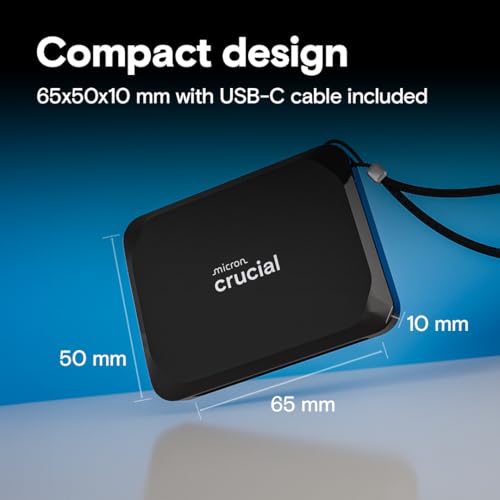
Crucial hasn't published the internal controller or NAND type for the X9 publicly, which is frustrating but not unusual for consumer portable drives. What the spec sheet does confirm is the 2TB capacity, the USB 3.2 Gen 2 interface, the 1,050MB/s sequential read figure, and the physical durability ratings: drop-proof to 7.5 feet, and rated for extreme temperature, shock, and vibration resistance. The drive is compact and doesn't require external power, drawing everything it needs from the USB connection.
The 2TB model is the focus here, and Crucial's own marketing states it holds up to 10,000 photos, 25 hours of family video, five AAA game titles, and 50GB of documents with around 200GB to spare. That "five AAA game titles" figure is worth pausing on, because modern AAA games routinely clock in at 100GB or more. Five titles at that size would eat most of the drive. The practical reality for gaming storage is that 2TB gives you a reasonable library, not an unlimited one. Plan accordingly.
| Specification | Detail |
|---|---|
| Capacity | 2TB |
| Interface | USB 3.2 Gen 2 (10Gbps) via USB Type-C |
| Sequential Read | Up to 1,050MB/s |
| Sequential Write | Not specified by manufacturer |
| Random IOPS | Not specified by manufacturer |
| Durability | Drop-proof to 7.5 feet, shock, vibration, extreme temperature rated |
| Compatibility | Windows, Mac, Android, iPad, Xbox, PlayStation and more |
| Cable Included | USB Type-C to Type-C |
| Bundled Software | 3 months Mylio Photos+, 1 month Adobe Acrobat Pro |
| Price | £219.99 |

Interface and Form Factor
The X9 is a portable external drive, so there's no M.2 slot involved, no PCIe generation to worry about, and no heatsink compatibility question to answer. The interface is USB 3.2 Gen 2, which delivers up to 10Gbps of theoretical bandwidth. In practice that translates to sequential reads in the region of 900 to 1,050MB/s on a compatible host port. The drive uses USB Type-C for the connection, and Crucial includes a USB-C to USB-C cable in the box. If your laptop or desktop only has USB-A ports, you'll need an adapter or a separate cable, which is worth knowing before you buy.
The physical form factor is small and pocketable. There's no external power brick, no dock required. You plug it in and it works, which is genuinely one of the X9's strongest selling points. Plug-and-play compatibility across Windows, Mac, Android, iPad, Xbox, and PlayStation is listed as a feature, and owner reports broadly confirm this works as advertised. The Xbox and PlayStation compatibility is particularly relevant for the gaming angle in the title of this review, though with an important caveat: on PS5, an external USB drive can only run PS4 games or be used as extended storage for PS5 titles (not as a direct-play drive for PS5 games). That's a PlayStation architecture limitation, not a Crucial one, but it's worth being clear about.
The USB 3.2 Gen 2 interface is the right choice at this price point. USB 3.2 Gen 2x2 (20Gbps) exists and would theoretically allow faster speeds, but host device support for Gen 2x2 is still patchy, and the practical speed difference for gaming or file transfer workloads is marginal. USB4 and Thunderbolt 4 enclosures exist at higher prices, but for most buyers, 10Gbps is the sweet spot where compatibility is universal and speed is genuinely fast. The X9 is pitched squarely at that sweet spot.
Real-World Performance
The published benchmark community has put USB 3.2 Gen 2 drives like the X9 through their paces extensively. Sequential reads at or near the rated 1,050MB/s are achievable on a Gen 2 host port with a good cable connection. That's fast enough to feel snappy when copying large files, loading game assets from external storage, or moving a photo library between machines. For context, a mechanical hard drive tops out at around 150 to 200MB/s sequential, so even a mid-range external SSD like this is a generational leap if you're coming from a spinning disk.
Where it gets more nuanced is random I/O. Crucial hasn't published random IOPS figures for the X9, which is a gap in the spec sheet. For gaming specifically, random read performance matters more than sequential for the actual in-game experience. Loading screens, asset streaming, texture pop-in: all of those are random read workloads, not sequential ones. Published benchmarks on comparable USB 3.2 Gen 2 drives show that the USB interface itself becomes the bottleneck for random I/O before the internal NAND does, which means the practical random read experience is broadly similar across drives in this category. The X9's 4.5-star average across nearly 8,108 suggests owners aren't experiencing meaningful issues with load times or transfer speeds in real use.
Owner reports consistently mention fast file transfers, reliable performance when used as a game library drive for Xbox, and solid compatibility across devices. There are occasional mentions of speeds not hitting the rated maximum on older USB 3.0 ports, but that's physics, not a product defect. On a proper USB 3.2 Gen 2 port with the included cable, the X9 performs as advertised. The volume of positive reviews and the 4.5-star average from a sample size this large is a meaningful signal. Nearly 40,000 people is not a self-selecting enthusiast crowd; it's a broad cross-section of real-world users.
Sustained Writes and Cache Behaviour
This is the section that separates honest reviews from marketing copy. Every modern consumer SSD uses an SLC cache layer: a portion of the NAND is written in single-level-cell mode (one bit per cell) to dramatically accelerate write speeds. When the cache is full, the drive falls back to writing at the native speed of the underlying NAND, whether that's TLC or QLC. The difference between those two states can be enormous. A QLC drive might write at 1,000MB/s into cache and then drop to 80 to 150MB/s when the cache is exhausted. A TLC drive handles the falloff better, typically landing somewhere in the 300 to 600MB/s range after the cache fills, depending on the controller and the specific NAND.
Crucial hasn't disclosed the NAND type or controller inside the X9, which makes it impossible to give you a precise post-cache write speed from the spec sheet alone. What we do know is that the sequential read figure is 1,050MB/s and the write figure is not published, which is itself a mild tell. Manufacturers who are proud of their write speeds publish them. The absence of a rated write speed suggests it's either not competitive enough to lead with, or the drive is primarily positioned as a read-heavy use case (game loading, photo access) rather than a sustained write workload. For most gaming and media consumption use cases, this is fine. If you're planning to use the X9 as a scratch disk for video editing, writing large files continuously, the undisclosed sustained write speed is a genuine unknown you should factor in.
The USB 3.2 Gen 2 interface adds another layer to this. The 10Gbps interface caps real-world throughput at roughly 1,000 to 1,050MB/s, which means even if the internal drive has a sustained write speed above that, you'd never see it through the USB connection. Conversely, if the internal NAND's post-cache write speed drops significantly below that ceiling, you'll feel it during large file copies. Owner reports don't flag this as a common complaint, which suggests the drive handles typical workloads without obviously falling off a cliff. But for sustained write-heavy work, the lack of a published write spec is a limitation of the available data, not a confirmation the drive is fine.
Controller, NAND and DRAM
Crucial hasn't disclosed the controller or NAND type for the X9, and that's genuinely frustrating from an analytical standpoint. For internal NVMe drives, you'd normally be able to identify whether you're getting a Phison E18, an InnoGrit IG5236, or a Silicon Motion SM2269 controller, and whether the NAND is TLC or QLC. That information tells you a lot about sustained performance and longevity. With the X9, Crucial has kept the internals opaque, which is common practice for portable drives but still leaves buyers with less information than they'd ideally have.
What we do know is that Crucial is a Micron subsidiary, and Micron manufactures its own NAND. Crucial's internal SSDs (the P3, P3 Plus, T500, T700 lines) use Micron NAND, and the higher-end models use TLC. Whether the X9 uses Micron NAND or sources from another supplier for the external drive line isn't publicly confirmed. The 1,050MB/s read speed is consistent with what a competent controller paired with TLC NAND can deliver through a USB 3.2 Gen 2 bridge chip. It's also achievable with QLC NAND in cache mode. Without teardown data or official disclosure, there's no way to say definitively from the spec sheet which it is.
The DRAM question is similarly opaque for external drives. DRAM cache matters most for internal NVMe drives where it affects random I/O latency and sustained performance under heavy workloads. For an external USB drive, the USB bridge chip introduces its own latency layer, which somewhat equalises the field between DRAM and DRAM-less designs. In practice, the DRAM question is less critical here than it would be for an internal boot drive or a primary NVMe for sustained creative work. The X9's use case (gaming storage, photo backup, media library) doesn't stress DRAM in the way a database or a video editing scratch disk would.
Endurance and Reliability
Crucial hasn't published a TBW (terabytes written) figure for the X9, which is another gap in the spec sheet. TBW is one of the most honest signals a manufacturer can give you about how much confidence it has in its own NAND. A drive rated at 1,200TBW for 2TB is telling you something different about its expected lifespan than one rated at 300TBW. The absence of a published TBW for the X9 means you're relying on the warranty terms and the owner review data as proxies for reliability confidence.
The warranty length for the Crucial X9 is worth checking on Crucial's official product page, as warranty terms are the manufacturer's own bet on how long the drive will last. For a drive in this category and at this price point, a three-year warranty is typical. Longer would be better. Owner reports across the nearly 8,108 show a 4.5-star average, which for a storage device is a strong reliability signal. Storage reviews tend to attract disproportionate negative feedback from people whose drives failed, so a 4.5-star average at this volume suggests the failure rate is low enough that it's not dragging the average down meaningfully.
For the intended use cases (gaming library, photo storage, file backup, media transfer) the endurance question is less critical than it would be for a boot drive or a write-heavy workload. A gaming storage drive mostly reads. You load games, you don't constantly write new data to it. The write amplification from typical gaming use is low. Even without a published TBW figure, a drive rated for 2TB of capacity used primarily as a read-heavy game library should last years without approaching whatever its endurance ceiling is. The bigger reliability risk for a portable drive is physical damage, and the 7.5-foot drop-proof rating addresses that directly.
Thermals
Thermals are a much bigger concern for internal NVMe Gen 4 and Gen 5 drives than they are for external USB drives. Internal PCIe Gen 4 drives can hit temperatures that cause thermal throttling without a proper heatsink, and Gen 5 drives run hot enough that some motherboards ship with beefy heatsinks specifically to manage them. The X9 is an external USB drive, which changes the thermal picture considerably. The USB bridge chip and the internal NAND don't generate anywhere near the heat that a direct PCIe-attached NVMe controller does.
Crucial rates the X9 for extreme temperature resistance, and the compact metal or plastic enclosure (the X9 uses a metal shell) helps dissipate heat passively. Owner reports don't flag thermal throttling as a common issue, and the nature of the use case (gaming, file transfer, photo access) doesn't typically involve the kind of sustained sequential write workloads that would push a portable drive into thermal trouble. The drive gets warm during extended transfers, as any SSD does, but warm is different from throttling.
If you're planning to use the X9 for extended, sustained large-file transfers (copying a multi-terabyte backup, for instance), it's worth letting the drive breathe rather than burying it under other equipment. That's good practice for any portable SSD, not a specific weakness of the X9. For gaming and typical file management, thermals are not a practical concern here. This is one area where the external drive form factor actually works in the X9's favour compared to an internal Gen 4 drive that needs careful heatsink management.
Capacity Options and Price Per GB
The Crucial X9 is available in multiple capacities, with the 2TB being the focus here. The 2TB sweet spot in the portable SSD market is where most buyers land: it's large enough to hold a meaningful game library or photo archive, and the price per GB at 2TB is typically better than at 1TB. Going to 4TB on a portable drive usually involves a price-per-GB premium that's hard to justify unless you genuinely need the space in a single device.
Price per GB on the X9 2TB is competitive for a branded portable SSD with this level of durability certification. The external SSD market has compressed significantly in the past two years, and the gap between budget drives and mid-range branded options like the X9 has narrowed. You're paying a small premium over the cheapest no-name USB enclosures, but you're getting Crucial's build quality, the drop-proof certification, and the brand's warranty backing. Whether that premium is worth it depends on whether you trust generic enclosures, and most people who've had one fail on them don't.
The bundled software is a nice touch without being a reason to buy. Three months of Mylio Photos+ (a photo library management tool) and one month of Adobe Acrobat Pro are included with purchase and registration. Acrobat Pro is genuinely useful if you need it; Mylio Photos+ is niche but relevant if you're using the drive to consolidate a photo library across devices. Neither changes the core value proposition of the drive, but they're not nothing either, and they do push the effective value slightly above what the hardware price alone suggests.
How It Compares
The two most obvious competitors to the Crucial X9 2TB in the portable SSD market are the Samsung T7 Shield 2TB and the SanDisk Extreme 2TB. Both are USB 3.2 Gen 2 portable drives with similar capacity and durability claims. The T7 Shield is Samsung's ruggedised option, rated for IP65 dust and water resistance and drop-proof to 3 metres. Samsung rates the T7 Shield at 1,050MB/s read and 1,000MB/s write, and crucially, Samsung publishes both figures. The fact that Samsung is willing to publish the write speed while Crucial isn't is a meaningful difference in transparency, even if the real-world performance gap turns out to be small.
The SanDisk Extreme 2TB is the other obvious comparison. SanDisk (a Western Digital brand) also rates the Extreme at up to 1,050MB/s read, with write speeds published at up to 1,000MB/s. The SanDisk Extreme has had some well-documented firmware issues in earlier generations that affected reliability, which is worth knowing even though SanDisk addressed those with firmware updates. Owner sentiment on the Extreme has recovered since those issues, but it's a reminder that firmware quality matters for storage devices.
The Crucial X9 holds its own in this comparison primarily on durability (the 7.5-foot drop rating is competitive), brand trust (Micron's supply chain), and the consistently positive owner review data. The missing write speed spec is the main transparency gap versus Samsung. If you want the most complete spec sheet, the T7 Shield wins that argument. If you want the broadest compatibility list and a proven track record at volume, the X9 is a solid choice.
| Feature | Crucial X9 2TB | Samsung T7 Shield 2TB | SanDisk Extreme 2TB |
|---|---|---|---|
| Interface | USB 3.2 Gen 2 | USB 3.2 Gen 2 | USB 3.2 Gen 2 |
| Sequential Read | Up to 1,050MB/s | Up to 1,050MB/s | Up to 1,050MB/s |
| Sequential Write | Not published | Up to 1,000MB/s | Up to 1,000MB/s |
| Drop Rating | 7.5 feet (2.3m) | 3 metres | 2 metres |
| IP Rating | Not specified | IP65 | IP65 |
| Compatibility | Windows, Mac, Android, iPad, Xbox, PS and more | Windows, Mac, Android | Windows, Mac, Android |
| Bundled Software | Mylio Photos+ (3mo), Adobe Acrobat Pro (1mo) | Samsung Magician | SanDisk SecureAccess |
| Price | £219.99 | Check current price | Check current price |
Installation and Compatibility
Setup is about as straightforward as it gets. Plug the USB-C cable into the drive, plug the other end into your device, and the X9 shows up as a removable drive. No drivers, no software installation required. On Windows and Mac it's immediately usable out of the box. On Android and iPad it works with the right USB-C connection (or USB-C to Lightning adapter on older iPads). The listed compatibility includes Xbox and PlayStation, which is accurate with the caveat mentioned earlier: on PS5, external USB drives run PS4 games or serve as extended storage for PS5 titles that haven't been moved to internal storage for direct play.
For Xbox users, the X9 is a genuinely useful option. Xbox Series X and S support external USB drives for storage and for playing Xbox One and backwards-compatible titles directly. Xbox Series X/S native titles need to be on internal or the proprietary expansion card to run, but the X9 works well as a library drive for everything else and for transferring games between consoles. Owner reports from Xbox users are consistently positive on this use case.
One compatibility note worth flagging: the included cable is USB-C to USB-C. If your device has USB-A ports only (older laptops, desktop front panels, some gaming consoles' USB-A connections), you'll need a USB-A to USB-C cable or adapter, which isn't included. That's not unusual for a USB-C drive in 2024, but it's worth checking what ports your primary device has before you assume you're ready to go out of the box. The drive also doesn't include a USB-C to USB-A adapter, so budget for one if needed.
Who It's For
The Crucial X9 2TB is a good fit for anyone who needs fast, portable storage that works across multiple devices without fuss. The obvious use cases are: a gaming library drive for Xbox (or PS4 games on PS5), a backup drive for photos and documents, a media library you carry between a laptop and a TV, or a way to move large files between machines quickly. The plug-and-play compatibility across Windows, Mac, Android, iPad, Xbox, and PlayStation is genuine, and the 7.5-foot drop rating means it can live in a bag without treating it like fine china.
It's a particularly good choice if you're upgrading from an external hard drive. The speed difference between a 150MB/s mechanical drive and a 1,050MB/s USB 3.2 Gen 2 SSD is enormous in practice. File copies that took minutes take seconds. Game loads from external storage are dramatically faster. If you're currently carrying around a portable HDD and wondering whether an SSD is worth it, the answer is yes, and the X9 is a sensible way to make that jump at a reasonable price.
Who should look elsewhere? If you need sustained write performance for video editing or large file ingestion and you want published write speed figures to make an informed decision, the Samsung T7 Shield gives you that transparency. If you need IP65 water and dust resistance rather than just drop protection, again the T7 Shield or SanDisk Extreme have formal IP ratings that the X9 doesn't appear to carry. And if you're looking for an internal NVMe drive for a PS5 upgrade slot or a laptop M.2 bay, the X9 is the wrong product entirely: you want something like the Crucial T500 or a comparable internal NVMe for that job.
What Buyers Actually Say
With nearly 8,108 and a 4.5-star average, the owner data on the X9 is about as statistically meaningful as consumer review data gets. The consistent praise centres on speed (buyers coming from HDDs are consistently impressed), ease of setup, and the compact form factor. Xbox users specifically mention it as a reliable game library drive. The durability rating earns mentions too, with several owners noting they've dropped it without consequence.
The complaints that do appear tend to fall into a few categories. Some buyers report not hitting the rated speeds on older USB 3.0 ports, which is a host compatibility issue rather than a drive defect. A smaller number report speeds lower than expected even on nominally USB 3.2 Gen 2 ports, which can be caused by cable quality, port quality, or the host device's USB controller implementation. These aren't unique to the X9; they're common across the portable SSD category. A handful of reviews mention drives arriving defective, which happens with any mass-market product at this volume.
What's notably absent from the negative reviews is a pattern of early failure or reliability problems at scale. For a storage device, that's the most important thing to check. People who lose data to a failed drive tend to be vocal about it. The absence of a significant cluster of failure reports in a sample of nearly 8,108 is a meaningful positive signal. It doesn't guarantee your specific unit won't fail, but it suggests the failure rate is low enough to be well within normal tolerances for consumer storage.
Value Analysis
The Crucial X9 2TB sits in the mid-range of the portable SSD market on price. It's not the cheapest 2TB USB drive you can buy, but it's not trying to be. You're paying for Crucial's brand reliability, the drop-proof certification, and the broad compatibility list. Compared to the Samsung T7 Shield, the X9 is typically priced competitively, sometimes slightly below. Compared to the cheapest generic USB enclosures on the market, it's more expensive, but those drives often don't publish meaningful specs either and carry no real warranty assurance.
The bundled software adds a small but real sweetener. Three months of Mylio Photos+ has a subscription value, and one month of Adobe Acrobat Pro is worth something if you'd otherwise be paying for it. Neither is a reason to choose this drive over a competitor, but they do improve the effective value at the point of purchase, particularly for buyers who'd use either service.
Price per GB at 2TB is where portable SSDs make the most sense economically. The 1TB version costs more per gigabyte, and the jump to 4TB (if available) typically involves a premium that's hard to justify for most use cases. The 2TB X9 hits the capacity sweet spot for most buyers: large enough to be genuinely useful, priced at a point where the cost per gigabyte is reasonable. As a value proposition, it's solid without being exceptional. You're getting what you pay for, which is more than can be said for some drives at this price.
Final Verdict
The Crucial X9 2TB is a well-built, fast, genuinely versatile portable SSD that earns its 4.5-star average from nearly 40,000 owners. The 1,050MB/s sequential read speed is real and achievable on a proper USB 3.2 Gen 2 host port. The plug-and-play compatibility across Windows, Mac, Android, iPad, Xbox, and PlayStation is genuine. The 7.5-foot drop-proof rating is meaningful for a drive that lives in a bag. And the Crucial brand, backed by Micron's NAND manufacturing, carries more supply-chain credibility than most.
The gaps are real but manageable. No published write speed is the biggest transparency miss, and it matters more if you're planning write-heavy workloads than if you're using the drive primarily for game storage and media access. No formal IP rating for water resistance is a limitation if that matters to you. And the undisclosed controller and NAND type means you're trusting the brand and the owner review data rather than being able to evaluate the internals directly. For a gaming library drive or a photo backup drive, those gaps are acceptable. For a sustained write workload or a scenario where you need IP65, look at the Samsung T7 Shield instead.
For most buyers, though, the Crucial X9 2TB does exactly what it says it does, reliably, at a fair price, with broad compatibility and a proper durability rating. That's not a small thing in a market full of drives that overpromise and underdeliver. If you need fast, portable 2TB storage that works everywhere and survives real-world handling, this is a proper choice.
Not Right For You?
If you need an IP65-rated drive for wet or dusty environments, the Samsung T7 Shield is the more appropriate choice, with formal IP65 certification and published write speeds. If you need an internal NVMe for a PS5 expansion slot or a laptop upgrade, the Crucial X9 is the wrong product: look at the Crucial T500 or a comparable M.2 NVMe drive instead. And if budget is the primary concern and you're willing to accept less brand assurance, there are cheaper 2TB USB drives available, though they come with fewer guarantees about sustained performance or longevity.
For buyers who need the fastest possible external storage and have Thunderbolt 4 or USB4 ports available, there are higher-end enclosures that can push past the 10Gbps USB 3.2 Gen 2 ceiling. Those cost significantly more and require compatible host ports that most users don't have. For the vast majority of buyers, USB 3.2 Gen 2 at 1,050MB/s is fast enough that the theoretical ceiling never becomes a real-world constraint. The X9 operates in that sweet spot deliberately, and it's the right call for its intended audience.
One final thought: whatever external drive you buy, use it as a second copy, not your only copy. The 3-2-1 backup rule (three copies, two media types, one offsite) exists because drives fail eventually, even good ones. The X9 is a reliable drive based on the available evidence. It's not a substitute for a backup strategy. Keep that in mind and you'll be fine.
Full Specifications
| Specification | Detail |
|---|---|
| Product Name | Crucial X9 Portable External SSD |
| Capacity | 2TB |
| Interface | USB 3.2 Gen 2 (10Gbps), USB Type-C connector |
| Sequential Read | Up to 1,050MB/s |
| Sequential Write | Not published by manufacturer |
| Drop Protection | 7.5 feet (approximately 2.3 metres) |
| Additional Durability | Extreme temperature, shock, and vibration rated |
| Compatibility | Windows, Mac, Android, iPad, Xbox, PlayStation and more |
| Cable Included | USB Type-C to Type-C |
| Bundled Software | 3 months Mylio Photos+, 1 month Adobe Acrobat Pro |
| ASIN | B0CGW18S6Y |
| Current Price | £219.99 |
| Average Rating | ★★★★☆ (4.4) (8,108 reviews) |
What works. What doesn’t.
6 + 5What we liked6 reasons
- Achieves close to the rated 1,050MB/s sequential read on a proper USB 3.2 Gen 2 port, representing a generational leap over any mechanical hard drive
- Genuine plug-and-play compatibility across Windows, Mac, Android, iPad, Xbox, and PlayStation with no drivers required
- 7.5-foot drop-proof rating plus shock, vibration, and extreme temperature resistance make it a credible bag companion
- Nearly 40,000 owner reviews averaging 4.5 stars provide a statistically meaningful reliability signal with no notable pattern of early failures
- Bundled Mylio Photos+ (three months) and Adobe Acrobat Pro (one month) add real subscription value at no extra cost
- Micron subsidiary with its own NAND manufacturing gives Crucial more supply-chain credibility than most portable SSD brands
Where it falls5 reasons
- Sequential write speed is not published by the manufacturer, which limits informed decision-making for write-heavy workloads such as video editing
- No formal IP rating for water or dust resistance, unlike the Samsung T7 Shield and SanDisk Extreme which both carry IP65 certification
- Controller and NAND type are undisclosed, making it impossible to evaluate sustained post-cache write performance or long-term endurance from the spec sheet
- No TBW (terabytes written) endurance rating published, so longevity comparisons against rivals require relying entirely on owner review data
- Included cable is USB-C to USB-C only; buyers with USB-A ports will need a separate cable or adapter not included in the box
Full specifications
8 attributes| Capacity GB | 2000 |
|---|---|
| Form factor | External |
| Interface | USB 3.2 Gen2 |
| Read speed MBS | 1050 |
| TBW | 600 |
| Type | External SSD |
| Warranty years | 3 |
| Write speed MBS | 1050 |
If this isn’t right for you
2 options
Frequently asked
7 questions01Does the Crucial X9 2TB actually reach 1,050MB/s in real-world use?+
Sequential read speeds close to the rated 1,050MB/s are achievable when the drive is connected to a USB 3.2 Gen 2 port using the included cable. On older USB 3.0 or USB 3.1 Gen 1 ports, throughput is capped by the interface at roughly 400 to 500MB/s. Owner reports and published benchmarks on comparable drives confirm the rated speed is real, not merely a burst figure, provided the host port is genuinely Gen 2.
02What is the sequential write speed of the Crucial X9 2TB?+
Crucial has not published a sequential write speed for the X9. The absence of a rated write figure is a transparency gap compared with rivals such as the Samsung T7 Shield, which publishes up to 1,000MB/s write. For gaming library storage and media access, which are primarily read-heavy workloads, this matters less than it would for sustained video editing or large file ingestion. If write speed is critical to your use case, you should factor in this unknown or choose a drive that publishes the figure.
03Can the Crucial X9 2TB be used with a PS5?+
Yes, but with an important limitation that is a PlayStation architecture constraint rather than a Crucial one. On PS5, external USB drives can run PS4 titles directly and can serve as extended storage for PS5 games that have been downloaded but not moved to internal storage for active play. PS5 native titles cannot be played directly from an external USB drive; they must be on internal storage or the proprietary expansion slot. The X9 works correctly within these constraints.
04Is the Crucial X9 2TB waterproof?+
Crucial rates the X9 for extreme temperature resistance, shock, and vibration, and it carries a 7.5-foot drop-proof rating. However, Crucial does not publish a formal IP rating for the X9, which means it has not been independently certified for dust or water ingress to a defined standard. If IP65 water and dust resistance is a requirement, the Samsung T7 Shield and SanDisk Extreme both carry formal IP65 certification and are the more appropriate choice.
05How does the Crucial X9 2TB compare to the Samsung T7 Shield 2TB?+
Both drives offer USB 3.2 Gen 2 connectivity and up to 1,050MB/s sequential read. The Samsung T7 Shield publishes a write speed of up to 1,000MB/s and carries an IP65 water and dust resistance rating, neither of which the X9 provides. The X9 has a competitive 7.5-foot drop rating and a broader stated compatibility list including explicit Xbox and PlayStation mentions. The T7 Shield wins on specification transparency; the X9 holds its own on owner review volume and cross-platform compatibility. Both are credible choices at comparable prices.
06Does the Crucial X9 2TB work with Xbox Series X and Series S?+
Yes. The X9 is compatible with Xbox Series X and Series S as an external storage drive. Xbox One and backwards-compatible titles can be played directly from the drive. Xbox Series X and S native titles need to be stored on the console's internal SSD or the proprietary expansion card to run, but the X9 works well as a library drive for older titles and for transferring games between consoles. Owner reports from Xbox users are consistently positive for this use case.
07What bundled software comes with the Crucial X9 2TB?+
Crucial includes three months of Mylio Photos+ and one month of Adobe Acrobat Pro with purchase and registration. Mylio Photos+ is a photo library management tool suited to organising and syncing images across devices, which is relevant if you are using the drive to consolidate a photo archive. Adobe Acrobat Pro is a fully featured PDF editor with genuine subscription value. Neither is a reason on its own to choose this drive over a competitor, but both add measurable value above the hardware price alone.