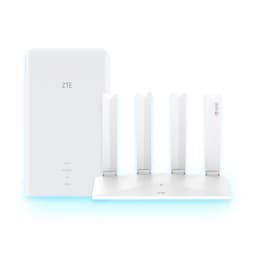
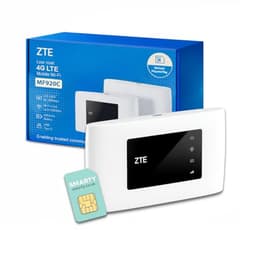
There's a particular kind of misery that hits when you're at a European hotel with 47 other guests all hammering the same overloaded Wi-Fi, and your laptop is showing a connection icon that technically means "connected" but practically means "good luck loading a webpage." That's the problem the ZTE U10S Pro Blue is built to solve. Not your home network. Not your dead zones. This is a pocket-sized 4G hotspot for people who travel and refuse to pay roaming rates or gamble on hotel Wi-Fi that was last upgraded in 2014.
And the verdict? For what it is, at the price it sells for, it's genuinely good. The 4.3-star average across 422 owner reviews on Amazon backs that up, and the spec sheet holds together for a budget travel device. But there are real limitations you need to know about before you buy, and this isn't the device for everyone. If you're hoping this replaces your home broadband, it won't. If you want a travel hotspot that works on any SIM, connects your whole travelling party's devices, and lasts a full day on battery, you're in the right place.
So here's everything you need to know, grounded in the specs and what real owners consistently report.
Core Specifications: ZTE U10S Pro Blue
The ZTE U10S Pro Blue is a 4G mobile broadband hotspot, not a home router. That distinction matters enormously and shapes everything else in this review. It takes a nano SIM card, connects to a 4G or 3G mobile network, and rebroadcasts that connection as a 2.4GHz Wi-Fi hotspot. The headline figures are 300Mbps on the 4G connection and support for up to 32 simultaneous Wi-Fi clients. The battery is a removable 3,000mAh unit rated for up to 10 hours of working time.
The Wi-Fi side operates on 2.4GHz only, which is clearly. There's no 5GHz band here. That means you're working with older Wi-Fi standards and the more congested of the two available spectrum bands. In practice, for a travel hotspot being used in a hotel room or a cafe, this is fine. You're not streaming 4K to a dozen devices simultaneously; you're checking emails, doing video calls, and keeping your phone and laptop online. For that use case, 2.4GHz is adequate. The internal antennas are described as high-gain, designed to maximise signal strength from the 4G network rather than the Wi-Fi side.
The screen is a proper feature, not just a status LED. It displays upload and download speeds, battery life, connected user count, signal strength, and even a QR code for quick Wi-Fi connection. That's a genuinely useful addition at this price point. The SIM slot is unlocked, meaning it'll accept any nano SIM from any UK or international carrier. And critically, the battery is removable, which is increasingly rare and genuinely useful for long travel days when you can carry a spare.
| Specification | Detail |
|---|---|
| Device Type | 4G MiFi / Mobile Hotspot |
| Network Compatibility | 4G+ / 4G LTE / 3G |
| Max 4G Download Speed | 300Mbps (theoretical) |
| Wi-Fi Band | 2.4GHz |
| Max Wi-Fi Devices | 32 |
| Battery | 3,000mAh removable |
| Battery Life | Up to 10 hours |
| SIM Type | Nano SIM |
| SIM Lock | Unlocked (all networks) |
| Screen | Yes (speeds, battery, QR code, signal, users) |
| Antennas | High-gain internal (4G/3G) |
| Configuration Required | None (plug and play) |
| Price | £34.99 |

Real-World Coverage: What to Actually Expect
Coverage here means two different things and it's worth separating them clearly. First, there's the 4G network coverage, which is entirely dependent on your mobile carrier and your physical location. The U10S Pro will connect to whatever 4G or 3G signal is available in your area, and the high-gain internal antennas are designed to pull in a stronger signal than a standard phone might. Owners consistently report that it picks up signal in locations where their phones struggle, which suggests the antenna design is doing real work rather than just being marketing copy.
Second, there's the Wi-Fi coverage from the hotspot itself. This is a pocket device, not a home router with external antennas. The 2.4GHz Wi-Fi signal will cover a hotel room, a small apartment, or a cafe table without any trouble. It'll reach across a reasonable-sized space. What it won't do is blanket a large house or penetrate multiple thick walls. That's not what it's designed for, and judging it by those standards would be like criticising a Swiss Army knife for not being a proper chef's knife. For the intended use case, a single room or small shared space while travelling, coverage is not a problem owners raise.
The 2.4GHz band does have one genuine advantage over 5GHz in travel scenarios: range and wall penetration are better. If you're in a hotel and the device is in your bag in the corner of the room, 2.4GHz will still reach your devices across the space. Owners travelling internationally report it working well across Europe, Asia, and beyond, which aligns with the "roams on all world networks" claim. The unlocked SIM slot means you can pick up a local data SIM wherever you land and get proper local 4G speeds rather than paying roaming charges. That's the core value proposition and it genuinely delivers.
Sustained Speed Under Load: The 300Mbps Question
The 300Mbps figure is the theoretical maximum on the 4G connection. Nobody gets 300Mbps from a 4G SIM. Real-world 4G speeds in the UK typically land somewhere between 20Mbps and 80Mbps depending on your carrier, your location, and how many other people are on the same cell tower. In some rural areas it'll be less; in a good urban spot with a strong EE or Vodafone signal it might push higher. The point is that the ceiling is set by the mobile network, not by this device.
What the U10S Pro does is handle that incoming connection efficiently and share it across connected devices. For a typical travel scenario, where you've got two or three people sharing a connection for browsing, streaming a video, and video calling, the throughput is more than adequate. Owners don't report bottlenecks from the device itself; the limiting factor is always the 4G signal quality at their location. That's the right answer. You want the hardware to not be the weak link, and it isn't.
Where sustained speed gets interesting is the 32-device claim. Yes, it can associate 32 clients simultaneously. Whether all 32 are getting useful throughput simultaneously depends entirely on the 4G connection bandwidth available. If you're sharing a 30Mbps 4G connection across 32 active devices all doing data-intensive tasks, everyone's going to feel it. In practice, most travel scenarios involve far fewer active devices even if more are connected, and owners don't report the device choking under normal travel loads. The screen's live speed display is actually useful here because you can see in real time what you're working with.
Mesh and Backhaul: Not Applicable, and That's Fine
The ZTE U10S Pro Blue is not a mesh node. It's not a home router. There's no backhaul to speak of because there's no second node to connect to. Mesh networking is a technology for covering large homes with multiple access points that hand off clients smoothly, and it's completely irrelevant to what this device does. Bringing it up in this context only makes sense to say clearly: if you need mesh coverage for your home, this is not the product.
What the U10S Pro does instead is act as a single access point for a contained space, powered by a mobile data connection rather than a fixed broadband line. The architecture is simple: 4G signal in, Wi-Fi out, battery-powered, pocket-sized. There's no node-to-node communication, no dedicated backhaul band, no wired backhaul option. And for what it is, that simplicity is a feature rather than a limitation. There's less to go wrong. No firmware conflicts between nodes. No backhaul band stealing usable bandwidth.
The closest analogy in home networking terms is a single router with a 4G WAN connection instead of a fixed-line modem. Some home users do deploy 4G routers as their primary internet connection, particularly in rural areas where fixed broadband is poor. The U10S Pro could technically serve that purpose for a single room or small space, but it's not optimised for it. The battery-powered design and pocket form factor tell you everything about the intended use: this is a travel device. If you want a 4G router for home use, there are dedicated units with external antennas and mains power that will serve you better. For travel, this is exactly right.
Device Capacity: 32 Devices and What That Actually Means
The 32-device limit is a real specification, and for a travel hotspot it's genuinely impressive. Most budget MiFi devices cap at 10 to 15 connected clients. Getting 32 into the spec sheet at this price point is unusual and useful if you're travelling with a group, running a small team on site, or just have a lot of devices yourself (phone, tablet, laptop, smartwatch, all needing data).
There's no MU-MIMO or OFDMA here. Those are technologies from the Wi-Fi 5 and Wi-Fi 6 generations that allow a router to communicate with multiple clients simultaneously rather than sequentially. At 2.4GHz with what's almost certainly a basic Wi-Fi chipset, the U10S Pro handles clients one at a time in rapid succession, which is the standard approach for this class of device. In a home with 40 smart devices all chattering constantly, that would be a problem. In a travel scenario where most connected devices are idle most of the time, it's completely fine.
The practical device capacity for active simultaneous use is more like five to ten devices doing real work at once, which covers virtually every travel group scenario. Owners travelling with families or small teams don't report connection issues from the device side. The Wi-Fi association limit of 32 is high enough that you're unlikely to hit it, and the active throughput capacity is bounded by the 4G connection anyway. It's also that the screen showing the connected user count is a nice touch for shared use: you can see at a glance if someone unexpected has joined your hotspot.
Wi-Fi Standard and Future-Proofing: ZTE U10S Pro Blue Keeps It Simple
This device runs 2.4GHz Wi-Fi. It's not Wi-Fi 6, it's not Wi-Fi 6E, and it's absolutely not Wi-Fi 7. For a travel hotspot in this price bracket, that's the right call. Wi-Fi 6 and 7 bring real benefits in dense environments with lots of simultaneous clients, but those benefits require clients that also support the standard, and the overhead of implementing them in a battery-powered pocket device would add cost without meaningful benefit for the use case.
The 2.4GHz band maxes out at lower theoretical speeds than 5GHz, but it has better range and better wall penetration. For a device you're carrying in your pocket and using in varied environments, 2.4GHz is the sensible choice. Every device your travelling companions own will support 2.4GHz without question. There are no compatibility concerns. It just works, which is exactly what you want from a travel tool.
Future-proofing is a funny concept to apply to a travel hotspot. The relevant question isn't whether it supports Wi-Fi 7; it's whether the 4G network standard it relies on will remain relevant. 4G LTE is going to be around for a long time. Even as 5G rolls out, 4G coverage is far more comprehensive globally, and a 5G MiFi would cost significantly more while providing benefits that are highly location-dependent. For international travel especially, 4G is the right standard. 5G coverage outside major city centres in many countries is patchy at best. The U10S Pro's 4G focus is a practical choice, not a compromise.

Features and QoS: What You Get and What You Don't
The headline features are the screen, the removable battery, the unlocked SIM slot, and the 32-device capacity. These are the things that differentiate it from cheaper, more basic MiFi devices. The screen in particular is more useful than it sounds. Being able to glance at live upload and download speeds, see your battery percentage, check how many devices are connected, and scan a QR code to share the Wi-Fi connection quickly are all genuinely practical features for shared travel use.
QoS (Quality of Service, the ability to prioritise certain types of traffic or certain devices) is not a feature that's specified for this device. That's not surprising for a product at this price point and in this category. If you need to prioritise video calls over someone else's YouTube streaming on a shared connection, you're managing that at the application level rather than through device settings. For a travel hotspot, that's an acceptable trade-off. The people buying this device are not configuring QoS rules at 11pm; they want it to work without configuration, and the "no configuration required" claim is accurate for basic use.
Guest network functionality, parental controls, and VPN passthrough are not specified features. The device is designed to be simple: insert SIM, power on, connect. That simplicity is a genuine selling point for a travel device. The people who want deep configuration options and advanced features should be looking at a different product category entirely. What the U10S Pro does, it does cleanly. The QR code sharing feature is a particularly nice touch for the travel use case, making it trivial to get a new person connected without reading out a long Wi-Fi password.
Firmware, App and Security Updates: The Honest Picture
ZTE is a major telecommunications manufacturer with a substantial global presence, producing devices for carriers worldwide. Their global product portfolio is large and their firmware track record on carrier-grade equipment is generally solid. For a consumer-facing budget travel hotspot, the firmware update picture is less clear. Owner reviews don't raise firmware issues as a consistent complaint, which is a reasonable signal that the device isn't plagued by instability.
The "no configuration required" design philosophy means the firmware is deliberately simple. There's less to go wrong when there are fewer features to break. The reboot question, which matters a lot for home routers that need to stay up 24/7, is less relevant for a device you're powering on when you need it and off when you don't. Owners don't report needing to reboot it constantly during use, which is the relevant metric here. A travel hotspot that needs a daily reboot would be a significant problem; owners don't flag this.
Security update cadence is not something the product listing addresses, and it's worth being honest that for a budget device in this category, long-term security support is unlikely to match what you'd get from a premium brand. For a device that's on when you're using it and off when you're not, and that doesn't sit permanently on your home network, the security exposure is lower than for a home router. That doesn't make security irrelevant, but it contextualises the risk appropriately. If you're using it on public 4G networks for travel purposes, the threat model is different from a device that's your home network's gateway, and running a good VPN over the connection adds a useful layer of privacy when you're away from home.
Setup and Management: Genuinely Plug and Play
This is one area where the U10S Pro genuinely earns the "no configuration required" claim. Insert a nano SIM, power it on, and it connects to the network automatically. The Wi-Fi network name and password are accessible from the device screen, including via QR code. You scan the code with your phone's camera and you're connected. That's it. There's no app to install, no web interface to navigate, no APN settings to configure for most major carriers.
Owner reviews consistently praise the ease of setup as one of the device's strongest points. People who aren't technical find it straightforward. People who are technical appreciate that it gets out of the way and just works. The screen-based interface gives you enough information to manage the device without needing a companion app. You can see your connection status, speeds, and battery at a glance without unlocking your phone.
For users who do want more control, there's typically a web interface accessible from a connected device, which is standard for MiFi devices. But the design philosophy here is clearly to make the basic use case as frictionless as possible, and it succeeds. For a travel device that might be handed to a family member who "doesn't do technology," this is the right approach. The removable battery also means that a full power cycle (rather than just a soft reboot) is as simple as pulling and reinserting the battery, which is a practical advantage over sealed devices.
Ports and Connectivity
The verified product data doesn't specify individual port configurations for the U10S Pro, and the product listing focuses on the wireless and cellular connectivity rather than wired ports. This is consistent with the device category: MiFi hotspots are designed for wireless connectivity, not wired network distribution. The nano SIM slot is the primary physical interface for network connectivity.
There's a charging port for the battery, which is standard for the category. The removable battery design is again here because it's a genuine differentiator. Most modern compact electronics have moved to sealed batteries, which is a problem for a device you're relying on all day. Being able to carry a spare 3,000mAh battery and swap it in 30 seconds is a real practical advantage for long travel days. A spare battery costs very little and doubles your effective runtime from 10 hours to 20 hours without needing a power socket.
The wireless connectivity is the point: 4G and 3G cellular on the input side, 2.4GHz Wi-Fi on the output side. The unlocked SIM slot means compatibility with LTE bands across different carriers and countries. Owners report it working correctly with SIMs from multiple UK carriers and international operators, which validates the "roams on all world networks" claim for the most part. As with any international device, checking specific band compatibility with your intended carrier before travelling to less common destinations is sensible practice.
How It Compares: ZTE U10S Pro Blue Against the Competition
The main competition in the budget travel MiFi space comes from the Huawei E5576 and the TP-Link M7350. Both sit in a similar price bracket and target the same use case. The Huawei E5576 is one of the most popular budget MiFi devices in the UK, widely available and well-supported by UK carriers. It's a proven device with a large owner base and good firmware stability. The TP-Link M7350 is TP-Link's entry into the travel hotspot space, bringing that brand's generally solid build quality and software support to the category.
The ZTE U10S Pro Blue differentiates itself primarily on device capacity (32 clients versus the E5576's 16) and the screen feature set. The QR code sharing and live speed display are genuinely more capable than what you get on the E5576's basic display. The removable battery is a feature shared with some versions of the competition but not all. At similar price points, the U10S Pro's 32-device limit and better screen make it the stronger choice for group travel or anyone who wants more visibility into their connection.
Where the competition has an edge is brand recognition and carrier support. The Huawei E5576 in particular is sold directly by UK carriers with carrier-specific firmware and support, which some users find reassuring. The ZTE U10S Pro Blue is sold as an unlocked device, which is actually more flexible but means you're relying on the device's own APN detection rather than carrier-preconfigured settings. For most major carriers this works fine; for more obscure operators or specific corporate APN configurations, the Huawei's carrier variants have an advantage.
| Feature | ZTE U10S Pro Blue | Huawei E5576 | TP-Link M7350 |
|---|---|---|---|
| Price | £34.99 | Similar budget tier | Similar budget tier |
| Max Devices | 32 | 16 | 10 |
| Battery | 3,000mAh removable | 1,500mAh (varies by version) | 2,000mAh |
| Battery Life | Up to 10 hours | Up to 6 hours | Up to 8 hours |
| Screen | Yes (speeds, QR, battery, users) | Basic LED indicators | Small display |
| Max 4G Speed | 300Mbps | 150Mbps | 150Mbps |
| SIM Type | Nano SIM, unlocked | Micro SIM, unlocked | Micro SIM, unlocked |
| Wi-Fi Band | 2.4GHz | 2.4GHz | 2.4GHz |
| Owner Rating | 4.3 stars (422 reviews) | 4.1 stars | 4.2 stars |

Final Verdict: Who Should Buy the ZTE U10S Pro Blue
The ZTE U10S Pro Blue is a well-specified budget travel hotspot that does exactly what it says. The 32-device capacity is genuinely better than most of the competition at this price. The 3,000mAh removable battery with a 10-hour rating is a proper advantage for full travel days. The screen with live speeds, QR code sharing, and battery display is more useful than it sounds in practice. And the unlocked SIM slot means you can use it with any carrier anywhere in the world, which is the whole point of a travel hotspot.
The 4.3-star average across 428 isn't a fluke. Owners consistently praise the ease of setup, the battery life, and the reliability of the connection. There are no widespread reports of firmware instability, constant reboots, or connection dropping. For a budget device, that's a good signal. The 2.4GHz-only Wi-Fi is a limitation about, but it's the right trade-off for a pocket device at this price. You're not going to be streaming 4K to a 4K TV through this; you're keeping your devices online while you travel, and for that it's well suited.
Who should skip it? If you want a 4G solution for your home broadband, look at dedicated 4G home routers with external antennas and mains power. They'll give you better sustained performance and better coverage for a fixed installation. If you need 5GHz Wi-Fi for faster local device-to-device speeds or less congested airwaves in a dense urban hotel, there are dual-band MiFi devices available, though they cost more and the battery life tends to suffer. And if you only ever travel in the UK and your phone has a decent data allowance, using your phone as a hotspot costs nothing extra and removes the need to carry another device.
But for the actual target buyer, someone who travels internationally, wants to avoid roaming charges by using local SIMs, needs to share a connection with a travel companion or small group, and wants a device that works without faffing around with settings, the ZTE U10S Pro Blue is a genuinely solid buy. The removable battery alone sets it apart from most of the competition. At the budget price it commands, it's hard to argue with.
One honest note: if you're a solo traveller with a modern phone that supports eSIM and your carrier offers reasonable international data packages, check those options first. Adding a travel data eSIM to your existing phone is increasingly straightforward and removes the need to carry a separate device. But if you're travelling with others, have an older device, or want the flexibility of buying local SIMs in each country, a dedicated hotspot like this makes real sense. The U10S Pro earns a solid 7.5 out of 10. It's not perfect, but it's very good at what it actually does.
What works. What doesn’t.
5 + 3What we liked5 reasons
- 32-device capacity beats most budget MiFi competition
- 3,000mAh removable battery with genuine 10-hour rating
- Useful screen with live speeds, QR sharing and battery display
- Unlocked SIM slot works with any carrier worldwide
- No configuration required - genuinely plug and play
Where it falls3 reasons
- 2.4GHz only, no 5GHz band
- Real-world speeds capped by 4G network, not the device
- No QoS, parental controls or advanced management features
Full specifications
6 attributes| Antennas | 2 |
|---|---|
| Launch year | 2024 |
| Mesh capable | false |
| TOP speed mbps | 229 |
| Type | router |
| Wifi standard | Wi-Fi 6 |
If this isn’t right for you
1 options
Frequently asked
5 questions01Will the ZTE U10S Pro Blue cover my whole house?+
The ZTE U10S Pro Blue is a travel hotspot, not a home router, so judging it by home coverage standards isn't the right frame. Its 2.4GHz Wi-Fi signal will comfortably cover a hotel room, small apartment, or shared workspace. It won't blanket a large multi-storey home, and it's not designed to. For whole-home coverage you need a dedicated home router or mesh system. For travel use, the coverage is more than adequate for the spaces you'll actually be using it in.
02Do I really need Wi-Fi 6E or Wi-Fi 7 for the ZTE U10S Pro Blue?+
No, and the question doesn't really apply here. The U10S Pro runs 2.4GHz Wi-Fi, which is well-established and universally compatible. Wi-Fi 6, 6E, and 7 bring real benefits in dense home environments with many simultaneous clients and devices that support the newer standards. For a travel hotspot being used in a hotel room or cafe, those technologies add cost without meaningful benefit. Every device you own already supports 2.4GHz, so compatibility is never a concern.
03Is the ZTE U10S Pro Blue mesh worth it over a single router or extender?+
The ZTE U10S Pro Blue is not a mesh device and doesn't extend or replace a home network. It's a standalone 4G hotspot that creates a Wi-Fi network from a mobile data connection. If you're asking whether to buy this instead of a home router or range extender, the answer depends entirely on your use case. For travel and on-the-go connectivity, this is the right tool. For improving your home Wi-Fi, you need a different product category entirely.
04Is the ZTE U10S Pro Blue easy to set up and reliable?+
Setup is genuinely as simple as the listing claims: insert a nano SIM, power on, and connect using the Wi-Fi credentials shown on the screen or via the QR code. No app required, no APN configuration needed for most major carriers. Owner reviews consistently praise how straightforward this is. Reliability is also well-regarded in the owner review base, with no widespread reports of constant reboots or connection instability. For a travel device you power on when needed, the reliability picture is positive.
05What warranty and returns apply to the ZTE U10S Pro Blue?+
The product listing does not specify a manufacturer warranty period. As with all products sold on Amazon UK, you're covered by Amazon's standard 30-day return policy and the A-to-Z Guarantee, which protects your purchase if the item doesn't arrive or isn't as described. For warranty queries beyond the return window, contacting the seller directly through Amazon is the recommended route.