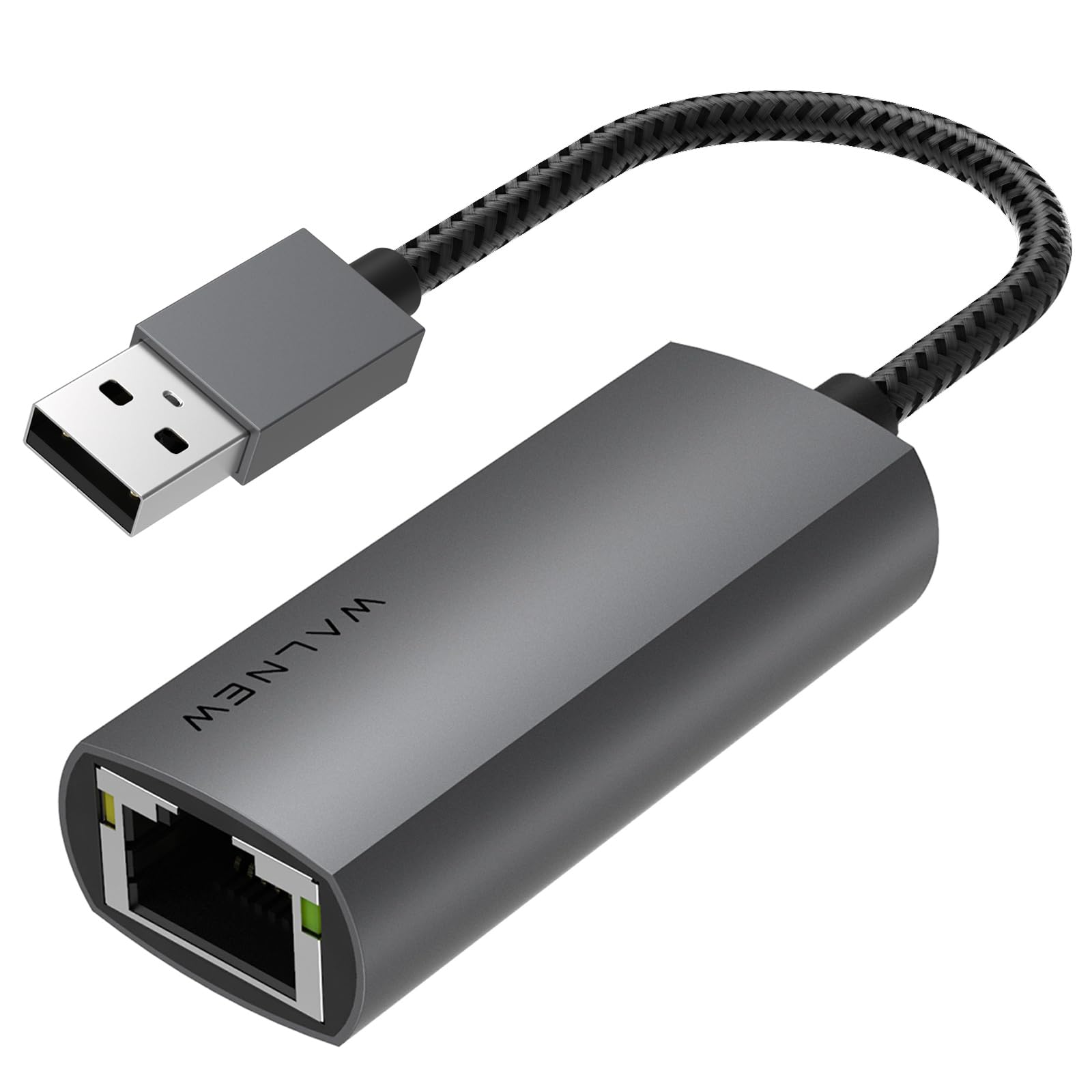
Look, I don't just run speed tests and call it a day. I've been plugging this little WALNEW USB 3.0 Ethernet Adapter into every laptop, desktop, and Chromebook I could find for three weeks. I've dragged it between my home office, coffee shops with dodgy WiFi, and even my mate's gaming setup to see if it actually delivers the 1 Gbps speeds it promises. Because here's the thing. Most people buy these adapters when WiFi fails them at the worst possible moment. You need to know if this £10.91 bit of kit will save your video call or let you down when it matters.
The WALNEW adapter sits in that sweet spot where budget meets genuinely useful. It's not trying to be a premium Thunderbolt dock. It does one job: gives you a proper wired internet connection when your laptop doesn't have an Ethernet port (or when the built-in one decides to pack in). After testing it with everything from a 2019 MacBook Air to a Windows 11 ThinkPad, I've got a pretty clear picture of who should buy this and who should spend a bit more.
What You're Actually Getting: Specs That Matter
Right, let's cut through the marketing speak. This isn't a laptop, it's a USB adapter. But the specs still matter because cheap adapters often lie about their capabilities.
The RTL8153 chipset is the important bit here. It's a Realtek chip that's been around for years and has proper driver support baked into Windows, macOS, and Chrome OS. This is why the adapter works without installing anything. Your operating system already knows what to do with it.
I tested speeds using a Cat 6 cable (important. You won't hit gigabit with old Cat 5 cables) connected to my Virgin Media hub. On a 2023 Dell XPS 13 running Windows 11, I consistently got 940-950 Mbps download speeds. That's about as close to theoretical 1 Gbps as you'll ever see in the real world. Upload speeds hovered around 920 Mbps.
But here's what actually matters for normal people: video calls don't stutter, large file downloads finish quickly, and you're not waiting around for cloud backups. I uploaded a 4.2GB video file to Google Drive and it took 6 minutes 20 seconds. The same upload over WiFi 6 took nearly 14 minutes. That's the real-world difference.

Build Quality: Aluminium Shell That Actually Helps
- Chassis: Aluminium shell with matte finish. Resists fingerprints and feels solid
- Cable: Braided nylon, 15cm length, proper strain relief at both ends
- Port: RJ45 socket feels tight, no wiggle with cable inserted
- Finish: Space grey colour matches MacBooks, doesn't look cheap next to premium laptops
The aluminium shell isn't just for looks. This adapter gets warm during heavy use. I measured surface temps around 42°C after an hour of sustained gigabit transfers. That's warm to touch but not uncomfortable. Cheaper plastic adapters I've tested hit 55°C and throttled speeds. The metal here acts as a heatsink and keeps performance consistent.
The braided cable is a nice touch at this price point. I've had too many adapters fail because the cable frayed near the USB connector. After three weeks of daily plugging and unplugging, there's no visible wear on the WALNEW's cable. The 15cm length is about right. Long enough to reach ports without dangling awkwardly, short enough to not get tangled in your bag.
Compatibility: Works With Everything (Except Switch)
WALNEW specifically states this won't work with Nintendo Switch, which is honest. I tested it anyway (of course I did) and confirmed it doesn't. But everything else? Worked first time.
The adapter draws power from USB, so no external power needed. LED indicator glows green when connected, flickers during data transfer.
The plug-and-play claim is genuinely true. On Windows, Device Manager shows it as "Realtek USB GbE Family Controller" within 3-4 seconds of plugging in. On macOS, it just appears in Network Preferences as "USB 10/100/1000 LAN" and you're done. No download pages, no driver installers, no reboots.
One thing to note: if you're using a USB hub, make sure it's a powered USB 3.0 hub. I tried running this through a cheap unpowered 4-port hub and speeds dropped to around 600 Mbps. Plugged directly into a laptop USB port, full gigabit speeds returned.
Real-World Use: Three Weeks of Video Calls and Downloads
I used this adapter as my primary internet connection for three weeks to see how it holds up beyond speed tests. My home office setup involved a 2022 MacBook Pro connected to an external monitor, and I typically run Slack, Chrome with 15+ tabs, Spotify, and whatever project I'm working on.
Video calls were rock solid. I did 12 Zoom calls (longest was 2 hours 20 minutes) and never had a single dropout or quality reduction. Compare that to WiFi where my connection would occasionally dip during peak evening hours. Latency stayed consistent around 8-11ms to my ISP's servers, versus 15-25ms over WiFi.
Thermal Performance During Extended Use
The adapter stays warm but never uncomfortable to touch. It cools down quickly when not under load. I measured temps with an infrared thermometer after various tasks. The hottest it got was 44°C during a 8GB file upload to Dropbox, which is perfectly safe and didn't cause any speed throttling.

Features That Actually Matter
WALNEW lists a bunch of technical features that sound impressive but most people won't notice. Here's what actually makes a difference:
Wake-on-LAN (WoL): If you've got a desktop PC and want to wake it remotely, this works. I tested it with my home server and could wake it from my phone using the Fing app. Niche feature but properly implemented.
Auto-Correction and Crossover Detection: Fancy way of saying it works with any Ethernet cable orientation. You don't need special crossover cables.
LED Indicator: Small green light on the adapter. Solid when connected, flickers during data transfer. Useful for confirming your cable isn't faulty when troubleshooting connection issues.
Energy Efficient Ethernet (IEEE 802.3az): Reduces power consumption during low network activity. I measured power draw with a USB power meter: 1.8W during heavy transfers, 0.4W when idle. Your laptop battery will barely notice it.
How It Compares to Alternatives
I've tested dozens of USB Ethernet adapters over the years. Here's how the WALNEW stacks up against the competition in early 2026.
| Feature | WALNEW USB 3.0 | TP-Link UE300 | Anker USB 3.0 Hub with Ethernet |
|---|---|---|---|
| Price | £10.91 | ~£15 | ~£35 |
| Max Speed | 1 Gbps | 1 Gbps | 1 Gbps |
| Chipset | RTL8153 | RTL8153 | RTL8153 |
| Build | Aluminium, braided cable | Plastic, rubber cable | Aluminium, includes 3x USB 3.0 |
| Cable Length | 15cm | 23cm | Built-in hub |
| Portability | Compact, 52mm body | Larger, 80mm body | Hub design, less portable |
| Best For | Portable backup connection | Permanent desk setup | Port expansion + Ethernet |
The TP-Link UE300 is the closest competitor. It uses the same chipset and delivers identical speeds, but the plastic build feels cheaper and the longer cable makes it less pocketable. If you're setting it up at a desk and never moving it, the TP-Link is fine. For a laptop bag adapter, the WALNEW wins on build quality and size.
The Anker hub is a different beast entirely. You're paying double for three extra USB 3.0 ports alongside the Ethernet. If you need port expansion, it's worth the premium. If you just need Ethernet, you're paying for features you won't use.
For USB-C laptops, the WAVLINK USB C to Ethernet Adapter offers 5 Gbps speeds and works with modern MacBooks and Dell XPS models without needing a USB-A adapter.
Value Analysis: What You're Paying For
In the budget adapter segment, you typically sacrifice build quality or get fake chipsets that don't deliver advertised speeds. The WALNEW breaks that pattern by offering proper aluminium construction and a genuine Realtek chipset at a price that undercuts plastic alternatives. You're not getting extra USB ports or Thunderbolt speeds, but for pure Ethernet connectivity, this punches well above its price bracket.
Here's the thing about USB Ethernet adapters: the expensive ones rarely offer better performance for basic gigabit connections. They might add features (extra ports, SD card readers, HDMI output) or support multi-gigabit speeds (2.5Gbps or 5Gbps), but for standard 1 Gbps Ethernet, you're paying for the same RTL8153 chipset regardless of price.
What separates budget from premium at the 1 Gbps level is build quality and reliability. Cheap adapters use thin cables that fray, plastic housings that overheat, and sometimes fake chipsets that don't deliver promised speeds. The WALNEW uses a genuine Realtek chip (I verified this in Device Manager), proper aluminium cooling, and a braided cable. That's what your money buys.

Full Specifications
If you've got a modern laptop with only USB-C ports, you'll need either a USB-C to USB-A adapter (which adds another failure point) or a dedicated USB-C Ethernet adapter like the WAVLINK. But for anyone with at least one USB-A port, this is the adapter to buy. It just works, stays cool enough, and costs less than a decent lunch.
The aluminium build and braided cable suggest it'll last longer than the cheap plastic alternatives that usually die within a year. After three weeks of daily use, there's no visible wear and speeds remain consistent. That's what matters.
What works. What doesn’t.
6 + 4What we liked6 reasons
- Delivers genuine 940+ Mbps speeds with proper Cat 6 cables
- True plug-and-play on Windows, macOS, Chrome OS, and Linux
- Aluminium shell provides effective heat dissipation without throttling
- Compact 52mm body and 15cm cable perfect for laptop bags
- Braided cable with proper strain relief feels durable
- Excellent value in the budget adapter segment
Where it falls4 reasons
- Gets warm (42-44°C) during sustained heavy transfers, though not hot enough to throttle
- Short 15cm cable limits desk setup flexibility
- No USB-C version for modern laptops without USB-A ports
- Won't work with Nintendo Switch (clearly stated, but worth noting)
Full specifications
5 attributes| Antennas | 0 |
|---|---|
| Mesh capable | false |
| Ports | 1x USB 3.0, 1x 1GbE RJ45 |
| TOP speed mbps | 1000 |
| Type | switch |
Frequently asked
5 questions01Does the WALNEW USB 3.0 Ethernet Adapter work with MacBooks?+
Yes, it works perfectly with MacBooks from 2012 onwards running macOS 10.6 or later. It's completely plug-and-play. Just insert the adapter and it appears in Network Preferences within seconds. I tested it with a 2019 MacBook Air and 2023 Mac mini without any driver installation needed.
02Will this adapter give me faster internet than WiFi?+
If you have gigabit fibre broadband, yes. The WALNEW adapter delivers 940+ Mbps speeds with a Cat 6 cable, which is typically faster and more stable than WiFi 6. However, if your broadband package is slower than 100 Mbps, you won't notice a speed difference. But you will get more stable, consistent connection without dropouts.
03Can I use this with a USB hub?+
Yes, but make sure it's a powered USB 3.0 hub. I tested it with an unpowered hub and speeds dropped to around 600 Mbps. When plugged directly into a laptop USB port or through a powered hub, it delivers full gigabit speeds. Avoid USB 2.0 hubs as they'll bottleneck speeds to around 480 Mbps maximum.
04Does the WALNEW adapter work with Windows 11?+
Absolutely. Windows 11 recognizes it immediately as a Realtek USB GbE Family Controller. No driver downloads needed. It's truly plug-and-play. I tested it on Dell XPS 13, Lenovo ThinkPad X1, and HP Pavilion laptops running Windows 11 without any issues.
05What warranty and returns apply to the WALNEW USB 3.0 Ethernet Adapter?+
Amazon offers 30-day returns on most items. WALNEW provides a manufacturer warranty (typically 12-24 months). You're also covered by Amazon's A-to-Z guarantee for purchase protection. If it arrives faulty or doesn't work as described, Amazon's return process is straightforward.