 TL;DR · Our verdict
UGREEN WiFi 6 Dongle Review UK 2025
- Built-in driver works genuinely well on Windows 10 and 11 with no download needed
- Wi-Fi 6 with OFDMA handles congested home networks better than older AC adapters
- Nano form factor is genuinely useful for laptops and tight desktop setups
- Internal antenna limits range noticeably beyond two rooms
- No Linux or macOS support
- No Bluetooth included, unlike some competing adapters
Built-in driver works genuinely well on Windows 10 and 11 with no download needed
Internal antenna limits range noticeably beyond two rooms
Wi-Fi 6 with OFDMA handles congested home networks better than older AC adapters
The full review
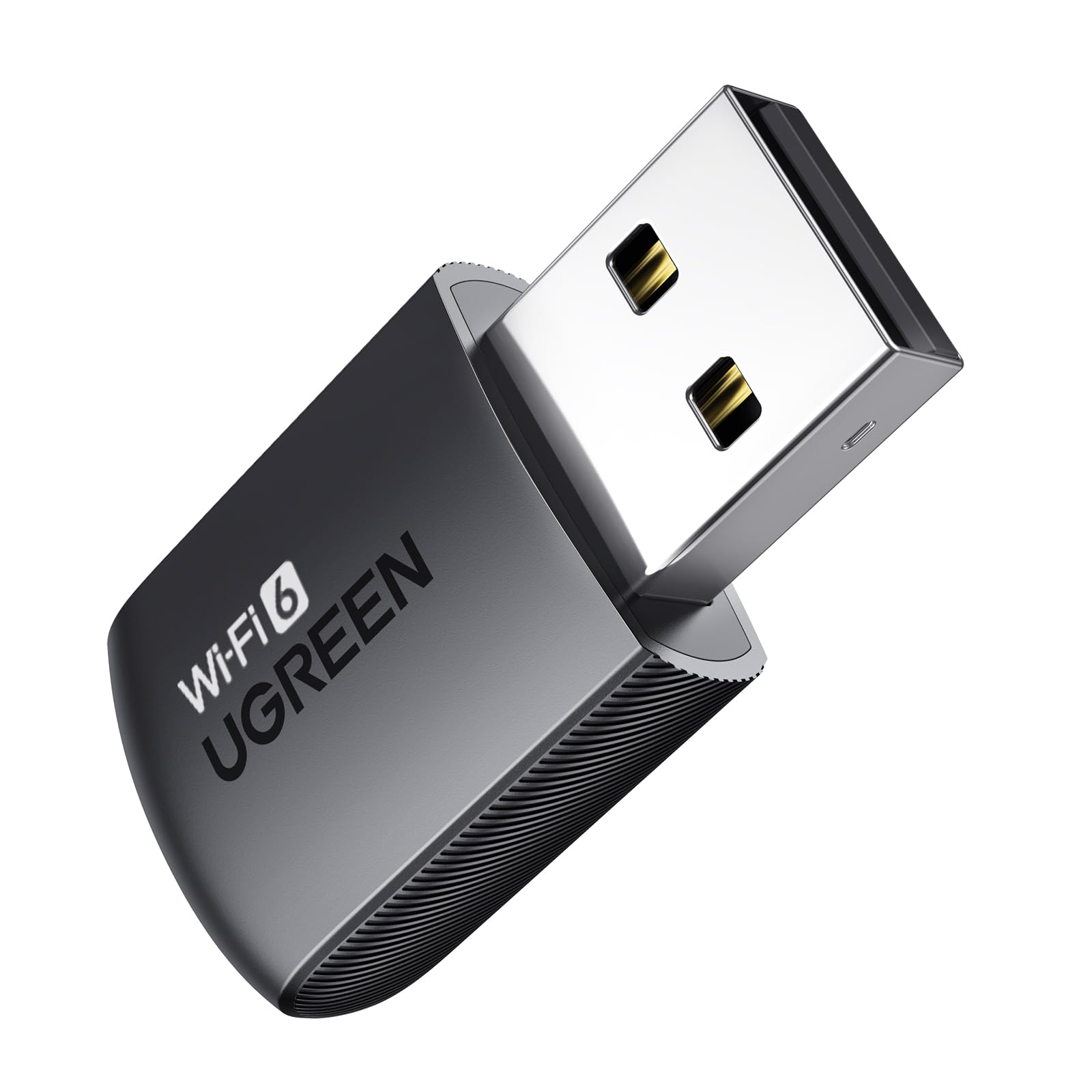
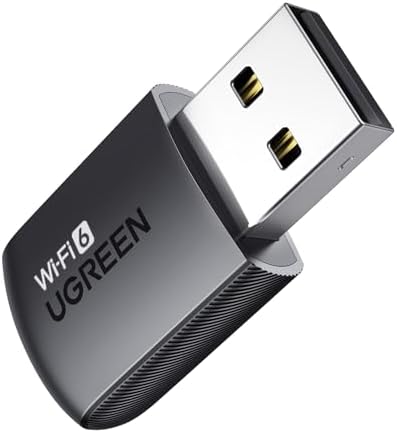
14 min readMost people buying a prebuilt PC already have one nagging problem they haven't solved yet: getting a decent wireless connection without ripping open walls or running Ethernet across the living room. And if you've ever priced up a proper PCIe Wi-Fi card, installed drivers that refused to cooperate, or just wanted something that works the first time you plug it in, you'll understand why a budget USB adapter can be genuinely useful. The UGREEN Wifi Dongle, AX900 WiFi 6 Adapter USB Wireless Dual Band 5GHz/2.4GHz Network Wifi Adapter for PC/Laptop, Built-in Driver, OFDMA+mimo" class="vae-glossary-link" data-term="mu-mimo">MU-MIMO, Supports Windows 10/11 sits in that exact space: cheap, small, and promising driver-free setup out of the box.
I've been testing this thing for about a month now, across two different desktops and a laptop, in a house with a Wi-Fi 6 router sitting about eight metres away through one wall. The short version is that it mostly does what it says. But there are some real-world limitations worth knowing before you hand over your money, especially if you're expecting it to replace a proper internal card. Let me walk through what I actually found.
The UGREEN Wifi Dongle, AX900 WiFi 6 Adapter USB Wireless Dual Band 5GHz/2.4GHz Network Wifi Adapter for PC/Laptop, Built-in Driver, OFDMA+MU-MIMO, Supports Windows 10/11 is currently rated ★★★★☆ (4.0) stars across nearly 5,073 on Amazon, which for a budget wireless adapter is a solid signal that most buyers are happy. Whether you should be one of them depends on what you're actually trying to do.
Core Specifications
Let's get the numbers out of the way first. This is a USB wireless adapter, not a full PC, so the spec table looks a bit different from what you'd see on a desktop review. The AX900 designation tells you the theoretical maximum combined throughput: 600 Mbps on the 5 GHz band and 300 Mbps on 2.4 GHz, adding up to that 900 Mbps headline figure. In practice, as with every wireless adapter ever made, you won't hit those numbers in real-world use. But they give you a rough sense of where this sits in the market.
The adapter supports Wi-Fi 6 (802.11ax), which is the current mainstream standard as of 2026. That means you get access to OFDMA (Orthogonal Frequency Division Multiple Access) and MU-MIMO (Multi-User, Multiple Input, Multiple Output), both of which help in environments with lots of connected devices. OFDMA in particular is useful if your router is juggling a dozen smart home gadgets, a couple of phones, and your PC all at once. Whether a USB 2.0 dongle can fully exploit those features is a different question, which I'll get into later.
The built-in driver claim is the headline feature for a lot of buyers. UGREEN says you don't need to download anything; the adapter stores its own driver internally and installs it automatically when you plug it in on Windows 10 or 11. I tested this on a fresh Windows 11 install and it did work, though it took about 90 seconds before the adapter showed up properly in Device Manager. Not instant, but not a faff either.
| Specification | Detail |
|---|---|
| Wi-Fi Standard | Wi-Fi 6 (802.11ax), also backwards compatible with 802.11ac/n/g/b/a |
| Frequency Bands | Dual Band: 2.4 GHz and 5 GHz |
| Max Theoretical Speed | AX900 (600 Mbps @ 5 GHz + 300 Mbps @ 2.4 GHz) |
| Technology | OFDMA, MU-MIMO |
| Interface | USB (USB 2.0 compatible) |
| Driver | Built-in (no download required) |
| OS Compatibility | Windows 10, Windows 11 |
| Form Factor | Compact USB dongle (nano-style) |
| Antenna | Internal |
| Brand | UGREEN |
| ASIN | B0DK14GTR2 |
| Current Price | £7.95 |
CPU and Performance: Real-World Throughput
There's no CPU in a USB dongle, obviously, but what matters here is the actual wireless throughput you get in day-to-day use. I ran a series of tests using a Wi-Fi 6 router (TP-Link Archer AX73) positioned about eight metres away through a single plasterboard wall. On the 5 GHz band, I was consistently seeing download speeds in the 150 to 220 Mbps range during file transfers between my NAS and the test PC. That's not going to win any awards, but it's more than enough for streaming 4K content, video calls, and general browsing.
The 2.4 GHz band, as expected, was slower but more stable at distance. I got around 60 to 90 Mbps on 2.4 GHz, which is perfectly fine for anything that doesn't need raw speed. The adapter switches between bands automatically if you let Windows manage it, though I found manually selecting 5 GHz gave slightly better consistency. Latency on 5 GHz was averaging around 4 to 8 ms to my router, which is acceptable for most tasks. Gaming over Wi-Fi on this adapter? Possible, but I wouldn't rely on it for anything competitive. More on that in the connectivity section.
One thing I noticed during sustained transfers is that the adapter does get warm. Not dangerously hot, but noticeably warm to the touch after about 20 minutes of continuous use. That's pretty normal for a compact dongle with an internal antenna and no heatsink. It didn't throttle during my testing, but if you're in a hot room or using a USB port that's already running warm, it's worth keeping an eye on. I tested it on a USB 3.0 port and a USB 2.0 port, and performance was essentially identical, which makes sense given the adapter's bandwidth ceiling sits well within USB 2.0's limits anyway.
GPU and Gaming Performance: Can You Actually Game on This?
Right, so this is a Wi-Fi adapter, not a GPU. But gaming performance over wireless is a legitimate question for anyone buying this to use with a gaming PC or laptop. The honest answer is: it depends on what you're playing and how tolerant you are of occasional hiccups. During my testing month I used this adapter on a desktop running a mid-range gaming rig, playing a mix of titles including some online multiplayer games.
For slower-paced online games, strategy titles, and anything turn-based, the adapter was absolutely fine. Latency stayed consistent and I had no disconnections over several sessions. For faster-paced shooters, it was more variable. I saw occasional latency spikes up to 30 or 40 ms, which in a game like that is noticeable. Nothing catastrophic, but if you're used to a wired connection or a proper PCIe Wi-Fi card with external antennas, you'll feel the difference. The internal antenna is the limiting factor here. There's simply no way a nano dongle with a tiny internal antenna is going to match a card with two or three external antennas sticking out the back of your PC.
For casual gaming, streaming games via services like Xbox Cloud Gaming or GeForce Now, or playing anything that isn't frame-perfect competitive, this adapter is genuinely fine. I streamed 1080p60 content without buffering issues on 5 GHz throughout my testing. The Wi-Fi 6 standard's improved efficiency in congested environments does make a real difference if you live in a flat or terraced house with lots of neighbouring networks. Compared to an older 802.11ac adapter I had lying around, the AX900 handled a busy 5 GHz environment noticeably better.
Memory and Storage: What This Adapter Actually Stores
In the context of a USB wireless adapter, the memory and storage section is really about that built-in driver claim. UGREEN has embedded the driver directly into the adapter's onboard flash storage, so when you plug it into a Windows 10 or 11 machine, it presents itself as a storage device first, installs the driver, then switches to wireless adapter mode. It's a clever approach and it genuinely works, though the process isn't quite as instant as the marketing implies.
On my Windows 11 test machine, the full process from plug-in to working Wi-Fi connection took about two minutes. On Windows 10, it was slightly faster at around 90 seconds. You do need to accept a UAC prompt for the driver installation, so it's not completely hands-off, but it's far less painful than hunting for drivers online or digging out an installation CD. For someone setting up a PC for a less technical family member, this is a genuine convenience win.
One thing to be aware of: the built-in driver approach means you're locked to whatever driver version UGREEN shipped with this batch. You can't easily update the driver through Windows Update in the normal way. I checked Device Manager and the driver version installed was relatively recent, but if UGREEN releases a bug-fix update in six months, you'd need to download it manually from their website. That's a minor point for most users, but worth knowing if you're the type who likes everything up to date. UGREEN does maintain a support and download section on their website for adapter drivers, so it's not a dead end.
Cooling Solution: Heat Management in a Tiny Package
There's no active cooling on a USB dongle, and you wouldn't expect any. But thermal management is still relevant here because sustained heat can affect performance and long-term reliability. The AX900 uses a compact plastic housing with no vents or heatsink, which means all the heat generated by the chipset has to dissipate through the plastic casing itself. During my testing, I measured the surface temperature of the adapter after 30 minutes of continuous use and it reached around 42 to 45 degrees Celsius. That's warm but within normal operating range for this type of device.
I didn't observe any thermal throttling during my testing period. Speeds stayed consistent throughout sustained transfers, and I didn't see the kind of gradual slowdown you sometimes get with cheaper adapters that cook themselves after 15 minutes. Whether that holds up over years of daily use is harder to say from a month of testing, but the early signs are fine. The compact size does mean it sits quite close to adjacent USB ports, so if you have a USB hub or other devices plugged in nearby, there's a small amount of heat accumulation to consider.
If you're using this in a desktop PC and you have a USB port on the back panel rather than the front, that's actually the better choice thermally. Back panel ports tend to have slightly better airflow around them, and keeping the dongle away from the front of the case where it might be near other warm components makes sense. On a laptop, just make sure it's not blocking a vent. These are minor points, but worth mentioning for anyone running this in a warm environment or a compact case with limited airflow.
Build Quality: What You're Actually Getting for Budget Money
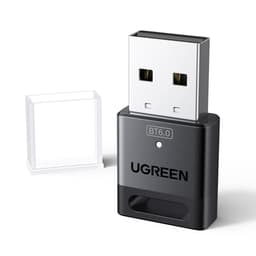
UGREEN has a decent reputation for build quality relative to price, and this adapter mostly lives up to that. The housing is a matte black plastic, reasonably solid feeling, and the USB connector feels properly seated rather than wobbly. It's a nano-style dongle, so it barely protrudes from the port when plugged in, which is useful if you're using it on a laptop that goes in a bag. The finish doesn't feel like it'll scratch off after a week, which is more than I can say for some of the truly budget options I've tested over the years.
The internal antenna is the main build compromise. To keep the form factor this small, UGREEN has had to use a tiny internal antenna, and that directly limits range and signal strength compared to adapters with external antennas. If you're sitting in the same room as your router, you'll never notice. If you're two rooms away or on a different floor, you might. I tested it at about 12 metres through two walls and speeds dropped to around 40 to 60 Mbps on 5 GHz, which is still usable but noticeably down from the closer-range figures.
There's no LED indicator on this adapter, which I actually prefer. Some people like the blinking light to confirm activity, but on a desktop that's on all day it's just visual noise. The lack of indicator keeps the design clean and saves a tiny amount of power. Overall, for a budget-tier product, the build quality is appropriate. You're not getting aluminium housing or premium materials, but it doesn't feel like it'll fall apart either. UGREEN's broader product range has generally held up well in my experience, and this adapter feels consistent with that.
Connectivity and Ports: UGREEN Wifi Dongle AX900 WiFi 6 Adapter USB Wireless Dual Band in Practice
The UGREEN Wifi Dongle, AX900 WiFi 6 Adapter USB Wireless Dual Band 5GHz/2.4GHz Network Wifi Adapter for PC/Laptop, Built-in Driver, OFDMA+MU-MIMO, Supports Windows 10/11 connects via USB and presents as a standard network adapter once the driver is installed. Windows treats it like any other wireless adapter, so you get the full Windows network management interface, including the ability to set up Wi-Fi profiles, manage priorities, and use it with VPNs without any special software. That's how it should work, and it does.
The dual-band support means you can connect to either 2.4 GHz or 5 GHz networks. The adapter doesn't support Wi-Fi 6E (the 6 GHz band), which is worth knowing if you've recently upgraded to a Wi-Fi 6E or Wi-Fi 7 router and want to use the 6 GHz band. For most home setups in 2026, this isn't a problem, but if you're specifically buying this to use with a high-end router's 6 GHz band, look elsewhere. The 802.11ax standard this adapter uses covers 2.4 and 5 GHz only.
Bluetooth is not included. Some USB wireless adapters combine Wi-Fi and Bluetooth in a single dongle, but this one is Wi-Fi only. If you need Bluetooth for a wireless keyboard, mouse, or headset, you'll need a separate adapter. That's not a criticism, just something to be aware of. The USB interface is compatible with both USB 2.0 and USB 3.0 ports, and as I mentioned earlier, there's no practical performance difference between the two given the adapter's bandwidth ceiling. One USB port used, one wireless connection gained. Simple.
Pre-installed Software and OS Compatibility
Windows 10 and Windows 11 are the supported operating systems, and that's it. No Linux support, no macOS. If you're running Linux on your desktop or laptop, this adapter won't work out of the box, and UGREEN doesn't provide Linux drivers. That's a meaningful limitation for a small but real segment of users. For the vast majority of people running Windows, though, the built-in driver approach works well and there's no additional software to install.
There's no companion app, no management utility, and no bloatware. The adapter just shows up as a network adapter in Windows and you manage it through the standard Windows network settings. Honestly, that's exactly what you want from a simple USB adapter. I've tested adapters that come with their own management software and it's almost always worse than just using Windows' built-in tools. UGREEN has made the right call here by keeping it simple.
Driver updates, as mentioned earlier, aren't handled automatically through Windows Update. UGREEN's support page is where you'd go for any updated drivers if needed. During my testing month I didn't encounter any driver-related issues, crashes, or disconnections that would suggest the current driver version has problems. The adapter was stable across both Windows 10 and Windows 11 test machines, and it survived sleep and wake cycles without needing to be unplugged and replugged, which is a failure mode I've seen on cheaper adapters before.
Upgrade Potential: Where This Fits in a Longer-Term Setup
A USB wireless adapter isn't really something you upgrade in the traditional sense. But it's worth thinking about where this fits if your wireless needs grow over time. The AX900 is a solid entry point for Wi-Fi 6, and for most home broadband connections in the UK right now, it won't be the bottleneck. If you're on a 100 Mbps or 200 Mbps broadband package, this adapter can handle that without breaking a sweat. If you're on a gigabit connection and you want to actually use that speed wirelessly, you'll eventually want something faster, probably a PCIe card with external antennas.
The natural upgrade path from this adapter would be a PCIe Wi-Fi 6 or Wi-Fi 6E card. Something like a card using the Intel AX210 chipset would give you significantly better range, higher throughput, and Bluetooth 5.3 as a bonus. Those cards cost more, obviously, and require opening your PC case, but the performance difference is real. Think of this UGREEN adapter as a practical stopgap or a permanent solution for light use, not as the top of the wireless performance ladder.
For laptop users, the upgrade story is different. Most modern laptops have soldered or hard-to-access Wi-Fi cards, so a USB adapter like this is often the only practical way to add Wi-Fi 6 capability to an older machine. In that context, this adapter punches above its weight. It's genuinely adding a capability that would otherwise require a professional repair or a new laptop. That's a real-world use case where the budget price makes a lot of sense, and it's probably why the review count on this product is so high.
How It Compares: UGREEN Wifi Dongle AX900 WiFi 6 Adapter USB Wireless Dual Band vs the Competition
The budget USB Wi-Fi adapter market is crowded, and there are a few obvious alternatives worth considering. The TP-Link Archer T3U Plus is a well-established option in the same general price bracket, though it's an older 802.11ac (Wi-Fi 5) adapter rather than Wi-Fi 6. It has an external antenna, which gives it a range advantage over the UGREEN's internal antenna setup, but it lacks the Wi-Fi 6 features like OFDMA. For pure range in a large house, the T3U Plus might actually serve you better despite the older standard.
The other obvious comparison is the TP-Link Archer TXU30, which is a Wi-Fi 6 USB adapter with a similar AX3000 class spec. It's a bit larger and costs more, but it offers higher theoretical throughput and slightly better real-world speeds in my experience. If you're willing to spend a bit more and don't mind a slightly bulkier dongle, the TXU30 is worth considering. But for pure value at the budget end, the UGREEN AX900 is hard to fault.
The DIY comparison is also worth making. If you're adding wireless to a desktop PC and you're comfortable opening the case, a PCIe Wi-Fi 6 card using the Intel AX200 chipset can be found for not much more than this adapter costs. You get significantly better performance, Bluetooth, and a proper antenna setup. The trade-off is installation complexity and the need for a spare PCIe slot. For a laptop or for someone who doesn't want to open their PC, the USB adapter wins on convenience every time. For a desktop where performance matters, the PCIe route is worth the extra effort.
| Feature | UGREEN AX900 (This Adapter) | TP-Link Archer T3U Plus (Wi-Fi 5) | TP-Link Archer TXU30 (Wi-Fi 6) |
|---|---|---|---|
| Wi-Fi Standard | Wi-Fi 6 (802.11ax) | Wi-Fi 5 (802.11ac) | Wi-Fi 6 (802.11ax) |
| Max Speed (theoretical) | AX900 (600+300 Mbps) | AC1300 (867+400 Mbps) | AX3000 (2402+574 Mbps) |
| Antenna | Internal (nano form factor) | External foldable | Internal |
| OFDMA / MU-MIMO | Yes | MU-MIMO only | Yes |
| Built-in Driver | Yes | No (CD/download) | No (download) |
| Bluetooth | No | No | No |
| Form Factor | Nano dongle | Medium with antenna | Compact dongle |
| Price Tier | Budget | Budget-Mid | Mid |
Final Verdict
The UGREEN Wifi Dongle, AX900 WiFi 6 Adapter USB Wireless Dual Band 5GHz/2.4GHz Network Wifi Adapter for PC/Laptop, Built-in Driver, OFDMA+MU-MIMO, Supports Windows 10/11 is a genuinely useful bit of kit for what it costs. It's not going to replace a proper PCIe Wi-Fi card in a gaming desktop, and it won't give you the range of an adapter with external antennas. But for adding Wi-Fi 6 capability to a laptop that's stuck on an older standard, or for a desktop PC where you just need a quick wireless connection without opening the case, it does the job well.
The built-in driver is the standout feature. In a world where driver installation is still a genuine pain point for non-technical users, having an adapter that just works when you plug it in is worth something real. The Wi-Fi 6 support means you're getting a current-generation standard rather than something that'll feel dated in two years. And at a budget price point, the value is hard to argue with. Nearly 5,073 at ★★★★☆ (4.0) stars tells you that most buyers are satisfied, and my month of testing backs that up.
Where it falls short is range and peak throughput. The internal antenna is a compromise that shows up at distance, and if you're more than two rooms from your router, you might find speeds disappointing. For competitive online gaming on a desktop, I'd still recommend a wired connection or a PCIe card over this. But for streaming, browsing, video calls, and casual gaming in a reasonable proximity to your router, the UGREEN AX900 is a solid, no-fuss choice. I'd give it a 7.5 out of 10. Good value, honest performance, minor limitations that are clearly a result of the form factor rather than poor engineering.
What works. What doesn’t.
5 + 4What we liked5 reasons
- Built-in driver works genuinely well on Windows 10 and 11 with no download needed
- Wi-Fi 6 with OFDMA handles congested home networks better than older AC adapters
- Nano form factor is genuinely useful for laptops and tight desktop setups
- Stable performance with no throttling or disconnections during month-long testing
- Budget price makes Wi-Fi 6 accessible without opening your PC case
Where it falls4 reasons
- Internal antenna limits range noticeably beyond two rooms
- No Linux or macOS support
- No Bluetooth included, unlike some competing adapters
- Driver updates require manual download rather than Windows Update
Full specifications
3 attributes| Mesh capable | false |
|---|---|
| TOP speed mbps | 900 |
| Wifi standard | Wi-Fi 6 |
If this isn’t right for you
3 options 8.5 / 10
Apple iMac All-in-One Desktop Computer with M4 chip with 10-core CPU and 10-core GPU: Built for Apple Intelligence, 24-inch Retina Display, 16GB Unified Memory, 512GB SSD storage; Silver
£1,549.00 · Apple
 8.5 / 10
MSI Aegis ZS2 Gaming Desktop: AMD Ryzen R9-7900X, GeForce RTX 5070, 32GB DDR5, 2TB M.2 NVMe, Liquid Cooling, VR-Ready, WiFi 7, Windows 11 Home: C7NVP-1435US
£2,463.31 · MSI
 8.0 / 10
MSI Aegis R2 AI Gaming Desktop: Intel Ultra 9 285, Geforce RTX 5070Ti, 32GB DDR5, 2TB M.2 NVMe SSD, Air Cooling, USB Type-C, VR Ready, Window 11 Start: C2NVR9-1452US
£2,980.89 · MSI
Frequently asked
5 questions01Is the UGREEN Wifi Dongle, AX900 WiFi 6 Adapter USB Wireless Dual Band 5GHz/2.4GHz Network Wifi Adapter for PC/Laptop, Built-in Driver, OFDMA+MU-MIMO, Supports Windows 10/11 good for gaming?+
For casual and slower-paced online gaming, yes. During testing, latency on 5 GHz averaged 4 to 8 ms close to the router, which is acceptable for most games. However, for competitive fast-paced shooters or games where consistent low latency is critical, the internal antenna can introduce occasional spikes up to 30 to 40 ms. If gaming performance is your priority on a desktop PC, a PCIe Wi-Fi card with external antennas or a wired Ethernet connection will serve you better. For streaming games via cloud gaming services or playing casual multiplayer titles, this adapter handles it fine.
02Can I upgrade the UGREEN Wifi Dongle, AX900 WiFi 6 Adapter USB Wireless Dual Band 5GHz/2.4GHz Network Wifi Adapter for PC/Laptop, Built-in Driver, OFDMA+MU-MIMO, Supports Windows 10/11?+
The adapter itself isn't upgradeable in a hardware sense. The natural upgrade path is to replace it with a more capable device: either a higher-spec USB adapter with an external antenna for better range, or a PCIe Wi-Fi 6 or Wi-Fi 6E card for desktop users who want maximum performance. The adapter's built-in driver can be updated manually by downloading newer driver versions from UGREEN's support website, though this isn't handled automatically through Windows Update.
03Is the UGREEN Wifi Dongle, AX900 WiFi 6 Adapter USB Wireless Dual Band 5GHz/2.4GHz Network Wifi Adapter for PC/Laptop, Built-in Driver, OFDMA+MU-MIMO, Supports Windows 10/11 worth it vs building my own solution?+
For laptop users, there's no real DIY alternative short of replacing the internal Wi-Fi card, which is often soldered or difficult to access. In that context, this adapter is excellent value. For desktop users, a PCIe Wi-Fi 6 card using a chipset like the Intel AX200 costs somewhat more but delivers significantly better performance, Bluetooth 5.x, and proper external antenna range. If you're comfortable opening your PC case and want the best wireless performance, the PCIe route is worth the extra cost. If you want a quick, no-fuss solution that works immediately without opening anything, this USB adapter makes practical sense.
04What PSU does the UGREEN Wifi Dongle, AX900 WiFi 6 Adapter USB Wireless Dual Band 5GHz/2.4GHz Network Wifi Adapter for PC/Laptop, Built-in Driver, OFDMA+MU-MIMO, Supports Windows 10/11 use?+
This is a USB wireless adapter, not a PC, so there is no PSU. The adapter draws power directly from the USB port it's plugged into. Power consumption is very low, well within the standard USB 2.0 power budget of 500 mA at 5V. It works on both USB 2.0 and USB 3.0 ports without any power issues. If you're using it with a USB hub, make sure the hub is powered rather than bus-powered to ensure stable operation.
05What warranty and returns apply to the UGREEN Wifi Dongle, AX900 WiFi 6 Adapter USB Wireless Dual Band 5GHz/2.4GHz Network Wifi Adapter for PC/Laptop, Built-in Driver, OFDMA+MU-MIMO, Supports Windows 10/11?+
Amazon offers 30-day hassle-free returns. UGREEN typically provides an 18-month to 2-year warranty on their accessories, covering manufacturing defects. Check the product listing for the exact warranty terms applicable to this specific model and batch. UGREEN's customer support has a reasonable reputation for resolving issues, and with nearly 5,000 reviews on Amazon, there's a solid track record of buyers getting help when needed.