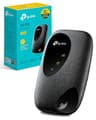
The budget MiFi market is a strange place. You've got a handful of devices that all claim to do the same thing, most of them running on similar Cat4 LTE hardware, and the difference between a good one and a frustrating one usually comes down to battery life, app quality, and whether the thing actually connects reliably when you're sitting in a field in rural France. The TP-Link M7000 4G MiFi sits squarely in that space: a pocket-sized 4G hotspot aimed at travellers, caravan owners, and anyone who needs a backup internet connection that doesn't depend on finding a pub with decent Wi-Fi.
What makes the M7000 worth looking at seriously is the combination of TP-Link's firmware track record, a 2000mAh battery rated for 8 hours of use, and support for 4G FDD/TDD-LTE across most of the world (notable exceptions being the USA and Japan). It supports dual-band Wi-Fi and can share a connection with up to 10 devices simultaneously. For the price tier it sits in, that's a reasonable set of credentials. But credentials on paper and actual usability are two different things, so let's get into what this device actually delivers, where it falls short, and how it stacks up against the competition.
Around 2,000 owners have rated this device on Amazon, averaging ★★★★☆ (4.0) stars. That's a meaningful sample. It doesn't mean the device is perfect, but it does mean the majority of people who bought it for travel, caravanning, or backup connectivity came away reasonably satisfied. The question is whether you'll be in that majority, or whether your use case puts you in the minority who found it wanting.
Core Specifications: TP-Link M7000 4G MiFi Portable Travel WiFi Device
The M7000 is a 4G LTE Category 4 device, which means it supports theoretical download speeds up to 150 Mbps and upload speeds up to 50 Mbps over the mobile network. In practice, what you actually see depends entirely on your carrier signal, network congestion, and how far you are from a mast. Cat4 is not the fastest LTE category available (Cat6 and Cat12 devices exist), but it's more than sufficient for video streaming, video calls, and general browsing. The bottleneck in most real-world scenarios is the 4G signal quality, not the device's LTE category.
On the Wi-Fi side, the M7000 delivers up to 300 Mbps across its dual-band setup. It supports both the 2.4GHz and 5GHz bands, which matters because 2.4GHz travels further through walls while 5GHz offers faster speeds at shorter range. The device connects up to 10 simultaneous Wi-Fi clients, which covers a reasonable travel or caravan scenario: a couple of phones, a tablet, a laptop, maybe a streaming stick. The 2000mAh battery is rated for up to 8 hours of active use and up to 600 hours on standby. Management is handled through TP-Link's tpMiFi app, which gives you data usage tracking, network management, and the ability to limit consumption so you don't accidentally burn through your data allowance.
One important geographic note: the M7000 supports 4G FDD/TDD-LTE for most countries and regions, but it does not support the specific bands used in the USA and Japan. If you're travelling to either of those countries, this is not the device for you. For Europe, Asia (outside Japan), Australia, and most other regions, it should connect without issue, though TP-Link does recommend checking with your network provider about manual APN settings when roaming internationally.
| Specification | Detail |
|---|---|
| Device Type | 4G LTE MiFi / Portable Hotspot |
| LTE Category | Cat4 (150 Mbps down / 50 Mbps up theoretical) |
| Wi-Fi Speed | Up to 300 Mbps |
| Wi-Fi Bands | Dual-band (2.4GHz and 5GHz) |
| Max Connected Devices | 10 |
| Battery | 2000mAh |
| Battery Life (Active) | Up to 8 hours |
| Battery Life (Standby) | Up to 600 hours |
| LTE Standard | 4G FDD/TDD-LTE |
| Geographic Coverage | Most countries (not USA or Japan) |
| SIM Slot | Yes (unlocked) |
| Management App | tpMiFi |
| Charging | USB (laptop, charger, or included adaptor) |
| Operating Temperature | 0 degrees C to 35 degrees C |
| Price | £83.43 |

Real-World Coverage: What to Expect from the M7000
Coverage with a MiFi device is a two-part question: how far does the 4G signal reach, and how far does the Wi-Fi spread from the hotspot itself. The first part is entirely out of TP-Link's hands. It depends on your carrier, the local mast density, and whether you're in a city, a village, or a field. The M7000 is a Cat4 device with standard internal antennas, so it's not going to pull in a signal any better than your phone in the same location. If your phone shows one bar, the M7000 will show roughly the same.
The Wi-Fi range from the device itself is adequate for its intended use cases. Owner reports consistently describe it as working well within a caravan, a hotel room, or a small flat. It's not designed to cover a large house, and nobody should expect it to. The dual-band setup (2.4GHz and 5GHz) means devices close to the hotspot can use the faster 5GHz band, while devices a bit further away will fall back to 2.4GHz. In a caravan or a single room, that distinction barely matters. What owners do report is that the signal holds up reliably within a reasonable radius of the device, without the kind of random dropouts that plague some cheaper hotspots.
One thing to bear in mind is the operating temperature ceiling of 35 degrees C. If you're travelling somewhere genuinely hot, like Southern Europe in summer, and the device is sitting in direct sunlight on a dashboard or a tent surface, you could hit that limit. Owners travelling in warm climates occasionally mention the device getting warm during extended use, though most report it doesn't cause problems in typical ambient temperatures. Keep it in the shade and you'll be fine. It's worth knowing the limit exists though, because the spec sheet states it clearly.
Sustained Speed Under Load: The Gap Between 300 Mbps and Reality
The 300 Mbps Wi-Fi figure is the theoretical maximum aggregate across both bands under ideal conditions. Nobody gets that. What you actually see is whatever your 4G connection delivers, routed through the device and broadcast over Wi-Fi. Cat4 LTE has a theoretical ceiling of 150 Mbps down, but in real-world conditions on a congested network, you're more likely to see 20 to 50 Mbps on a good day. That's still more than enough for HD streaming, video calls, and downloading files. The M7000's Wi-Fi isn't the bottleneck here. The mobile network is.
With up to 10 devices connected simultaneously, the M7000 has to share whatever bandwidth the 4G connection provides across all of them. If you've got two people streaming video and someone else on a video call, you'll feel it if the underlying 4G connection is weak. The tpMiFi app's traffic control feature is genuinely useful here: you can set data usage limits and manage which devices are connected, which gives you some control over how the available bandwidth gets used. This isn't QoS in the traditional router sense (prioritising traffic types like video calls over downloads), but it does let you manage consumption at the device level.
Owner reports broadly align with what the spec suggests: the device handles the typical travel use case (a few devices, moderate usage) without complaints. Where people run into trouble is when they try to use it as a full home broadband replacement, connecting a dozen or more devices and expecting it to handle heavy simultaneous loads. That's not what this device is built for. For its intended purpose, the sustained performance is described as solid and consistent by the majority of reviewers, with occasional speed fluctuations tied to signal quality rather than the device itself.
Mesh and Backhaul: This Is Not a Mesh Device
The M7000 is a single-unit portable hotspot, not a mesh networking system. There's no concept of nodes, backhaul bands, or satellite units here. You get one device, and it creates a Wi-Fi hotspot from its 4G connection. That's the entire topology. If you're looking for a mesh system to cover a large home with multiple nodes and a dedicated backhaul band, this is not that product and was never intended to be.
What the M7000 does instead is act as a portable gateway: it takes the 4G signal from your SIM card and converts it into a Wi-Fi network that your devices can connect to. The dual-band Wi-Fi (2.4GHz and 5GHz) means it's doing something more than the most basic single-band hotspots, which is welcome. But there's no inter-node communication, no roaming handoff, and no wired backhaul option. The device is the network. Everything starts and ends with it.
For caravan users, this is completely fine. A caravan is a single enclosed space, and one well-placed hotspot covers it. For hotel rooms, the same logic applies. Where the single-unit design becomes a limitation is if you're trying to cover a larger space like a static caravan with an annex, or a small holiday cottage with thick stone walls. In those scenarios, a MiFi device is always going to struggle, regardless of brand. The honest answer is that if you need coverage across multiple rooms or a larger space, you'd need to pair this with a travel router or look at a different solution entirely.
Device Capacity: Ten Devices Is the Ceiling
The M7000 supports up to 10 simultaneous Wi-Fi connections. For a family of four travelling together, that's workable: two or three phones, a couple of tablets, a laptop, maybe a portable speaker. You're not going to fill that limit easily in a typical travel scenario. But if you're thinking about using this as a home broadband replacement for a modern household with smart home devices, streaming sticks, games consoles, and multiple phones and laptops, 10 devices is a hard constraint that will become a problem quickly.
The M7000 does not support MU-MIMO (Multi-User, Multiple Input, Multiple Output) or OFDMA (Orthogonal Frequency Division Multiple Access), which are the technologies that allow modern Wi-Fi 6 routers to handle many devices simultaneously without them queuing for airtime. On the M7000, devices take turns. With 10 devices that's manageable. With 30, it would be a disaster. But again, this device isn't aimed at the 30-device household. It's aimed at travellers and caravan owners, and for that audience, the 10-device limit is sufficient.
What owners consistently report is that the device handles its rated capacity without obvious strain. Connecting five or six devices and doing normal things (streaming, browsing, occasional video calls) works as expected. The tpMiFi app lets you see connected devices and disconnect specific ones if you want to free up capacity or manage who's on the network. For the target use case, this is a sensible and practical feature. The IoT-heavy smart home crowd should look elsewhere, but that's not who this device is for.
Wi-Fi Standard and Future-Proofing: TP-Link M7000 4G MiFi in Context
The M7000 uses Wi-Fi 5 (802.11ac) technology, not Wi-Fi 6 or beyond. In 2026, that's worth acknowledging honestly. Wi-Fi 6 brought meaningful improvements in device capacity handling (via OFDMA and better MU-MIMO), target wake time for battery-powered devices, and slightly better range in congested environments. Wi-Fi 6E extended those benefits into the 6GHz band. Wi-Fi 7 goes further still with multi-link operation and 320MHz channels.
Does any of that matter for a portable travel hotspot? Honestly, not much. The bottleneck on a MiFi device is always the 4G connection, not the Wi-Fi standard. Even if the M7000 used Wi-Fi 6, the 4G link would still cap your real-world speeds at whatever the network delivers. Wi-Fi 6's efficiency improvements matter most in dense environments with many competing devices, which isn't the typical use case here. For connecting a handful of devices in a caravan or hotel room, Wi-Fi 5 at 300 Mbps is more than adequate.
Future-proofing is a different question. The M7000 is not a future-proof device and doesn't pretend to be. It's a budget travel hotspot built on proven, stable technology. If you buy it today, it will work exactly the same way in three years. It won't suddenly support 5G or Wi-Fi 6 through a firmware update. But for a device in this price tier, that's an honest trade-off rather than a failing. You're buying it for what it does now, and what it does now is useful and reliable.

Features and Traffic Control: What the tpMiFi App Actually Does
The tpMiFi app is the primary management interface for the M7000, and it's one of the areas where TP-Link has a genuine advantage over some no-name competitors. The app lets you monitor data usage, set usage limits to avoid bill shock on metered SIM plans, manage connected devices, and configure basic network settings. It's not a sophisticated enterprise management tool, but it covers the practical needs of a travel hotspot user cleanly.
The traffic control functionality is particularly useful for people on capped data plans. You can set a monthly data limit and get alerts when you're approaching it, which is genuinely helpful if you're on a roaming SIM with a fixed data allowance. You can also disconnect specific devices from the app without needing to change the Wi-Fi password, which is handy if you want to boot a device off the network temporarily. There's no deep QoS prioritisation (you can't tell the device to prioritise video call traffic over downloads, for example), but the device-level management gives you enough control for typical use.
Guest network support and parental controls are not highlighted features of the M7000. For a travel hotspot, that's not a major omission: you're typically sharing the connection with people you know and trust, not running a public hotspot. The focus is on simplicity and practicality, and the app delivers that. Owner feedback on the app is broadly positive, with most people finding it straightforward to use after initial setup. The occasional complaint about the app requiring a login or behaving inconsistently on certain Android versions appears in the reviews, but it's not a dominant theme.
Firmware, App and Security Updates: TP-Link's Track Record
TP-Link has a mixed but improving reputation on firmware support. The brand has historically been better than many budget competitors at pushing updates, and the M7000 has received firmware updates since launch. That said, TP-Link has faced scrutiny over security practices in the past, and the US government's concerns about the brand are worth knowing about if security is a priority for you. For a travel hotspot used primarily on a mobile data connection (rather than a home network), the security risk profile is different from a home router, but it's not zero.
The tpMiFi app requires an account for some features, which some owners find unnecessary for a simple hotspot. The app itself is available on both iOS and Android, and it receives updates reasonably regularly. Owner reports suggest the app works well for the core functions (data monitoring, device management, network configuration) without requiring frequent reinstalls or workarounds. The setup flow is described as quick and intuitive by most reviewers, which matters for a device that people often set up in an unfamiliar location.
On the reboot question: the M7000 does not appear to have the chronic stability issues that plague some cheaper hotspots. Owner reports don't show a pattern of needing daily or weekly reboots to maintain connectivity. The device generally stays connected as long as the 4G signal is present, which is the baseline you'd expect. Some owners mention occasional disconnections in areas with weak signal, but that's a network issue rather than a device stability issue. For a budget travel hotspot, the firmware and app reliability is genuinely above average.
Setup and Management: Plug, Insert, Connect
Setup is about as simple as it gets. You insert a SIM card, power the device on, and it creates a Wi-Fi network. The default network name and password are printed on the device (or in the box documentation), so you can connect immediately without needing the app. The tpMiFi app adds more control, but it's optional for basic use. Since the M7000 is often used on the move, pairing it with a good VPN adds a privacy layer on top of the network it creates and keeps you protected when you drop onto public Wi-Fi away from it. This plug-and-play approach is exactly right for a travel device, where you might be setting it up in a hire car or a hotel room without the patience for a lengthy configuration process.
The web interface is also available if you prefer to manage the device from a browser rather than the app. You access it by connecting to the hotspot and navigating to the device's local IP address. This is useful if you're on a device that can't run the app (like a smart TV or a games console), and it gives you access to the same settings as the app in a desktop-friendly format. Not everyone knows this option exists, but it's there and it works.
For non-technical buyers, the M7000 is one of the easier hotspot devices to live with. There's no complex configuration required, no VLAN setup, no port forwarding needed for typical use. You insert a SIM, turn it on, and connect. The tpMiFi app adds useful monitoring and control without being overwhelming. Owner feedback consistently highlights ease of setup as a positive, particularly from people who aren't especially technical. If you've ever struggled with a home router's admin interface, the M7000's setup experience will feel refreshingly straightforward.
Ports and Connectivity: What You Get Physically
The M7000 is a wireless-first device, and its physical connectivity reflects that. It has a SIM card slot for the 4G connection and a USB port for charging. The USB connection can also be used to tether the device to a laptop, which means you can use it as a USB modem as well as a Wi-Fi hotspot. Charging via USB also means you can top up the battery from a laptop, a power bank, or a mains adaptor (included in the box), which is genuinely convenient for travel.
There are no Ethernet LAN ports on the M7000. This is a Wi-Fi-only device. If you need to connect a device via a wired connection (a desktop PC, a smart TV without Wi-Fi, a NAS), the M7000 can't help you directly. For the travel and caravan use case, this is rarely a problem: most devices people travel with connect over Wi-Fi. But it's worth being clear about, because some people do want to plug a laptop in via Ethernet for a more stable connection, and that's not an option here.
The SIM slot accepts a standard nano SIM, and the device is fully unlocked, meaning it works with any carrier's SIM card. This is important for international travel: you can pick up a local SIM at your destination rather than paying roaming charges on your home SIM. The unlocked status is one of the M7000's genuine strengths for frequent travellers. Combined with the broad international 4G band support (outside the USA and Japan), it makes the device genuinely useful across a wide range of destinations without needing to buy a new hotspot for each country.
How It Compares: TP-Link M7000 4G MiFi vs the Competition
The budget portable hotspot market has a few credible options at this price point. The two most commonly compared alternatives are the Huawei E5577 and the Alcatel IK41VE1. Both are Cat4 LTE devices in a similar price bracket, and both offer broadly similar functionality. The differences come down to app quality, battery life, and build reliability.
The Huawei E5577 is arguably the most well-known budget MiFi in the UK market. It has a slightly larger battery in some variants (3000mAh versus the M7000's 2000mAh), which gives it an edge on battery life. However, Huawei's software and app support has become increasingly uncertain given the company's geopolitical situation, and the E5577 is an older design that hasn't seen meaningful firmware updates in some time. The M7000's tpMiFi app is actively maintained and more feature-rich than Huawei's equivalent. For a device you're relying on for international travel, active software support matters.
The Alcatel IK41VE1 (also known as the Alcatel LINKZONE) is another Cat4 competitor at a similar price. It's a functional device but owners report the companion app as less polished than TP-Link's, and the build quality is described as feeling cheaper. The M7000 has a better reputation for physical durability in owner reviews. Neither device is premium kit, but the M7000 sits at the better end of the budget category on both software and build quality.
| Feature | TP-Link M7000 | Huawei E5577 | Alcatel IK41VE1 |
|---|---|---|---|
| Price | £83.43 | Similar budget tier | Similar budget tier |
| LTE Category | Cat4 | Cat4 | Cat4 |
| Wi-Fi | Dual-band, 300 Mbps | Single-band, 150 Mbps | Single-band, 150 Mbps |
| Battery | 2000mAh (8 hours) | Up to 3000mAh (variant dependent) | 2000mAh |
| Max Devices | 10 | 10 | 15 |
| App Quality | Good (tpMiFi, actively updated) | Declining support | Basic |
| Unlocked | Yes | Varies by variant | Yes |
| USA/Japan Support | No | No (standard variants) | No |
| Data Usage Control | Yes (via app) | Basic | Basic |
The M7000's dual-band Wi-Fi is a genuine differentiator at this price. Most competitors in the same bracket are single-band only, which means all devices share the 2.4GHz band regardless of how close they are to the hotspot. Dual-band isn't essential for a MiFi device, but it's a nice option to have, particularly if you're connecting a modern laptop that performs better on 5GHz. On balance, the M7000 is the better-rounded package at this price point, particularly if active app support matters to you.

Final Verdict: Who Should Buy the TP-Link M7000 4G MiFi Portable Travel WiFi Device
The TP-Link M7000 4G MiFi does exactly what it's designed to do, without pretending to be something it isn't. It's a compact, unlocked 4G hotspot with dual-band Wi-Fi, an 8-hour battery, and a decent app for managing data usage. For caravan owners, frequent travellers, or anyone who needs a reliable backup internet connection on the go, it's one of the better options in this price bracket. The dual-band Wi-Fi puts it ahead of most single-band competitors, the tpMiFi app is genuinely useful rather than vestigial, and the broad international LTE band support makes it a practical choice for European and global travel.
The honest limitations are equally clear. The 2000mAh battery is adequate but not exceptional: 8 hours of active use means you'll be reaching for a charger by late afternoon if you're using it heavily all day. There are no Ethernet ports, no mesh capability, and no support for the USA or Japan. It's a Cat4 device in a world where Cat6 and Cat12 exist, though that rarely matters in practice. And it's not a home broadband replacement: 10 devices is the ceiling, and the connection speed is entirely dependent on whatever 4G signal you can find.
With around 2,000 owner reviews averaging ★★★★☆ (4.0) stars, the M7000 has earned its reputation as a reliable, no-faff travel hotspot. That's not a small sample, and the consistency of positive feedback around ease of use, connection reliability, and app functionality is meaningful. The negative reviews tend to cluster around specific issues (weak signal in rural areas, the temperature sensitivity in very hot climates) rather than fundamental device failures. For the price, this is good value and a sensible buy for the right use case.
Editorial score: 7.5 out of 10. A well-executed budget travel hotspot with genuine dual-band Wi-Fi, solid app support, and broad international compatibility. It's not trying to be a home router, and it succeeds at being a proper travel companion. The battery could be bigger and the USA/Japan exclusion is worth knowing, but for European travel and caravan use, it's hard to beat at this price.
What works. What doesn’t.
5 + 4What we liked5 reasons
- Dual-band Wi-Fi (2.4GHz and 5GHz) at a price where most rivals are single-band only
- Fully unlocked with broad international 4G LTE band support across most countries
- tpMiFi app is actively maintained with useful data usage controls
- Simple plug-and-play setup with no complex configuration required
- Solid owner satisfaction across approximately 2,000 reviews averaging 4 stars
Where it falls4 reasons
- 2000mAh battery is adequate but not class-leading; 8 hours active use is the ceiling
- No Ethernet ports and no USA or Japan 4G band support
- Cat4 LTE only, no 5G option for future network upgrades
- 10-device limit makes it unsuitable as a home broadband replacement
Full specifications
6 attributes| Antennas | 0 |
|---|---|
| Launch year | 2019 |
| Mesh capable | false |
| TOP speed mbps | 150 |
| Type | router |
| Wifi standard | Wi-Fi 4 |
Frequently asked
5 questions01Will the TP-Link M7000 4G MiFi cover my whole house?+
The M7000 is designed for travel and caravan use, not whole-home coverage. It will comfortably cover a caravan, a hotel room, or a single-room space. For a larger home with multiple rooms and floors, a single MiFi hotspot of any brand will struggle. The dual-band Wi-Fi helps in smaller spaces, but the device is not a replacement for a home router with proper antenna design and higher transmit power. If you need whole-home coverage, a dedicated home router or mesh system is the right tool.
02Does the TP-Link M7000 support Wi-Fi 6 or Wi-Fi 7?+
No. The M7000 uses Wi-Fi 5 (802.11ac) technology. For a portable travel hotspot, this is not a meaningful limitation: the bottleneck is always the 4G connection speed, not the Wi-Fi standard. Wi-Fi 6 and Wi-Fi 7 bring efficiency improvements that matter most in dense environments with many competing devices, which is not the typical use case for a travel MiFi. Your devices will connect and perform well on Wi-Fi 5 for streaming, browsing, and video calls.
03Is the TP-Link M7000 a mesh Wi-Fi system?+
No. The M7000 is a single-unit portable hotspot, not a mesh system. There are no satellite nodes, no dedicated backhaul band, and no multi-room coverage architecture. It creates a single Wi-Fi hotspot from its 4G connection. For a caravan, hotel room, or small space, this is entirely sufficient. If you need mesh coverage across a larger home, you need a different product category entirely.
04Is the TP-Link M7000 easy to set up and reliable day to day?+
Setup is very straightforward: insert a SIM card, power the device on, and connect to the Wi-Fi network using the credentials on the device. The tpMiFi app adds more control but is optional for basic use. Owner reports consistently describe setup as quick and intuitive, even for non-technical users. On reliability, the M7000 does not show a pattern of needing frequent reboots in owner feedback. Connection stability is generally good when the 4G signal is present, with most reported disconnections linked to weak signal rather than device instability.
05What warranty and returns apply to the TP-Link M7000?+
Amazon offers 30-day returns on most items sold on its platform. TP-Link typically provides a 2-year manufacturer warranty on its networking products, covering hardware defects. You are also covered by Amazon's A-to-Z guarantee for purchases made through Amazon. Check the specific listing for warranty details, as these can vary by seller.