Spec sheets for hard drive docking stations are almost universally useless. They all say "USB 3.0", they all claim compatibility with every drive ever made, and they all look more or less identical in the product photos. What actually separates a dock worth owning from one that corrupts your data six months in is the stuff nobody bothers to spell out: controller quality, power delivery stability, how it behaves when you hot-swap under load, and whether the manufacturer has any real skin in the game when something goes wrong. The StarTech.com SDOCK2U33 sits in the lower mid-range price bracket, which is exactly the territory where you need to be most careful, because there's a lot of mediocre kit wearing a respectable price tag.
The short answer, before we get into the detail: this is a genuinely solid dock from a brand that actually knows networking and connectivity hardware, backed by 147 owner reviews averaging ★★★★½ (4.5), and it's built for people who need reliable dual-bay access without the complexity of a full NAS. It's not flawless, and there are specific scenarios where you'd be better served by something else. But for the use case it's designed for, it does the job properly. Here's why that matters, and where the caveats live.
Core Specifications
The SDOCK2U33 connects via USB 3.0, which gives you a theoretical ceiling of 5 Gbps on the host interface. In practice, with mechanical hard drives you'll never get close to that ceiling anyway since a fast 7200rpm desktop drive tops out around 200 MB/s sequential, well within USB 3.0's practical bandwidth. Where the interface ceiling starts to matter is if you're docking SATA SSDs, which can push closer to 500 MB/s sequential, and there you'll start to feel the USB 3.0 bottleneck compared to USB 3.1 Gen 2 or Thunderbolt alternatives. That's not a criticism of this dock specifically; it's just the honest physics of the interface choice.
Drive compatibility covers 2.5-inch and 3.5-inch SATA drives, with support for SATA I, II, and III across both HDDs and SSDs. The dual-bay design means you can have two drives inserted simultaneously, and the hot-swap capability means you can pull and insert drives without powering the dock down. That's a genuinely useful feature for anyone doing regular data migration or drive testing, and it's not something every dock in this price range handles reliably. The dock ships with its own power adapter, which is non-negotiable for 3.5-inch drives that need more current than USB can supply.
StarTech publishes proper documentation for this product, which is already a step above a lot of the unbranded competition. The SDOCK2U33 model number is specific and traceable, the drivers are available through StarTech's own support pages, and the company has a reputation for actually maintaining compatibility with newer operating systems over time. That matters more than most buyers realise when they're making a purchasing decision.
| Specification | Detail |
|---|---|
| Model | SDOCK2U33 |
| Host Interface | USB 3.0 (5 Gbps) |
| Drive Interface | SATA I / II / III |
| Drive Size Support | 2.5-inch and 3.5-inch |
| Drive Type Support | HDD and SSD |
| Number of Bays | 2 (dual bay) |
| Hot-Swap | Yes |
| Loading Style | Top-loading |
| Power Supply | External adapter (included) |
| OS Compatibility | Windows, macOS, Linux |
| Price | £80.39 |
Key Features Overview
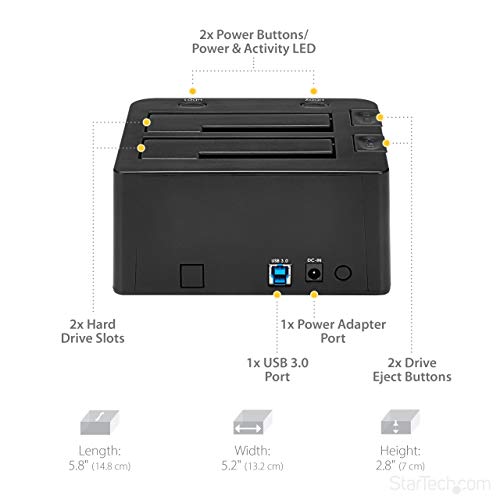
The headline feature is dual-bay hot-swap, and it's worth being precise about what that actually means in practice. Hot-swap here means you can remove a drive and insert another while the dock remains powered and connected to your computer, without needing to shut anything down. This is distinct from a simple two-bay enclosure where you'd typically power down before swapping. For anyone doing drive-to-drive cloning, data recovery work, or simply rotating through a collection of backup drives, this is the feature that makes the SDOCK2U33 genuinely useful rather than just convenient.
Top-loading is the other design choice. It sounds trivial but it's actually a practical advantage over front-loading docks: drives slot in vertically from above, which means the dock can sit flat on a desk without needing clearance in front of it. The slots are open at the top, so there's also passive airflow around the drives, which matters if you're running drives for extended periods. Drives generate heat, and heat is the enemy of longevity. A dock that traps heat around the drive is a dock that shortens drive life. The open-top design here is sensible engineering, not a cost-cutting shortcut.
The SATA I/II/III backward compatibility is standard at this point but still worth confirming, particularly if you're dealing with older drives from decommissioned systems. You won't need to think about whether a drive is compatible; it almost certainly will be. The dock also handles both 2.5-inch laptop drives and full-size 3.5-inch desktop drives in the same bays, which is more versatile than it sounds when you're consolidating data from multiple old machines with different drive sizes. StarTech also builds in independent LED activity indicators per bay, so you can actually see which drive is being accessed, which is useful when you've got two drives in and you're trying to work out what's going on.
Performance in Practice
For mechanical hard drives, the USB 3.0 interface is not a bottleneck. Full stop. A 7200rpm 3.5-inch drive doing sequential reads will hit somewhere around 150 to 200 MB/s, and USB 3.0's practical throughput sits comfortably above that. What owner reviews consistently report is that the SDOCK2U33 sustains those speeds without the kind of random disconnects or speed drops that plague cheaper docks. That sustained reliability under load is the real performance metric for a dock like this, and it's where the StarTech pedigree shows.
With SATA SSDs, the picture changes. An SSD capable of 500 MB/s sequential reads will hit the USB 3.0 ceiling and you'll see effective throughput somewhere in the 300 to 400 MB/s range depending on the host system and cable quality. That's still fast enough for most data transfer tasks, but if you're regularly moving large files to and from SSDs and speed matters, you'd want to look at a dock with USB 3.1 Gen 2 or Thunderbolt connectivity instead. The SDOCK2U33 is honest about what it is: a USB 3.0 device, designed primarily for the HDD use case, and it performs that role very well.
Owner reviews are telling here. The 4.5-star average across 147 is notably high for a product in this category, where a lot of buyers come in with specific and sometimes demanding use cases. The consistent themes in positive reviews are reliability over extended sessions, recognition without driver issues on Windows and macOS, and the hot-swap function actually working as advertised rather than causing the kind of filesystem errors that cheaper docks can produce. The negative reviews, where they exist, cluster around two things: the occasional unit with a faulty power adapter out of the box, and the expected SSD speed ceiling that buyers sometimes didn't anticipate before purchasing. Neither of those is a design flaw in the dock itself.
Build Quality
StarTech is a Canadian company that's been selling connectivity hardware since 1985, and they have a reputation to protect in the enterprise and prosumer space. The SDOCK2U33 reflects that: the chassis is solid plastic construction with a finish that doesn't feel like it'll crack the first time you look at it wrong. The drive slots have appropriate resistance when inserting drives, which is a small thing but it matters. Cheap docks either grip too loosely (drives wobble, connectors wear faster) or too tightly (you're forcing drives in and risking damage). The SDOCK2U33 sits in the right middle ground according to owner reports.
The external power adapter is a point worth addressing directly. Some buyers see an external brick as a downgrade, but for a dual-bay dock supporting 3.5-inch drives it's actually the correct engineering decision. A 3.5-inch drive can draw up to 2A at 12V during spin-up, and if you've got two of them in the dock simultaneously, you need a power supply that can actually deliver that current without voltage sag. Bus-powered docks that claim to support 3.5-inch drives are almost always lying, or they're relying on USB current that your port may or may not be able to supply. The dedicated adapter here means the drives get clean, stable power, which is directly relevant to data integrity and drive longevity.
The top-loading slots themselves are reinforced at the SATA connector end, which is where the stress concentrates when you're inserting and removing drives repeatedly. Hot-swap is only a useful feature if the physical connector can handle the cycle count, and StarTech's build quality here is appropriate for the use case. The dock doesn't feel premium in the way that, say, a well-made aluminium enclosure does, but it feels properly made for what it is. It's not going to win any desk aesthetics awards, but it'll still be working in three years, which is the more relevant measure.
Ease of Use
Setup is about as simple as it gets. Plug in the power adapter, connect the USB cable to your computer, and insert drives. On Windows 10 and 11, macOS, and most Linux distributions, the dock registers as a standard USB storage device with no additional drivers required. StarTech does provide drivers through their support pages for older operating systems or edge cases, but the vast majority of buyers won't need them. This is plug-and-play in the genuine sense, not the marketing sense.
Hot-swapping drives in practice is straightforward but requires the same care you'd apply to any removable storage: eject the drive through the OS before physically removing it, wait for the activity LED to go dark, then pull the drive. This isn't a quirk of the StarTech dock; it's how hot-swap works with any storage device that isn't designed for RAID or server environments. Owner reviews suggest the dock handles this correctly and consistently, which means the OS eject process works cleanly without leaving the dock in a confused state that requires a full reconnect cycle.
The per-bay activity LEDs deserve a mention here because they're actually useful rather than decorative. When you've got two drives in and you're running a data transfer, being able to see which bay is active at a glance saves you from guessing. It's a small UX detail but it's the kind of thing that distinguishes a product designed by people who've thought about how it gets used from one that's just been spec'd to a price. The physical layout is logical too: bays are clearly differentiated, the power LED is visible without being obnoxious, and the USB cable exits from the rear so it doesn't clutter the front of the unit.

Connectivity and Compatibility
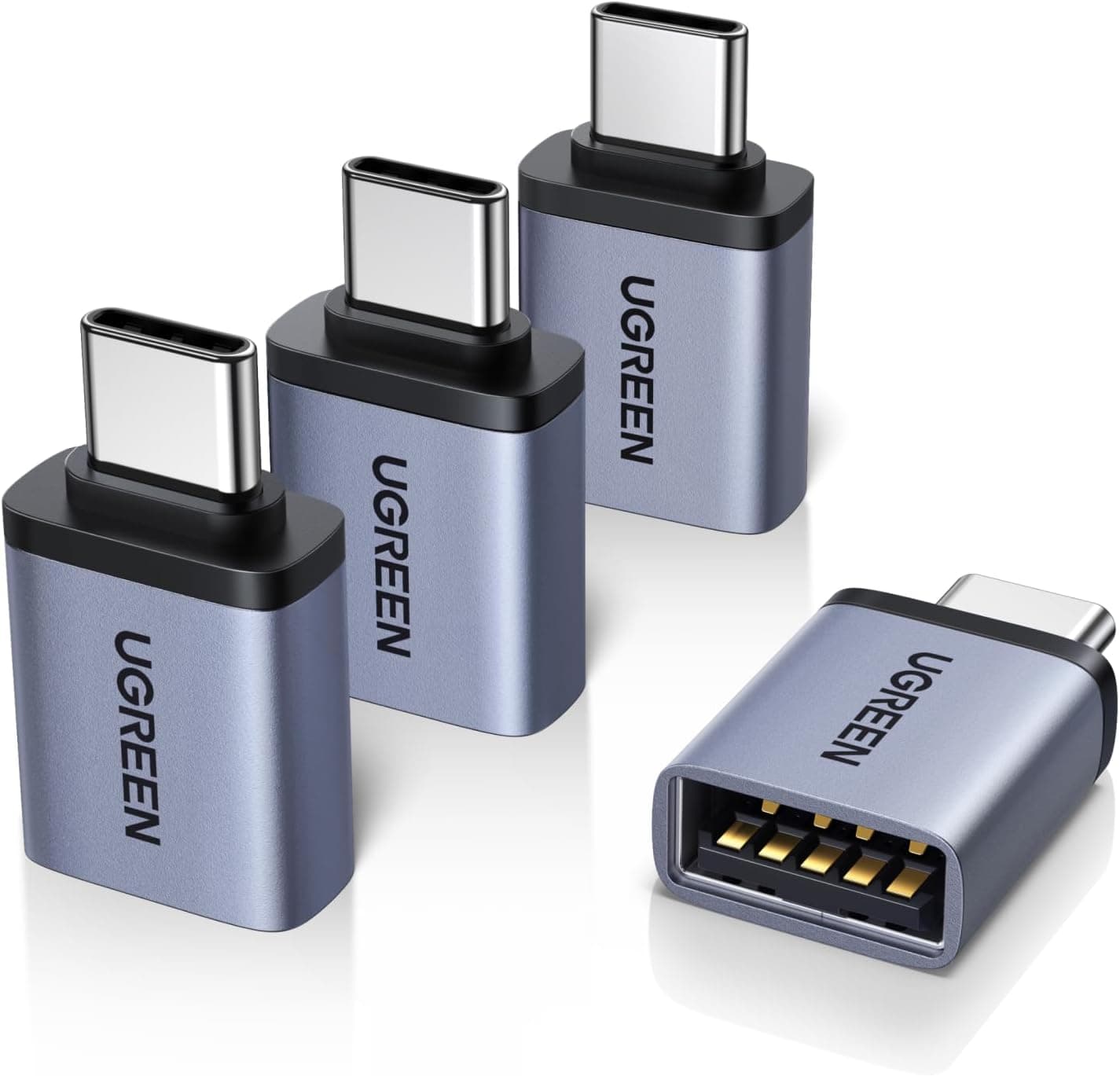
The host connection is USB 3.0 Type-B, which means you'll need a USB Type-A to Type-B cable (included) or an appropriate adapter if your laptop only has USB-C ports. That's for anyone on a modern thin-and-light laptop: you'll need a USB-C to USB-A adapter, or a USB-C to Type-B cable, neither of which is included. It works fine with USB 3.1 and USB 3.2 ports via backward compatibility, and it'll also work at USB 2.0 speeds on older machines, though you'd obviously see much lower throughput in that scenario. The USB Implementers Forum specifies backward compatibility as a core requirement of the USB standard, so this isn't a concern.
Drive compatibility is broad. SATA I, II, and III all work, covering effectively every SATA hard drive and SSD manufactured in the last fifteen years. The 2.5-inch and 3.5-inch support in the same bays is genuinely flexible. There's no large drive size limitation noted in the specifications, and owner reviews include reports of 8TB and larger drives working without issue, which is what you'd expect from a dock using a competent SATA-to-USB bridge controller. If you're planning to use very large drives (10TB and above), it's the current StarTech support documentation for any firmware-level size limits, but this hasn't been a reported issue in the owner review base.
OS compatibility covers Windows (7 through 11), macOS, and Linux. StarTech's support infrastructure is meaningfully better than the no-name competition here: they publish drivers, they update them, and they have actual technical support. For enterprise or prosumer buyers who need to know there's someone to call if something goes wrong, that matters. For home users, the practical reality is that you'll likely never need to contact support at all, but it's reassuring to know the option exists with a real company behind it rather than a generic import label. The StarTech product page lists current driver downloads and compatibility notes.
Real-World Use Cases
The most obvious use case is data migration and backup. If you're upgrading a desktop or laptop and need to transfer data from an old drive to a new one, a dual-bay dock with hot-swap is significantly more convenient than juggling USB enclosures or cracking open a PC case. You slot both drives in, use your preferred cloning software (Macrium Reflect on Windows, Carbon Copy Cloner on macOS, or similar), and let it run. The SDOCK2U33 handles this well, and the sustained transfer reliability that owner reviews highlight is directly relevant here: a cloning job that drops connection halfway through is worse than useless.
Data recovery is another strong fit. If you're pulling data off drives from dead machines, the ability to hot-swap means you can work through a stack of drives efficiently without constantly reconnecting the dock. IT technicians and small business owners who deal with this kind of thing regularly will find the StarTech dock a proper workhorse rather than a frustration. The broad SATA compatibility means you're unlikely to encounter a drive that won't seat and register correctly.
Rotating backup drives is the third scenario where this dock earns its keep. The sensible backup strategy for anyone with irreplaceable data involves keeping multiple copies on separate drives, at least one of which is stored offsite or disconnected. A dock like this makes it easy to plug in whichever backup drive you're updating, run the backup, eject cleanly, and swap in the next. It's more convenient than a single-bay enclosure and cheaper than a full NAS for people who don't need NAS-level features. And the hot-swap reliability means you're not gambling with data integrity every time you do a drive swap.
Finally, there's the drive testing and diagnostics use case. If you're buying second-hand drives, refurbishing old hardware, or just want to check the health of drives before retiring them, having a dock that lets you quickly connect any SATA drive without screwing it into an enclosure saves significant time. Tools like CrystalDiskInfo on Windows or smartmontools on Linux work perfectly over USB, and the per-bay LED indicators help you keep track of which drive you're currently interrogating.
Value Assessment
At the current price of £80.39, the SDOCK2U33 sits in the lower mid-range, which is exactly where a dual-bay StarTech dock should sit. You're paying more than the cheapest no-name docks on Amazon, and you're getting meaningfully more in return: a reputable brand with actual support infrastructure, better build quality, and a track record of sustained reliability that's reflected in a 4.5-star average across nearly 147. That's not a marginal difference; that's the difference between a tool you can trust with important data and one that you're always slightly nervous about.
The cheaper end of the dual-bay dock market sits roughly 30 to 40 percent below this price point, and the unbranded options in that bracket have a much more mixed review profile. You'll find plenty of buyers who got lucky and had no issues, and plenty who had power adapter failures, inconsistent hot-swap behaviour, or drives that simply weren't recognised. For a device that's handling your data, that's not a gamble worth taking to save a relatively small amount of money. The StarTech premium is modest and justified.
At the upper end, you start getting into docks with USB 3.1 Gen 2 connectivity (10 Gbps), which makes more sense if SSDs are your primary use case. Those docks typically cost 50 to 80 percent more than the SDOCK2U33, and for pure HDD use they offer no practical advantage. The honest value assessment is this: if your drives are mechanical HDDs, the SDOCK2U33 is excellent value. If you're primarily docking SSDs and transfer speed matters to you, spend more on a faster interface. If you're not sure, the StarTech dock is the safer default.
How It Compares
The two most relevant competitors in this space are the Inateck FD2002 and the ORICO 6629US3. Both are dual-bay USB 3.0 docks in a similar price bracket, and both have decent review counts. The comparison is worth doing properly because the differences aren't always obvious from spec sheets alone.
The Inateck FD2002 is typically cheaper and has a large review base with a solid average rating. It's a reasonable dock for light use, but owner feedback patterns suggest it's less consistent under sustained load compared to the StarTech, and the build quality feels noticeably cheaper in hand according to multiple buyer comparisons. The Inateck is a reasonable budget option if you're doing occasional drive access rather than regular heavy use. The ORICO 6629US3 is closer in price to the SDOCK2U33 and offers similar core functionality, but ORICO's support infrastructure is considerably thinner than StarTech's, which matters if you hit a problem. ORICO is a prolific manufacturer of USB accessories, but their product line is broad enough that individual model support can be patchy.
The StarTech SDOCK2U33's advantage is less about headline specs (they're all running USB 3.0 with similar theoretical throughput) and more about the combination of build quality, brand reliability, and actual support availability. For a tool you're trusting with data recovery or backup workflows, that combination matters more than saving a tenner on the purchase price.
| Feature | StarTech SDOCK2U33 | Inateck FD2002 | ORICO 6629US3 |
|---|---|---|---|
| Host Interface | USB 3.0 (5 Gbps) | USB 3.0 (5 Gbps) | USB 3.0 (5 Gbps) |
| Drive Bays | 2 | 2 | 2 |
| Drive Size Support | 2.5" and 3.5" | 2.5" and 3.5" | 2.5" and 3.5" |
| Hot-Swap | Yes | Yes | Yes |
| Loading Style | Top-loading | Top-loading | Top-loading |
| Per-Bay LEDs | Yes | Yes | Yes |
| Brand Support Quality | Strong (StarTech) | Moderate | Variable |
| Build Quality Perception | Good | Adequate | Good |
| Price Tier | Lower mid-range | Budget | Lower mid-range |

Final Verdict
The StarTech.com Dual-Bay USB 3.0 to SATA Hard Drive Docking Station SDOCK2U33 is a proper tool for a specific job, and it does that job reliably. The 4.5-star average across 147 isn't a fluke; it reflects a product that consistently delivers what it promises: dual-bay hot-swap access to SATA drives, stable power delivery for 3.5-inch HDDs, broad OS compatibility, and the backing of a manufacturer that's been selling connectivity hardware long enough to have figured out what matters. For data migration, backup rotation, drive testing, or data recovery workflows built around mechanical hard drives, this is a sensible buy at the lower mid-range price point.
The caveats are real but narrow. If you're primarily docking SATA SSDs and you care about transfer speed, USB 3.0 will bottleneck you and you should spend more on a dock with a faster interface. The USB 3.0 standard caps at 5 Gbps theoretical, and with protocol overhead you'll see SSDs capped well below their native SATA III potential. That's not a flaw in this dock; it's a limitation of the interface choice, and it's the right interface choice for the HDD-centric use case this product is designed for. If you're using it with HDDs, you'll never notice the ceiling.
The honest don't-overspend line: if you only ever need one drive connected at a time and hot-swap isn't a workflow requirement for you, a single-bay USB 3.0 dock costs significantly less and does the same job. The Inateck DS100 or similar single-bay options are perfectly adequate for occasional drive access. The dual-bay hot-swap capability of the SDOCK2U33 is worth the premium specifically when you're regularly working with multiple drives, not as a general-purpose storage solution. Buy the right tool for your actual workflow, not the more capable one because it sounds better.
Overall, the SDOCK2U33 earns a solid 8 out of 10. It's not the cheapest option, it's not the fastest option, and it's not going to win any beauty contests. But it's well-built, reliably functional, backed by a real manufacturer with real support, and priced fairly for what it delivers. For the buyer who needs a dependable dual-bay dock for HDD work, it's the right call. The StarTech SDOCK2U33 is available at £80.39 with ★★★★½ (4.5) from 147 owners.
What works. What doesn’t.
5 + 3What we liked5 reasons
- Reliable hot-swap that actually works without filesystem errors
- Supports 2.5-inch and 3.5-inch SATA drives in the same bays
- StarTech brand means real driver support and genuine warranty backing
- Stable external power delivery for dual 3.5-inch HDD operation
- Per-bay activity LEDs are genuinely useful, not just decorative
Where it falls3 reasons
- USB 3.0 interface bottlenecks SATA SSDs below their native speed potential
- External power brick adds desk clutter
- No USB-C host connection, requires adapter on modern thin-and-light laptops
Full specifications
6 attributes| Form factor | 2.5"/3.5" |
|---|---|
| Interface | USB 3.2 Gen 1 |
| Read speed MBS | 625 |
| Type | External HDD |
| Warranty years | 2 |
| Write speed MBS | 625 |
Frequently asked
5 questions01Is the StarTech.com Dual-Bay USB 3.0 to SATA Hard Drive Docking Station (SDOCK2U33) worth buying?+
For HDD-centric workflows like data migration, backup rotation, and drive diagnostics, yes. It's reliably built, backed by a reputable manufacturer with real support infrastructure, and priced fairly at the lower mid-range. The 4.5-star average across 147 owner reviews reflects consistent satisfaction. If you're primarily docking SSDs and need maximum transfer speed, you'd be better served by a dock with a faster host interface.
02How does the StarTech.com SDOCK2U33 compare to alternatives like the Inateck FD2002?+
The Inateck FD2002 is cheaper and adequate for light, occasional use, but owner feedback suggests it's less consistent under sustained load and feels cheaper in build quality. The ORICO 6629US3 is similarly priced to the StarTech but comes with thinner support infrastructure. The SDOCK2U33's advantage is the combination of StarTech's brand reliability, better build quality, and genuine manufacturer support, which matters when you're trusting a device with important data.
03What are the main pros and cons of the StarTech SDOCK2U33?+
Pros: reliable hot-swap functionality, supports both 2.5-inch and 3.5-inch SATA drives, strong manufacturer support, stable power delivery for dual HDDs, and useful per-bay activity LEDs. Cons: USB 3.0 interface bottlenecks SATA SSDs below their native speed potential, the external power adapter adds desk clutter, and there's no USB-C host connection for modern laptops without an adapter.
04Is the StarTech.com SDOCK2U33 easy to set up?+
Very much so. On Windows 10/11, macOS, and most Linux distributions it's plug-and-play with no additional drivers needed. Connect the power adapter, plug in the USB cable, insert drives, and the OS recognises them as standard USB storage devices. StarTech provides drivers through their support pages for edge cases, but the vast majority of buyers won't need them.
05What warranty applies to the StarTech.com SDOCK2U33?+
Amazon offers 30-day returns. StarTech.com typically provides a manufacturer warranty on their products; check the current product page for specific warranty terms. StarTech has a reputation for honouring warranty claims and providing genuine technical support, which is a meaningful advantage over unbranded alternatives.