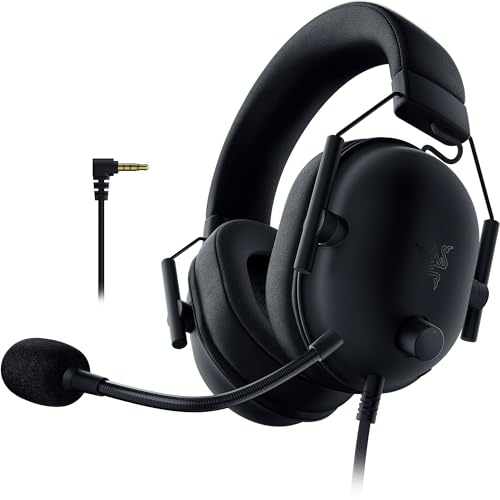
Right, so here's a situation most of us have been in at some point. You're mid-match, you've just called out an enemy position, and your mate replies with "mate, your mic sounds like you're talking through a crisp packet." Or maybe you've been grinding through a long session and your ears are absolutely killing you by hour two. Sound familiar? If you're nodding along, it might be time to look at what's sitting on your head and ask whether it's actually doing its job.
The Razer BlackShark V2 PlayStation Headset is Razer's attempt to give PlayStation players a proper mid-range option that doesn't cost a fortune but still delivers where it counts. I've been wearing this thing for three weeks solid across PS5 sessions, some PC gaming, and a fair bit of just general use. And honestly? There's quite a bit to talk about. This isn't a headset that's going to blow your mind in every department, but it's also not trying to. It's aiming squarely at that mid-range sweet spot where most of us actually live.
Before we get into the detail, a quick note on context. The mid-range gaming headset market in 2026 is absolutely packed. You've got options from SteelSeries, HyperX, Corsair, and Sony's own first-party stuff all competing for the same wallets. So Razer needs to bring something real to the table here, not just slap a logo on a mediocre product and call it a day. Let's see how they've done.
Core Specifications
The BlackShark V2 PlayStation Headset uses 50mm drivers, which is a solid size for a gaming headset at this price point. Larger drivers don't automatically mean better sound (I've heard terrible 53mm drivers and brilliant 40mm ones), but 50mm gives Razer enough room to work with in terms of low-end extension and overall volume headroom. The headset connects via a 3.5mm jack for the standard wired connection, and there's also a USB-A connection option depending on which version you're using. Weight sits at a comfortable level that I'll get into more in the comfort section, but it's not a heavy headset by any stretch.
Frequency response is listed at 12Hz to 28kHz, which is the kind of spec that looks impressive on paper but means relatively little in practice. Human hearing tops out around 20kHz for most adults, and even less as you get older. What matters more is how the headset performs within the 20Hz to 20kHz range that actually matters for gaming and music. The impedance sits at 32 ohms, which means it'll drive fine from a controller or phone without needing a dedicated amp. That's the right call for a PlayStation-focused headset.
Build-wise, you're getting a mostly plastic construction with some metal reinforcement in the headband. The earcups are oval-shaped, which Razer has been using on the BlackShark line for a while now, and they're covered in a leatherette material. The cable is braided, which is a nice touch at this price, and the inline volume control is easy to find by feel during a session. Here's the full spec breakdown:
| Specification | Detail |
|---|---|
| Driver Size | 50mm |
| Driver Type | Dynamic |
| Frequency Response | 12Hz, 28kHz |
| Impedance | 32 ohms |
| Sensitivity | 100 dBSPL/mW (1kHz) |
| Connection | 3.5mm / USB-A |
| Microphone Type | Detachable boom mic |
| Mic Frequency Response | 100Hz, 10kHz |
| Mic Pickup Pattern | Cardioid |
| Earcup Style | Closed-back, oval |
| Cable Length | 1.3m (with 2m extension) |
| Platform | PlayStation (primary), PC, mobile |
| Current Price | £39.99 · Details |

Audio Specifications
The BlackShark V2 uses dynamic drivers, which is the standard choice for gaming headsets and for good reason. Dynamic drivers are generally better at producing impactful bass and handling the kind of sudden loud transients you get in gaming (explosions, gunshots, that sort of thing) compared to planar magnetic drivers. Planar magnetics are brilliant for audiophile listening but they tend to be expensive and power-hungry, neither of which suits a PlayStation headset that needs to run off a controller.
At 32 ohms impedance and 100 dBSPL/mW sensitivity, this headset is genuinely easy to drive. Plug it into a DualSense controller and you'll have more than enough volume without maxing out the PS5's audio output. That sensitivity figure also means it responds quickly to volume changes, which matters when you're adjusting on the fly mid-game. Some cheaper headsets have lower sensitivity and you end up cranking everything to max just to hear dialogue properly. Not an issue here.
The microphone specs are worth a look too. A 100Hz to 10kHz frequency response for the mic is fairly standard for a gaming boom mic. It's not going to capture the full richness of a studio condenser, but it covers the range where human voice sits comfortably, roughly 85Hz to 8kHz for most people. The cardioid pickup pattern is the right choice for gaming because it focuses on what's directly in front of it (your mouth) and rejects sound from the sides and rear. So your keyboard clatter and background noise should be reasonably well controlled, though I'll get into the real-world performance of that in the mic section. For a deeper look at how dynamic drivers work versus other types, Wikipedia's headphones article is actually a decent starting point if you want the technical background.
Sound Signature
The BlackShark V2 PlayStation Headset has a V-shaped sound signature, which means the bass and treble are pushed forward while the mids sit slightly recessed. This is a deliberate tuning choice and it's honestly the most popular tuning for gaming headsets because it makes things sound exciting. Explosions hit harder, gunshots crack more sharply, and music sounds punchy. But it does come with trade-offs, particularly if you care about voice clarity in games or want to use this for music listening.
For competitive gaming, the V-shaped tuning is a bit of a double-edged sword. On one side, the boosted treble helps with high-frequency cues like footsteps on hard surfaces and distant gunfire. On the other, the slightly recessed mids can make some directional audio cues feel less precise than they would on a more neutral headset. I noticed this most in Warzone sessions where enemy movement sounds sometimes felt a touch muddier than I'd like. It's not a dealbreaker, but if you're a hardcore competitive player who lives and dies by audio cues, a flatter tuning might suit you better.
For story games and cinematic experiences, though? The V-shape actually works really well. Playing through a narrative game with this headset felt genuinely immersive. The bass gives weight to environmental sounds and the treble adds sparkle to music scores. Razer has clearly tuned this with entertainment in mind as much as pure competitive play, which makes sense given it's a PlayStation headset. PS5 players are often as interested in single-player experiences as they are in multiplayer, and the tuning reflects that. It's a crowd-pleaser rather than a specialist tool.
Sound Quality
Right, there's a fair bit to say here. Starting with gaming, the soundstage on the BlackShark V2 is decent for a closed-back headset. It's not going to fool you into thinking you're wearing open-backs, but there's enough width to the sound that you can get a reasonable sense of direction. Left and right separation is good. Front and back separation is where it gets a bit woolly, which is pretty common for closed-back gaming headsets at this price.
Bass extension is genuinely impressive for the money. Playing through some heavy action sequences, the low-end had real presence without becoming overwhelming or muddy. Across a few different games including racing titles where engine rumble matters, the BlackShark V2 handles it well. The bass doesn't bleed into the mids too badly either, which is a common problem with budget headsets that try to do the same thing. Treble clarity is good, maybe slightly harsh at higher volumes on certain sounds, but nothing that made me wince regularly.
For music, it's fine. I wouldn't buy this as a music headset, but if you're listening to gaming soundtracks or chucking on a playlist while you play, it sounds decent. Electronic music and hip-hop benefit from the V-shape tuning. Acoustic stuff and classical music sounds a bit thin because of those recessed mids. Movies are a highlight actually. The bass weight and treble clarity combine nicely for film audio, and if you're using your PS5 as a media player as well as a gaming machine, you'll probably enjoy this more than you expect. Razer's official BlackShark V2 product page has more detail on their TriForce Titanium driver technology if you want to dig into the engineering side.
Microphone Quality
The mic is detachable, which I always appreciate. When you're playing solo or watching something, you can just pull it off and not have a boom arm dangling in your peripheral vision. The connection is solid too, no wobble or loose feeling when it's attached. The mic itself is flexible enough to position properly, and I found the sweet spot was about two finger-widths from the corner of my mouth, angled slightly downward.
Real-world voice clarity is genuinely good for a gaming headset mic. My squad could hear me clearly in Discord and in-game voice chat without me having to repeat myself constantly, which is more than I can say for some best gaming headsets for streaming The cardioid pattern does a reasonable job of rejecting keyboard noise, though if you're a loud mechanical keyboard user, some of that will still bleed through. My Razer BlackWidow (yes, I know, very on-brand) was audible to teammates when I was typing quickly, but not enough to be annoying. A quieter keyboard would probably be fine.
Where the mic falls short is in that slightly nasal, compressed quality that's common to gaming headset mics at this price. It's not going to sound like you're broadcasting from a studio. Voices come through clearly but lack the warmth and depth you'd get from even a basic standalone USB mic. For gaming comms, that's absolutely fine. If you're streaming and care about audio quality for your audience, you'd want a separate mic. But for its intended purpose, chatting with your squad during a session, it does the job without embarrassing you. The noise rejection is better than average for the category, which is worth calling out specifically.
Comfort & Build
Comfort is where I spend a lot of time in my reviews because it's genuinely the thing that matters most for long sessions. A headset that sounds brilliant but gives you a headache after 90 minutes is a bad headset, full stop. The BlackShark V2 PlayStation Headset sits at a weight that's light enough to forget about during shorter sessions. Over two-hour stretches, I did start to notice it, but it never became uncomfortable enough to make me want to take it off.
The oval earcups are a design choice I've always liked on the BlackShark line. They fit around the ear rather than pressing on it, which makes a big difference for long sessions. The leatherette material is soft enough initially, but I'll be honest, after a couple of hours it does get a bit warm. If you run hot or you're gaming in a warm room, you might find yourself wanting to take a break just to let your ears breathe. Memory foam earcups would help here, and some of Razer's pricier headsets have them, but at this price point you're getting standard foam with leatherette covering.
The headband padding is adequate. It's not the thickest padding I've seen, but the headset distributes weight well enough that it doesn't create a pressure point on top of your head. Clamp force is on the firmer side, which is actually good for noise isolation but might be a bit much if you have a wider head. It's manageable with glasses on, though not the most glasses-friendly headset around. The build quality overall feels solid for the price. The plastic doesn't creak, the hinges feel sturdy, and the braided cable hasn't shown any signs of fraying after three weeks of daily use. It's not a premium build, but it's not cheap-feeling either.

Connectivity
The BlackShark V2 PlayStation Headset is a wired headset, which I know some people will immediately write off, but hear me out. For competitive gaming, wired is still the gold standard. Zero latency, no battery anxiety, no wireless interference. You plug it in and it works. The 3.5mm connection goes straight into the DualSense controller, which is exactly how most PS5 players want to use a headset. No dongles, no setup, just plug and play.
There's also a USB connection option which gives you access to some additional features including virtual surround sound processing. I'll be honest, I mostly used the 3.5mm connection because it's simpler and the audio quality difference wasn't dramatic enough to make the USB route feel necessary for everyday gaming. The USB connection does unlock the Razer software features though, which I'll cover in the software section. The cable length is 1.3 metres with a 2-metre extension included in the box, which is a genuinely useful inclusion. The short cable is fine for handheld or close-up use, and the extension sorts you out if you're sitting further from your TV.
One thing worth mentioning is that the wired nature does mean you're tethered. If you're used to wireless freedom, going back to a cable can feel restrictive. I've been using wireless headsets for a lot of my daily gaming and switching to the BlackShark V2 for testing did remind me how much I've come to appreciate not having a cable. That's not a knock on this headset specifically, it's just the reality of the wired category. For the price, you're not going to find a wireless option that competes on audio quality, so the trade-off makes sense.
Battery Life
This is a wired headset, so there's no battery to worry about. Which is genuinely one of the underrated advantages of wired headsets that people don't talk about enough. You never have to remember to charge it. You never sit down for a gaming session and discover it's dead. You never get that low-battery warning beep in the middle of a crucial match. Just plug it in and you're sorted, indefinitely.
I've reviewed enough wireless headsets to know that battery anxiety is a real thing. Even headsets with 30-plus hour battery life can catch you out if you forget to charge them after a long session. The BlackShark V2 sidesteps that entire problem. It draws power from the controller or the USB port, so as long as your PS5 is on, you're good. That simplicity has genuine value, especially for more casual players who don't want to think about managing another device's battery.
The flip side is that you are dependent on having a cable plugged in at all times. If your cable gets damaged, you need a replacement. Razer uses a standard 3.5mm connection though, so finding a replacement cable is trivially easy and cheap. Some headsets use proprietary connectors that make cable replacement a nightmare, so the standard connection here is a sensible choice. Overall, the lack of battery is a feature as much as it's an absence of one, depending on how you look at it.
Software & Customisation
When connected via USB to a PC, the BlackShark V2 PlayStation Headset works with Razer Synapse 3, Razer's software suite. Synapse gives you access to a parametric EQ with a handful of presets and the ability to create custom EQ curves. There's also mic monitoring (sidetone), which lets you hear your own voice through the headset so you don't end up shouting. That's a feature I always appreciate and it's implemented well here, with adjustable levels so you can dial in exactly how much of your own voice you want to hear.
The virtual surround sound option, THX Spatial Audio, is available through Synapse. I'll give you my honest take on virtual surround: it's a gimmick more often than not. For some games it adds a bit of extra spatial awareness, but for most competitive gaming I found it made the audio sound more processed and actually hurt my ability to pinpoint sounds accurately. I turned it off after a few sessions and stuck with stereo. That said, for cinematic gaming and movies, the spatial processing does add some width to the soundstage that can be enjoyable. It's worth trying both and seeing what works for you.
On PlayStation itself, you're limited to whatever audio settings the PS5 offers natively, which is actually pretty decent. The PS5's built-in 3D audio processing (Tempest Audio) works through the 3.5mm connection, so you're not entirely missing out on spatial audio features even without Synapse. Firmware updates for the headset aren't really a thing here since it's a passive wired device, which again is one of the advantages of going wired. There's nothing to update, nothing to go wrong with software, and no connectivity issues to troubleshoot. It just works.
Compatibility
Despite the PlayStation branding, the BlackShark V2 is actually pretty versatile when it comes to compatibility. The 3.5mm connection means it'll work with anything that has a headphone jack, so PS5, PS4, Xbox Series X/S, Nintendo Switch, PC, Mac, and mobile devices are all fair game. The PlayStation branding is more about the marketing focus and the fact that it's aimed at PlayStation owners, rather than any hard technical limitation.
On PS5, it works perfectly. Plug into the DualSense, adjust your audio settings in the PS5 menu, and you're off. The PS5's Tempest 3D Audio works through the headset when connected this way, which is a nice bonus. On Xbox, it also works fine via the 3.5mm port on the Xbox controller. It works on an Xbox Series S without issues. Switch works too, both in handheld mode and docked with a controller that has a headphone jack.
PC compatibility via USB gives you the full Synapse experience as mentioned above. Via 3.5mm on PC, it works as a standard audio device without any software features. Mobile is fine for listening and calls, though the mic may not work perfectly on all phones depending on whether they use a CTIA or OMTP standard for the 3.5mm jack. Most modern phones use CTIA, which is the same standard the BlackShark V2 uses, so it should be fine. The 3.5mm audio connector Wikipedia page has more on the different standards if you're curious. Bottom line: this headset is more cross-platform than its PlayStation branding suggests.
How It Compares
The mid-range gaming headsets under £100 market is genuinely competitive right now, and the BlackShark V2 PlayStation Headset needs to justify its place against some strong alternatives. The two I'd put it up against most directly are the HyperX Cloud II and the SteelSeries Arctis Nova 1. Both sit in a similar price bracket and target a similar audience, so it's a fair fight.
The HyperX Cloud II has been around for ages and is still a solid choice. It's got a slightly warmer sound signature than the BlackShark V2, better earcup padding in my opinion, and a mic that's similarly capable. Where the BlackShark V2 edges ahead is in treble clarity and the overall crispness of the audio, particularly for competitive gaming. The Cloud II can sound a touch muddy in the highs by comparison. The SteelSeries Arctis Nova 1 is the more interesting comparison. It's got a more neutral sound signature, which some players will prefer, and the ski-goggle headband design is genuinely more comfortable for long sessions. But the BlackShark V2 has more bass impact and the mic is arguably a bit cleaner.
None of these headsets are perfect, and honestly the differences between them are smaller than the marketing would have you believe. Your best bet is to think about what matters most to you. If comfort is the priority, the Arctis Nova 1's headband design is hard to beat. If you want the most exciting sound signature for action games, the BlackShark V2 is a strong pick. If you want a proven, reliable option with good all-round performance, the Cloud II is still worth considering. Here's how they stack up on paper:
| Feature | Razer BlackShark V2 PS | HyperX Cloud II | SteelSeries Arctis Nova 1 |
|---|---|---|---|
| Driver Size | 50mm | 53mm | 40mm |
| Connection | 3.5mm / USB | 3.5mm / USB | 3.5mm |
| Sound Signature | V-shaped | Warm, bass-forward | Neutral |
| Mic Type | Detachable boom | Detachable boom | Retractable |
| Virtual Surround | THX Spatial (USB/PC) | 7.1 (USB) | No |
| Wireless Option | No | No | No |
| Platform Focus | PlayStation / PC | Multi-platform | Multi-platform |
| Price Tier | Mid-range | Mid-range | Mid-range |

Final Verdict
After three weeks of daily use across competitive multiplayer, story games, and general media consumption, the Razer BlackShark V2 PlayStation Headset has earned a solid recommendation from me. It's not the best headset I've ever tested, and there are things I'd change if I could, but for the price it's asking, it delivers where it counts.
The audio quality is genuinely good for the mid-range bracket. The V-shaped tuning makes games sound exciting and impactful, the bass has real weight without becoming a mess, and the treble is crisp enough to help with directional audio in competitive play. The mic is better than average for the category, the build quality is solid, and the cross-platform compatibility is a nice bonus even if the PlayStation branding is front and centre. My main gripes are the leatherette earcups getting warm during long sessions, the slightly firm clamp force that might not suit everyone, and the fact that it's wired in a world where wireless is increasingly the norm.
Who should buy this? PlayStation players who want a reliable, good-sounding wired headset without spending a fortune. If you're primarily a PS5 gamer who plays a mix of competitive and story games, this headset covers both reasonably well. It's also a decent pick for PC gamers who want something that works across multiple platforms without fuss. Who should skip it? Anyone who's already committed to wireless and doesn't want to go back to a cable. Also, if you have a wider head or wear glasses for extended periods, the clamp force might become an issue over time. And if you're a hardcore competitive player who needs the most precise audio imaging possible, a more neutrally-tuned headset might serve you better.
My editorial score for the Razer BlackShark V2 PlayStation Headset is 7.5 out of 10. It's a genuinely good mid-range headset that does most things well and nothing catastrophically badly. In a crowded market, that's actually harder to achieve than it sounds. Check the current price below and see if it fits your budget.
What works. What doesn’t.
5 + 4What we liked5 reasons
- Exciting V-shaped sound signature suits action games and cinematic play
- Detachable boom mic with above-average voice clarity for the price
- Works across PS5, Xbox, Switch, PC, and mobile via 3.5mm
- Solid build quality with braided cable and sturdy hinges
- No battery to manage. Plug in and play instantly
Where it falls4 reasons
- Leatherette earcups get warm during sessions over two hours
- Firm clamp force may not suit wider heads or glasses wearers
- Wired only. No wireless option at any price point in this line
- V-shaped tuning slightly hurts mid-range precision for hardcore competitive play
Full specifications
12 attributes| Connectivity | 3.5mm wired |
|---|---|
| Surround | 7.1 |
| Microphone | fixed-cardioid |
| Noise cancellation | true |
| Driver size | 50mm |
| Driver size MM | 50 |
| Frequency response HZ | 12-28000 |
| Microphone type | cardioid boom |
| Microscope type | non-detachable boom |
| Platforms | PC, PS4, PS5, Xbox, Switch, Mobile |
| Spatial audio | false |
| Type | over-ear |
If this isn’t right for you
2 options

Frequently asked
5 questions01Is the Razer BlackShark V2 PlayStation Headset good for competitive gaming?+
It's decent for competitive gaming. The V-shaped sound signature boosts treble clarity which helps with high-frequency cues like footsteps, but the slightly recessed mids mean positional audio isn't as precise as you'd get from a more neutrally-tuned headset. For casual to mid-level competitive play it's absolutely fine. For serious ranked play where every audio cue matters, you might want something flatter in its tuning.
02Does the Razer BlackShark V2 PlayStation Headset have a good microphone?+
Yes, the mic is above average for a gaming headset at this price. The detachable boom mic uses a cardioid pickup pattern that does a reasonable job of rejecting background noise, and voice clarity is good enough that teammates can hear you clearly in Discord and in-game voice chat. It has that slightly compressed quality common to gaming headset mics, so it won't replace a standalone USB mic for streaming, but for gaming comms it's solid.
03Is the Razer BlackShark V2 PlayStation Headset comfortable for long sessions?+
It's comfortable for sessions up to around two hours without issue. The oval earcups fit around the ear rather than pressing on it, and the weight distribution is good. The main comfort concern is the leatherette earcups getting warm during longer sessions, and the clamp force is on the firmer side which may not suit wider heads or glasses wearers. For most people it's fine, but it's not the most comfortable headset in its price bracket.
04Does the Razer BlackShark V2 PlayStation Headset work with PS5 and Xbox?+
Yes, it works with both. The 3.5mm connection plugs straight into the DualSense controller for PS5 and into the Xbox controller for Xbox Series X/S. It also works with Nintendo Switch, PC, Mac, and mobile devices. The PlayStation branding reflects its primary focus and tuning rather than any technical limitation. On PS5 via 3.5mm, you also get access to the Tempest 3D Audio processing.
05What warranty applies to the Razer BlackShark V2 PlayStation Headset?+
Amazon offers 30-day returns on most products. Razer typically provides a 1-2 year manufacturer warranty on their headsets, covering manufacturing defects. Check Razer's official warranty page and your Amazon order confirmation for the specific terms that apply to your purchase.