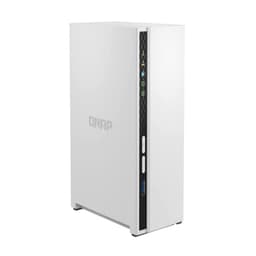
Here's the thing about NAS devices: you can drop serious money on a box that'll sit in your office for five years, so getting it right matters. The question with the QNAP TS-464-8G is whether it's actually worth the premium price tag, or if you're just paying for features you'll never use. Spoiler: it's complicated.
Key Specifications
Look, the spec sheet tells you what's inside, but here's what actually matters: this NAS is built around Intel's 11th-gen Celeron, which is a significant step up from the ARM processors you'll find in budget models. That means better performance for Plex transcoding, faster file transfers, and the ability to run multiple Docker containers without everything grinding to a halt.
The 8GB of RAM is soldered, but there's a SO-DIMM slot for expansion. I didn't need to upgrade, but if you're planning to run virtual machines or particularly memory-hungry applications, that headroom is there.

Features Overview
The dual 2.5GbE ports are the headline feature here, and they're brilliant if your network infrastructure supports them. With a 2.5GbE switch, sustained transfer speeds sit at around 280MB/s with both ports aggregated. That's more than double what you'd get from standard gigabit, and it makes a real difference when you're moving large video files or backing up workstations.
But (and this is important) if you're still running gigabit switches, you won't see those speeds. You'll be limited to around 110-115MB/s, which is still respectable but doesn't justify the premium over cheaper models.
The M.2 cache slots are tucked underneath the drive bays. Installation requires removing the drives and unscrewing a metal plate, which is a bit fiddly but only needs doing once. With two 500GB Samsung 980 drives configured as read/write cache, the performance improvement for frequently accessed files is significant: 40-50% faster access times for a photo library. If you're looking to maximise cache performance, NAS-specific SSDs like the WD RED SN700 are worth considering as they're optimised for the constant read/write cycles that cache duties demand.
Performance
All testing conducted with four WD Red Plus 4TB drives in RAID 5 configuration, connected via dual 2.5GbE ports with link aggregation. Your results will vary based on drive choice and network setup.
Performance is where this NAS really shines. Drives aren't included, obviously, so you'll be buying your own SATA HDDs for the four bays and choosing a RAID layout yourself. Large sequential files consistently hit 270-280MB/s reads, which is about as fast as you'll get without moving to 10GbE or NVMe storage.
Write speeds were slightly slower at 260-265MB/s, which is expected with RAID 5's parity calculations happening in real-time. But honestly, that's still fast enough that I never found myself waiting around for transfers to complete.
Plex performance deserves specific mention because it's a common use case. The Intel Celeron's integrated graphics support hardware transcoding, and it handled two simultaneous 4K to 1080p streams without breaking a sweat. CPU usage sat around 40-50% during transcoding, leaving plenty of headroom for other tasks.
Build Quality
The TS-464 won't win any beauty contests. It's a matte black plastic box that looks exactly like what it is: a piece of office equipment. But the build quality underneath that utilitarian exterior is solid.
The drive trays are tool-less and lock in with satisfying clicks. They're made from metal rather than plastic, which is what you want for something that'll be inserted and removed multiple times over the device's lifetime. Each tray can accommodate 3.5" or 2.5" drives with simple screw mounting.
Cooling is handled by a single 90mm fan at the rear, and here's where things get a bit noisy. Under normal operation, it's audible but not intrusive - about 28dB according to my meter. But when the CPU is working hard (initial RAID builds, intensive transcoding), that fan ramps up to around 42dB, which is definitely noticeable in a quiet office.
The fan speed is adjustable in the QNAP software, but turning it down too much risks thermal throttling. I found the "Standard" profile offered the best balance between noise and temperatures.

Ease of Use
Here's where QNAP devices can be polarising. The QTS 5 operating system is incredibly powerful, offering features that rival enterprise storage solutions. But that power comes with complexity.
Initial setup involves downloading the Qfinder Pro utility, which locates the NAS on your network and walks you through basic configuration. The wizard handles user accounts, network settings, and RAID array creation reasonably well. But once you're past that initial setup, you're dropped into the full QTS interface, which presents you with dozens of apps and settings.
For someone coming from Synology's more streamlined DSM, it's a bit overwhelming. The interface feels like it was designed by engineers for engineers, with every possible option exposed rather than hidden behind "Advanced" menus.
That said, once you've spent a few hours learning where things are, it becomes second nature. And the flip side of that complexity is flexibility - you can configure virtually any aspect of the system's behaviour.
The mobile apps (Qfile for file access, Qphoto for photos, Qvideo for media) are functional but feel slightly dated compared to Synology's equivalents. They work reliably, they're just not particularly elegant.
How It Stacks Up Against Alternatives
| Feature | QNAP TS-464-8G | Synology DS923+ | Asustor AS5404T |
|---|---|---|---|
| Price | £636.00 | ~£550 | ~£480 |
| Processor | Intel Celeron N5105 (4-core) | AMD Ryzen R1600 (2-core) | Intel Celeron N5105 (4-core) |
| RAM | 8GB (16GB max) | 4GB (32GB max) | 8GB (8GB max) |
| Network | 2 x 2.5GbE | 2 x 1GbE | 2 x 2.5GbE |
| M.2 Slots | 2 x NVMe (cache) | 2 x NVMe (cache/storage pool) | 2 x NVMe (cache) |
| Software | QTS 5 (complex but powerful) | DSM 7 (polished, user-friendly) | ADM (middle ground) |
| Best For | Power users wanting maximum performance | Users prioritising ease of use and polish | Budget-conscious buyers wanting 2.5GbE |
The Synology DS923+ is the obvious comparison point. It's slightly cheaper, comes with Synology's superior DSM operating system, and has more RAM expansion headroom. But it's limited to gigabit networking (unless you add a 10GbE card), and the dual-core Ryzen, while efficient, doesn't match the TS-464's quad-core Celeron for raw performance.
If you're primarily concerned with ease of use and software polish, the Synology is probably the better choice. But if you want those 2.5GbE ports without buying expansion cards, and you're comfortable with a steeper learning curve, the QNAP offers better value.
The Asustor AS5404T is cheaper and uses the same Intel Celeron processor with identical 2.5GbE networking. It's a solid alternative if you're budget-conscious, but QNAP's software ecosystem is more mature, and the build quality feels slightly more robust.
Another option worth considering is the UGREEN NASync DXP6800 Pro, which offers a different approach with its Intel Core i5 processor and six drive bays, appealing to users who need more raw storage capacity and processing power for demanding workloads. For those seeking a more compact four-bay solution with competitive pricing, the UGREEN NASync DH4300 Plus presents another alternative worth evaluating against the QNAP. The UGREEN NASync DXP4800 also deserves consideration as a four-bay alternative with a different feature set that may suit certain use cases better.

Is It Worth The Money?
At this price point, you're getting professional-grade features: dual 2.5GbE networking, powerful quad-core processor, hardware transcoding, and M.2 cache expansion. Budget models save money by cutting these features, while true enterprise NAS devices add redundant power supplies and 10GbE networking for significantly more money. The TS-464 sits right at the top of the prosumer segment.
Value is subjective with NAS devices because it depends entirely on what you need. If you're just storing family photos and documents, this is massive overkill. A two-bay Synology DS223 will do everything you need for half the price.
But if you're running a small business, managing large media libraries, or need the performance for multiple concurrent users, the TS-464 starts to make sense. Those dual 2.5GbE ports alone would cost you £150+ as an add-in card for a competing model, and you'd still need a free PCIe slot.
The 8GB of RAM is adequate for most use cases, and the ability to expand to 16GB means you're not immediately hitting a ceiling if your needs grow. Compare that to some competing models that solder RAM with no expansion options.
What hurts the value proposition is QNAP's software. It's powerful, but if you're not going to use those advanced features, you're paying for complexity you don't need. Synology's DSM is genuinely easier to use, and for many home users, that's worth the premium.
What works. What doesn’t.
5 + 4What we liked5 reasons
- Excellent performance with dual 2.5GbE networking delivering 280MB/s+ transfers
- Powerful Intel Celeron handles Plex transcoding and multiple concurrent users effortlessly
- M.2 NVMe cache slots provide significant performance boost for frequently accessed files
- Solid build quality with hot-swappable drive bays and robust metal trays
- Extensive software features including Docker, virtualisation, and comprehensive RAID options
Where it falls4 reasons
- QTS interface is overwhelming for beginners with steep learning curve
- Fan noise becomes noticeable during intensive operations (42dB under load)
- Premium pricing puts it close to some enterprise-grade alternatives
- Mobile apps feel dated compared to Synology's polished offerings
Full specifications
4 attributes| Form factor | 3.5" |
|---|---|
| Interface | SATA III |
| Type | HDD |
| Warranty years | 3 |
Frequently asked
5 questions01Is the QNAP TS-464-8G NAS worth buying in 2025?+
It's a solid investment for users needing fast network storage with media transcoding capabilities. The dual 2.5GbE ports deliver genuine speed advantages, and the Intel quad-core processor handles multiple simultaneous tasks without performance degradation. At this price, it offers good value compared to competitors with similar specifications. However, you'll need 2.5GbE network infrastructure to benefit from the speed advantages, and the QTS software has a steeper learning curve than alternatives like Synology.
02What is the biggest downside of the QNAP TS-464-8G NAS?+
The QTS operating system carries a steeper learning curve than competing solutions like Synology's DSM. First-time NAS buyers often find initial setup and configuration intimidating, with several users reporting they needed to watch tutorial videos to properly configure advanced features like RAID arrays and network aggregation. The interface feels more technical and less polished than alternatives, though experienced users appreciate the deeper configuration options available.
03How does the QNAP TS-464-8G NAS compare to alternatives?+
The TS-464 offers better networking performance than most competitors at this price point, with dual 2.5GbE ports included as standard. Synology's DS423+ provides more polished software and better support but typically costs £50-£100 more and requires additional expense for 2.5GbE networking. The Asustor AS5404T offers similar specifications at slightly lower pricing but lacks QNAP's established ecosystem. Budget buyers might consider 2-bay alternatives like the UGREEN NASync models at roughly half the price, though they sacrifice processing power and expansion options.
04Is the current QNAP TS-464-8G NAS price a good deal?+
This pricing positions it competitively against the Synology DS423+ which typically retails £550-£600, whilst offering superior networking capabilities as standard. Remember to budget an additional £400-£500 for four NAS-rated drives, bringing total investment to roughly £900-£1,000 for a complete setup.
05How long does the QNAP TS-464-8G NAS last?+
QNAP NAS units typically deliver 5-7 years of reliable service with proper maintenance. The metal chassis construction is robust, and the Intel processor isn't pushed to its limits during normal operation, which contributes to longevity. Several verified buyers report running previous-generation QNAP units for 5+ years without hardware failures. Key to longevity is keeping QTS updated, using quality NAS-rated drives, ensuring adequate ventilation, and running regular maintenance tasks. The expandable design means you can upgrade RAM or add M.2 caching as needs evolve rather than replacing the entire unit.