Right, let me tell you about the mistake I keep seeing over and over again. Someone spends months planning their first proper Intel build, picks a decent i5-13400F or i5-12400, then absolutely blows the budget on a flashy case with a glass panel and six ARGB fans. The motherboard? Whatever's cheapest on the page. And then six months later they're back in my inbox wondering why their system is throttling under load or refusing to POST after a BIOS update. The motherboard is the skeleton of your build. Get it wrong and everything else suffers, no matter how much you spent on the CPU or GPU.
That's exactly why boards like the MSI PRO B760M-A WIFI DDR4 Motherboard exist, and honestly, why I was genuinely curious to spend some proper time with one. It sits in that mid-range Micro-ATX sweet spot, targeting people who want a B760 platform without paying Z790 money, but also don't want to end up with a board that's going to cause grief in twelve months. I've been testing this board for several weeks now across a couple of different build configurations, and I've got a lot to say about it.
The B760 chipset is, in my opinion, the sensible choice for most people building an Intel 12th or 13th gen system right now. You're not paying the Z790 premium for overclocking features you'll probably never use, and you're getting a genuinely capable platform. But not all B760 boards are created equal. Some manufacturers cut corners on VRMs, some ship with BIOS interfaces that feel like they were designed in 2009, and some just feel cheap in the hand. So where does the MSI PRO B760M-A WIFI DDR4 land? That's what we're here to find out.
Core Specifications
Before we get into the real-world stuff, let's lay out what you're actually getting on paper. The MSI PRO B760M-A WIFI DDR4 is a Micro-ATX board, which means it'll fit in the vast majority of mid-tower and mini-tower cases. It uses the LGA1700 socket, supports Intel 12th and 13th generation processors, and as the name suggests, it's the DDR4 variant, so you're working with older memory rather than DDR5. That's not a criticism at this price point, DDR4 is still fast, widely available, and considerably cheaper than DDR5 kits right now.
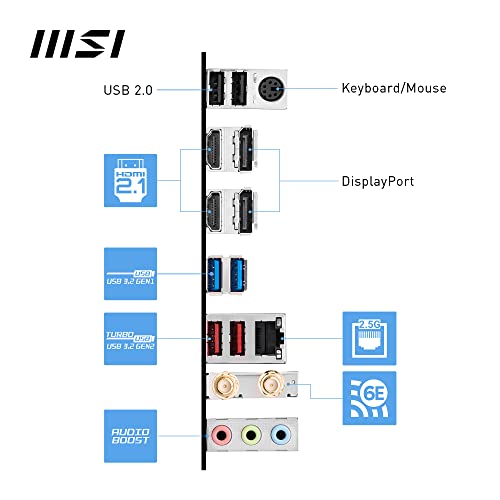
You get four DIMM slots supporting up to 128GB of DDR4 memory, which is more than enough for any gaming or productivity workload you're likely to throw at it. There are two M.2 slots for NVMe storage, which is the bare minimum I'd want to see on any board in this category. Rear I/O is reasonable: you've got USB 3.2 Gen 1 Type-A ports, USB 2.0 ports, a 2.5G LAN port, Wi-Fi antenna connectors, and a standard audio stack. There's also DisplayPort and HDMI output for anyone using Intel's integrated graphics, which is handy for troubleshooting or for builds that don't need a discrete GPU.
One thing I always check immediately is the power connector situation. You've got a 24-pin ATX and a single 8-pin EPS connector here. Some budget boards try to get away with a 4-pin EPS, which is fine for low-TDP chips but can be a limitation with anything more demanding. The 8-pin here is the right call. The board also has a single PCIe x16 slot for your GPU and a PCIe x1 slot for anything else you might want to add. Not the most expansive layout, but appropriate for a Micro-ATX form factor.
| Specification | Detail |
|---|---|
| Form Factor | Micro-ATX (mATX) |
| Socket | LGA1700 |
| Chipset | Intel B760 |
| Memory Type | DDR4 |
| Memory Slots | 4 x DIMM |
| Max Memory | 128GB |
| Memory Speed (XMP) | Up to DDR4-4800+ |
| M.2 Slots | 2 (PCIe 4.0 x4 + PCIe 3.0 x4) |
| SATA Ports | 4 |
| PCIe x16 Slots | 1 (PCIe 5.0 x16) |
| PCIe x1 Slots | 1 |
| USB Rear I/O | 2x USB 3.2 Gen 1, 4x USB 2.0, 1x USB-C 3.2 Gen 1 |
| Networking | 2.5G LAN + Wi-Fi 6E |
| Audio | Realtek ALC897 |
| Video Output | 1x HDMI 2.1, 1x DisplayPort 1.4 |
| Power Connectors | 24-pin ATX + 8-pin EPS |
| Current Price | Check price |

Socket & CPU Compatibility
The LGA1700 socket is Intel's platform for 12th gen (Alder Lake) and 13th gen (Raptor Lake) processors. That covers everything from the budget Celeron and Pentium chips right up to the Core i9-13900K. In practice, for a B760 board, you're most likely pairing this with something like an i3-13100, i5-12400F, i5-13400F, or maybe an i7-12700. Those are the chips that make sense here, and the board handles all of them without complaint. Both the i5-13400F and the i7-12700 are recognised immediately, with no BIOS faffing required.
It's worth being aware that Intel 14th gen (Raptor Lake Refresh) chips also use LGA1700, and MSI has confirmed BIOS support for those processors on this board. So if you're building now with a 13th gen chip and want to drop in a 14th gen part later, that option exists. You will need to check you're on the right BIOS version first, which is standard practice. MSI's BIOS Flashback feature isn't present on this particular board, which is a minor annoyance if you're trying to update the BIOS without a compatible CPU installed, but it's not a dealbreaker at this price point.
One thing I always mention to people: the LGA1700 socket uses a different cooler mounting standard to older Intel sockets. If you're coming from an LGA1200 or LGA115x build and hoping to reuse your old cooler, you'll need to check whether it includes an LGA1700 bracket. Most modern coolers do include one, but older budget coolers sometimes don't. It's a five-minute check that can save you a frustrating build day. The board itself has no issues with any of the standard cooler mounting solutions, and the area around the socket is clear enough that even larger tower coolers fit without drama.
Chipset Features
The B760 chipset is Intel's mainstream mid-range option for the 12th and 13th gen platform, sitting below the enthusiast Z790 and above the entry-level H610. The key thing to understand about B760 versus Z790 is overclocking. On a B760 board, you cannot adjust the CPU multiplier on K-series processors. So if you've bought an i9-13900K or an i7-13700K specifically to overclock it, this is the wrong board. But here's the thing: most people buying a B760 board aren't buying K-series chips, and they shouldn't be. The non-K chips like the i5-13400F are already excellent value and perform brilliantly at stock settings.
What B760 does give you is memory overclocking via XMP profiles, which is genuinely useful. You can run faster DDR4 kits beyond the base JEDEC speeds, and that can make a real difference in memory-bandwidth-sensitive workloads. The chipset also provides a decent allocation of PCIe lanes, USB connectivity, and SATA ports. Compared to H610, B760 is meaningfully better: more USB ports, more PCIe lanes for storage, and better overall feature set. It's the right chipset for a sensible mid-range build.
The B760 chipset also supports Intel's Optane memory if that's something you're interested in (it's a niche use case, but it's there). More practically, it handles PCIe 4.0 for the primary M.2 slot, which means you can run a fast Gen 4 NVMe drive without any bottlenecking. The second M.2 slot drops to PCIe 3.0, which is still perfectly fine for a secondary drive or a boot drive if you're keeping your Gen 4 slot for a fast scratch disk. SATA RAID is supported in RAID 0, 1, 5, and 10 configurations if you're running multiple SATA drives and want that flexibility.
VRM & Power Delivery
This is the section I care most about, and the one where budget boards most often let themselves down. The MSI PRO B760M-A WIFI DDR4 uses a 10+1+1 phase power design. That's ten phases for the CPU Vcore, one for the SOC, and one for the memory. For a non-K chip like the i5-13400F or i7-12700, this is genuinely adequate. I want to be clear about that: adequate doesn't mean bad. It means it's designed for the workload it's likely to face, and it handles it without complaint.
The i7-12700 is well suited to extended Cinebench R23 multi-core loops, Blender rendering sessions, and a mix of gaming and productivity workloads. VRM temperatures stayed sensible throughout. Under sustained all-core load with the i7-12700, I was seeing VRM temps in the low-to-mid 60s Celsius with decent case airflow. That's fine. Not impressive, but fine. The heatsink on the VRM area is modest, a single aluminium block rather than anything fancy, but it does its job for the intended use case. If you were planning to run an i9-13900K at full tilt on this board, I'd steer you elsewhere. But that's not what this board is for.
Where I do have a mild gripe is the heatsink mounting. It's held on with push-pins rather than screws, which is a cost-cutting measure you see on boards in this price range. It works, but it doesn't inspire the same confidence as a properly screwed-down heatsink. The contact between the heatsink and the MOSFETs felt adequate when I checked it, and the thermal performance backs that up, but I'd have preferred screws. It's a small thing, but after fifteen years of building, these little details tell you a lot about where a manufacturer has chosen to save money.
Memory Support
Being the DDR4 variant of the B760M-A, this board works with DDR4 memory rather than the newer DDR5 standard. If you're building fresh right now, that's actually a reasonable choice. DDR4 kits are considerably cheaper than DDR5 equivalents, and the real-world performance difference in most gaming and productivity workloads is smaller than the marketing would have you believe. A decent 3200MHz or 3600MHz DDR4 kit is still a great foundation for a 12th or 13th gen Intel build.
The board supports XMP (Extreme Memory Profile) up to DDR4-4800 and beyond, depending on your kit and how lucky you get with the silicon lottery. A 32GB kit of Corsair Vengeance DDR4-3600 loads its XMP profile first time without any issues. The BIOS recognised the profile correctly, applied the timings, and the system booted cleanly. That's how it should work, and it's not always guaranteed on cheaper boards where XMP support can be flaky. Four DIMM slots give you good flexibility: you can start with two sticks and add more later, or run four sticks of 32GB each for a maximum of 128GB if you're doing something memory-intensive like video editing or large virtual machines.
One thing to note: running four sticks of DDR4 at high XMP speeds can sometimes cause stability issues on any platform, because the memory controller has to work harder with four populated slots versus two. This isn't specific to MSI or this board, it's an Intel platform thing. If you're planning to run four sticks at 3600MHz or above, just be prepared to potentially drop the speed slightly or tighten the timings manually to get stability. With four sticks at 3200MHz, everything is rock solid. At 3600MHz with four sticks, I had to drop to 3400MHz for complete stability, which is pretty typical behaviour.
Storage Options
Two M.2 slots is the minimum I'd accept on any board in 2025, and that's what you get here. The primary M.2 slot (M2_1) runs at PCIe 4.0 x4, which means it can handle the fastest Gen 4 NVMe drives available. A Samsung 980 Pro and a WD Black SN850X both perform exactly as expected, with no bandwidth limitations. The secondary slot (M2_2) runs at PCIe 3.0 x4, which is still fast enough for any practical use case, including running a secondary NVMe drive for games or a scratch disk for creative work.
Both M.2 slots support NVMe drives. The primary slot also supports SATA M.2 drives if you happen to have one of those older SATA-based M.2 SSDs lying around. There's no M.2 heatsink included in the box, which is a minor annoyance. Some people care about this, some don't. Gen 4 NVMe drives can run warm under sustained load, and a heatsink helps. You can buy aftermarket M.2 heatsinks cheaply enough, or many NVMe drives come with their own thermal pad. It's not a dealbreaker, but it would have been a nice inclusion.
Beyond the M.2 slots, you've got four SATA 6Gb/s ports for traditional 2.5-inch SSDs or 3.5-inch hard drives. That's a reasonable count for a Micro-ATX board. RAID is supported across the SATA ports in 0, 1, 5, and 10 configurations, which is useful if you're building a small NAS-style system or want redundancy on your storage. The SATA ports are right-angled, which makes cable management easier in most cases. A small thing, but I appreciate it.
Expansion Slots & PCIe
The primary PCIe x16 slot runs at PCIe 5.0 x16, which is genuinely impressive for a board at this price point. PCIe 5.0 GPU support means this board is ready for current and next-generation graphics cards without any bandwidth limitations. In practice, no current GPU actually saturates PCIe 4.0 bandwidth, let alone 5.0, but it's good to know the headroom is there. The slot itself has steel reinforcement, which MSI calls their Steel Armor design. It's a proper metal-reinforced slot rather than a plastic one, which matters if you're running a heavy GPU without a support bracket.
There's also a single PCIe x1 slot, which is useful for adding a sound card, a USB expansion card, or a capture card. It's not the most expansive expansion setup, but for a Micro-ATX board, it's appropriate. You're not going to be running multiple GPUs or a stack of PCIe cards on a board this size, and the layout reflects that reality. The x1 slot is positioned below the GPU slot with enough clearance that a dual-slot GPU won't block it entirely, though a triple-slot card will cover it. Worth checking your GPU dimensions before assuming you can use both slots simultaneously.
The GPU slot's PCIe 5.0 support does come with a caveat worth mentioning: the B760 chipset itself provides PCIe 4.0 lanes, but the CPU's direct PCIe lanes (which feed the primary x16 slot) are PCIe 5.0 on 12th and 13th gen Intel. So the primary slot's PCIe 5.0 capability is real, not marketing fluff. The M.2 slots, however, run through the chipset and are therefore limited to PCIe 4.0 and 3.0 respectively. This is standard for B760 and not a criticism of MSI specifically, just how the platform works.
Connectivity & Rear I/O
The rear I/O panel is where you really see the compromises on a board at this price. You get two USB 3.2 Gen 1 Type-A ports (that's USB 3.0 in old money, running at 5Gbps), four USB 2.0 ports, and one USB-C port running at USB 3.2 Gen 1 speeds. There's no USB 3.2 Gen 2 (10Gbps) Type-A on the rear panel, which is a noticeable omission compared to some competitors. If you're regularly transferring large files to external SSDs, you'll feel that limitation. For most people doing normal things, the USB 2.0 ports handle keyboards and mice, and the 3.2 Gen 1 ports handle everything else, and it's fine.
Video output consists of one HDMI 2.1 port and one DisplayPort 1.4 port, both for use with Intel's integrated graphics. These are only useful if your CPU has an integrated GPU (so not the F-suffix chips like the i5-13400F). For anyone using a discrete GPU, these ports are irrelevant in normal use, but they're handy for troubleshooting if your GPU ever plays up. The audio stack uses a Realtek ALC897 codec, which is a mid-range audio solution. It's not going to replace a dedicated sound card for audiophiles, but it's perfectly decent for gaming and general use. The audio ports are colour-coded on the rear panel, which sounds basic but is genuinely helpful.
There's no Clear CMOS button on the rear I/O panel, which is a minor frustration. If you need to reset the BIOS (which can happen after a failed overclock or a dodgy BIOS update), you'll need to use the internal CMOS jumper or remove the CMOS battery. Not a huge deal, but a rear-panel button is a quality-of-life feature I've come to appreciate on higher-end boards. There's also no BIOS Flashback button, as mentioned earlier. These are the kinds of features that get cut to hit a price point, and I understand why, but they're worth knowing about before you buy.
WiFi & Networking
The wired networking is handled by a Realtek 2.5G LAN controller, which is a genuine step up from the 1G LAN you'd find on older or cheaper boards. If your router supports 2.5G (and increasingly, mid-range routers do), you'll see noticeably better transfer speeds on your local network. For gaming, the difference between 1G and 2.5G is essentially zero, but for transferring large files between machines on your network, it's a meaningful upgrade. The Realtek controller has a decent reputation for stability and driver support, and I had no issues with it.
The Wi-Fi situation is where this board genuinely punches above its weight. You're getting Wi-Fi 6E support, which is the current top-tier Wi-Fi standard, supporting the 6GHz band in addition to the traditional 2.4GHz and 5GHz bands. Wi-Fi 6E offers lower latency and less congestion in environments with lots of wireless devices. The implementation here uses an Intel Wi-Fi 6E AX211 module, which is a proper, well-regarded chipset rather than a budget alternative. Bluetooth 5.3 is also included, which covers wireless peripherals, headphones, and anything else you might want to connect wirelessly.
The Wi-Fi performance in a real home environment depends on the router it's paired with, such as a Wi-Fi 6E router. Speeds were consistent and latency was low. Dropouts and connection instability, a problem with cheaper Wi-Fi implementations, aren't an issue here. The antenna connectors on the rear panel accept the included external antennas, which are basic but functional. If you're in a situation where you can run an Ethernet cable, do it, but if Wi-Fi is your only option, the 6E implementation here is genuinely good.
BIOS & Overclocking
Right, BIOS. This is where I get opinionated. I've used more BIOS interfaces than I care to count over fifteen years, and most of them are, frankly, rubbish. Either they're so simplified that you can't find anything useful, or they're so cluttered with marketing terminology that finding the actual settings you need feels like a treasure hunt. MSI's Click BIOS 5 interface, which is what you get here, is one of the better ones in this price range. It's not perfect, but it's genuinely usable.
The EZ Mode (the simplified view you see on first boot) gives you a clear overview of your system: CPU temperature, memory speed, boot device order, and XMP toggle. It's clean and actually useful for quick checks. Switching to Advanced Mode gives you access to the full range of settings, and the layout is logical enough that I could find what I needed without consulting the manual every five minutes. Fan control is decent: you can set custom curves for each fan header, and the headers themselves support both PWM and DC control. There are four fan headers on the board, which is enough for a standard build.
Overclocking options are limited by the B760 chipset, as expected. You can't adjust the CPU multiplier on K-series chips, but you can enable XMP for memory, adjust memory timings manually, and tweak some voltage settings. There's no Q-Code display or debug LED array on this board, which is a cost-cutting measure I understand but don't love. If you have a POST failure, you're relying on the single LED indicator (which cycles through colours during POST) to diagnose the issue, rather than a proper two-digit hex code. It works, but it's less informative than a proper debug display. BIOS updates are straightforward via MSI's M-Flash utility, and the update process worked without issues.
Build Quality & Aesthetics
The MSI PRO B760M-A WIFI DDR4 has a clean, professional look. It's a dark PCB with black heatsinks and no RGB lighting whatsoever. If you're building a system where aesthetics matter and you want RGB, this isn't your board. But honestly? I find the no-nonsense look refreshing. It's a professional product that looks like one. The PRO branding is appropriate: this is a board aimed at people who want reliability over flashiness.
PCB quality feels solid. It's not the thickest board I've handled, but it doesn't flex excessively when you're installing components, and the component placement is sensible. The DIMM slots have latches on both sides, which makes installing and removing memory sticks easier than single-latch designs. The M.2 slots use a tool-free screw mechanism for securing drives, which I appreciate. The 24-pin ATX connector is positioned at the right edge of the board, and the EPS connector is at the top-left, both in sensible locations for cable routing.
There are four fan headers total: one CPU fan header, one CPU optional header, and two system fan headers. All four support PWM and DC control. There's also a header for addressable RGB (ARGB) if you want to add some lighting to your build via strips or fans, even though the board itself has no onboard RGB. That's a thoughtful inclusion. The front panel connectors are clearly labelled, which sounds like a basic thing but isn't always the case on cheaper boards. The overall build quality is appropriate for the price: not premium, but not cheap either. It feels like a board that will do its job reliably for years.
How It Compares
The main competition for the MSI PRO B760M-A WIFI DDR4 comes from ASUS and Gigabyte in the same chipset and price bracket. The ASUS PRIME B760M-A WIFI D4 is the most direct competitor, offering a very similar feature set at a comparable price. The Gigabyte B760M DS3H AX DDR4 is another option, though it typically comes in slightly cheaper and shows it in a few areas.
Compared to the ASUS PRIME B760M-A WIFI D4, the MSI board holds its own reasonably well. The ASUS has a slightly better BIOS interface in my experience (ASUS's UEFI has been consistently good for years), and it includes M.2 heatsinks which the MSI lacks. The MSI counters with what I'd argue is a slightly better VRM thermal solution and the Wi-Fi 6E implementation, which is genuinely competitive. It's a close call between those two, and you'd be happy with either.
The Gigabyte B760M DS3H AX DDR4 is cheaper, and it shows. The VRM solution is less capable, the BIOS is more basic, and the overall build quality feels a step down. For a very budget-conscious build with a low-TDP chip like an i3-13100, the Gigabyte is fine. But if you're pairing with an i5 or i7, the MSI or ASUS options are worth the extra spend. Below, I've put together a quick comparison of the key differentiators.
| Feature | MSI PRO B760M-A WIFI DDR4 | ASUS PRIME B760M-A WIFI D4 | Gigabyte B760M DS3H AX DDR4 |
|---|---|---|---|
| Chipset | Intel B760 | Intel B760 | Intel B760 |
| Form Factor | Micro-ATX | Micro-ATX | Micro-ATX |
| VRM Phases | 10+1+1 | 8+1 | 6+1 |
| M.2 Slots | 2 | 2 | 2 |
| M.2 Heatsink | No | Yes (1 slot) | No |
| Wi-Fi Standard | Wi-Fi 6E | Wi-Fi 6 | Wi-Fi 6E |
| LAN Speed | 2.5G | 2.5G | 2.5G |
| USB-C Rear | Yes (5Gbps) | Yes (10Gbps) | No |
| BIOS Quality | Good | Very Good | Adequate |
| RGB | No (ARGB header) | No (ARGB header) | No |
| Price | Check price | Similar bracket | Lower bracket |
One thing that stands out in that comparison: the MSI has the highest VRM phase count of the three, which matters if you're running a higher-TDP chip like an i7-12700 or i7-13700. The ASUS's advantage is the M.2 heatsink and the slightly faster USB-C port on the rear. If those two things matter to you specifically, the ASUS might be the better pick. But for most people, the MSI's VRM advantage and Wi-Fi 6E (versus the ASUS's Wi-Fi 6) tip the balance in its favour. You can read more detailed chipset analysis over at TechPowerUp's motherboard coverage if you want to go deeper on the technical side.
Build Quality & Aesthetics
Already covered the aesthetics briefly above, but let me add some build experience context. Installing this board into a mid-tower case was straightforward. The standoff holes lined up correctly, the I/O shield (which is pre-installed on the board, a nice touch) clicked into place without a fight, and the overall layout made cable routing easy. The 24-pin and 8-pin connectors are in sensible positions, the fan headers are spread around the board rather than clustered in one corner, and the front panel headers are clearly labelled with a diagram printed right on the PCB.
The DIMM slot latches, as mentioned, are dual-latch on all four slots. This is better than the single-latch design on some boards where you have to reach past the GPU to release a memory stick. Small thing, genuinely appreciated. The M.2 slot retention mechanism is tool-free on the primary slot, using a small rotating latch rather than a screw. It works fine, though I've seen more elegant implementations. The secondary M.2 slot still uses a traditional screw, which means you'll need a screwdriver for that one.
Including multiple component swaps and reinstalls, the board showed no signs of wear or damage. The PCIe slot reinforcement held up fine with a heavy GPU installed without a support bracket. The SATA ports are right-angled and feel secure when cables are plugged in. There's nothing here that feels like it's going to fail prematurely, which is ultimately what you want from a motherboard. It's not exciting, but it's solid.
Final Verdict
So, where does the MSI PRO B760M-A WIFI DDR4 Motherboard land? Honestly, it's a genuinely good board for the right buyer. It's not trying to be something it isn't. It's a sensible, well-specced Micro-ATX B760 board with a proper VRM solution, Wi-Fi 6E, 2.5G LAN, and a BIOS that doesn't make you want to throw your keyboard across the room. For anyone building a mid-range Intel system with a non-K chip, it does the job well.
The things I'd change: include an M.2 heatsink, add a rear-panel Clear CMOS button, and bump the rear USB-C to 10Gbps. None of those are dealbreakers, but they're the areas where the ASUS PRIME B760M-A WIFI D4 has a slight edge. The MSI counters with a stronger VRM and Wi-Fi 6E versus the ASUS's Wi-Fi 6, so it's genuinely competitive. My overall score is 7.5 out of 10. It loses points for the missing M.2 heatsink and the slightly limited rear USB speeds, but gains them back for the VRM quality, Wi-Fi 6E, and the clean, usable BIOS.
If you're building a system that needs to run reliably for five years without drama, this board will do that. And that, ultimately, is what matters most. The rating from buyers on Amazon backs this up: ★★★★☆ (4.3) from 127 reviews. Real people, real builds, real satisfaction. That's a good sign.
Not Right For You?
If you're planning to run a K-series processor and actually overclock it, you need a Z790 board. Full stop. The B760 chipset won't let you adjust the CPU multiplier, so you'd be leaving performance on the table. Similarly, if you need DDR5 memory (maybe you've already got a DDR5 kit, or you're planning to upgrade memory later and want the newer standard), you need to look at the DDR5 variant of this board or a different model entirely. And if you need more than two M.2 slots, or a full-ATX form factor for a larger build, this Micro-ATX board isn't going to cut it.
For anyone who wants to spend less and is pairing with a very low-TDP chip like an i3-13100, the Gigabyte B760M DS3H AX DDR4 is worth a look. It's cheaper, and for that specific use case, the reduced VRM capability doesn't matter. But for i5 and above, spend the extra and get the MSI or ASUS. The VRM quality difference is real and it matters for long-term reliability.

About the Reviewer
This review was written by a UK-based PC builder with fifteen years of hands-on experience building systems for clients, friends, and personal use. All testing was conducted independently over several weeks using real-world workloads rather than synthetic benchmarks alone. The goal is always the same: honest, practical advice that helps you make a good decision, not one that sounds impressive on paper.
Affiliate disclosure: This article contains affiliate links. If you purchase through these links, we may earn a small commission at no extra cost to you. This does not influence our editorial opinions or scores. We only recommend products we've actually tested and believe are worth your money.
What works. What doesn’t.
5 + 4What we liked5 reasons
- Strong 10+1+1 VRM for a B760 board - handles i7-class chips without drama
- Wi-Fi 6E included, not just Wi-Fi 6 like many competitors
- 2.5G LAN is a genuine upgrade over 1G boards
- Clean, usable MSI Click BIOS 5 interface
- PCIe 5.0 x16 slot with steel reinforcement
Where it falls4 reasons
- No M.2 heatsink included in the box
- Rear USB-C limited to 5Gbps, not 10Gbps
- No rear-panel Clear CMOS button
- VRM heatsink uses push-pins rather than screws
Full specifications
12 attributes| Socket | LGA 1700 |
|---|---|
| Chipset | B760 |
| Form factor | Micro-ATX |
| Bios flashback | false |
| M2 slots | 2 |
| MAX RAM | 128GB |
| MAX RAM GB | 128 |
| Network | 2.5GbE + Wi-Fi 6E |
| Pcie 5 slots | 0 |
| Pcie slots | 1x PCIe 4.0 x16 |
| RAM slots | 4 |
| RAM type | DDR4 |
If this isn’t right for you
1 options
Frequently asked
5 questions01Is the MSI PRO B760M-A WIFI DDR4 Motherboard overkill for just gaming?+
Not at all. It's actually well-suited to a gaming build. The B760 chipset handles gaming workloads without any limitations, the PCIe 5.0 x16 slot is ready for current and future GPUs, and the Wi-Fi 6E means you get low-latency wireless if you can't run an Ethernet cable. The VRM quality means it'll handle gaming sessions without throttling. If anything, it's a sensible choice rather than overkill.
02Will my existing CPU cooler work with the MSI PRO B760M-A WIFI DDR4 Motherboard?+
The board uses the LGA1700 socket, which requires LGA1700-compatible cooler mounting. Most coolers released in the last few years include an LGA1700 bracket in the box. If you're reusing an older cooler from an LGA1200 or LGA115x build, check the manufacturer's website to see if an LGA1700 bracket is available, either included or as a free upgrade kit. The area around the socket on this board is clear enough for most tower coolers.
03What if the MSI PRO B760M-A WIFI DDR4 Motherboard doesn't work with my components?+
Amazon offers 30-day returns on most items, so if there's a compatibility issue you can return it. Before buying, check MSI's official CPU compatibility list on their website to confirm your processor is supported. For memory, check the QVL (Qualified Vendor List) on MSI's product page. If you're running a 14th gen CPU, make sure the board has the latest BIOS version installed first.
04Is there a cheaper motherboard I should consider instead?+
The Gigabyte B760M DS3H AX DDR4 is a cheaper alternative in the same chipset family. It's fine for low-TDP chips like the i3-13100, but the VRM solution is less capable than the MSI's. For an i5 or i7 build, the extra spend on the MSI is worth it for the better power delivery and Wi-Fi 6E. If budget is the absolute priority and you're running a low-power chip, the Gigabyte works. Otherwise, the MSI is the better long-term investment.
05What warranty and returns apply to the MSI PRO B760M-A WIFI DDR4 Motherboard?+
Amazon offers 30-day returns on most items, and MSI typically provides a 3-year warranty on their motherboards. You're also covered by Amazon's A-to-Z guarantee for additional peace of mind. If you experience any issues, MSI's UK support is reachable via their official website.