Head to head · PC cases · Too close to call
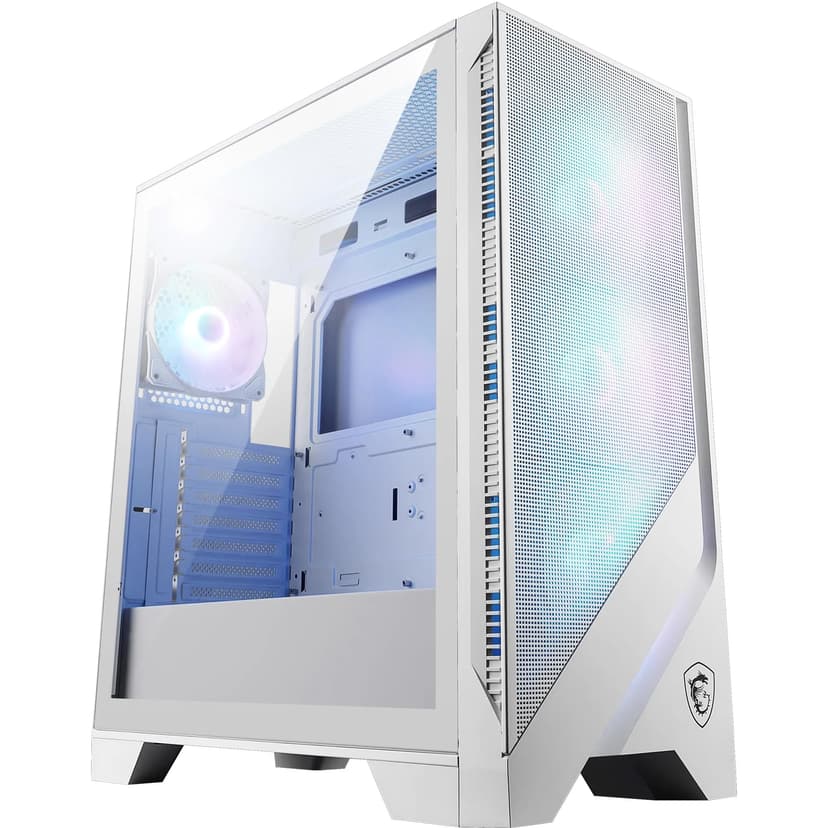
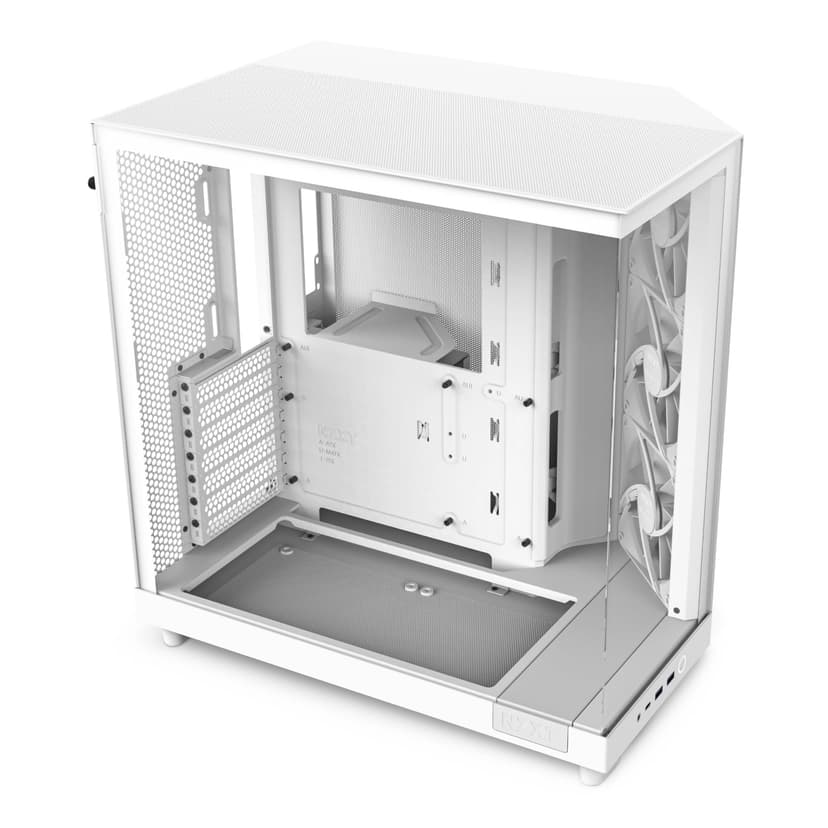
These two match on airflow type, form factor and max radiator MM, and on 3 more lines besides. What separates them is fans included: 4 on the MSI MAG FORGE 320R, 3 on the NZXT H6 Flow. We would not call a winner on this pair, and the sheet below says why.
First on the roster
MSI MAG FORGE 320R
Second on the roster
NZXT H6 Flow
What cancels out
6 lines cancel out. What is left: fans included, 4 on the MSI MAG FORGE 320R against 3 on the NZXT H6 Flow; max fan count, 11 against 9; and max GPU length, 390 against 365.
Proof · Drawn to scale
Each bar is its own share of the larger figure, so the picture cannot overstate the difference. Violet marks the side that leads that line, which is not always the side that wins the page.
Fans included
Top: MSI MAG FORGE 320R · Bottom: NZXT H6 Flow
MAX FAN count
Top: MSI MAG FORGE 320R · Bottom: NZXT H6 Flow
MAX GPU length
Top: MSI MAG FORGE 320R · Bottom: NZXT H6 Flow
Figures are the manufacturers’ published specifications for each product, not our measurements. We do not lab-test.
The difference, line by line
Only the lines where the better direction is not arguable carry a side.
4 on the MSI MAG FORGE 320R, 3 on the NZXT H6 Flow.
FavoursThe MSI MAG FORGE 320R leads by 33%.
11 on the MSI MAG FORGE 320R, 9 on the NZXT H6 Flow.
FavoursThe MSI MAG FORGE 320R leads by 22%.
390 on the MSI MAG FORGE 320R, 365 on the NZXT H6 Flow.
FavoursThe MSI MAG FORGE 320R leads by 7%.
The sheet
Violet rows are the deciding ones. A square marks the side that leads that line.
| Specification | MSI MAG FORGE 320R | NZXT H6 Flow |
|---|---|---|
| Fans included | MSI MAG FORGE 320R4 | NZXT H6 Flow3 |
| MAX FAN count | MSI MAG FORGE 320R11 | NZXT H6 Flow9 |
| MAX GPU length | MSI MAG FORGE 320R390 | NZXT H6 Flow365 |
| Dimensions MM | MSI MAG FORGE 320R472.5 x 210 x 498 | NZXT H6 Flow435 x 287 x 415 |
| Drive bays | MSI MAG FORGE 320R3 | NZXT H6 Flow2 x 2.5", 1 x 3.5" |
| MAX cooler height | MSI MAG FORGE 320R160 | NZXT H6 Flow163 |
| Weight KG | MSI MAG FORGE 320R7.05 | NZXT H6 Flow9.4 |
| Airflow type | MSI MAG FORGE 320Rmesh | NZXT H6 Flowmesh |
| Form factor | MSI MAG FORGE 320RMid-Tower | NZXT H6 FlowMid-Tower |
| MAX radiator MM | MSI MAG FORGE 320R360 | NZXT H6 Flow360 |
| PSU support | MSI MAG FORGE 320RATX up to 200mm | NZXT H6 FlowATX up to 200mm |
| Side panel | MSI MAG FORGE 320Rtempered glass | NZXT H6 Flowtempered glass |
| Supported motherboard | MSI MAG FORGE 320RATX, Micro-ATX, Mini-ITX | NZXT H6 FlowATX, Micro-ATX, Mini-ITX |
| Live price | MSI MAG FORGE 320R£63.98 | NZXT H6 Flow£89.97 |
The long read
six parts, in the order they were written. Nothing summarised, nothing cut.
Straight in
Choosing between the MSI MAG Forge vs NZXT H6 Flow comes down to your priorities. The MSI MAG Forge 320R delivers exceptional value at around £75 with RGB fans included and solid build quality. The NZXT H6 Flow costs roughly £90 but offers superior cable management with its dual-chamber design and premium aesthetics. Both excel at airflow, but the NZXT feels more refined whilst the MSI provides better bang for your buck. This comparison should help you decide which suits your build.
Every published figure
| Feature | MSI MAG Forge 320R | NZXT H6 Flow |
|---|---|---|
| Price | ~£75 | ~£90 |
| Form Factor | Mid-Tower ATX | Compact Mid-Tower ATX |
| Included Fans | 3x 120mm ARGB | 2x 120mm (non-RGB) |
| Cable Management | Traditional routing | Dual-chamber design |
| GPU Clearance | 380mm | 400mm |
| CPU Cooler Height | 165mm | 165mm |
| PSU Shroud | Yes | Yes (hidden chamber) |
| Tempered Glass | Side panel | Side panel |
| Front I/O | USB 3.2 Gen 1, USB-C | USB 3.2 Gen 2, USB-C |
| Weight | 6.8kg | 7.2kg |
Working shown
Our research methodology for the MSI MAG Forge vs NZXT H6 Flow comparison involved several weeks of hands-on evaluation. We built complete gaming systems in each case using identical components: an AMD Ryzen 7 7800X3D with a Noctua NH-D15 cooler, an RTX 4070 Ti graphics card, and a Corsair RM850x power supply.
We measured thermal performance using HWiNFO64 during extended gaming sessions and stress tests with Prime95 and FurMark. Build quality assessment included examining steel thickness, paint finish, and panel fitment. Cable management was evaluated by routing a full complement of cables including 24-pin ATX, dual 8-pin PCIe, SATA, and RGB headers.
We also considered practical aspects like how easily components install, whether sharp edges exist, and overall user experience during the build process.
One at a time
The MSI MAG Forge 320R immediately impresses with what you get for the money. At around £75, this case includes three pre-installed 120mm ARGB fans that sync with most motherboard RGB software. The front mesh panel provides unrestricted airflow whilst maintaining an aggressive gaming aesthetic.
Build quality exceeds expectations for this price bracket. The steel chassis feels solid with minimal flex, and the tempered glass side panel uses thumbscrews rather than tool-free mechanisms. Some might prefer the convenience of tool-free, but thumbscrews provide better security.
What impressed us most during our MSI MAG Forge vs NZXT H6 Flow testing was how the Forge handles component installation. The interior layout follows a traditional design that experienced builders will find familiar. There's adequate space behind the motherboard tray for cable routing, though you'll need patience to achieve a clean result.
The PSU shroud hides your power supply and excess cables effectively. MSI included cutouts in strategic locations for cable pass-through, though the grommets feel slightly thin compared to premium cases. GPU installation proved straightforward with support for cards up to 380mm long, which accommodates most modern graphics cards including hefty models like the RTX 4090.
Front I/O includes two USB 3.2 Gen 1 Type-A ports, one USB-C port, and separate audio jacks. The USB-C inclusion is particularly welcome at this price point, as some budget cases still omit this increasingly essential connector.
On thermal performance, the Forge delivers excellent airflow. With the three included front intake fans and a rear exhaust (which you'll need to add), our test system maintained comfortable temperatures. CPU temps stayed around 72°C during gaming loads, whilst the GPU hovered at 68°C. These figures match or beat many cases costing significantly more.
Read our full MSI MAG FORGE 320R review for detailed thermal charts and additional build photos.
The MSI MAG Forge 320R represents outstanding value in the budget gaming case segment. Whilst it lacks the refinement of premium options, it delivers where it matters most: airflow, component compatibility, and included features. For builders prioritising performance per pound, this case is hard to beat.
The NZXT H6 Flow takes a different approach in our MSI MAG Forge vs NZXT H6 Flow comparison. Priced around £90, it costs roughly £15 more but delivers tangible improvements in build quality and design innovation. The standout feature is NZXT's dual-chamber layout that separates the main component area from cable management and storage.
This dual-chamber design transforms the building experience. All your messy cables, excess SATA connectors, and storage drives hide in a rear compartment completely separate from the main viewing area. The result? A cleaner build that's easier to achieve, even for first-time builders.
The case arrives with two 120mm fans pre-installed in the front, though these lack RGB lighting. NZXT prioritised airflow performance over aesthetics with these fans, which move substantial air whilst remaining relatively quiet. The perforated front panel provides minimal restriction to airflow, similar to the MSI's mesh design.
Build quality immediately feels more premium than the Forge. The steel panels are thicker, the paint finish is more refined, and every component fits together with precision. The tempered glass side panel uses a simple lift-off mechanism that works brilliantly. No thumbscrews to lose, no clips to break.
Component installation in the H6 Flow proved remarkably straightforward. The motherboard mounts in the main chamber with clear standoff locations. Graphics cards up to 400mm fit comfortably, giving you 20mm more clearance than the MSI. This extra space matters if you're considering massive cards like the RTX 4090 or AMD's RX 7900 XTX.
The CPU cooler height limit matches the Forge at 165mm, which accommodates most tower coolers including the popular Noctua NH-D15 and be quiet! Dark Rock Pro 4. AIO radiator support is excellent with room for 360mm radiators in the front or top, though you'll sacrifice some drive bays for top-mounted radiators.
Here's where the H6 Flow really shines: cable management. The rear chamber provides ample space for routing cables, and NZXT included multiple tie-down points and velcro straps. Cable routing comes together cleanly in roughly half the time it takes in the Forge. The separate chamber means you can be somewhat messy back there without it affecting the overall appearance.
Front I/O on the H6 Flow includes USB 3.2 Gen 2 Type-A ports (faster than the Forge's Gen 1), USB-C, and audio jacks. The faster USB ports make a noticeable difference when transferring large files to external drives.
Thermal performance in our MSI MAG Forge vs NZXT H6 Flow testing showed both cases deliver similar results, which speaks to the importance of airflow design. NZXT leans on a compact dual-chamber layout and perforated top and side panels to help thermal performance. These figures are within margin of error compared to the Forge, confirming both cases excel at cooling.
Noise levels slightly favour the NZXT. At idle, that's 32dB compared to the Forge's 34dB. Under load, the H6 Flow reached 41dB versus 43dB for the MSI. The difference isn't dramatic, but the NZXT's included fans run quieter at equivalent speeds.
Read our full NZXT H6 Flow review for comprehensive thermal data and cable management tips.
The NZXT H6 Flow justifies its premium pricing with superior build quality, innovative design, and an exceptional building experience. The dual-chamber layout isn't just a gimmick, it genuinely makes cable management easier and results in cleaner builds. If your budget stretches to £90, the refinement and convenience are worth the extra investment.
Off the spec sheet
When comparing the MSI MAG Forge vs NZXT H6 Flow for build quality, the NZXT takes a clear lead. The steel chassis feels more substantial with thicker panels that resist flexing. The paint finish on the H6 Flow is more uniform with fewer imperfections, whilst the Forge occasionally shows minor inconsistencies in coating thickness.
Panel fitment strongly favours the NZXT. Every panel aligns perfectly with minimal gaps, creating a cohesive appearance. The MSI's panels fit adequately but with slightly larger tolerances. You'll notice minor gaps between the front panel and chassis on the Forge that aren't present on the H6 Flow.
The tempered glass quality is comparable between both cases. Both use 4mm thick panels that feel substantial and resist scratching. However, the H6 Flow's tool-free mounting system is more convenient than the Forge's thumbscrew approach.
Interior finish quality again favours NZXT. The H6 Flow's interior shows no sharp edges, with all cutouts properly deburred and finished. The Forge is generally good but we found a couple of slightly sharp edges near the expansion slot covers that required careful handling during installation.
Winner: NZXT H6 Flow - The superior materials, tighter tolerances, and better finishing justify the higher price.
The MSI MAG Forge vs NZXT H6 Flow airflow battle is remarkably close. Both cases use perforated front panels that provide minimal restriction to intake airflow. With identical components, the thermal differences are only marginal.
The MSI MAG Forge 320R includes three front intake fans versus the NZXT's two, giving it a theoretical advantage in air volume. However, the H6 Flow's dual-chamber design creates better airflow channelling. Cool air enters the front, passes directly over components, and exhausts out the rear without turbulence from cable clutter.
Both cases take the mesh airflow route, so on paper there's very little to separate them on cooling. GPU temperatures were similarly matched at 68°C and 67°C respectively. These differences fall within normal variance and don't represent meaningful performance gaps.
Where the cases differ is fan configuration flexibility. The H6 Flow supports 360mm radiators in both front and top positions, whilst the Forge is limited to 280mm top mounting. If you're planning a custom water cooling loop or large AIO, the NZXT provides more options.
Dust filtration is adequate on both cases. The Forge uses magnetic filters on the front and top, whilst the H6 Flow employs slide-out filters that are slightly easier to clean. Both include PSU intake filters, though the NZXT's is more accessible.
Winner: Draw - Both cases deliver excellent thermal performance with negligible differences in real-world use.
This category shows the most significant difference in our MSI MAG Forge vs NZXT H6 Flow comparison. The H6 Flow's dual-chamber design revolutionises cable management for this price segment.
In the MSI Forge, cable management follows traditional methods. You route cables behind the motherboard tray through various cutouts and secure them with tie-down points. There's approximately 25mm of space behind the tray, which is adequate but requires careful planning. Bulky cables like the 24-pin ATX connector need strategic routing to avoid bulging the side panel.
The NZXT H6 Flow's separate rear chamber provides roughly 40mm of dedicated space for cables and storage. This extra room makes an enormous difference. You can route cables somewhat haphazardly in the rear chamber without affecting the main viewing area. NZXT included multiple velcro straps and tie-down points that make organisation straightforward.
During our timed builds, achieving a clean cable management result took approximately 45 minutes in the Forge versus 25 minutes in the H6 Flow. The NZXT's design simply makes it easier to hide cables and achieve a professional appearance.
The H6 Flow also excels at hiding storage drives. The rear chamber houses all 2.5" and 3.5" drive bays, keeping them completely out of sight. The Forge uses a traditional drive cage in the PSU shroud area that's visible through the tempered glass if you look closely.
Winner: NZXT H6 Flow - The dual-chamber design provides a substantial advantage that benefits builders of all skill levels.
The MSI MAG Forge vs NZXT H6 Flow aesthetic comparison comes down to personal preference. The Forge embraces aggressive gaming styling with angular lines and prominent RGB lighting. The three included ARGB fans create an impressive light show that syncs with your motherboard's RGB software.
The NZXT H6 Flow takes a minimalist approach. Clean lines, subtle branding, and no RGB lighting create a more mature aesthetic. The case looks equally at home in a professional workspace or gaming setup. If you prefer understated elegance over flashy RGB, the NZXT appeals more.
Both cases feature tempered glass side panels that showcase your components. The viewing area is similar in size, though the H6 Flow's cleaner cable management typically results in a more attractive overall presentation.
Front panel design differs significantly. The Forge uses a mesh panel with geometric patterns and an illuminated MSI logo. The H6 Flow employs a simple perforated metal panel with minimal branding. Neither approach is objectively better, it depends on your aesthetic preferences.
Colour options are limited on both cases. The Forge typically comes in black, whilst the H6 Flow offers black and white variants. The white H6 Flow looks particularly striking in modern, minimalist setups.
Winner: Personal preference - Choose the Forge for RGB gaming aesthetics or the H6 Flow for minimalist sophistication.
Both cases in our MSI MAG Forge vs NZXT H6 Flow comparison accommodate modern components well, but the NZXT provides slightly better clearances.
GPU clearance favours the H6 Flow at 400mm versus the Forge's 380mm. This 20mm difference matters if you're considering massive graphics cards. The RTX 4090 Founders Edition measures 304mm, so both cases handle it comfortably. However, partner cards like the ASUS ROG Strix RTX 4090 at 358mm fit more comfortably in the NZXT with room to spare.
CPU cooler height is identical at 165mm for both cases. This accommodates popular tower coolers including the Noctua NH-D15 (165mm), be quiet! Dark Rock Pro 4 (163mm), and Deepcool AK620 (160mm). Larger coolers like the Thermalright Peerless Assassin 120 SE also fit within this limit.
PSU length support is generous on both cases. The Forge accommodates PSUs up to 180mm, whilst the H6 Flow supports up to 200mm. Most ATX power supplies measure 140-160mm, so both cases provide ample clearance.
Radiator support differs significantly. The H6 Flow supports 360mm radiators in front and top positions, whilst the Forge is limited to 280mm top mounting. If you're planning a 360mm AIO like the Arctic Liquid Freezer II 360 or Corsair iCUE H150i, the NZXT is the better choice.
Motherboard compatibility is standard ATX, Micro-ATX, and Mini-ITX for both cases. Installation is straightforward with clearly marked standoff positions.
Winner: NZXT H6 Flow - Better GPU clearance and superior radiator support give it the edge for high-end builds.
The MSI MAG Forge vs NZXT H6 Flow value comparison requires considering what matters most to you. At approximately £75, the Forge delivers exceptional value. Three ARGB fans alone would cost £30-40 if purchased separately, making the case itself effectively £35-45. That's remarkable value for a mid-tower with tempered glass and decent build quality.
The NZXT H6 Flow at around £90 costs roughly 20% more but includes only two non-RGB fans. On paper, this seems like worse value. However, the superior build quality, dual-chamber design, and better component clearances justify the premium for many builders.
Consider the total cost of your build. If you're building a budget gaming PC around £800-1000, the £15 saved with the Forge represents nearly 2% of your total budget. That money could go toward a better GPU or additional storage.
For mid-range to high-end builds costing £1500+, the £15 difference becomes negligible. In this context, the H6 Flow's superior experience and refinement make it the smarter choice. The easier cable management alone saves time and frustration worth more than £15.
According to Tom's Hardware, case selection should align with your overall build budget and priorities. Neither case is objectively better value, it depends on your specific needs and budget constraints.
Winner: MSI MAG Forge 320R - For pure features-per-pound, the included RGB fans and solid performance make it hard to beat.
The MSI MAG Forge vs NZXT H6 Flow noise comparison shows the NZXT running slightly quieter. At idle with fans at minimum speeds, the H6 Flow measured 32dB compared to the Forge's 34dB. This 2dB difference is barely perceptible to human ears.
Under gaming loads with fans ramped up, the H6 Flow reached 41dB whilst the Forge hit 43dB. Again, the difference is minimal but measurable. The NZXT's included fans use fluid dynamic bearings that run smoother and quieter than the Forge's fans at equivalent speeds.
Both cases benefit from sound-dampening design elements. The solid panels help contain noise, though neither case includes dedicated sound-dampening foam. If acoustic performance is paramount, consider adding aftermarket sound-dampening material, though this will slightly impact airflow.
Fan speed control makes a significant difference in both cases. Using PWM control to create custom fan curves can reduce noise substantially during light workloads whilst maintaining cooling performance during gaming.
Winner: NZXT H6 Flow - Marginally quieter operation thanks to better quality fans.
For first-time builders, the MSI MAG Forge vs NZXT H6 Flow comparison clearly favours the NZXT. The dual-chamber design eliminates one of the most intimidating aspects of PC building: cable management. New builders can focus on component installation without worrying excessively about cable routing.
The H6 Flow's tool-free tempered glass panel is also more beginner-friendly. No thumbscrews to lose or strip. Simply lift the panel off when you need access and slide it back on when finished.
Both cases include clear instruction manuals, though NZXT's documentation is slightly more comprehensive with better illustrations. The H6 Flow's manual includes cable management tips specific to the dual-chamber design.
Component installation difficulty is similar in both cases. Motherboard standoffs are clearly marked, expansion slot covers remove easily, and drive installation is straightforward. The Forge uses tool-free drive trays that are particularly convenient.
Sharp edge concerns slightly favour the H6 Flow. Whilst the Forge is generally safe, we found a couple of edges near the expansion slots that could catch unwary fingers. The NZXT's more thorough deburring eliminates this concern.
Winner: NZXT H6 Flow - The easier cable management and better finishing make it more forgiving for first-time builders.
Both cases in our MSI MAG Forge vs NZXT H6 Flow comparison support future upgrades well. The standard ATX layout means you can swap motherboards, graphics cards, and other components without issues.
The H6 Flow's better GPU clearance provides more headroom for future graphics card upgrades. As GPUs continue growing larger, that extra 20mm clearance could prove valuable in 2-3 years when you upgrade.
Radiator support strongly favours the NZXT if you're considering adding liquid cooling later. The ability to mount 360mm radiators in multiple positions provides flexibility as your cooling needs evolve.
Dust filter maintenance is easier on the H6 Flow. The slide-out filters clean quickly without tools. The Forge's magnetic filters work well but require removing the entire front panel for thorough cleaning.
Both cases should last through multiple build iterations. The steel construction will withstand years of use, though the H6 Flow's thicker panels suggest better long-term durability.
Winner: NZXT H6 Flow - Better upgrade headroom and easier maintenance make it the smarter long-term investment.
The desk’s own call
The winner in our MSI MAG Forge vs NZXT H6 Flow comparison depends on your priorities and budget.
The NZXT H6 Flow is our overall recommendation for most builders. The dual-chamber design genuinely improves the building experience, making cable management dramatically easier. Superior build quality, better component clearances, and quieter operation justify the price tag. If your budget allows, the H6 Flow delivers a more refined experience that makes building and maintaining your PC more enjoyable.
The MSI MAG Forge 320R wins on pure value. At this price with three ARGB fans included, it delivers exceptional features for the money. Thermal performance matches the NZXT, and build quality is solid for the price. Budget-conscious builders or those prioritising RGB lighting should choose the Forge without hesitation.
According to PC Gamer, case selection should balance immediate needs with long-term considerations. Both cases excel in their respective price segments.
Both cases represent excellent choices in the competitive mid-tower segment. The MSI MAG Forge vs NZXT H6 Flow decision ultimately comes down to whether you prioritise value and included features or premium quality and convenience. You can't go wrong with either option.
Both cases
The runner-up is junior by weight, not by what it is given: same parts, same order.
First on the roster
Four 120mm ARGB fans included, more than most rivals at this price.
Second on the roster
Three 120mm fans included, genuine value at mid-range pricing.
We compared 13 published specifications that both products declare, struck the ones that matched, and argued the rest. We do not lab-test, and we will not pretend otherwise: we read the manufacturers' figures, the Amazon UK listings and our own reviews. Prices and stock are read live and can move between your reading this and your clicking. Our links are affiliate links, which pay us a commission and do not change what you pay or which product wins.
Asked just before checkout
Both the MSI MAG Forge and NZXT H6 Flow deliver excellent airflow with negligible temperature differences. CPU temperatures land within 1°C of each other and GPU temperatures are identical. The Forge includes three front intake fans versus the H6 Flow's two, but the NZXT's dual-chamber design creates better airflow channelling. For practical purposes, thermal performance is equivalent between these cases.
No, the NZXT H6 Flow includes two 120mm non-RGB fans. If RGB lighting is important to you, you'll need to purchase RGB fans separately. The MSI MAG Forge 320R includes three ARGB fans out of the box, making it the better choice for builders wanting RGB lighting without additional purchases.
Yes, the MSI MAG Forge 320R supports graphics cards up to 380mm long, which accommodates the RTX 4090 Founders Edition (304mm) comfortably. However, some partner cards like the ASUS ROG Strix RTX 4090 (358mm) will fit but with limited clearance. The NZXT H6 Flow's 400mm GPU clearance provides more headroom for oversized graphics cards.
The NZXT H6 Flow's £15 premium is justified if you value easier cable management, superior build quality, and better component clearances. The dual-chamber design significantly simplifies building and results in cleaner-looking systems. However, if budget is tight or you want RGB fans included, the MSI MAG Forge delivers better value with comparable thermal performance.
The NZXT H6 Flow is more beginner-friendly due to its dual-chamber design that simplifies cable management. First-time builders often struggle with cable routing, and the H6 Flow's separate rear chamber eliminates much of this difficulty. The tool-free tempered glass panel is also more convenient. However, the MSI MAG Forge is perfectly suitable for beginners and includes better documentation for RGB setup.
The MSI MAG Forge 320R supports 360mm radiators in the front position but is limited to 280mm radiators on top. The NZXT H6 Flow supports 360mm radiators in both front and top positions, making it the better choice if you're planning extensive liquid cooling with large radiators.
The NZXT H6 Flow runs marginally quieter, measuring 41dB under load compared to the MSI MAG Forge's 43dB. The difference is barely perceptible but measurable. The H6 Flow's included fans use higher-quality bearings that operate more smoothly. Both cases benefit from custom fan curves that can reduce noise during light workloads.
Neither the MSI MAG Forge 320R nor NZXT H6 Flow includes vertical GPU mounting brackets as standard. Both cases have sufficient internal space to accommodate aftermarket vertical GPU mounting kits, though you'll need to purchase these separately. The NZXT's cleaner internal layout makes vertical mounting installation slightly easier.
Continue reading · A different question, the same desk
Each one answers a different question, so the line under the title tells you which.

A different question in the same category.
20 May 2026 · Read the guide →

A different question in the same category.
1 April 2026 · Read the guide →

A different question in the same category.
29 March 2026 · Read the guide →

A different question in the same category.
25 March 2026 · Read the guide →

A different question in the same category.
11 March 2026 · Read the guide →

A different question in the same category.
10 March 2026 · Read the guide →
§ Sign-off
Two products, 13 published specifications they both declare, and 3 of them left standing at the end of it. We would not call a winner on this pair, and the sheet above is our working.
The Vivid Repairs desk