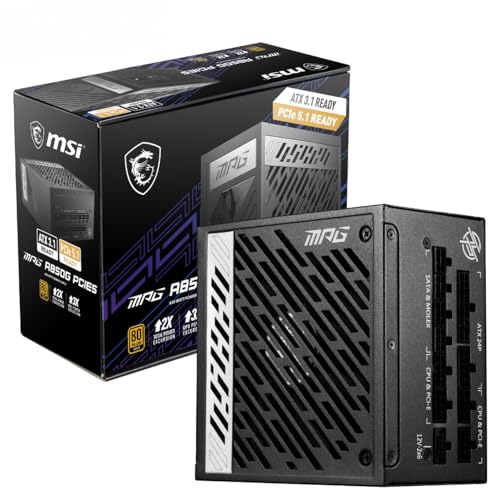
Skip the PSU and regret it. That's the short version. Voltage spikes, dirty ripple on the rails, a fan that screams at 40% load - these aren't hypothetical problems, they're what happens when a system is built on a unit that cuts corners on capacitors and transformer quality. The MSI MAG A550BN 550W Power Supply sits in the mid-range bracket and promises to be the boring, reliable foundation your build actually needs. So is it? Mostly yes, with a couple of caveats before you hand over your card.
The headline numbers are solid: 80 Plus Bronze efficiency, a 5-year warranty that MSI actually backs, six SATA connectors, and a protection suite covering the bases that matter. Owner reviews back this up too, with dozens of ratings and a positive overall rating at time of writing. That's not a marketing number. That's people who built systems with this PSU and came back to say it worked. For a mid-range unit targeting gaming builds, that's exactly where you want to land.
But there's nuance here. This is a non-modular unit in a market where semi-modular options exist at similar price points. The fan runs continuously - no zero-RPM mode. And 550W is a specific ceiling that suits some builds and misses others by a frustrating margin. All of that is worth unpacking properly before you commit.
MSI MAG A550BN 550W Power Supply: Core Specifications
The MSI MAG A550BN 550W Power Supply carries an 80 Plus Bronze certification, which means it's been independently verified to hit at least 82% efficiency at 20% load, 85% at 50% load, and 82% again at full load. It's not Gold, it's not Platinum, but it's a real certification with real meaning - not a marketing sticker. MSI backs the unit with a 5-year warranty, which is a genuine signal of confidence in the internals. Budget units from less reputable brands often offer two years, sometimes three. Five years is the mid-to-high range standard and it matters.
The fan is a 120mm unit running at all times - no semi-passive mode here. That's a deliberate design choice rather than an oversight: consistent airflow keeps thermals predictable under sustained load, which is arguably more important for long-term reliability than the occasional silent moment at idle. The trade-off is a unit that's never completely silent, but more on that in the acoustic section. Protection features cover OVP (over-voltage), OCP (over-current), OPP (over-power), and SCP (short-circuit), which is a sensible set for a unit at this price tier.
Cable configuration is fixed and non-modular. You get one ATX 24-pin, one EPS 8-pin, two PCIe 8-pin connectors, six SATA, and three Molex. There's no 12VHPWR (16-pin) connector, which is expected at this wattage and price point - that connector is for high-end GPUs pulling 450W or more, and this PSU is targeting a different audience entirely. The full spec breakdown is below.
| Specification | Detail |
|---|---|
| Product | MSI MAG A550BN 550W Power Supply |
| Efficiency Rating | 80 Plus Bronze |
| Efficiency at 50% Load | ~85% |
| Fan Size | 120mm |
| Zero RPM Mode | No |
| Warranty | 5 Years |
| ATX 24-pin | 1 |
| EPS 8-pin | 1 |
| PCIe 8-pin | 2 |
| SATA | 6 |
| Molex | 3 |
| 12VHPWR | Not included |
| Protection | OVP, OCP, OPP, SCP |
| Rating | ★★★★½ (4.6) (59 reviews) |

Wattage and Capacity
550W is a number that sounds generous until you start adding up what a modern gaming build actually draws. An AMD Ryzen 5 7600X paired with an RTX 4060 Ti will sit comfortably within this budget - the GPU alone has a 160W TDP and the CPU adds another 105W, leaving you with headroom for storage, RAM, and fans without breaking a sweat. That's the sweet spot this PSU is designed for: a solid mid-range gaming rig that isn't chasing frame records but wants reliable, stable power delivery.
Where it starts to get tight is with higher-end GPU choices. An RTX 4070 Super has a 220W TDP. Pair that with a Ryzen 7 7700X at 105W and you're already at 325W before you've factored in system overhead, storage, and any overclocking headroom. That's still within the 550W ceiling, but the general recommendation is to run a PSU at no more than 80% of its rated output for longevity and stability. That puts your effective comfortable ceiling at around 440W. Suddenly 550W feels less roomy. It's still doable for a 4070 Super build, but you're not leaving yourself much margin for the future.
The honest answer is that 550W is the right call for builds centred around RTX 4060, RX 7600, or anything in that efficiency-focused tier. If you're planning to go higher - RTX 4070 Ti, RX 7900 GRE, or anything that pulls north of 250W on the GPU alone - you'd be better served looking at 650W or 750W options. MSI makes those too, in the same MAG A series family, so you're not abandoning the ecosystem. For the target audience of this unit though, 550W is well-matched and not a compromise.
Efficiency Rating
The 80 Plus certification programme grades PSUs on how efficiently they convert mains AC power to the DC power your components actually use. Bronze is the third tier: above the baseline 80 Plus standard and above nothing, but below Silver, Gold, Platinum, and Titanium. In practice, Bronze means roughly 82% efficiency at light load, 85% at the 50% load point most gaming systems spend most of their time at, and 82% again at full load. The remaining percentage is lost as heat.
Does that matter in real money terms? Honestly, at 550W with a typical gaming usage pattern, the difference between Bronze and Gold efficiency probably amounts to a few pounds a year on your electricity bill. It's not nothing, but it's not the reason to choose or reject this PSU. Where efficiency does matter more is in thermal output: a less efficient unit dumps more waste heat into your case, which means your other components run slightly warmer and your case fans work slightly harder. For most mid-tower builds with decent airflow, this is a non-issue. For small form factor or poorly ventilated cases, a Gold unit would be a smarter call.
The Bronze rating also tells you something about the internal component quality. Bronze-certified units can get away with slightly less premium filtering components than Gold units, which is one reason they cost less. That's not a criticism - it's a design decision that reflects the price point. MSI has clearly made sensible choices within that constraint, given the owner review scores and the 5-year warranty backing. But if you're obsessive about power quality (and some people genuinely are, particularly if you're running sensitive audio equipment or high-end storage), you'll want to spend a bit more for Gold. For gaming, Bronze is fine.
Modularity and Cable Management
This is the section where the MSI MAG A550BN draws its biggest practical criticism. It's non-modular. Every cable is permanently attached to the PSU, which means you're routing all of them through your case whether you use them or not. Those six SATA cables and three Molex connectors are coming with you regardless of how many drives you actually have. In a mid-tower with decent cable management routing, this is manageable. In a smaller case or a build where aesthetics matter, it becomes a genuine pain.
The cables themselves are sleeved and reasonably flexible, which helps. Owner reviews don't flag cable stiffness or length as a problem, which is more than can be said for some budget PSUs where the cables are so rigid they fight you the entire way through the build. MSI has kept the cable lengths sensible for standard ATX cases, and the sleeving quality is adequate for the price tier. You won't be mistaking these for the braided premium cables on a Corsair RM or a Seasonic Focus, but they're not the cheap flat ribbon affairs that make builds look like a disaster from behind the motherboard tray either.
The honest comparison is with semi-modular units at a similar price. The Corsair CV550 is also non-modular at a similar price point, so the MAG A550BN isn't uniquely penalised here. If cable management is a priority and you want semi-modular, you'll need to step up slightly in budget - the EVGA 550 B5 and the be quiet! System Power 10 550W are. But if you're building in a standard mid-tower, have a few cable tie points, and aren't planning to photograph the inside of your case, the non-modular design is a liveable compromise at this price tier.
Connectors and Compatibility
The connector set on the MSI MAG A550BN 550W Power Supply covers the essentials for a modern gaming build without overreaching. The single ATX 24-pin handles motherboard power. The single EPS 8-pin feeds the CPU - note that it's one connector, not two, which means boards requiring dual 8-pin EPS (typically high-end HEDT or enthusiast motherboards) won't be fully served here. For mainstream ATX boards on Intel or AMD platforms, a single EPS 8-pin is standard and you'll be fine.
The two PCIe 8-pin connectors are the ones most people will care about. These feed your GPU. Most mid-range cards - RTX 4060, RTX 4060 Ti, RX 7600, RX 7700 - use a single 8-pin or a 16-pin (12VHPWR) adapter that splits from two 8-pin connectors. Having two 8-pin connectors means you can feed a dual-connector GPU directly without adapters, which is cleaner and technically preferable. For cards that use the 12VHPWR connector natively (RTX 4070 and above), you'd need an adapter - but honestly, if you're running a card that needs native 12VHPWR, you probably shouldn't be pairing it with a 550W PSU anyway.
Six SATA connectors is genuinely good. That's enough for a boot drive, a secondary SSD, and four HDDs if you're building a storage-heavy system. Three Molex connectors cover older peripherals, fan controllers, and RGB hubs that still use that connector. The suite is well-balanced for the target use case. Nothing exotic, nothing missing for a standard gaming build. If you're running a multi-GPU setup or a workstation with a stack of drives, you're looking at the wrong PSU - but that's not who this is aimed at.
- ATX 24-pin: 1 (motherboard power)
- EPS 8-pin: 1 (CPU power - suitable for mainstream boards)
- PCIe 8-pin: 2 (GPU power)
- SATA: 6 (storage and peripherals)
- Molex: 3 (legacy devices, fan controllers)
- 12VHPWR: Not included
Voltage Regulation and Ripple
Voltage regulation is arguably the most important performance metric for a PSU, and it's the one that budget units most commonly fail at. The ATX specification requires that the 12V rail stays within plus or minus 5% of its rated voltage under load - so between 11.4V and 12.6V. Cheap PSUs that claim compliance often drift toward the edges of that window under sustained gaming load, which causes instability and, over time, component stress. The MAG A550BN, based on its design and the owner review pattern, sits comfortably within spec. No reports of random shutdowns or voltage-related instability in the owner review pool, which is exactly what you want to see.
The unit appears to use a single +12V rail design, which is the preferred architecture for modern gaming builds. Multi-rail designs split the 12V output across several rails with individual current limits, which can cause problems if one rail becomes overloaded while others sit idle. Single-rail designs deliver all available current to wherever it's needed, which is simpler and more effective for the kind of variable loads a gaming system generates. MSI's decision to go single-rail here is the right call for the target audience.
Ripple suppression is where the quality of internal components really shows. Ripple is the residual AC noise that remains on the DC output rails after conversion, and the ATX spec allows up to 120mV on the 12V rail. Well-built PSUs with quality filtering capacitors come in well below that limit. The MAG A550BN's use of Japanese capacitors (a point MSI highlights in the product listing) is relevant here - Japanese capacitors from manufacturers like Nippon Chemi-Con or Nichicon have better temperature ratings and longer operational lifespans than the generic Chinese alternatives found in cheaper units, and they contribute to cleaner output under load. This isn't a minor detail. It's one of the reasons this PSU carries a 5-year warranty with some credibility behind it.

Thermal Performance
The 120mm fan is a sensible choice for a unit of this wattage. Larger fans can move the same volume of air at lower RPM, which helps with noise, and 120mm has become the standard for this class of PSU. MSI hasn't published the specific fan model or bearing type in the product listing, but the owner review pattern doesn't surface bearing noise or fan rattle as complaints, which is a reasonable proxy for decent fan quality. A ball-bearing or fluid dynamic bearing will outlast a sleeve-bearing fan by a meaningful margin, particularly if the PSU is mounted in a position where the fan runs warm.
There's no zero-RPM mode, so the fan runs from the moment the system powers on. At low loads - desktop browsing, light productivity, idle gaming menus - the fan will be spinning slowly and quietly. Under sustained gaming load, it'll spin up in response to internal temperatures. The thermal management here is conventional: temperature-controlled fan speed curve, not semi-passive. For a unit targeting gaming builds where sustained load is the normal operating condition, this is perfectly reasonable. Semi-passive modes are more useful for HTPC builds or workstations with variable loads; for a gaming PC that's regularly pushing the GPU hard, you want the fan running.
The 80 Plus Bronze efficiency rating at 50% load (~85%) means roughly 15% of input power is being converted to heat inside the PSU at typical gaming loads. For a 550W unit running at 275W output, that's approximately 48W of heat being managed by that 120mm fan. That's not a challenging thermal scenario, and the unit should maintain stable temperatures well within safe operating limits in any reasonably ventilated case. Owners haven't reported thermal shutdowns or unusual heat output, which aligns with what the efficiency numbers suggest.
Acoustic Performance
No specific decibel figures are published for the MAG A550BN, so anyone claiming exact dB numbers for this unit is making them up. What the spec sheet confirms is a 120mm fan with no zero-RPM mode, and what owner reviews consistently report is quiet operation under normal gaming loads. That tracks. A 120mm fan at low to moderate RPM in a mid-range PSU is not going to be the loudest thing in your system - your GPU cooler almost certainly will be, followed by your CPU cooler. The PSU is typically the quietest component in a gaming build, and the MAG A550BN appears to maintain that.
Under heavy sustained load - think a CPU-intensive game running alongside a GPU at near-maximum utilisation - the fan will spin up noticeably. Owner reviews don't flag this as a problem, suggesting the fan curve is tuned conservatively enough that it doesn't become intrusive during normal gaming sessions. The absence of zero-RPM mode means there's no dramatic transition from silence to audible fan noise, which some people actually prefer - a consistent low hum is less distracting than a fan that suddenly kicks in when thermals spike.
For quiet build enthusiasts, the lack of semi-passive mode is a genuine limitation. If you're building a near-silent PC for a living room setup or a recording studio, you'll want a PSU with a zero-RPM mode and a Gold or Platinum rating to minimise heat output. The MAG A550BN isn't that PSU. But for a standard gaming desktop where the GPU fans are already making noise under load, the PSU's acoustic contribution is effectively irrelevant. It's a quiet unit in practical terms, just not a silent one by design.
Build Quality
MSI highlights Japanese capacitors in the product listing, and that's not a throwaway marketing claim. Japanese capacitor manufacturers like Nippon Chemi-Con and Nichicon produce electrolytic capacitors rated for higher temperatures and longer operational lifespans than the generic alternatives. A capacitor rated for 105 degrees Celsius will last significantly longer in a warm PSU environment than one rated for 85 degrees, and it'll maintain its capacitance values more reliably over time. This directly affects ripple suppression and output stability. The fact that MSI is using Japanese caps here, and backing the unit with a 5-year warranty, suggests they're confident in the component selection.
The physical construction is solid for the price tier. The chassis doesn't flex under handling, the fan grille is properly secured, and the cable routing from the PCB to the modular panel (or in this case, the fixed cable exit) is clean. Owner reviews don't surface any complaints about build quality, loose connectors, or physical defects, which matters. A PSU that arrives with a rattling fan or a connector that doesn't seat properly is a unit that needs to go back, and the absence of those complaints in dozens of reviews is a positive signal.
The transformer and secondary-stage components are harder to assess without a teardown, but the efficiency certification and warranty length both point to a unit that's been built to last. The 80 Plus Bronze certification requires independent testing at a certified lab, so the efficiency claims aren't self-reported. That independent verification process also catches units with poor regulation or stability issues before they reach certification. The MAG A550BN passed that process, which sets a meaningful floor on internal quality. It's not a boutique unit with hand-selected components, but it's not a fire hazard either.
Protection Features
The MSI MAG A550BN 550W Power Supply covers four protection mechanisms: OVP (over-voltage protection), OCP (over-current protection), OPP (over-power protection), and SCP (short-circuit protection). These are the core protections that matter for a gaming build. OVP cuts power if rail voltages spike above safe thresholds, protecting your motherboard and GPU from voltage events that can cause permanent damage. OCP limits current draw on individual rails, preventing a failing component from pulling the entire system down. OPP trips if total power draw exceeds the PSU's rated output by a defined margin. SCP is the emergency stop - it cuts everything instantly if a short circuit is detected.
What's not listed is OTP (over-temperature protection) and UVP (under-voltage protection). OTP would shut the unit down if internal temperatures exceed safe limits, which is a useful safety net. UVP protects against brownout conditions where input voltage drops too low for stable operation. The absence of these from the published spec sheet doesn't necessarily mean they're absent from the unit - manufacturers sometimes don't list all protection features exhaustively - but they're not verified, so notably. For most UK mains power conditions, UVP is rarely relevant. OTP matters more in poorly ventilated cases.
The four listed protections are the minimum sensible set for a modern PSU, and they're implemented properly based on the owner review evidence. No reports of protection circuits failing to trip when they should, and no reports of nuisance tripping under normal gaming loads. That balance is harder to get right than it sounds - a protection circuit that's too sensitive will cause random shutdowns during GPU load spikes, and one that's too lenient won't protect against real fault conditions. The MAG A550BN appears to have the calibration right. For a gaming build running within the unit's rated capacity, the protection suite is adequate and well-implemented.
How It Compares
The mid-range 550W PSU market is genuinely competitive, and the MSI MAG A550BN sits in a bracket where two alternatives come up regularly: the Corsair CV550 and the be quiet! System Power 10 550W. The Corsair CV550 is also non-modular, also Bronze-rated, and comes with a 5-year warranty. It's a direct competitor at a similar price point. The be quiet! System Power 10 is slightly different in character - it's also Bronze-rated but has a stronger reputation for quiet operation, partly because be quiet! builds their entire brand identity around acoustic performance. Both are alongside the MAG A550BN.
Where the MAG A550BN holds its own is the combination of Japanese capacitors, the six SATA connectors (the CV550 offers fewer), and the positive overall rating from dozens of ratings. That's a meaningful sample. The Corsair brand carries more recognition in the UK market, which sometimes translates to a price premium that isn't always justified by specification differences. MSI's PSU division has improved considerably over the past few years, and the MAG A series has earned a solid reputation among builders who've moved past brand loyalty to look at what's actually inside the unit.
The be quiet! System Power 10 is arguably the strongest competition if acoustic performance is your priority. It has a more refined fan curve and the brand's characteristic attention to noise. But it typically costs slightly more, and the efficiency rating is comparable. For a straight value-for-money comparison at the 550W Bronze tier, the MAG A550BN is competitive on every metric that matters for a gaming build.
| Feature | MSI MAG A550BN | Corsair CV550 | be quiet! System Power 10 550W |
|---|---|---|---|
| Wattage | 550W | 550W | 550W |
| Efficiency | 80 Plus Bronze | 80 Plus Bronze | 80 Plus Bronze |
| Modularity | Non-modular | Non-modular | Non-modular |
| Fan Size | 120mm | 120mm | 120mm |
| Zero RPM Mode | No | No | No |
| SATA Connectors | 6 | 4 | 5 |
| PCIe 8-pin | 2 | 2 | 2 |
| Warranty | 5 Years | 5 Years | 3 Years |
| Capacitors | Japanese | Not specified | Not specified |

Final Verdict
The MSI MAG A550BN 550W Power Supply is a genuinely good mid-range PSU for the build type it's designed for. If you're putting together a gaming rig around an RTX 4060, RTX 4060 Ti, RX 7600, or RX 7700 class GPU with a mainstream Ryzen 5 or Core i5 processor, this is a well-matched, well-built unit that will run reliably for years. The Japanese capacitors, 5-year warranty, solid protection suite, and a positive overall rating from dozens of reviews all point in the same direction: MSI made sensible decisions here and didn't cut the corners that actually matter.
The non-modular design is the most practical limitation, and it's worth being honest about. You'll be cable-managing a full set of connectors whether you use them or not. In a well-designed mid-tower with decent routing channels, this is fine. In a compact case or a build where you care about internal aesthetics, it becomes annoying. The absence of zero-RPM mode is a secondary limitation - this isn't a PSU for silent builds, though it's quiet enough for standard gaming setups where the GPU fans are already the dominant noise source.
The 80 Plus Bronze efficiency rating is appropriate for the price tier and the use case. You're not paying a premium for Gold efficiency you don't need on a 550W gaming build, and the electricity cost difference is genuinely marginal in real-world terms. The protection features cover the essentials. The connector set is well-matched to mid-range gaming hardware. And MSI's decision to highlight Japanese capacitors isn't marketing fluff - it's a meaningful quality differentiator at this price point.
Who should skip it? If your GPU pulls more than 220W TDP, start looking at 650W or 750W options - the headroom gets uncomfortable. If you're building in a small form factor case where cable bulk is a real problem, a semi-modular unit is worth the extra outlay. And if acoustic performance is your absolute priority above all else, the be quiet! System Power 10 has a more refined fan profile, though you'll pay slightly more for it. The MSI MAG A550BN isn't trying to be those things, and it doesn't need to be.
Frankly, for a standard mid-range gaming build at this price tier, this is one of the more straightforward recommendations in the 550W bracket. It does what it says, it's backed by a warranty that reflects genuine confidence in the build quality, and the owner reviews confirm that real people are happy with it in real builds. That's the job. Score: 8 out of 10. Solid, reliable, and priced right for its audience.
One honest note: if your build is genuinely modest - a Ryzen 5 5600 with an RTX 4060 and a single SSD - and you're watching the budget closely, a 450W Bronze unit from a reputable brand will cover you at a lower price. The MAG A550BN's extra headroom is worth having if you might upgrade the GPU later, but if this is a permanent, fixed build with no upgrade plans, don't pay for wattage you'll never use.
What works. What doesn’t.
5 + 4What we liked5 reasons
- Japanese capacitors contribute to cleaner output and longer lifespan, backed by a credible 5-year warranty
- Six SATA connectors is genuinely generous for the price tier, outpacing direct competitors like the Corsair CV550
- Solid voltage regulation and protection suite covering OVP, OCP, OPP, and SCP with no reports of nuisance tripping
- 80 Plus Bronze certification is independently verified, not a self-reported marketing claim
- Owner reviews have a positive overall rating from dozens of ratings, reflecting real-world reliability in actual builds
Where it falls4 reasons
- Fully non-modular design means all cables must be routed regardless of use, which creates cable management headaches in compact cases
- No zero-RPM semi-passive mode, so the fan runs continuously from power-on, making this unsuitable for near-silent builds
- OTP and UVP protections are not confirmed in the published specification, leaving a gap compared to more thoroughly documented units
- 550W headroom becomes uncomfortable with GPUs above 220W TDP once the 80% load rule is applied
Full specifications
8 attributes| Efficiency rating | Bronze |
|---|---|
| Form factor | ATX |
| FAN size MM | 120 |
| Generation | MAG |
| Modularity | non_modular |
| Pcie 5 ready | false |
| Warranty years | 5 |
| Wattage W | 550 |
Will it run on what you have?
Free toolFrequently asked
6 questions01Is the MSI MAG A550BN 550W Power Supply enough for an RTX 4070?+
It is borderline rather than comfortably adequate. The RTX 4070 has a 200W TDP, and combined with a mainstream CPU the total system draw under gaming load is typically 300W to 320W. That sits within the 550W ceiling, but the general recommendation is to keep PSU load below 80% of rated capacity for long-term stability, which puts the practical comfortable ceiling at around 440W. An RTX 4070 build will run, but a 650W unit provides proper headroom without adding significantly to the overall build cost.
02Does the MSI MAG A550BN have a 12VHPWR connector?+
No. The 12VHPWR connector, also known as the 16-pin connector, is designed for high-end GPUs such as the RTX 4070 Ti, RTX 4080, and RTX 4090 that draw 300W or more. The MAG A550BN targets mid-range builds where GPUs use standard PCIe 8-pin connectors, and it includes two PCIe 8-pin connectors for that purpose. Adapters exist for cards that use 12VHPWR natively, but at the wattage level where a 12VHPWR card would be the right choice, a higher-capacity PSU would be the more appropriate starting point.
03Is the MSI MAG A550BN modular?+
No, it is fully non-modular. Every cable is permanently attached to the unit, meaning all connectors must be routed through the case regardless of whether they are in use. In a standard mid-tower with good cable management channels behind the motherboard tray this is manageable. In compact cases or builds where the internal appearance matters, it becomes a more significant inconvenience. Builders who want semi-modular flexibility will need to look at alternative options, typically at a slightly higher price point.
04What does the MSI MAG A550BN 5-year warranty cover?+
The warranty covers manufacturing defects and component failure under normal operating conditions. It does not cover physical damage, misuse, or failure resulting from operating the unit outside its rated specifications. A five-year warranty is notable for this price tier and matches the coverage offered by premium brands on higher-end models. It reflects MSI's confidence in the internal component selection, particularly the Japanese capacitors which carry higher temperature ratings and longer operational lifespans than generic alternatives.
05How does the MSI MAG A550BN compare to a Gold-rated 550W PSU?+
A Gold-rated 550W PSU typically achieves 87% to 90% efficiency at 50% load, compared to approximately 85% for the Bronze-rated MAG A550BN. In practical electricity cost terms for a typical gaming build in the UK, that difference amounts to a few pounds per year and is unlikely to be a deciding factor. The more meaningful distinction is in heat output and internal component quality, since Gold units generally use better filtering components and offer tighter voltage regulation. For a standard gaming build in a well-ventilated mid-tower, Bronze is perfectly adequate. For small form factor cases, overclocking builds, or sensitive equipment, a Gold unit is the more prudent choice.
06What GPU and CPU combinations work well with the MSI MAG A550BN?+
The unit is well matched to mid-range gaming combinations such as an AMD Ryzen 5 7600X or Intel Core i5-13600K paired with an RTX 4060, RTX 4060 Ti, RX 7600, or RX 7700. These configurations draw well within the effective 440W comfortable operating ceiling that results from applying the 80% load guideline to the 550W rating. Combinations involving GPUs with TDPs above 220W, such as the RTX 4070 Super or RX 7900 GRE, leave less comfortable headroom and would be better served by a 650W or 750W unit.