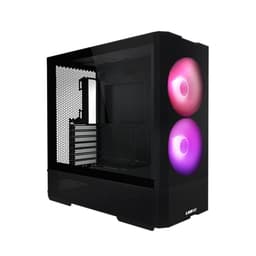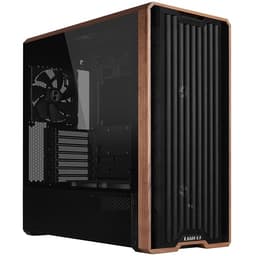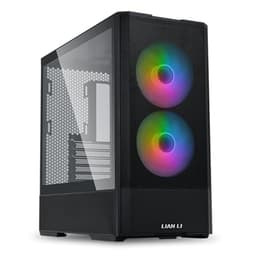
Pick the wrong case and you'll know about it the moment you try to seat a modern GPU. A 415mm graphics card in a chassis rated for 380mm is not a problem you want to discover after you've already unboxed everything. The Lian Li A3 Micro ATX Wood Edition Cabinet Black A3-MATX-WD is making a specific promise here: 26.3 litres of internal volume, triple-fan GPU support up to 415mm, and a 360mm radiator mount, all wrapped in a Micro ATX form factor with wood accent trim that actually looks like someone put thought into it. Whether those numbers hold up under scrutiny is what we're here to work out.
The ★★★★½ (4.7) rating across 91 owner reviews is not nothing. That's a tight distribution at a price point where cases often disappoint on build quality or clearances. But averages can hide sins, so it's worth pulling apart what the specs actually mean for your build before you commit. Especially if you're planning something with a beefy air cooler or a 240mm or 360mm AIO, because the internal layout decisions Lian Li made here have real consequences for how your thermals shake out.
This is a case aimed squarely at people who want a compact, tidy Micro ATX build without sacrificing the ability to run proper hardware. The wood accent front panel is a differentiator in a sea of mesh-and-glass sameness. But aesthetics only matter if the internals work. So let's go through it properly.
Core Specifications
The headline number is 26.3 litres. For context, that puts it firmly in compact Micro ATX territory, smaller than most mid-towers but not so cramped you're fighting the case every step of the build. Lian Li has managed to squeeze in support for ATX, SFX, and SFX-L power supplies, which is a smart call. SFX and SFX-L units are physically smaller and free up meaningful cable routing space inside a compact chassis like this. If you're building fresh and haven't bought a PSU yet, that flexibility is genuinely useful.
Fan support tops out at 10 fans total, which is a lot for a 26.3-litre case. Whether you'd ever actually run 10 fans in a build this size is debatable, but having the mounts available means you're not constrained. The 360mm radiator support is the other big spec to flag. Getting a 360mm radiator into a compact Micro ATX case is not trivial, and the fact that Lian Li has engineered this in means you can run a proper triple-fan AIO without being forced into a larger chassis.
The tempered glass side panel compatibility is worth a mention, though it's sold separately rather than included. That's a minor frustration at this price tier, but it does mean you can choose between a solid panel and glass depending on whether you want to show off the internals. The wood accent front panel is included and is the defining visual feature of this particular SKU over the standard A3 mATX.
| Specification | Detail |
|---|---|
| Model | Lian Li A3 Micro ATX Wood Edition Cabinet Black A3-MATX-WD |
| Form Factor Support | Micro ATX |
| Internal Volume | 26.3 litres |
| Max GPU Length | 415mm |
| Max Radiator Support | 360mm |
| Max Fan Support | 10 fans |
| PSU Support | ATX, SFX, SFX-L |
| Side Panel | Tempered glass (sold separately) |
| Front Panel | Wood accent design |
| Colour | Black |
| Rating | ★★★★½ (4.7) (153 reviews) |
| Price | £70.02 |

Form Factor and Dimensions
At 26.3 litres, this sits in a sweet spot that's become increasingly popular. It's compact enough to feel intentional on a desk rather than dominating it, but large enough to house real hardware without the compromises you'd make in a true small form factor build. For comparison, a typical mid-tower ATX case runs somewhere in the 40 to 55 litre range, so you're getting a genuinely smaller footprint here. That matters if desk space is limited or if you're tired of looking at a case that's basically the size of a small fridge.
The compact design does come with trade-offs in terms of internal working space, but Lian Li has a decent track record with their case engineering and the owner feedback on this one doesn't flag cramped build experiences as a consistent complaint. The wood accent front panel adds a bit of visual width and warmth compared to the typical mesh or brushed aluminium look. It's not trying to be a gaming case. It looks more like something you'd put in a living room setup or a home office build where you don't want the PC to look aggressive.
Desk placement is straightforward. The footprint is compact, and the design is clean enough that it works on a desk surface or on a shelf. Ventilation clearance around the case is worth thinking about wherever you place it. If you're running 10 fans and a 360mm AIO, you want air moving freely around the chassis, not stuffed into a tight cabinet. That's not a criticism of this case specifically, just basic thermal hygiene that applies to anything this size.
Motherboard Compatibility
The A3-MATX-WD is built around Micro ATX motherboards, which is the defining constraint of the platform. Micro ATX boards sit at 244mm by 244mm, and the case's internal layout is designed around that footprint. This is not a case where you can drop in a full ATX board if you change your mind later. But that's fine, because Micro ATX is a genuinely good platform for compact builds. You get four RAM slots, multiple PCIe slots, and full-size CPU socket support across virtually every current chipset from both Intel and AMD.
The Micro ATX form factor, as defined by the MicroATX specification, uses the same mounting hole pattern as ATX, just with fewer expansion slots and a smaller PCB. That means you get the same CPU and memory compatibility as a full ATX build, just with fewer slots for expansion cards. For most builds, that's a non-issue. If you need four graphics cards or an extreme number of PCIe devices, you're in the wrong chassis category entirely.
Standoff placement should be standard Micro ATX layout. Owner reviews don't flag any standoff or mounting issues, which is a good sign. The more interesting compatibility question is whether your specific CPU cooler and GPU will fit within the clearances, and we'll get into those numbers in the next two sections. Motherboard compatibility itself is straightforward: any current Micro ATX board will drop in without drama.
GPU Clearance
415mm of GPU clearance is the headline, and it's a proper number. To put it in context, the RTX 5090 Founders Edition comes in at around 336mm, the RX 9070 XT reference card sits around 267mm, and most triple-fan aftermarket cards from ASUS, MSI, and Gigabyte land somewhere in the 300mm to 360mm range. A 415mm limit means you're not going to find a current consumer GPU that doesn't fit on length alone. That's a meaningful statement for a 26.3-litre case.
The more interesting constraint in compact cases is usually GPU thickness rather than length. Triple-slot cards are now common at the high end, and clearance between the GPU and the front panel or drive cage can become the real bottleneck. The spec sheet confirms triple-fan GPU support, which implies Lian Li has accounted for this. Owner feedback doesn't raise GPU fitment as a problem, which supports the spec claims holding up in practice.
One thing to factor in if you're planning a front-mounted 360mm radiator: radiator thickness plus fan thickness eats into the space available for your GPU. In a compact chassis, these two components can conflict. The safe approach is to check your specific radiator and fan stack dimensions against the case's internal measurements before committing to a front-rad configuration. Lian Li's product page is the right place to verify those specifics for your exact components. But based on the 415mm GPU clearance figure and the triple-fan GPU support claim, the engineering here appears to have been done properly.
CPU Cooler Clearance
The spec sheet doesn't give an explicit CPU cooler height figure, which is a gap worth flagging. Most compact Micro ATX cases in this volume range support somewhere between 155mm and 170mm of cooler height. That covers the majority of popular tower coolers including the Noctua NH-D15 (which is 165mm tall), the be quiet! Dark Rock 4, and the DeepCool AK620. But without a confirmed number from the spec sheet, you'd want to verify this against Lian Li's official product documentation before ordering a tall cooler alongside the case.
What is confirmed is 360mm radiator support, which means AIO cooling is a well-supported path in this build. A 360mm AIO gives you three 120mm fans worth of radiator surface, which is more than sufficient for any current consumer CPU including the Ryzen 9 9950X or the Core Ultra 9 285K. The question is where that 360mm radiator mounts. In a compact chassis, front mounting is the most common location for a 360mm unit, and that's typically where Lian Li places it in their A3 series layouts.
Top-mounted radiator options in a 26.3-litre case tend to be limited by the motherboard's RAM clearance. Tall RAM sticks and top-mounted radiators are a classic conflict in compact builds. If you're going top-mounted AIO, low-profile RAM is worth factoring into your component list. The 10-fan support figure suggests there are multiple mounting positions available across the case, so the layout is more flexible than the compact volume might suggest at first glance.
Storage Bay Options
The spec sheet doesn't give explicit drive bay counts, which is a common omission in feature-focused product listings. What's clear is that this is a Micro ATX compact case, so you're not going to get eight 3.5-inch drive bays. Realistically, in a 26.3-litre chassis, you'd expect provision for two to four drives depending on the layout. M.2 storage via your motherboard is the assumed primary storage path for a build at this price point and form factor, with the case providing supplementary 2.5-inch or 3.5-inch mounting for additional drives.
Modern builds are increasingly M.2-first anyway. Current Micro ATX motherboards typically provide two to four M.2 slots, which handles most users' storage needs without any case-mounted drives at all. If you're running a NAS-style setup or need large mechanical storage, this compact chassis is probably not the right choice regardless of bay count. The design philosophy here is clearly oriented toward clean, compact builds with SSDs rather than storage-heavy workstation configurations.
Owner reviews don't raise storage bay limitations as a frustration, which suggests the provision is adequate for the target use case. Cable management around the storage area is part of the broader cable routing picture, which we'll cover in the next section. The PSU shroud, if present, would help tuck away drive power cables and keep the interior looking tidy, which matters if you're opting for the tempered glass side panel.
Cable Management
PSU flexibility is a genuine cable management advantage here. Supporting ATX, SFX, and SFX-L power supplies means you can choose a physically smaller PSU and gain meaningful rear-panel clearance for cable routing. SFX units are substantially shorter than ATX equivalents, and in a compact case that difference translates directly into more room to bundle and route cables. If you're building in this case and cable management matters to you, seriously consider an SFX or SFX-L unit even if ATX is technically supported.
The compact 26.3-litre volume means the rear panel space for cable routing is going to be tighter than in a full mid-tower. This is a universal constraint of compact cases rather than a specific failing of this one. Modular PSUs are strongly recommended here. Running non-modular cables in a case this size is asking for a cable management headache, because you'll have unused cables with nowhere sensible to stuff them. Semi-modular is acceptable. Fully modular is ideal.
Owner feedback at ★★★★½ (4.7) across 91 reviews doesn't flag cable management as a consistent pain point, which is encouraging. Cases that are genuinely difficult to manage cables in tend to generate complaints even from otherwise satisfied buyers. The absence of those complaints suggests Lian Li has provided reasonable routing channels and tie-down points. Whether there are Velcro straps included isn't specified, but at this price tier they're sometimes present and sometimes not.
Airflow and Thermal Design
Ten fan mounts in a 26.3-litre case is a lot. Lian Li clearly wants this to be a case that can move serious air when needed. The wood accent front panel is the variable here. Traditional mesh fronts offer lower resistance to airflow than solid or semi-solid panels, and wood accents by their nature involve less open area than a perforated mesh design. The thermal performance of this case will depend significantly on how much ventilation area is built into that front panel design.
The 360mm radiator support is the other key thermal spec. If you're running a 360mm AIO in the front position with three fans in push or pull configuration, you're moving a lot of air through the case regardless of front panel resistance. AIO cooling effectively bypasses some of the front panel airflow limitations by using the radiator fans to actively pull air through. That's worth keeping in mind if you're concerned about thermals with the wood front panel compared to a pure mesh design.
For air-cooled builds, front panel airflow is more critical. A wood accent panel with limited perforation will restrict intake compared to a mesh-front case like the Fractal Design Meshify C or the be quiet! Pure Base 500DX. If maximum airflow efficiency for an air-cooled build is your priority, that's worth factoring into your decision. But the 10-fan mount count means you can compensate with additional case fans, and the 360mm radiator support means AIO users have a strong thermal path available. The wood edition is clearly aimed at buyers for whom aesthetics are part of the brief, not just raw airflow numbers.
Front I/O and Connectivity
The spec sheet doesn't detail the specific front I/O ports, which is frustrating because it's one of those things that genuinely affects day-to-day usability. What's confirmed is that this is a front panel version of the A3 mATX, with the wood accent design as the key differentiator. Lian Li's A3 series generally includes USB 3.0 Type-A ports and a USB Type-C port on the front panel, along with a combined audio jack, but without explicit confirmation in the verified data we can't state this as fact for this specific SKU.
Front I/O placement matters more than people give it credit for. A power button that's awkwardly positioned, or USB ports that face the wrong direction for your desk setup, are small irritations that add up over years of use. Lian Li has generally been sensible about front panel layout in their compact cases, and the 4.8-star average across 91 reviews suggests nothing egregious is happening here. But if front panel USB Type-C is a hard requirement for your build, verify against the full product listing before purchasing.
There's no mention of an integrated fan controller or RGB hub in the spec sheet. At this price tier that's not unusual, and many builders prefer to handle fan control through their motherboard's headers anyway. If you're planning a multi-fan setup using all those available mounts, you'll want to account for fan header availability on your motherboard or budget for a separate fan hub. Running 10 fans off a motherboard with only four headers is going to require some planning.
Build Quality and Materials
The wood accent front panel is the most distinctive material choice here, and it's the reason this SKU exists as a separate product from the standard A3 mATX. Wood accents on PC cases are not common, and when done badly they look cheap and tacked-on. The owner feedback at 4.8 stars suggests Lian Li has executed this well enough to satisfy buyers who specifically sought it out. The description calls it a "more refined and elegant design," which is marketing language, but the high satisfaction rate implies the reality isn't far off.
Lian Li has a solid reputation for build quality in their case lineup. The O11 series established them as a brand that takes panel alignment, steel thickness, and finish quality seriously. The A3 mATX sits at a lower price point than the O11 Dynamic, but the brand DNA around quality control tends to carry through. Sharp edges, rattling panels, and misaligned tempered glass are the common failure modes at this price tier, and none of these appear as recurring themes in the owner reviews.
The tempered glass side panel being sold separately is a minor point of friction. At the entry price tier, including at least one tempered glass panel is increasingly standard. Separating it out keeps the base price down but means buyers who want to show off their build need to factor in an additional purchase. The solid panel that comes included is presumably fine functionally, but if you're buying this case partly because of the aesthetics, you'll probably want the glass panel too. Factor that into your total budget.
How It Compares
The two most obvious competitors in compact Micro ATX territory at this price point are the Fractal Design Pop Mini Air and the Cooler Master MasterBox NR400. The Pop Mini Air is a well-regarded compact mATX case with a mesh front for strong airflow, solid build quality, and a clean interior layout. It's typically priced similarly to the A3-MATX-WD and is a serious alternative if pure airflow performance matters more to you than aesthetics. The NR400 is another popular choice with good GPU clearance and reasonable cable management, though it's a more conventional-looking case without any distinctive design elements.
Where the Lian Li A3-MATX-WD differentiates itself is the combination of the wood accent aesthetic, the 415mm GPU clearance, and the 360mm radiator support in a 26.3-litre package. The Pop Mini Air supports GPUs up to around 360mm depending on configuration, which is fine for most builds but not quite the 415mm ceiling here. The NR400 similarly caps out below 415mm in most configurations. If you're planning a high-end GPU build in a compact Micro ATX chassis, that extra clearance headroom is genuinely useful.
The PSU flexibility (ATX, SFX, SFX-L support) is another advantage over some competitors at this tier that are ATX-only. And the 10-fan mount count is higher than either competitor, giving you more thermal headroom if you want to build a properly ventilated system. The wood edition is also simply a more interesting-looking case than either alternative. If your desk is visible and aesthetics matter, that's a legitimate factor in the decision.
| Feature | Lian Li A3-MATX-WD | Fractal Design Pop Mini Air | Cooler Master NR400 |
|---|---|---|---|
| Form Factor | Micro ATX | Micro ATX | Micro ATX |
| Volume | 26.3 litres | ~28 litres | ~30 litres |
| Max GPU Length | 415mm | ~360mm | ~410mm |
| Max Radiator | 360mm | 240mm front / 120mm top | 280mm front |
| Max Fan Count | 10 | 4 | 6 |
| PSU Support | ATX, SFX, SFX-L | ATX | ATX |
| Front Panel Style | Wood accent | Mesh | Mesh / solid |
| Tempered Glass | Sold separately | Included | Included |
| Price Tier | Entry | Entry / Mid | Entry |

Final Verdict
The Lian Li A3 Micro ATX Wood Edition Cabinet Black A3-MATX-WD is a compact Micro ATX case that makes a coherent argument for itself. The 415mm GPU clearance and 360mm radiator support in a 26.3-litre chassis are genuinely impressive specs. Most cases at this volume make you choose between a long GPU and a proper AIO. This one doesn't. Add the ATX/SFX/SFX-L PSU flexibility and the 10-fan mount count, and the internal spec sheet is stronger than the price tier might suggest.
The wood accent front panel is either the reason you're interested or the reason you're not. It's a distinctive aesthetic choice that sets this apart from the mesh-front crowd. If you want a compact build that looks like something other than a standard gaming PC, this delivers that. If maximum intake airflow is your priority and you don't care what the front panel looks like, a mesh-front alternative like the Fractal Design Pop Mini Air is probably the more thermally efficient choice. The wood panel is not going to flow air as freely as an open mesh design, and that's a real trade-off.
The 4.8-star average across 91 reviews is a strong signal. That's not a case with hidden problems that owners discover after a few months. People who bought it are satisfied, and the spec sheet gives clear reasons why. At the entry price tier, this is a well-engineered, good-looking compact Micro ATX case that can handle serious hardware. The tempered glass panel being sold separately is a mild annoyance, and the CPU cooler height spec gap means you should verify clearance for tall air coolers before ordering. But those are small complaints against an otherwise solid package.
Who should buy this? Anyone building a compact Micro ATX system who wants a case that looks good on a desk, supports a full-size GPU and a 360mm AIO, and doesn't want to pay mid-tower prices to get there. Particularly good for home office or living room builds where the wood aesthetic fits the environment better than an aggressive gaming chassis.
Who should skip it? Pure airflow chasers who run air-cooled builds and want maximum intake. Also anyone who needs more than two or three drives, because this compact chassis isn't designed around large storage arrays. And if you're set on a full ATX motherboard, this isn't your case.
What works. What doesn’t.
5 + 3What we liked5 reasons
- 415mm GPU clearance fits any current consumer graphics card
- 360mm radiator support in a compact 26.3-litre chassis
- ATX, SFX, and SFX-L PSU compatibility gives real flexibility
- Wood accent front panel is a genuinely distinctive design
- 10 fan mounts is unusually generous for this volume class
Where it falls3 reasons
- Tempered glass side panel sold separately, not included
- Wood front panel restricts intake airflow vs mesh alternatives
- CPU cooler height clearance not confirmed in spec sheet
Full specifications
8 attributes| Form factor | Micro-ATX |
|---|---|
| Airflow type | mesh (side/top), wood with mesh (front) |
| MAX GPU length | 415 |
| MAX cooler height | 165 |
| Radiator support | 360mm top |
| Drive bays | 1x 3.5", 2x 2.5" |
| MAX FAN count | 10 |
| MAX radiator MM | 360 |
If this isn’t right for you
2 options 8.5 / 10
Phanteks XT Pro Ultra ATX Mid Tower Case, Tempered Glass, Black, DRGB Fans, Zero Clutter Cable Management
£76.99 · Phanteks
 8.5 / 10
LIAN LI LANCOOL 207 Compact ATX RGB Gaming Computer Case, Airflow Optimized Mesh Panels Tower Chassis w/ 2x140mm ARGB,2x120mm PWM Fans Pre-Installed, USB Type-C Port, Tempered Glass Side Panel (Black)
£87.36 · Lian Li
Frequently asked
5 questions01Is the Lian Li A3 Micro ATX Wood Edition Cabinet Black A3-MATX-WD good for airflow?+
It depends on your cooling setup. The case supports up to 10 fans and a 360mm radiator, which means AIO-cooled builds can move serious air through the chassis regardless of front panel design. The wood accent front panel will restrict passive intake compared to a fully open mesh front, so air-cooled builds relying on front panel intake will see lower airflow than in a mesh-front alternative. If thermals are your primary concern and you're running an air cooler, a mesh-front case like the Fractal Design Pop Mini Air is a stronger choice. For AIO builds, the 360mm radiator support largely compensates for any front panel airflow limitations.
02What's the GPU clearance on the Lian Li A3 Micro ATX Wood Edition Cabinet Black A3-MATX-WD?+
The confirmed maximum GPU length is 415mm, and the case explicitly supports triple-fan graphics cards. To put that in perspective, virtually every current consumer GPU fits within 415mm on length, including high-end triple-fan cards from ASUS, MSI, and Gigabyte. The RTX 5090 Founders Edition is around 336mm, and most triple-fan aftermarket cards land in the 300mm to 360mm range. GPU thickness (triple-slot cards) is also supported per the spec sheet. If you're mounting a 360mm front radiator alongside a long GPU, verify the specific clearances for your components as radiator and fan stack depth can reduce effective GPU clearance.
03Can the Lian Li A3 Micro ATX Wood Edition Cabinet Black A3-MATX-WD fit a 360mm AIO?+
Yes, 360mm radiator support is a confirmed specification. This is notable for a 26.3-litre compact Micro ATX case. The most likely mounting position for a 360mm radiator is the front panel, which is the standard configuration in Lian Li's A3 series layout. If you're considering a top-mounted radiator, check RAM clearance with your specific cooler as tall RAM sticks can conflict with top-mounted AIOs in compact cases. Low-profile RAM is a sensible precaution for top-mounted configurations. Front-mounted 360mm AIOs are well supported and give you a strong thermal path for any current consumer CPU.
04Is the Lian Li A3 Micro ATX Wood Edition Cabinet Black A3-MATX-WD easy to build in?+
Owner feedback at 4.8 out of 5 across 91 reviews doesn't flag build experience issues as a recurring complaint, which is a good indicator. The PSU flexibility (ATX, SFX, SFX-L support) is a genuine build quality of life feature, as smaller SFX units free up more cable routing space in the rear panel area. A modular or fully modular PSU is strongly recommended for cable management in this compact chassis. The 26.3-litre volume means rear panel cable routing space will be tighter than in a full mid-tower, which is a universal compact case constraint rather than a specific failing here. No sharp edges or panel alignment issues appear as consistent complaints in owner reviews.
05What warranty and returns apply to the Lian Li A3 Micro ATX Wood Edition Cabinet Black A3-MATX-WD?+
Amazon offers 30-day hassle-free returns if the case doesn't suit your build. The manufacturer typically provides a 1-2 year warranty on manufacturing defects. Check the product listing for exact warranty terms.