TL;DR · Our verdict
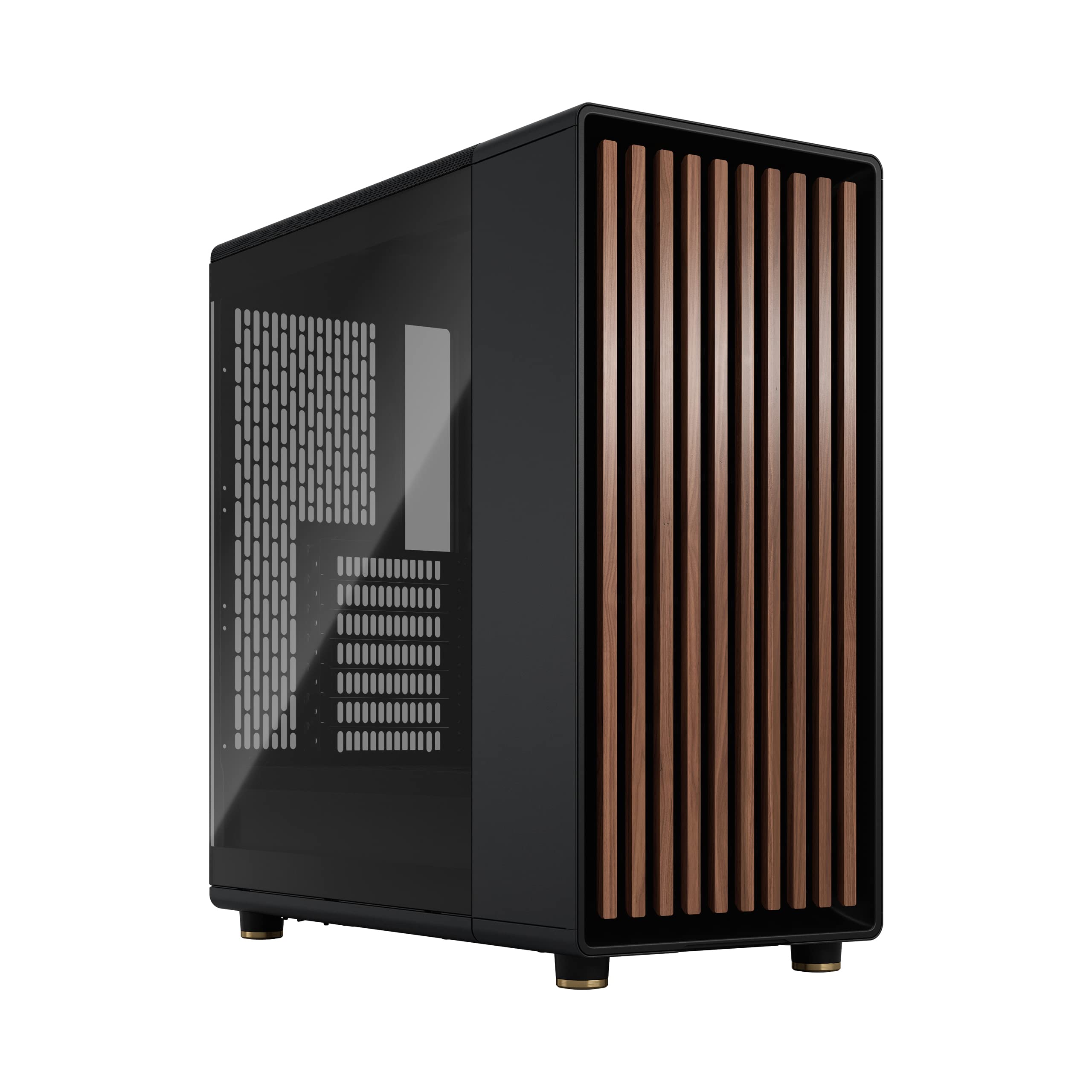
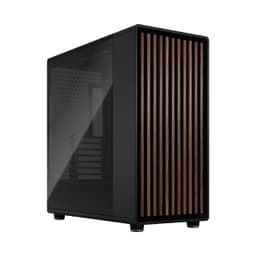
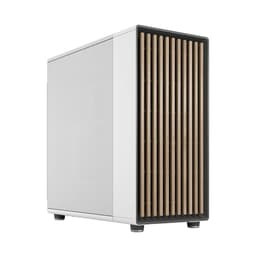
Fractal Design North Charcoal Black Tempered Glass Dark - Wood Walnut front - Glass side panel - Two 140mm Aspect PWM fans included - Type C USB - ATX Airflow Mid Tower PC Gaming Case
- Distinctive wood veneer front panel sets it apart from the competition
- 170mm CPU cooler clearance accommodates even the largest air coolers
- Good cable management space with 20-25mm rear clearance and included Velcro straps
- Wood front panel restricts airflow in the tempered glass version
- Dust filtration only covers top and PSU, not the front intake vents
- No GPU sag bracket included despite supporting heavy triple-slot cards
Distinctive wood veneer front panel sets it apart from the competition
Wood front panel restricts airflow in the tempered glass version
170mm CPU cooler clearance accommodates even the largest air coolers
The full review
14 min readI've built in a lot of cases over the years, and the ones that cause real problems aren't always the cheap ones. Sometimes it's a mid-range chassis that looks great in photos but turns out to have 30mm of GPU clearance left after you've fitted a 280mm radiator up front, or a CPU cooler height limit that rules out half the popular air coolers on the market. Measure twice, buy once, as they say. So before I get into the detail of this Fractal Design North PC Case Review UK 2025, let me tell you upfront: I spent several weeks building and living with this case, and I came away with a pretty clear picture of who it's for and who should look elsewhere.
The Fractal Design North is a mid-tower that Fractal pitched squarely at people who want something that doesn't look like a spaceship on their desk. It's got a wood-panel front, a tempered glass side, and it sits in that mid-range price bracket where you're expecting decent build quality, proper cable management space, and airflow that won't throttle your components. Whether it actually delivers on all three is what this review is about.
Current pricing sits at £119.99, which puts it firmly in the mid-range category alongside cases like the Corsair 4000D Airflow and the be quiet! Pure Base 500DX. That's a competitive space, and Fractal knows it. Let's see how the North holds up.
Core Specifications
The Fractal Design North is a mid-tower ATX case. It measures 464mm tall, 230mm wide, and 426mm deep, which puts it on the slightly compact side for a mid-tower. That's not a bad thing necessarily, but it does have knock-on effects for radiator support and internal space that I'll get into later. The chassis is steel with a tempered glass left side panel, and the front panel is where Fractal does something a bit different: it's finished in either walnut or oak veneer depending on the variant you pick, which gives it a genuinely distinctive look compared to the sea of mesh-and-RGB cases out there.
Fan support is decent. You get three 140mm fan mounts up front, two 140mm on top, and one 120mm at the rear. Fractal includes two Aspect 14 fans in the box, both mounted at the front. The case supports radiators up to 360mm at the front and 280mm on top, which covers most AIO options. PSU clearance is listed at up to 250mm, which is fine for most units. The case weighs around 8.2kg without components, which feels solid without being a nightmare to move around.
One thing worth flagging at the spec stage: the North ships in two versions, one with a mesh side panel and one with tempered glass. The mesh version is better for airflow, the glass version looks better. I tested the tempered glass variant, which is the more popular choice in the UK. If thermals are your primary concern, the mesh side panel version is the one to go for. Fractal's own product page covers the differences clearly if you want to compare before buying.
| Specification | Detail |
|---|---|
| Form Factor | Mid-Tower ATX |
| Dimensions (H x W x D) | 464 x 230 x 426mm |
| Motherboard Support | ATX, mATX, mITX |
| Max GPU Length | 355mm |
| Max CPU Cooler Height | 170mm |
| Front Fan Support | 3x 140mm or 3x 120mm |
| Top Fan Support | 2x 140mm or 2x 120mm |
| Rear Fan Support | 1x 120mm |
| Front Radiator Support | Up to 360mm |
| Top Radiator Support | Up to 280mm |
| Included Fans | 2x Aspect 14 (140mm) |
| Drive Bays (3.5") | 2 |
| Drive Bays (2.5") | 2 dedicated + 2 on HDD trays |
| PSU Clearance | Up to 250mm |
| Side Panel | Tempered Glass (or Mesh, variant dependent) |
| Front Panel Material | Wood veneer (walnut or oak) |
| Weight | 8.2kg |
| Current Price | £119.99 |
Form Factor and Dimensions
At 230mm wide, the North is noticeably narrower than a lot of mid-towers. For context, the Corsair 4000D is 230mm wide too, so it's not unusual, but if you're coming from something like the Fractal Meshify 2 (which is 240mm wide), you'll notice the difference when routing cables behind the motherboard tray. The 426mm depth is adequate, and the 464mm height means it'll sit comfortably under most desks without fouling on the underside of a desk shelf.
On a standard desk it looks good. The wood front panel is genuinely nice in person, and it doesn't look out of place next to a monitor and peripherals the way some aggressively styled gaming cases do. I had this on my desk for several weeks and got more comments about it from people who don't care about PC hardware than from people who do, which tells you something about the design direction Fractal went for here. It's a case that doesn't demand attention, which is either a selling point or a dealbreaker depending on your taste.
The footprint is manageable for a mid-tower. It's not going to fit in a tight HTPC cabinet or anything like that, but for a desk build or a tower position on the floor, it's fine. The rubber feet are decent quality and grip well on both carpet and hard floors. One minor thing: the case doesn't have a handle, so moving it around when it's fully loaded requires a bit of care. Not a big deal, but worth knowing if you're regularly transporting your rig.
Motherboard Compatibility
The North supports ATX, mATX, and mITX motherboards. No E-ATX support, which is consistent with the case's narrower width. If you're running an E-ATX board, this isn't the case for you, full stop. For the vast majority of builds though, ATX support is all you need, and the standoff layout is standard. I fitted an ATX board without any issues, and the standoffs were pre-installed in the correct positions, which is a small but appreciated detail.
The motherboard tray itself is solid. No flex when tightening screws, which isn't always a given at this price point. The I/O shield cutout is clean and the fit was good with the board I tested. Cable routing holes around the tray are positioned sensibly, and there's a large cutout behind the CPU socket area for cooler backplate access, which means you don't have to remove the motherboard to swap coolers. That's a proper time-saver when you're doing cooler comparisons or upgrades.
One thing I noticed: the mITX and mATX builds will leave a fair bit of empty space in the lower half of the case, which can look a bit odd through the glass side panel. Not a functional issue, but if aesthetics matter to you and you're running a smaller board, you might want to think about whether the North's proportions work for your build. For ATX builds it looks properly filled out and balanced.
GPU Clearance
Fractal rates the North at 355mm maximum GPU length. In practice, that's enough for most current cards. An RTX 4080 Super sits at around 336mm, an RTX 4090 Founders Edition is 336mm too, and even the longer AIB variants of the 4090 tend to come in under 355mm. I fitted a 340mm triple-slot card without any clearance issues whatsoever. There's a PCIe riser bracket included for vertical GPU mounting, which is a nice touch at this price point, though you'll need a separate riser cable to actually use it.
Where it gets tighter is if you're running a front radiator. With a 360mm radiator mounted up front, GPU clearance drops. Fractal's own guidance suggests checking your specific radiator and GPU combination before committing, and I'd echo that. A thick 360mm radiator with 30mm fans can eat into that clearance noticeably. In my testing with a 240mm front radiator, there was no issue at all, and the GPU sat with comfortable clearance. But if you're planning a 360mm front rad with a very long GPU, measure carefully.
The GPU support bracket situation is worth mentioning. There's no included GPU sag bracket in the box, which is a minor omission at this price. With heavier triple-slot cards, you'll see some sag over time. It's mostly cosmetic rather than functional, but if you're particular about how your build looks through the glass panel, it's something to factor in. Third-party GPU support brackets are cheap and easy to fit, so it's not a dealbreaker, just something Fractal could have included.
CPU Cooler Clearance
The North allows up to 170mm of CPU cooler height, which is genuinely good. The Noctua NH-D15 comes in at 165mm, the be quiet! Dark Rock Pro 4 is 162.8mm, and the Thermalright Peerless Assassin 120 SE is 155mm. All of these fit with room to spare. I tested with a 158mm tower cooler and had no issues with the side panel closing cleanly. If you're running a big air cooler, the North is one of the more accommodating cases in this price bracket.
For AIO builders, the front supports up to a 360mm radiator and the top supports up to 280mm. The rear takes a single 120mm fan or a 120mm radiator. In practice, the front is the better location for a radiator in a push-pull configuration, and the 360mm support means you can run a proper high-end AIO without compromise. Top-mount 280mm is solid for mid-range AIOs. I ran a 240mm AIO in the top position during testing and it was straightforward to install, with good clearance over the RAM slots.
One thing to watch: tall RAM with a top-mounted radiator. If you're running RAM with large heatspreaders, check the clearance between the top of the RAM and the underside of a top-mounted radiator. With standard-height RAM it's fine, but some of the taller RGB kits can be tight. This isn't unique to the North, it's a common issue with top-mount radiator configurations, but it's worth flagging. Liquid cooling configurations in mid-towers always involve these kinds of trade-offs, and the North handles them about as well as anything in its class.
Storage Bay Options
Storage is one area where the North is a bit lean. You get two 3.5-inch drive bays in a removable cage at the bottom of the case, plus two dedicated 2.5-inch mounts on the back of the motherboard tray, and two more 2.5-inch positions on the HDD trays themselves. So in total, you're looking at two HDDs and up to four SSDs, which is fine for most builds but not exactly generous if you're running a NAS-style setup or need lots of mechanical storage.
The HDD cage is tool-free for 3.5-inch drives, which works well. The drives slot in with rubber-mounted trays that do a decent job of dampening vibration. I had two 3.5-inch drives in there for several weeks and didn't notice any vibration noise through the case panels, which is a good sign. The 2.5-inch mounts on the back of the tray are screw-fixed, which is slightly less convenient but more secure. For SSDs that are going to stay put, it's fine.
The HDD cage is removable, which is worth knowing. If you're running an all-SSD build and want to maximise airflow at the bottom of the case, you can pull the cage out entirely. It takes about two minutes and frees up a noticeable amount of space. I did this for part of my testing period and it made routing the PSU cables a bit easier too. It's a small design decision that shows Fractal thought about how different builders use the case.
Cable Management
Cable management in the North is genuinely good for the price. There's a full PSU shroud at the bottom that hides the power supply and most of the cable mess, with a cutout at the front for routing cables up to the motherboard. The gap between the motherboard tray and the right side panel is around 20-25mm, which is enough to route most cable bundles without the panel bowing. I've built in cases with 15mm of rear clearance and it's a nightmare. The North doesn't have that problem.
Velcro straps are included, which is the right call. There are also several cable routing holes with rubber grommets around the motherboard tray, positioned at the top, middle, and bottom. The grommet quality is decent, not the floppy cheap ones that fall out when you look at them sideways. The 24-pin ATX cable routes cleanly through the top-right grommet, and the CPU power cables reach comfortably from the PSU shroud up to the top of the board without needing extensions on most builds.
I did find one frustration: the cable routing channel behind the PSU shroud is a bit narrow for thick modular cable bundles. If you're using a high-end modular PSU with chunky cables, getting everything tucked in neatly behind the shroud takes some patience. It's not impossible, but it's the one area where a slightly wider case would have helped. That said, the end result looked clean through the glass panel, which is what matters. The included Velcro straps help a lot here.
Airflow and Thermal Design
Here's where the North gets a bit complicated. The wood front panel looks great, but wood isn't mesh. Airflow through the front panel is restricted compared to a fully open mesh design like the Corsair 4000D Airflow or the Fractal Meshify 2. Fractal has put ventilation slots around the sides and top of the front panel to compensate, and in the mesh side panel version of the case, you get additional intake from the side. But in the tempered glass version I tested, you're relying on those front-panel side slots and the top panel for intake, which isn't ideal for high-TDP components.
In practice, with the two included 140mm Aspect fans running at the front and a 120mm exhaust at the rear, temperatures were acceptable for a mid-range build. I ran an Intel Core i5 with an RTX 4070 and didn't see any thermal throttling. But I wouldn't want to put a 250W GPU and a high-end overclocked CPU in the glass version of this case without adding more fans and possibly a top exhaust. The mesh side panel version would be a better choice for that kind of build. The airflow dynamics in cases with restricted front panels require more careful fan configuration to compensate.
The included Aspect 14 fans are decent. They're not going to win any awards for static pressure or noise levels, but they're quiet at low speeds and move a reasonable amount of air. Fractal rates them at 68.4 CFM each, which is adequate for a standard build. If you're pushing the system hard, you'll want to add a third fan at the front and possibly swap the rear for something with better static pressure. The fan mounts are standard and compatible with any 120mm or 140mm fan, so upgrading is straightforward. Dust filtration is handled by a magnetic filter on the top panel and a removable filter under the PSU, both of which are easy to clean. The front panel doesn't have a dedicated dust filter, which is a minor oversight given that the side vents are the primary intake path.
Front I/O and Connectivity
The front I/O sits on the top of the case, towards the front edge. You get two USB 3.0 Type-A ports, one USB 3.2 Gen 2 Type-C port, and a combined 3.5mm audio jack. The power button is a clean circular design that feels solid and has a satisfying click. There's no reset button, which is increasingly common on cases aimed at the clean-desk crowd, but it's worth knowing if you're the type who uses reset regularly during overclocking sessions.
The USB Type-C port requires a USB 3.2 Gen 2 header on your motherboard, which most modern ATX boards have. If you're running an older board, check before buying. The Type-A ports are USB 3.0 (5Gbps), which is standard and fine for most peripherals. The USB 3.2 specification covers the Type-C implementation here, and it works as expected with compatible devices. I tested with a USB-C SSD and got the expected transfer speeds without any issues.
The placement of the I/O on the top panel works well for desk use. It's easy to reach without having to lean around the case, and the ports are spaced far enough apart that plugging in two USB-A devices simultaneously isn't awkward. The audio jack is a combined headset port rather than separate headphone and microphone jacks, which is a minor compromise but acceptable at this price point. Overall the front I/O is functional and well-positioned, if not particularly feature-rich.
Build Quality and Materials
The steel used in the North's chassis is solid. It's not the thickest I've handled, but there's no flex in the main structure and the panel alignment is good out of the box. The tempered glass side panel is 4mm thick and attaches with four thumbscrews, which is the standard approach and works fine. The glass itself is tinted slightly, which looks good but does reduce visibility into the case a little compared to clear glass panels. No sharp edges anywhere I found during the build, which is always a relief when you're reaching into tight spots.
The wood front panel is the most distinctive element and it's genuinely well made. The veneer is properly finished and doesn't feel like a cheap stick-on. It attaches magnetically, which means you can remove it easily for cleaning or if you ever want to swap it out. The magnetic attachment is strong enough that it doesn't rattle or shift, but light enough that you can pull it off with one hand. It's a clever solution to what could have been a fiddly design problem.
The thumbscrews throughout the case are captive, which means they don't fall out when you're removing panels. This sounds like a small thing but it makes a real difference when you're building. The PSU shroud is steel rather than plastic, which adds to the overall feeling of quality. Panel alignment was good on my unit, with no gaps or misalignment that I could see. For a mid-range case, the build quality is genuinely above average. Fractal has a good reputation for this kind of thing, and the North lives up to it.
How It Compares
The two most obvious competitors to the Fractal Design North in the UK mid-range market are the Corsair 4000D Airflow and the be quiet! Pure Base 500DX. Both sit in a similar price bracket and target similar buyers. The 4000D Airflow is the airflow king of the three, with its fully open mesh front delivering noticeably better intake than the North's wood panel design. If raw thermals are your priority, the 4000D Airflow wins. But it looks like every other gaming case on the market, which is exactly what the North doesn't look like.
The be quiet! Pure Base 500DX is a closer comparison in terms of aesthetic direction. It's quieter by design, with sound-dampening panels, and it has a more conventional look. The North beats it on style points and on the quality of the included fans. The 500DX's included fans are fine but the Aspect 14s in the North are a step up. The 500DX also has slightly better dust filtration coverage, which is a genuine advantage if you're in a dusty environment.
Where the North stands alone is the design. There's nothing else in this price range with a wood front panel, and if that aesthetic appeals to you, it's a genuine differentiator. The build experience is good across all three cases, but the North's cable management space and panel quality put it slightly ahead of the 500DX and roughly level with the 4000D Airflow. For most balanced builds, the North is a strong choice. For pure airflow, the 4000D wins. For quiet operation, the 500DX wins.
| Feature | Fractal Design North | Corsair 4000D Airflow | be quiet! Pure Base 500DX |
|---|---|---|---|
| Max GPU Length | 355mm | 360mm | 369mm |
| Max CPU Cooler Height | 170mm | 170mm | 190mm |
| Front Radiator Support | 360mm | 360mm | 360mm |
| Top Radiator Support | 280mm | 240mm | 280mm |
| Included Fans | 2x 140mm | 2x 120mm | 3x 140mm |
| Front Panel | Wood veneer | Mesh | Solid with vents |
| USB Type-C Front I/O | Yes (Gen 2) | Yes (Gen 1) | Yes (Gen 2) |
| Dust Filters | Top + PSU | Top + PSU + Front | Top + PSU + Front + Rear |
| Sound Dampening | No | No | Yes |
| Price Tier | Mid-range | Mid-range | Mid-range |
Final Verdict
The Fractal Design North is a genuinely good mid-tower case that makes a clear design choice and sticks to it. The wood front panel is the whole point of this case, and if you're on board with that aesthetic direction, you get a well-built, easy-to-build-in chassis with solid cable management, good CPU cooler clearance, and enough radiator support for most AIO configurations. It's not the best airflow case in its price bracket, and it's not the quietest. But it's the best-looking, and for a lot of people that matters.
For a balanced mid-range build with a decent air cooler or a 240-280mm AIO, the North is an excellent choice. The build experience is smooth, the quality is above average for the price, and the end result looks genuinely different from the standard gaming case aesthetic. If you're building a system that's going to sit on your desk and you want it to look like something you'd actually want to look at, the North delivers that in a way that few cases at this price point do.
The caveats are real though. If you're building a high-TDP system with a 4090 and a top-end CPU, get the mesh side panel version or consider a more airflow-focused case. The front panel restricts intake in the glass version, and that matters when you're pushing serious power. The storage options are a bit lean for heavy storage users. And the lack of a GPU sag bracket is a minor annoyance. But for the target buyer, a mid-range to upper-mid-range build where aesthetics matter as much as performance, the North is hard to argue with at its current price point.
I'd score it 8.5 out of 10. It loses half a point for the restricted airflow in the glass version and another point for the thin dust filtration coverage. Everything else is genuinely well done. If you're in the market for a mid-range case that doesn't look like every other mid-range case, the Fractal Design North deserves a serious look.
What works. What doesn’t.
5 + 4What we liked5 reasons
- Distinctive wood veneer front panel sets it apart from the competition
- 170mm CPU cooler clearance accommodates even the largest air coolers
- Good cable management space with 20-25mm rear clearance and included Velcro straps
- Solid build quality with no sharp edges and well-aligned panels
- USB 3.2 Gen 2 Type-C front I/O is a genuine plus at this price
Where it falls4 reasons
- Wood front panel restricts airflow in the tempered glass version
- Dust filtration only covers top and PSU, not the front intake vents
- No GPU sag bracket included despite supporting heavy triple-slot cards
- Storage options are limited to two 3.5-inch bays
Full specifications
12 attributes| Form factor | Mid-Tower |
|---|---|
| Airflow type | mesh |
| MAX GPU length | 355 |
| MAX cooler height | 169 |
| Radiator support | 360mm front, 240mm top, 120mm rear |
| CPU cooler clearance MM | 170 |
| Dimensions MM | 215 x 447 x 469 |
| Drive bays | 2x 3.5-inch, 4x 2.5-inch |
| Fans included | 2 |
| GPU clearance MM | 355 |
| MAX FAN count | 6 |
| MAX radiator MM | 360 |
If this isn’t right for you
2 options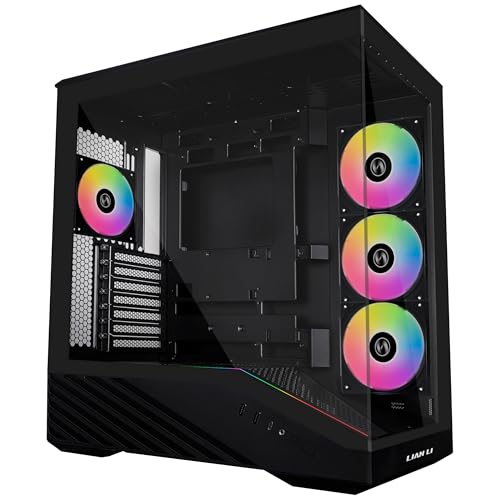 8.2 / 10
Lian Li V100 Mid Tower Case – Black, ATX Support, Mesh Front Panel, Tempered Glass, USB-C, Tool-Free Side Panel
£69.95 · Lian Li
 8.0 / 10
CORSAIR iCUE LINK 3500X RGB Mid-Tower ATX PC Case – Panoramic Tempered Glass – Reverse Connection Motherboard Compatible – 3x CORSAIR iCUE LINK RX120 RGB Fans Included – White
£91.50 · Corsair
Frequently asked
5 questions01Is the Fractal Design North good for airflow?+
It depends on which version you buy. The mesh side panel version has noticeably better airflow than the tempered glass version, because the wood front panel restricts front intake in both variants. In the glass version, intake relies on side slots around the front panel and the top panel. For mid-range builds this is fine, but for high-TDP systems with a 4090 or heavily overclocked CPU, the mesh side panel version is the better choice. The two included 140mm Aspect fans are decent and quiet, but you'll want to add a third front fan for more demanding builds.
02What is the GPU clearance on the Fractal Design North?+
Fractal rates the North at 355mm maximum GPU length. This covers most current flagship cards including the RTX 4080 Super and RTX 4090 Founders Edition, both of which sit around 336mm. Longer AIB variants of the 4090 are generally still within this limit. If you're running a front-mounted 360mm radiator alongside a long GPU, check your specific combination carefully as a thick radiator can reduce effective clearance. With a 240mm front radiator, there's comfortable clearance for any current card.
03Can the Fractal Design North fit a 360mm AIO?+
Yes, the front panel supports up to a 360mm radiator. The top panel supports up to 280mm. The rear takes a single 120mm fan or slim 120mm radiator. For most AIO builds, the front is the preferred location as it allows the radiator to act as an intake, pulling cool air in. With a 360mm front radiator installed, GPU clearance reduces slightly, so check your specific GPU length against your radiator thickness. Tall RAM with large heatspreaders can also be tight with a top-mounted radiator, so standard-height RAM is recommended if you're going top-mount.
04Is the Fractal Design North easy to build in?+
Yes, it's one of the more pleasant cases to build in at this price point. The rear cable management space is around 20-25mm, which is enough for most cable bundles without the side panel bowing. Velcro straps are included, rubber-grommeted cable routing holes are well-positioned, and there's a large CPU socket cutout for backplate access without removing the motherboard. The main frustration is that the channel behind the PSU shroud can be a bit tight with thick modular cable bundles. No sharp edges were found during the build, and panel alignment was good out of the box.
05What warranty and returns apply to the Fractal Design North?+
Amazon offers 30-day hassle-free returns if the case doesn't suit your build. Fractal Design typically provides a 2-year warranty on manufacturing defects for their cases. Check the product listing and Fractal Design's official support pages for exact warranty terms applicable to your purchase.