There are roughly forty-seven thousand hard drive docking stations on Amazon and most of them look identical, cost nearly the same, and have suspiciously similar spec sheets. So when something like the FIDECO Hard Drive Docking Station turns up with over 5,797 owner reviews and a 4.4-star average, that's not just noise. That's a signal worth paying attention to. The crowd has spoken, and the crowd is, on balance, pretty happy.
My verdict? For the budget it sits in, this is a genuinely solid pick. Two bays, offline cloning, USB 3.0 at up to 5Gbps, and support for drives up to 16TB each. It won't win any design awards and there are a few caveats about before you order, but if you need a no-fuss way to plug bare drives into your computer without spending proper money, the FIDECO delivers. Now let me show you exactly why I think that, and where the edges are.
Core Specifications
Strip away the marketing and here's what you're actually buying: a dual-bay SATA docking station that connects to your PC or Mac via USB 3.0, handles both 2.5-inch and 3.5-inch drives, and supports the SATA I, II, and III standards. The maximum drive size per bay is 16TB, so you can have a total of 32TB of raw storage accessible at once. That's a decent ceiling for a budget dock, and it covers the vast majority of consumer and prosumer drives you're likely to own.
The USB 3.0 connection is rated for up to 5Gbps theoretical throughput. In practice, real-world speeds will be limited by your drive's own read/write performance and the quality of the USB cable you use, but the interface itself isn't the bottleneck for any spinning hard drive and won't throttle even a mid-range SSD. The dock requires no drivers on Windows XP through 10, Mac OS, or Linux. It's plug-and-play in the truest sense, which matters more than people give it credit for when you're dealing with drives at odd hours.
One spec that stands out at this price point is the offline clone function. Press the Clone button for five seconds, the LED flashes, and the dock copies one drive to another without a computer involved at all. That's a feature you'd expect to pay more for, and it's one of the genuine differentiators here. Below is the full spec rundown.
| Specification | Detail |
|---|---|
| Interface | USB 3.0 (up to 5Gbps) |
| Drive Compatibility | 2.5" and 3.5" SATA I/II/III HDD/SSD |
| Number of Bays | 2 |
| Max Capacity Per Bay | 16TB |
| Total Max Capacity | 32TB |
| Offline Clone | Yes (no PC required) |
| OS Compatibility | Windows XP/Vista/7/8/8.1/10, Mac OS, Linux |
| Driver Required | No |
| Installation | Tool-free |
| Current Price | £26.99 |
| Rating | ★★★★☆ (4.4) (5,816 reviews) |

Key Features Overview
The headline feature, and probably the reason most people land on this listing, is the dual-bay setup. Being able to slot in two drives simultaneously is more useful than it sounds. You're not just doubling your access; you're enabling direct drive-to-drive transfers, comparative checks between drives, and that offline clone function. Single-bay docks are cheaper, obviously, but once you've used a dual-bay setup you'll find the single-bay feels like a step backwards pretty quickly.
The offline clone capability deserves its own paragraph because it's genuinely underrated. The disk cloning process typically requires software, a running computer, and a fair amount of faff. Here, you insert your source drive in one bay and your destination drive in the other, hold the Clone button for five seconds until the LED indicator starts flashing, and walk away. The dock handles everything. No computer needed. This is brilliant for IT support work, for migrating an ageing laptop drive, or for anyone who regularly needs to duplicate drives as part of a backup workflow. At this price, it's a proper bonus.
USB 3.0 SuperSpeed at up to 5Gbps is the connectivity standard here. To put that in context, USB 3.0 (also marketed as USB 3.1 Gen 1 or USB 3.2 Gen 1 depending on who's labelling it) offers roughly ten times the bandwidth of USB 2.0. For spinning hard drives, which typically top out around 150 to 200MB/s, this interface is more than adequate. For SSDs, you'll hit the ceiling of the interface before you hit the ceiling of the drive, but the dock still moves data significantly faster than a USB 2.0 alternative would. The plug-and-play, no-driver-needed setup across Windows, Mac, and Linux rounds out a feature set that's genuinely comprehensive for the money.
Performance in Practice
Owner reviews consistently back up the core performance claims. The USB 3.0 connection delivers the speeds you'd expect from a decent SATA hard drive, with no reports of the interface throttling transfers in normal use. Owners copying large file archives, transferring video libraries, or running full drive backups report the process going smoothly, with transfer speeds matching what they'd expect from their drives directly. That's the baseline you want from any dock: get out of the way and let the drive do its job.
The offline clone function attracts specific praise in the reviews. Multiple owners describe using it for laptop drive migrations, NAS drive replacements, and IT support scenarios where having a computer in the loop would be impractical. The process is straightforward enough that non-technical users report completing it without issues. That said, a handful of reviews flag that the clone progress indicator (the LED) doesn't give you granular feedback on how far through the process you are, which can be a bit unnerving if you're cloning a large drive and you're not sure whether it's hung or just working. That's a minor gripe, but.
Where the performance picture gets slightly complicated is with SSD use. The dock supports SATA SSDs and they'll work fine, but the USB 3.0 interface caps out at 5Gbps theoretical (roughly 500MB/s real-world ceiling). A fast SATA SSD can push 550MB/s sequentially, so you will be nudging the interface limit. In practice, for most tasks this won't matter at all. But if you're specifically buying this to clone or transfer data from high-performance SATA SSDs and you want maximum speed, a USB 3.1 Gen 2 or USB-C dock would serve you better. For HDD use, which is the primary use case here, the performance is exactly what it should be.
Build Quality
This is a budget product and it looks like one. The chassis is plastic, the finish is functional rather than premium, and it won't look particularly elegant on a desk. That's fine. A hard drive dock is a tool, not a centrepiece, and nobody's buying this to show it off. What matters is whether the construction is solid enough to handle regular use without the drive bays getting wobbly or the unit flexing when you insert and remove drives.
Owner feedback here is broadly positive, with most people reporting the dock feels sturdy enough in daily use. The bays hold drives securely, which is the critical thing. A dock with loose bays is a dock that risks connection drops mid-transfer, and that's the kind of thing that can corrupt data. No widespread reports of that problem here. The tool-free insertion and removal works as advertised, with drives sliding in and out cleanly. A small number of reviewers mention the unit feeling lighter than expected, which is a fair observation, but lightweight doesn't automatically mean flimsy.
Longevity is harder to call from a research perspective, and it's an honest limitation of any budget dock review. What I can say is that the review count is high enough (nearly 5,816) and old enough that if there were a systematic build failure rate, it would show up clearly in the one and two-star reviews. It doesn't. The negative reviews that do exist tend to be about specific units arriving with faults (which happens with any product) or about user error in the cloning process, not about the dock physically falling apart after a few months. That's a reasonable indicator of acceptable durability for the price.
Ease of Use
Plug-and-play is one of those phrases that gets thrown around so much it's lost meaning, but in this case it's accurate. According to owner reports and the product specification, no driver installation is required on Windows XP through 10, Mac OS, or Linux. You connect the dock to your computer via USB, insert a drive, and the operating system recognises it as an external storage device. That's it. If you've ever fought with a peripheral that required a CD-ROM driver install from 2009, you'll appreciate how much this matters.
The cloning function is slightly more involved, but only slightly. The process requires you to identify which bay is the source and which is the destination, insert the drives correctly, and hold the Clone button for five seconds. The LED indicator confirms the process has started. From there, you wait. The main friction point owners mention is the lack of a progress percentage or time estimate, which means you're watching a flashing LED and hoping for the best. For a small drive this is a minor inconvenience. For a 4TB or 8TB drive, it can feel like a long wait in the dark. A simple progress indicator would have been a meaningful quality-of-life improvement.
Day-to-day operation for straightforward storage access is genuinely low friction. Drives go in, drives come out, data transfers happen. The tool-free design means you're not reaching for a screwdriver every time you swap drives, which adds up to a meaningful time saving if you're doing this regularly. IT technicians and data recovery hobbyists in the reviews particularly appreciate this. Setup across different operating systems is consistently described as painless, with no OS-specific quirks flagged in the review pool. For a product aimed at a broad audience, that cross-platform reliability is.
Connectivity and Compatibility
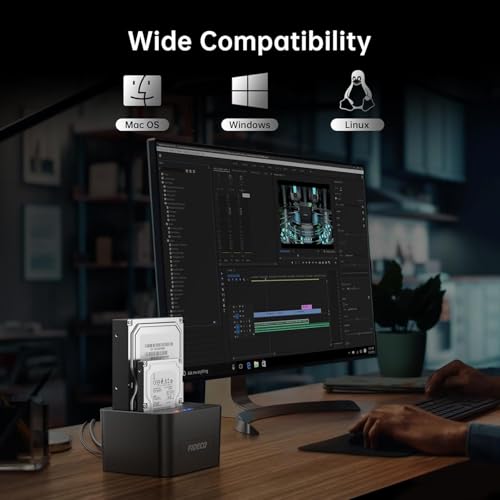
The FIDECO Hard Drive Docking Station connects to your computer via USB 3.0. It will also work connected to a USB 2.0 port, though at significantly reduced speeds (USB 2.0 tops out at 480Mbps theoretical, versus 5Gbps for USB 3.0). If your computer has USB 3.0 ports, use them. If it only has USB 2.0, the dock will still function but data transfer will be much slower. USB 3.0 ports are identifiable by the blue plastic inside the connector, and they've been standard on laptops and desktops for well over a decade now, so this shouldn't be an issue for most people.
Drive compatibility covers 2.5-inch and 3.5-inch SATA drives, including SATA I, II, and III. The dock is backward compatible across all three SATA generations, which means you can slot in an old SATA I drive from a decade ago alongside a modern SATA III SSD and both will work. What it does not support is NVMe. NVMe drives use the M.2 form factor and a completely different interface protocol, and no SATA dock will handle them. If you have M.2 NVMe drives to deal with, you need a different product entirely. The listing is clear that this is SATA only, so this isn't a hidden limitation, just worth stating plainly.
OS compatibility is broad: Windows XP, Vista, 7, 8, 8.1, and 10 are all listed, along with Mac OS and Linux. In practice, this covers virtually every computer you're likely to encounter. The no-driver requirement means compatibility extends to scenarios where you can't install software, such as a work computer with restricted admin privileges, or a borrowed machine. That's a practical advantage that doesn't get enough credit. Chromebooks are not listed in the compatibility spec, and whether they work will depend on the specific Chromebook and its USB storage handling. The spec doesn't confirm it, so I won't claim it either way.
Real-World Use Cases
The most common use case in the reviews is straightforward data recovery and drive access. Someone has an old laptop that died, they pull the hard drive, slot it into the FIDECO, and access their files. No specialist software, no expensive data recovery service, just a dock and a USB cable. This is genuinely one of the most useful things a dock like this can do, and at this price point it's an accessible solution for anyone who isn't a professional technician.
The offline clone function opens up a second major use case: drive migration. Upgrading the internal drive in a laptop or desktop typically means either reinstalling everything from scratch or using cloning software, which requires the old drive to still be accessible from inside the machine. With this dock, you can clone the old drive to a new one externally, then swap them in. IT support professionals mention this workflow repeatedly in the reviews, and it's a legitimate time-saver. The fact that it works without a computer means you can run a clone in the background on one machine while you're working on something else entirely.
A third use case is bulk storage access for people who work with a lot of bare drives. Photographers and videographers who archive raw files to individual drives, for example, benefit from being able to slot drives in and out without enclosures. The dual-bay setup means you can compare contents across two drives, or run a transfer from one to the other, without any additional hardware. And for anyone building a basic backup rotation with multiple drives, the dock provides a cheap and flexible way to manage that without buying a full NAS enclosure.
Finally, there's the hobbyist and tinkerer use case. People who buy second-hand hard drives to test before use, people who wipe old drives before disposal, people who are rebuilding systems and need temporary access to drives during the process. The FIDECO handles all of these without complaint, and the plug-and-play nature means it's ready to go the moment you need it rather than requiring a setup ritual every time.
Value Assessment
At the budget price point this sits in, the FIDECO Hard Drive Docking Station is excellent value. Dual-bay docks with offline cloning at this price are not the norm. You'd typically pay noticeably more to get both bays and the cloning feature together, particularly from brands with stronger name recognition. The fact that FIDECO bundles all of this in at entry-level pricing, and backs it up with nearly 5,816 averaging 4.4 stars, suggests this isn't just cheap kit that happens to be priced low. It's genuinely competitive on features for what it costs.
The value equation is clearest if you compare it to what it replaces. A professional data recovery service for a failed laptop drive can run into hundreds of pounds. Even a basic single-bay dock from a recognised brand costs more than this dual-bay unit. If you only ever use this dock once to recover files from a dead machine, it will almost certainly have paid for itself. If you use it regularly for drive management, migrations, and backups, the value compounds further.
Where the value calculation gets more nuanced is if your primary need is SSD speed. The USB 3.0 interface is the right choice for HDDs but starts to show its ceiling with fast SATA SSDs. If you're specifically buying this to work with SSDs and you want maximum throughput, there are USB 3.1 Gen 2 docks that offer 10Gbps and won't cost a fortune. They'll cost more than this, but the speed difference is meaningful for SSD work. For the majority of buyers, though, working primarily with HDDs, the USB 3.0 interface is not a compromise. It's adequate, full stop.
How It Compares
The two most obvious competitors at similar price points are the Inateck FD2002 and the Sabrent EC-DFLT. Both are dual-bay SATA docking stations targeting the same audience, and both turn up in the same searches. Understanding where the FIDECO sits relative to these two helps clarify whether it's the right choice or whether you should look elsewhere.
The Inateck FD2002 is a well-regarded option from a brand with a longer track record in storage accessories. It offers similar USB 3.0 connectivity and dual-bay support, and Inateck's build quality reputation is generally a notch above the typical budget offering. However, it typically costs more than the FIDECO, and whether it includes offline cloning depends on the specific variant. If build quality and brand confidence matter to you more than price, the Inateck is. If you want the most features for the least money, the FIDECO makes a compelling case.
The Sabrent EC-DFLT is another budget-friendly option that competes directly on price. It offers dual bays and USB 3.0, and Sabrent has a reasonable reputation for budget storage accessories. The FIDECO's offline cloning capability is a differentiator here; not all Sabrent dock variants include it, and when they do, the price tends to be higher. The FIDECO's review count is also significantly larger, which gives more confidence in the consistency of the product. More reviews means more data points, and a 4.4-star average across nearly 5,816 is harder to fake or cherry-pick than a 4.5-star average across 200.
| Feature | FIDECO Hard Drive Docking Station | Inateck FD2002 | Sabrent EC-DFLT |
|---|---|---|---|
| Number of Bays | 2 | 2 | 2 |
| Interface | USB 3.0 (5Gbps) | USB 3.0 (5Gbps) | USB 3.0 (5Gbps) |
| Offline Clone | Yes | Varies by variant | Varies by variant |
| Max Capacity | 2x 16TB (32TB total) | Not specified | Not specified |
| Drive Support | 2.5" and 3.5" SATA I/II/III | 2.5" and 3.5" SATA | 2.5" and 3.5" SATA |
| Driver Required | No | No | No |
| Price Tier | Budget | Budget to Mid | Budget |
| Review Count (approx.) | 5,797 | Lower | Lower |

Final Verdict
The FIDECO Hard Drive Docking Station is one of those products that does exactly what it says, costs less than you'd expect, and has the review volume to back up the claims. Nearly 5,816 at 4.4 stars isn't luck. It's a product that works for the people who buy it, consistently enough that the positive feedback has accumulated at scale. That's a meaningful endorsement.
For HDD work, this is a proper value buy. The dual-bay setup, the offline cloning, the plug-and-play compatibility across Windows, Mac, and Linux, and the 32TB total capacity ceiling are all features you'd expect to pay more for. The build quality is plastic and budget, but it's functional and sturdy enough for regular use. The cloning progress indicator is basic (a flashing LED and not much else), which is an irritation rather than a dealbreaker. And the USB 3.0 interface is the right spec for HDD use, though it will start to feel limiting if you move heavily into SSD workflows.
Who should buy this? If you're an IT support technician who regularly migrates drives, a home user who wants a sensible way to access bare drives without buying enclosures, or someone who needs to recover data from a dead machine, this is a straightforward recommendation. The price is low enough that even occasional use justifies it. If you're working primarily with SATA SSDs and you care about maximum transfer speeds, consider spending a bit more on a USB 3.1 Gen 2 or USB-C dock that offers 10Gbps throughput. You'll feel the difference. But for the majority of real-world drive work, which involves spinning HDDs and occasional SATA SSDs, the FIDECO is more than good enough.
One honest caveat worth ending on: if you only ever need to access a single drive at a time and you have no interest in cloning, a single-bay dock will cost you less and serve you just as well. Don't pay for two bays if you'll never use both. But if there's any chance you'll want to clone or compare drives, the dual-bay FIDECO at this price is the smarter buy over a cheaper single-bay alternative, because the cloning capability alone is worth the difference.
What works. What doesn’t.
5 + 3What we liked5 reasons
- Offline cloning without a PC is a genuine differentiator at this price
- Dual-bay setup supports 2x 16TB drives simultaneously
- Plug-and-play across Windows, Mac, and Linux with no drivers needed
- Nearly 6,000 reviews at 4.4 stars gives real confidence in consistency
- Budget price for a feature set that typically costs more
Where it falls3 reasons
- Clone progress indicator is just a flashing LED with no percentage or time estimate
- USB 3.0 interface starts to feel limiting with fast SATA SSDs
- Plastic build won't impress anyone looking for premium feel
Full specifications
5 attributes| Form factor | 2.5"/3.5" |
|---|---|
| Interface | USB 3.0 |
| Read speed MBS | 625 |
| Type | External HDD |
| Write speed MBS | 625 |
Frequently asked
5 questions01Is the FIDECO Hard Drive Docking Station worth buying?+
Yes, for most HDD use cases it represents excellent value. The dual-bay setup with offline cloning at a budget price point is genuinely competitive, and nearly 6,000 owner reviews averaging 4.4 stars gives strong confidence in the product's consistency. If you work primarily with fast SATA SSDs and need maximum throughput, a USB 3.1 Gen 2 dock would be a better fit.
02How does the FIDECO Hard Drive Docking Station compare to alternatives?+
Against similarly priced dual-bay docks like the Inateck FD2002 and Sabrent EC-DFLT, the FIDECO holds up well. Its offline cloning capability is a differentiator, its review count is significantly higher than most competitors, and its price is competitive. Inateck has a stronger brand reputation for build quality but typically costs more. The FIDECO wins on features-per-pound for most buyers.
03What are the main pros and cons of the FIDECO Hard Drive Docking Station?+
Pros: offline cloning without a PC, dual-bay support for drives up to 16TB each, plug-and-play compatibility across Windows, Mac, and Linux, no drivers required, and competitive budget pricing. Cons: the clone progress indicator is just a flashing LED with no percentage or time estimate, the USB 3.0 interface starts to show its ceiling with fast SATA SSDs, and the plastic build is functional rather than premium.
04Is the FIDECO Hard Drive Docking Station easy to set up?+
Very. No driver installation is required on Windows XP through 10, Mac OS, or Linux. You plug it in via USB, insert a drive, and the operating system recognises it immediately. The offline clone function requires holding the Clone button for five seconds, which is straightforward enough that non-technical users report completing it without issues. The main frustration owners mention is the lack of a progress indicator during cloning.
05What warranty applies to the FIDECO Hard Drive Docking Station?+
Amazon offers 30-day returns. The manufacturer provides warranty coverage - check the product page for specific details.