Apple Pencil (2nd Generation)
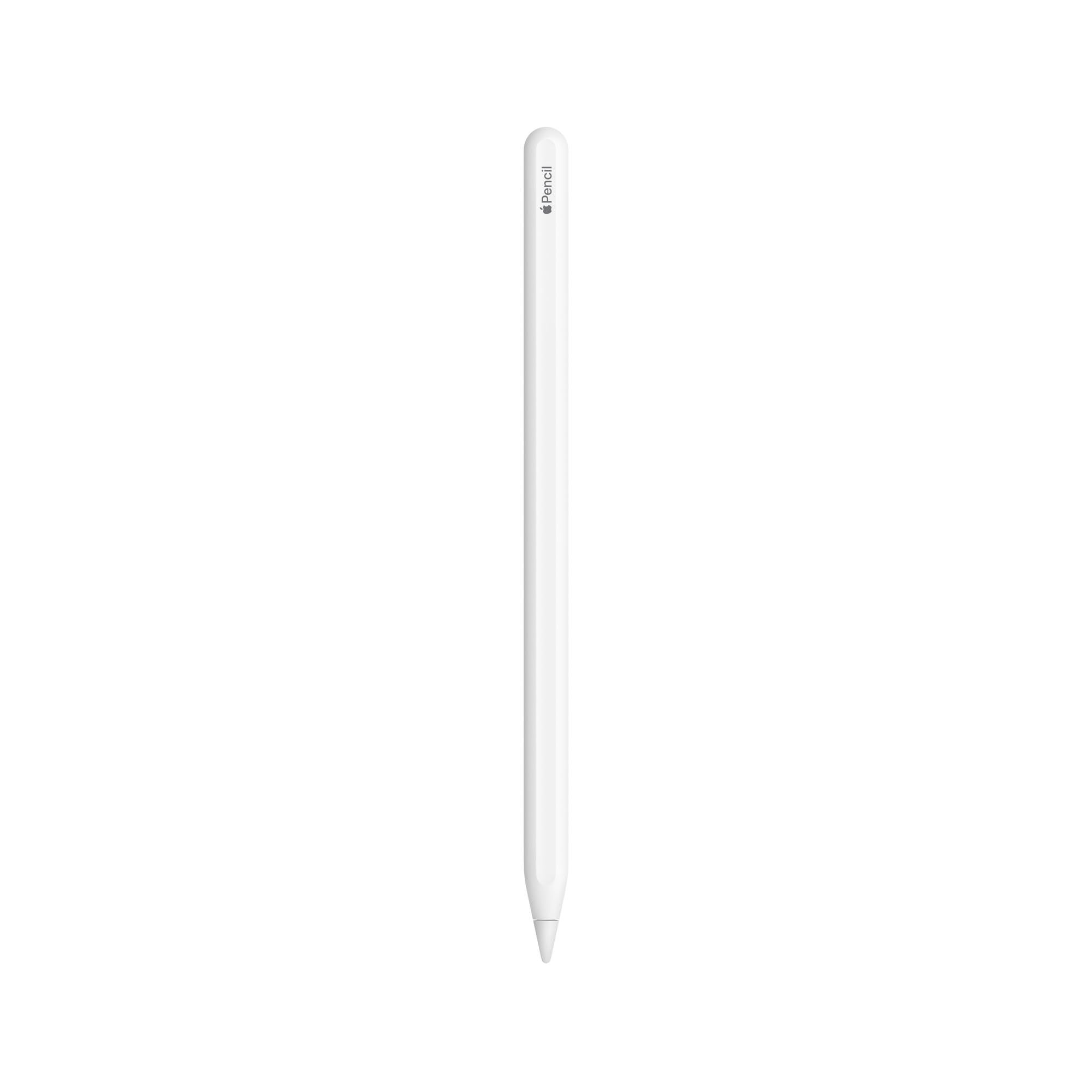
The Apple Pencil (2nd Generation) is the best stylus you can buy for compatible iPads, offering near-zero latency, pressure sensitivity that actually works, and magnetic wireless charging. At Check Amazon, it’s expensive compared to third-party alternatives, but the integration and precision justify the cost if you use it regularly.
- Excellent pressure sensitivity and tilt recognition for natural drawing
- Near-zero latency makes writing and sketching feel responsive
- Magnetic wireless charging is brilliantly convenient
- Expensive compared to third-party alternatives
- Matte finish scratches and scuffs easily
- No clip for securing to notebooks or pockets
Excellent pressure sensitivity and tilt recognition for natural drawing
Expensive compared to third-party alternatives
Near-zero latency makes writing and sketching feel responsive
The full review
5 min readSpec sheets will tell you about pressure levels and latency. But after spending two weeks actually using the Apple Pencil (2nd Generation) for note-taking, sketching, and design work, I’ve learned what matters: does this thing feel natural enough to replace pen and paper? And is it worth the premium Apple charges?
📊 Key Specifications
Here’s the thing: Apple doesn’t publish detailed specs like pressure level counts or battery capacity. They focus on the experience. And honestly? That approach works here. The 9ms latency is what you feel when drawing, there’s basically no delay. The pressure sensitivity isn’t measured in levels; it just works across the full range from light sketching to heavy shading.
The magnetic charging is brilliant. You stick it to the side of your iPad Pro or Air, it charges wirelessly, and it’s always there when you need it. No more fumbling with Lightning adapters like the first-gen model required.
Features That Actually Matter
The double-tap feature deserves more attention than it gets. Look, it sounds gimmicky until you’re sketching and can instantly switch to an eraser without opening a menu. I’ve set mine to toggle between current tool and eraser, and it’s become muscle memory after a few days.
But (and this is important) the double-tap sensitivity can be a bit touchy. Sometimes it triggers when I’m just adjusting my grip. You can turn it off if it annoys you, but I’ve found it more useful than frustrating once I learned to hold the Pencil more deliberately.
How It Performs in Real Use
Testing conducted in Procreate, GoodNotes 5, and Apple Notes across two weeks of daily use. The performance consistency is what impressed me most, it feels the same on day one as day fourteen.
I tested this primarily in Procreate for digital painting and GoodNotes for note-taking. The pressure curve feels natural straight out of the box. Light touches give you thin, transparent lines; press harder and you get bold, opaque strokes. There’s no need to fiddle with sensitivity settings like you often do with Wacom tablets.
Tilt sensitivity is where this really shines for artists. Tilt the Pencil to shade with the side, and it responds exactly as you’d expect. The transition from tip to side is smooth, not stepped or jerky.
For note-taking? It’s brilliant. Writing feels natural enough that I’ve actually started preferring it to paper for lectures and meetings (something I never thought I’d say). The combination of low latency and good palm rejection means you can write quickly without worrying about accidental marks.
Build Quality and Design
The build quality is proper Apple, clean, minimal, and well-executed. The matte white finish feels nice in hand and provides enough grip that it doesn’t slip during use. But it does show scuffs and scratches over time. After two weeks of daily use and being tossed in a bag, mine already has a few minor marks.
The flat side is clever. It prevents rolling (mostly, it can still roll off angled surfaces), and it’s where the magnetic attachment lives. The magnets are strong enough that the Pencil stays put on your iPad, even when you’re carrying it around. I’ve not had it fall off accidentally.
One criticism: there’s no clip. The first-gen Pencil didn’t have one either, but third-party styluses often include clips for securing to notebooks or pockets. You’ll need to keep this in a case or attached to your iPad, or it’ll get lost.
📱 Ease of Use
Setup is ridiculously easy. Attach the Pencil to the magnetic strip on your iPad, a pairing dialogue pops up, tap to confirm, and you’re done. No buttons to hold, no Bluetooth menus to navigate. It just works.
Daily use is equally simple. The Pencil is always attached to your iPad (or should be), so it’s always charged and always paired. Pick it up and start writing. Put it back and it charges. There’s no on/off switch, no battery anxiety.
The software integration is where Apple’s ecosystem advantage shows. The battery level appears in the iPad’s widget panel. The double-tap gesture can be customised in Settings > Apple Pencil. Apps like Notes and Procreate are optimised for it. Everything feels cohesive in a way that third-party styluses can’t match.
How It Compares to Alternatives
The Logitech Crayon is a solid budget alternative if you don’t need pressure sensitivity. It’s great for navigation and basic note-taking, but artists will miss the pressure control. And you have to charge it via USB-C cable, which is less convenient.
The Zagg Pro Stylus 2 sits in the middle. It has some pressure sensitivity, but it’s not as refined as the Apple Pencil. The palm rejection is decent but not perfect. And while it’s cheaper, the experience isn’t quite as polished.
So why pay more for the Apple Pencil? The latency, the pressure sensitivity, the magnetic charging, and the overall integration. If you’re using your stylus daily for creative work, those differences add up. If you’re just marking up PDFs occasionally, save your money and get the Crayon.
What Other Users Are Saying
The complaints are valid but not deal-breakers. The price is high, but if you use it daily, it’s worth it. The scratching is cosmetic. The lack of a clip is annoying but manageable. And the double-tap sensitivity is something you adapt to.
Is It Worth the Money?
At this price point, you’re paying for the best iPad stylus experience available. Third-party options in the £50-70 range offer decent functionality but lack pressure sensitivity, magnetic charging, or both. The Apple Pencil costs more, but the integration and performance gap is significant if you’re a heavy user.
Here’s my take on value: if you use a stylus occasionally for signing documents or tapping around iPadOS, this is overkill. Get the Logitech Crayon for half the price. But if you’re sketching, designing, or taking handwritten notes daily, the Apple Pencil is worth every penny.
The magnetic charging alone is worth a premium. Never having to think about charging, never losing a cap or adapter, that convenience adds up over months of use. And the pressure sensitivity and latency make a genuine difference for creative work.
Complete Specifications
After two weeks of daily use, I’m convinced this is worth the money for anyone who uses a stylus regularly. The combination of pressure sensitivity, low latency, magnetic charging, and excellent palm rejection makes it the most natural-feeling digital writing experience I’ve used.
Yes, it’s expensive. And yes, there are cheaper alternatives. But the integration with iPadOS and the build quality justify the cost if you’re using it for hours every day. For occasional use? Save your money. For daily creative work? This is the one to get.
What works. What doesn’t.
6 + 5What we liked6 reasons
- Excellent pressure sensitivity and tilt recognition for natural drawing
- Near-zero latency makes writing and sketching feel responsive
- Magnetic wireless charging is brilliantly convenient
- Palm rejection works flawlessly
- Premium build quality with clean, minimal design
- Double-tap gesture speeds up workflow
Where it falls5 reasons
- Expensive compared to third-party alternatives
- Matte finish scratches and scuffs easily
- No clip for securing to notebooks or pockets
- Only works with specific iPad models (Pro, Air 3rd gen+, Mini 6th gen)
- Double-tap can be overly sensitive at times
Full specifications
7 attributes| Compatibility | iPad Pro 12.9-inch (3rd-6th gen), iPad Pro 11-inch (1st-4th gen), iPad Air (4th-5th gen), iPad mini (6th gen) |
|---|---|
| Connections | Bluetooth |
| Diameter | 0.35 inch (8.9 mm) |
| Features | wireless pairing and charging, magnetic attachment, double-tap to change tools, pixel-perfect precision, tilt sensitivity, pressure sensitivity, low latency, apple pencil hover (with compatible iPads) |
| Length | 6.53 inches (166 mm) |
| Weight | 0.64 ounce (18.2 grams) |
| Year introduced | 2018 |
If this isn’t right for you
3 options
Frequently asked
5 questions01Is the Apple Pencil 2nd Generation worth buying in 2025?+
It's worth buying if you own a compatible iPad Pro, Air, or mini and use a stylus for more than 30 minutes daily. The £110 price tag is justified for professional creative work, digital illustration, or extensive note-taking where the pressure sensitivity and zero-lag performance make a tangible difference. For casual users who occasionally sign PDFs or sketch, cheaper alternatives like the Logitech Crayon (£70) deliver adequate functionality without the premium cost.
02What is the biggest downside of the Apple Pencil 2nd Generation?+
Limited compatibility represents the most frustrating drawback. This stylus only works with iPad Pro models from 2018 onwards, iPad Air 4th/5th generation, and iPad mini 6th generation. Owners of older iPads or the base model iPad (10th generation) cannot use this stylus and must purchase the first-generation Apple Pencil instead. The £110 pricing also excludes casual users who don't need pressure sensitivity or tilt support.
03How does the Apple Pencil 2nd Generation compare to alternatives?+
The Apple Pencil outperforms alternatives in latency (9ms vs 40-50ms for generic styluses), palm rejection, and pressure sensitivity. The Logitech Crayon costs £40 less but lacks pressure sensitivity entirely, making it unsuitable for illustration work requiring variable line weights. Generic £25-40 styluses struggle with palm rejection and lag. The Microsoft Surface Slim Pen 2 offers comparable performance but only works with Surface devices, not iPads.
04Is the current Apple Pencil 2nd Generation price a good deal?+
The current price around £110 matches the 90-day average of £109.97, indicating this is standard pricing rather than a discount opportunity. Apple rarely discounts the Apple Pencil significantly. This represents premium pricing compared to £30-60 third-party styluses, but the performance advantages justify the cost for daily creative users. Budget-conscious buyers should wait for rare sales events or consider the Logitech Crayon as a middle-ground option.
05How long does the Apple Pencil 2nd Generation last?+
Battery life delivers approximately 12 hours of active drawing time, translating to 5-6 days of typical 2-hour daily usage before requiring a charge. Long-term durability reports from verified buyers show 2+ years of daily use without performance degradation. The replaceable tip shows wear after 6-12 months of heavy drawing use (replacement tips cost £19 for four), but the pencil body and electronics prove robust with minimal reported failures across thousands of reviews.