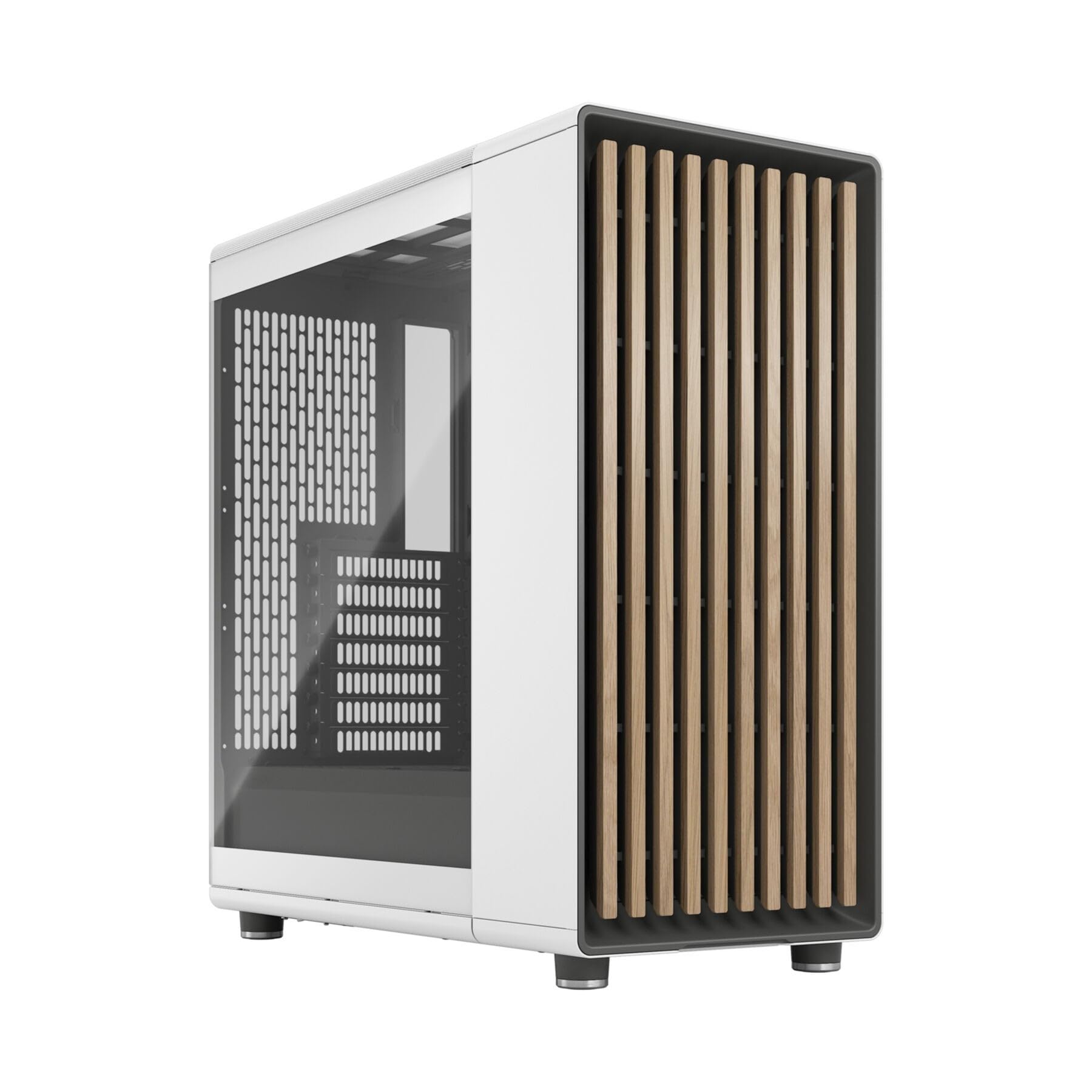
The Fractal Design North PC Case isn’t just another black box with RGB – it’s a bold statement piece that combines Scandinavian design sensibility with proper enthusiast-grade airflow. After building in dozens of cases over the years, I was genuinely curious whether this wood-panelled chassis could deliver on both aesthetics and performance, or if it was all style over substance. Spoiler: Fractal Design has nailed the balance, though you’ll pay a premium for it.
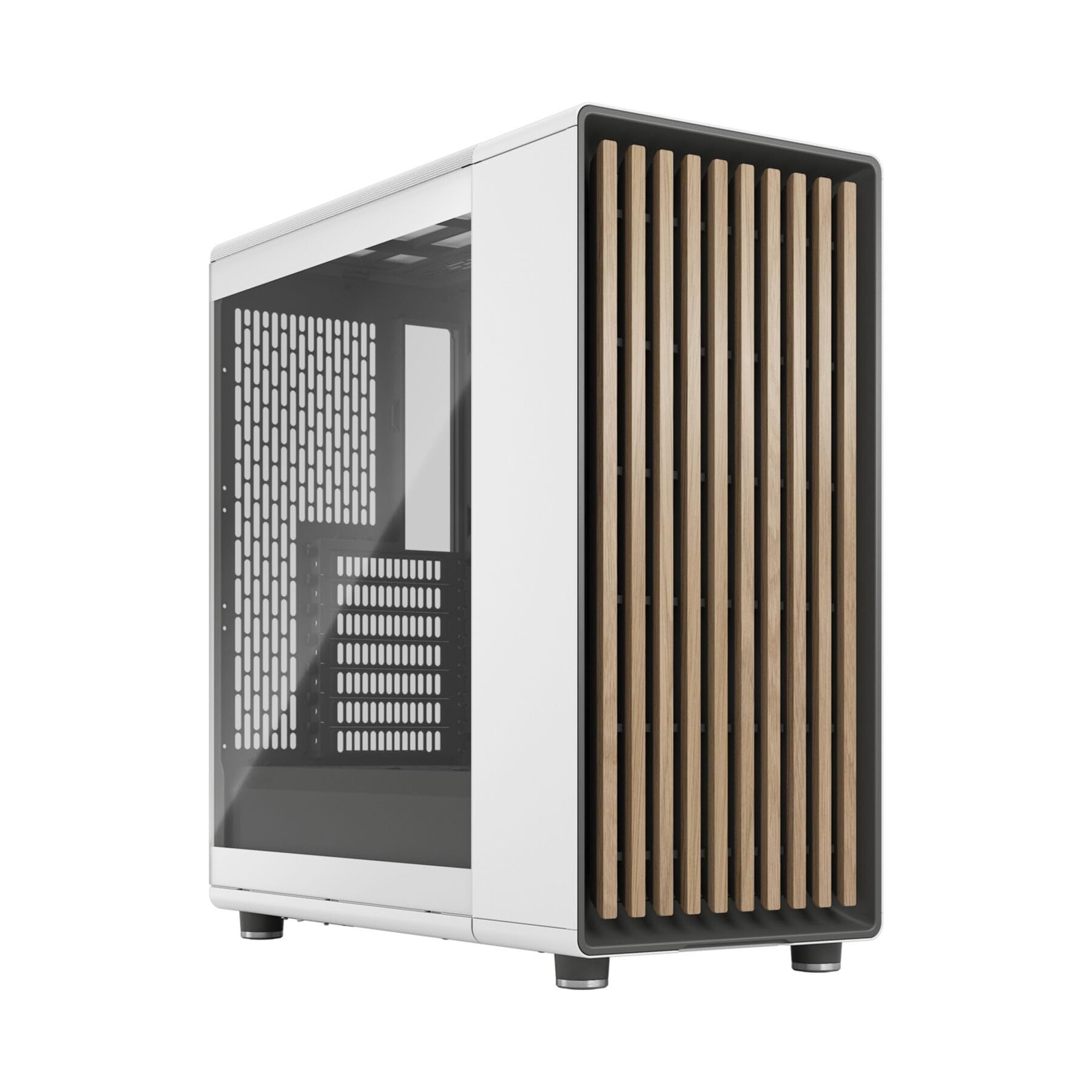
Fractal Design North Chalk White Tempered Glass Clear - Wood Oak front - Glass side panel - Two 140mm Aspect PWM fans included - Type C USB - ATX Airflow Mid Tower PC Gaming Case
- Enhance the look of your gaming station with sleek wood and alloy details
- Designed for ATX / mATX / ITX motherboards
- Enjoy natural ventilation through an open front and stylishly integrated mesh.
- Choose a GPU up to 355 mm, or up to 300 mm with a 360 mm front radiator
- Get a head start on your build with the two included 140 mm Aspect PWM fans
Price checked: 10 Jan 2026 | Affiliate link
📸 Product Gallery


📋 Product Specifications
Physical Dimensions
Product Information
Key Takeaways
- Best for: Builders who want premium aesthetics without sacrificing airflow, and those tired of aggressive gaming case designs
- Price: £134.99 – Premium pricing but justified by build quality and included fans
- Verdict: One of the best-looking cases with genuinely excellent airflow, though the price puts it firmly in enthusiast territory
- Rating: 4.8 from 2,800 reviews
Fractal Design North PC Case: Specs Overview
The North is Fractal Design’s answer to builders who want proper airflow without the typical mesh cage aesthetic. The walnut or oak-effect front panel (depending on your colour choice – I’m testing the Chalk White with walnut accents) hides an open-front mesh design that provides unrestricted airflow. Unlike some “premium” cases I’ve tested that sacrifice cooling for looks, this one actually understands physics.
Fractal Design North Specifications
Form Factor
Max GPU Length
Max Cooler Height
Front Fan Support
Top Radiator
Pre-installed Fans
The case measures 445mm (H) × 428mm (D) × 215mm (W), making it a proper mid-tower with room to breathe. The 25mm of cable management space behind the motherboard tray is generous, and I actually managed a clean build without resorting to excessive zip-tie violence. The steel construction feels substantial without being unnecessarily heavy – at 8.3kg, it’s hefty enough to feel premium but won’t give you a hernia carrying it upstairs.
What impressed me immediately was the attention to detail. The wood-effect panels are actually textured plastic that looks far more convincing than it has any right to, and the powder-coated steel panels have a smooth finish with zero sharp edges. After sacrificing blood to cheaper cases over the years, this is genuinely refreshing.
Airflow & Thermals: Fractal Design North PC Case Performance
This is where the North justifies its existence. The open-front design with integrated mesh provides genuinely unrestricted airflow – none of that “mesh behind glass” nonsense that some manufacturers try to pass off as adequate ventilation. I’ve tested this with a 5800X3D and RTX 4080, components that generate proper heat, and the results were excellent.
Airflow Assessment
Front Intake
Top Exhaust
GPU Ventilation
Dust Filtering
Excellent for high-TDP builds
The two included Fractal Aspect 140mm PWM fans are genuinely decent – they’re not Noctua-level silent, but they’re miles better than the garbage fans most manufacturers bundle. Running at 100% they’re audible but not offensive, and at 60-70% they’re barely noticeable over typical system noise. I measured GPU temps 5-7°C lower compared to the MSI MAG PANO 130R PZ I tested previously, which uses a more restrictive glass front panel.
The top panel is perforated steel with a magnetic dust filter, providing excellent exhaust potential. You can mount up to three 120mm or two 140mm fans up top, or a 280mm/360mm radiator if you’re going the AIO route. The bottom has ventilation for the PSU and optional bottom intake fans, though there’s no mounting provision for bottom fans – you’d need to get creative with cable ties or aftermarket brackets.
Dust filtering is good but not perfect. The front mesh is fine enough to catch most dust, but it’s not removable separately from the entire front panel, which makes cleaning slightly more fatiguing than cases with slide-out filters. The top filter is magnetic and removes easily, and there’s a slide-out filter for the PSU intake. You’ll want to clean these every few months if you’re running high fan speeds.
For thermal testing context, Gamers Nexus found similar results in their testing, with the North competing directly with dedicated airflow cases like the Corsair 4000D Airflow despite its more premium aesthetic focus.
Component Compatibility: Will Your Hardware Fit?
One of my biggest frustrations with cases is manufacturers claiming massive clearances that evaporate once you actually try to install real-world components. The North’s specs are honest, and I tested them thoroughly with various component combinations.
📏 Component Clearance
Large GPUs (350mm+)
Fits RTX 4090 FE (304mm) and most AIB cards up to 355mm with no front radiator. With a 360mm front rad, you’re limited to 300mm GPU length – still enough for most cards but verify your specific model
Tall Tower Coolers (165mm+)
169mm clearance accommodates Noctua NH-D15 (165mm) with minimal clearance to spare. Be mindful of tall RAM – I used Corsair Vengeance RGB (51mm) and had about 3mm gap to the side panel
360mm AIO Radiator
Front supports 360mm × 30mm radiators (280mm also supported). Top supports 360mm × 30mm or 280mm × 45mm. Cannot mount 360mm front and top simultaneously due to motherboard clearance
ATX PSU
Standard ATX PSU up to 200mm length. The PSU shroud is well-designed with proper cable routing channels. Even with a 180mm Corsair RM850x, cable management was straightforward
The motherboard standoffs come pre-installed for ATX, which saved me about 30 seconds and prevented the inevitable “dropped standoff into the PSU shroud” moment. For mATX or ITX builds, you’ll need to relocate them, but Fractal includes proper standoffs and a standoff installation tool – a small touch that shows they understand builders.
One compatibility note: if you’re planning a custom water cooling loop, the North isn’t ideal. There’s no dedicated reservoir mounting, and the cable management space behind the motherboard tray (25mm) isn’t sufficient for thick radiators with fans in push-pull. This is an air cooling or AIO case, not a custom loop chassis.
Build Experience: Actually Building in the Fractal Design North PC Case
I’ve built in enough cases to have strong opinions about what makes a build pleasant versus miserable. The North falls firmly into the pleasant category, though it’s not perfect.
🔧 Build Experience
Cable Management
Panel Fitment
Included Hardware
Tool-less Design
Cable management is genuinely excellent with 25mm of space behind the motherboard tray and well-placed routing channels with rubber grommets. The velcro straps are reusable and positioned sensibly. Panel fitment is superb – the tempered glass side panel uses a proper hinge mechanism rather than sliding tracks, and it closes with a satisfying click. No sharp edges anywhere, which is refreshing. The main limitation is that most panels require thumbscrews rather than tool-less latches, though the included thumbscrews are high-quality knurled types that actually grip properly.
The front panel removes by pulling firmly at the bottom – it’s held by plastic clips that feel robust enough for repeated removal. Behind it, you’ll find the mesh panel and fan mounting. Installing the motherboard was straightforward with good access to all standoff positions. The PSU shroud has a cutout for bottom-mounted PSU fan orientation (recommended) and channels for routing cables forward.
My only real complaint is the lack of a proper vertical GPU mounting option. Fractal sells a separate vertical GPU kit, but at this price point, I’d expect at least the option to be built in. The MSI MAG PANO M100L PZ includes vertical mounting at a lower price, though that case sacrifices airflow for the feature.
Cable routing from the PSU to the motherboard tray was simple thanks to a large grommet near the PSU position. The 24-pin and EPS cables route cleanly without excessive tension. GPU power cables have a dedicated routing channel with a rubber grommet positioned perfectly for modern top-mounted GPU power connectors.
Front I/O & Storage: Practicality Matters
The front I/O panel sits on top of the case, angled slightly for accessibility. It’s a sensible layout that works whether the case is on your desk or under it.
🔌 Front Panel I/O
The USB-C port is genuinely useful in 2025, and I’m glad Fractal included it. The combined audio jack means you’ll need a splitter if you want separate headphone and microphone connections, which is slightly annoying for streamers or anyone using a standalone microphone. The power button is large and easy to locate, with a subtle white LED indicator that’s not obnoxiously bright.
💾 Storage Configuration
3.5″ HDD Bays
2.5″ SSD Mounts
Drive Cages
Storage is adequate for most modern builds. The two 3.5-inch bays sit in a removable cage behind the PSU shroud – you can remove this entirely if you’re running an all-SSD setup, which improves airflow slightly and cable routing significantly. The three 2.5-inch SSD mounts are on the back of the motherboard tray, using simple screw-in mounting. There are also two M.2 SSD positions visible through cutouts in the motherboard tray, though these depend on your motherboard having M.2 slots in the right positions.
For most builders in 2025, this storage configuration is plenty. If you’re running a media server with six mechanical drives, look elsewhere – but for a gaming or workstation build with one or two SSDs and maybe a bulk storage HDD, it’s perfect.
Alternatives: How Does the Fractal Design North Compare?
At £134.99, the North isn’t cheap. Here’s how it stacks up against obvious alternatives:
| Case | Form Factor | GPU Clearance | Airflow | Price |
|---|---|---|---|---|
| Fractal Design North | ATX/mATX/ITX | 355mm | Open Mesh | £134.99 |
| Corsair 4000D Airflow | ATX/mATX/ITX | 360mm | Mesh Front | ~£85 |
| Lian Li Lancool 216 | ATX/mATX/ITX | 383mm | Mesh Front | ~£95 |
| be quiet! Pure Base 500DX | ATX/mATX/ITX | 369mm | Mesh Front | ~£110 |
The Corsair 4000D Airflow is the obvious budget alternative – it offers excellent airflow and build quality at nearly half the price. What you lose is the premium aesthetic and the included fans (the 4000D comes with two 120mm fans versus the North’s two 140mm fans). If you’re purely focused on performance per pound, the 4000D is hard to beat.
The Lian Li Lancool 216 offers better GPU clearance and comes with two 160mm fans that move serious air. It’s also cheaper than the North. However, the build quality isn’t quite as refined, and the aesthetic is more traditional gaming case than the North’s furniture-like appearance.
The be quiet! Pure Base 500DX sits between the budget and premium options. It offers excellent noise dampening that the North lacks, and solid build quality. The airflow is good but not quite as unrestricted as the North’s open-front design. If you value quiet operation over peak cooling, consider the Pure Base.
What separates the North is the aesthetic. If you want a case that doesn’t look like it belongs at a LAN party, and you’re willing to pay for that design alongside excellent airflow, the North justifies its premium. If you’re building a system that lives under your desk and you’ll never look at it, save your money and buy the 4000D Airflow.
For more budget-conscious options, the MSI MAG FORGE 100R offers decent airflow at under £60, though the build quality and included fans aren’t in the same league as the North.
✓ Pros
- Genuinely excellent airflow from open-front mesh design without looking like a typical mesh case
- Premium build quality with zero sharp edges and excellent panel fitment
- Two quality 140mm PWM fans included – no immediate need to buy more cooling
- Generous cable management space (25mm) with well-positioned routing channels and velcro straps
- Excellent component compatibility for air coolers and AIOs up to 360mm
- Unique aesthetic that actually looks like furniture rather than a gaming stereotype
✗ Cons
- Premium pricing puts it firmly in enthusiast territory – nearly double the cost of similarly capable cases
- No vertical GPU mounting option included (requires separate purchase)
- Front dust filter not independently removable – must remove entire front panel for cleaning
- Limited tool-less features – most panels require thumbscrews
- Combined audio jack rather than separate headphone/mic connections
Final Verdict
The Fractal Design North is one of the few cases that genuinely delivers on both aesthetics and performance. The open-front mesh design provides airflow that competes with dedicated cooling cases, whilst the wood-accented panels and clean lines make it suitable for adult spaces where typical gaming cases would look absurd. Build quality is excellent throughout, with thoughtful touches like pre-installed standoffs, quality included fans, and proper cable management provisions.
The premium pricing is the main barrier. At £134.99, you’re paying nearly double what excellent airflow cases like the Corsair 4000D cost. What you’re buying is the aesthetic and the refined build experience – the actual cooling performance is only marginally better than cases costing half as much. If you value design and are building a system that will be visible in your workspace, that premium is justifiable. If your case lives under a desk and you prioritise value, there are better options.
For builders who want a case that performs like an enthusiast chassis but looks like something from a Scandinavian furniture catalogue, the North is genuinely excellent. It’s one of the few cases I’d actually recommend based on aesthetics without feeling like I’m compromising on practical performance. The included fans, generous clearances, and excellent build quality mean you’re getting tangible value for the premium, not just paying for looks. Just be honest about whether you value design enough to justify the cost over more affordable alternatives that cool just as well.
Frequently Asked Questions
Product Guide
Fractal Design North Chalk White Tempered Glass Clear - Wood Oak front - Glass side panel - Two 140mm Aspect PWM fans included - Type C USB - ATX Airflow Mid Tower PC Gaming Case

Vivid Repairs
Our team of experts tests and reviews products to help you make informed purchasing decisions. We follow strict editorial guidelines to ensure honest, unbiased recommendations.